

Notifications
Clear all
Joining the Renewable Heating Hub forums is completely free and only takes a minute. By registering you’ll be able to ask questions, join discussions, follow topics you’re interested in, bookmark useful threads and receive notifications when someone replies. Non-registered members also do not have access to our AI features. When choosing your username, please note that it cannot be changed later, so we recommend avoiding brand or product names. Before registering, please take a moment to read the Forum Rules & Terms of Use so we can keep the community helpful, respectful and informative for everyone. Thanks for joining!

Topic starter
05/03/2024 9:19 pm
Hi,
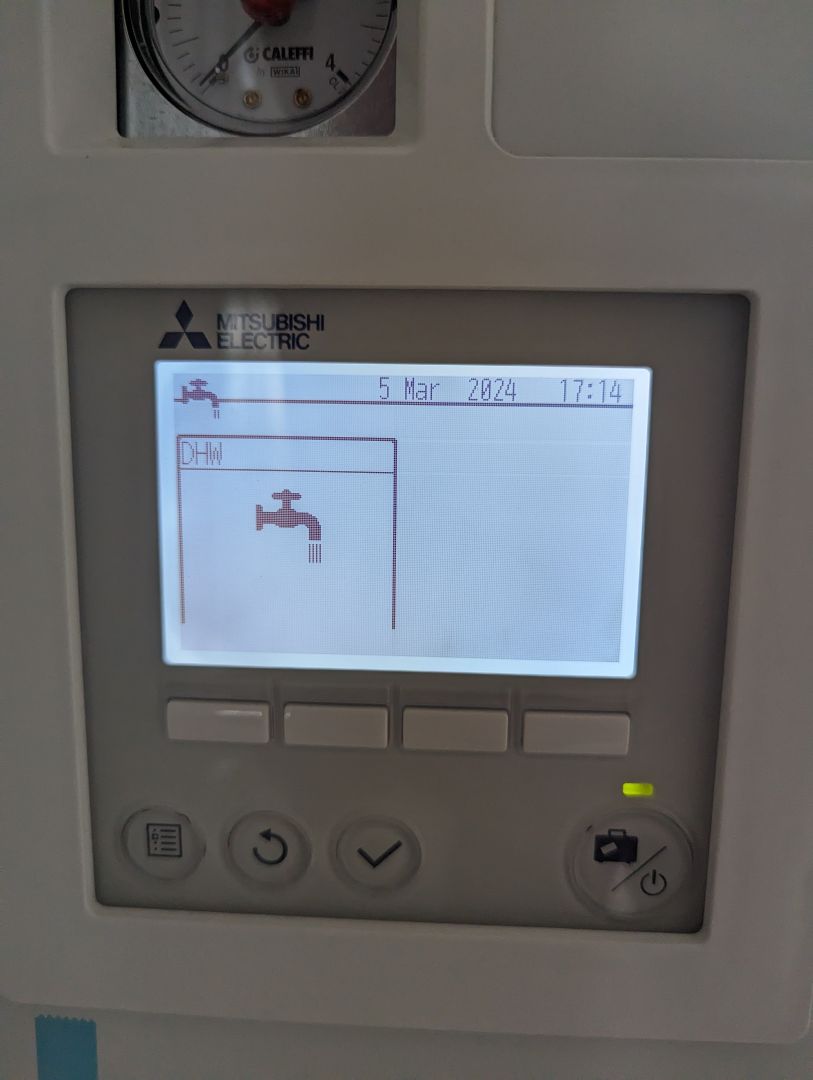
I'm sure I'm missing the DHW Settings button...please see the attached photo.
Any ideas how I can get this menu back?
Thanks.

06/03/2024 10:45 am
What did you press to get to this screen, it doesn't look right at all, but try a long press of the menu button see if the screen looks any different.
If that doesn't work have you tried turning its on and back on again it does look like the screen isn't scaled correctly.
Topic starter
06/03/2024 11:21 am
This screen was accessed by long pressing the menu button and selecting the first item 'DHW'.
I've power cycled the unit, reset the controller, reset the FTC, all to no avail.
06/03/2024 12:36 pm
@pingu807 Sounds like its got an issue then, best to call mitsubishi tech support


06/03/2024 1:05 pm
I would suggest that you check the setting of DIP Switch SW1-3 which identifies the presence or absence of a DHW cylinder. If the setting of this DIP Switch indicates that a DHW cylinder has not been installed then the controller display is unlikely to show the parameters relating to DHW.
Also check the setting of SW3-7.
Topic starter
07/03/2024 1:50 am
Hi Derek, that sounds promising. How exactly would I do that.
Gary, yes I think it is a tech issue, that's why I'm here...I live in an Overseas Territory and calling international support numbers is rather expensive unfortunately!
07/03/2024 10:20 am
Hi Derek, that sounds promising. How exactly would I do that.
Gary, yes I think it is a tech issue, that's why I'm here...I live in an Overseas Territory and calling international support numbers is rather expensive unfortunately!
Look at section 4.3 Dip switch functions on page B-57 of the attached document.
Topic starter
08/03/2024 2:11 am
Hi, thanks for your help.
It was all working properly only a few days ago and noone has touched any physical switches. Before I go opening it up, is it possible these switches could have moved themselves?
I have also lost both the temperature readouts for room temp and DHW temp on the 'home' screen now.

SPONSORS
Degrees of Separation

Latest Posts
-

RE: Heat pump branding. Clever, contemporary… or a bit too much?
I think Heat Geek have done an amazing job on their bra...
By Tomtheheatingengineer , 3 hours ago
-
RE: HeatGeek vs Octopus surveys: puzzling disparity - any ideas why?
I have just had 3 heat loss surveys, one by heat geek o...
By David , 4 hours ago
-
RE: Heat Geek Zero Disrupt: Are We Sleepwalking Into Another Race to the Bottom?
I think that's the key question. After all inverter uni...
By Prunus , 5 hours ago
-
RE: battery storage without solar
As of October 1st they need specific qualifications to ...
By EtchedPixels , 6 hours ago
-
RE: How should the Boiler Upgrade Scheme be reformed?
A unit which uses water to transfer the heat/chill from...
By Temperature_Gradient , 6 hours ago
-
RE: Renewables & Heat Pumps in the News
With regards to the BUS grant raid, I gave it more thou...
By ASHP-BOBBA , 7 hours ago
-
RE: Why are ASHP installs so expensive?
The whole system seems to work on the basis of...
By ian33a , 7 hours ago
-
RE: Missing flow temperature in Heat Geek proposal
Good plan. If you can get half hourly meter readings a...
By JamesPa , 12 hours ago
-
RE: Heat Pumps Without Grants: Would You Have Installed One & Will You Now?
@editor Most certainly. The heat pump was an ideal s...
By Abernyte , 12 hours ago
-
Although regulations may well vary from country to coun...
By Majordennisbloodnok , 13 hours ago
-
RE: Does anyone have experience of a smart water meter?
Yep I caught our slow leak from a £100 bill rise 8)
By EtchedPixels , 13 hours ago
-
RE: Do You Need a Buffer Tank or Low Loss Header for Underfloor Heating in a Large Property?
@jamespa in some cases, failing the Turing test might b...
By GrahamF , 16 hours ago
-
RE: Passiv Smart Thermostat - Help & Forum Support
@energystoragetech The heat capacity of some...
By JamesPa , 18 hours ago
-
RE: tepeo ZEB UK Support & Info Thread
Sorry you are correct, I was remembering figures from t...
By JamesPa , 1 day ago




SPONSORS
