

Notifications
Clear all
Joining the Renewable Heating Hub forums is completely free and only takes a minute. By registering you’ll be able to ask questions, join discussions, follow topics you’re interested in, bookmark useful threads and receive notifications when someone replies. Non-registered members also do not have access to our AI features. When choosing your username, please note that it cannot be changed later, so we recommend avoiding brand or product names. Before registering, please take a moment to read the Forum Rules & Terms of Use so we can keep the community helpful, respectful and informative for everyone. Thanks for joining!

07/03/2023 12:46 pm
try changing the value to something like 100, to see if that value appears in the message or whether it is overwritten by the true value
It gets overwritten by the true value, 'tank_actual_temperature': 38 in the log 'Status update' and 38 degrees C shows on HA dashboard. That seems plausible, the None is perhaps a default value, in the event nothing is returned.
Now try changing one of the 'setting' values to see if that gets overwritten.
class MideaC3Device(MiedaDevice):

DeviceAttributes.dhw_temp_max: 60,
Try changing the above to say 65.
Topic starter
07/03/2023 12:59 pm
Try changing the above to say 65.
It stays at 60 in the logged status update (doesn't appear in HA as I don't have an 'entity' for it (HA jargon)). Might it be relevant that this looks like a setting rather than a reading, as in setting the max DHW temp, as opposed to getting/reading the actual DHW temp?
Midea 14kW (for now...) ASHP heating both building and DHW
07/03/2023 1:19 pm
Try changing the above to say 65.
It stays at 60 in the logged status update (doesn't appear in HA as I don't have an 'entity' for it (HA jargon)). Might it be relevant that this looks like a setting rather than a reading, as in setting the max DHW temp, as opposed to getting/reading the actual DHW temp?
That test would seem to prove that the data in the message is only being read from the Midea controller, but it is not being written to the controller. As a further test you could try changing the above setting on the actual Midea controller.
Topic starter
07/03/2023 2:02 pm
As a further test you could try changing the above setting on the actual Midea controller.
I don't think I can do that. I can set the DHW target temp, which is currently set to 50 degrees, but there is nowhere to set (or read) the dhw_temp_max for for that matter dhw_temp_min on the wired controller. I'm also not sure what it even means. Maybe it is the max the LWT can be when the heat pump is in DHW mode? But that is only a guess. I have had a look in a number of the Midea manuals I have, and dhw_temp let alone dhw_temp_max or min do not appear anywhere. I did find this though (these are in the 'For Serviceman' pages):
T4DHWMAX sets the ambient temperature above which the heat pump will not operate in DHW mode. The highest value that
T4DHWMAX can take is 43°C, which is the DHW mode upper ambient temperature operating limit of the heat pump.
T4DHWMIN sets the ambient temperature below which the heat pump will not operate in DHW mode. The lowest value that
T4DHWMIN can take is -25°C, which is the DHW mode lower ambient temperature operating limit of the heat pump.
but in midea_ac_lan, the default dhw_temp_max and min values are 60 and 20, neither of which make any sense at all given the above quote, or indeed common sense (if it was prevented from DHW heating at ambients below 20 degrees, I would have had no hot water all winter).
In passing, DHW is normally T5, and ambient temp is T4 (and LWT is T1), so the above use of T4 makes sense because those quoted lines seem to be about the max/min ambient temp (at which pump will not operate etc).
Midea 14kW (for now...) ASHP heating both building and DHW
07/03/2023 2:15 pm
Tracing the code for tank_actual_temperature in C3/device.py, the following is shown.
custom_components/midea_ac_lan/midea/devices/c3/device.py
DeviceAttributes.tank_actual_temperature: None,

custom_components/midea_ac_lan/midea_devices.py
C3Attributes.tank_actual_temperature: {

custom_components/midea_ac_lan/water_heater.py
return self._device.get_attribute(C3Attributes.tank_actual_temperature)
So to obtain the actual value it would appear to use code within water_heater.py
Applying the same to outdoor temperature in AC/device.py gives.
custom_components/midea_ac_lan/climate.py
return self._device.get_attribute(ACAttributes.outdoor_temperature)

custom_components/midea_ac_lan/midea/devices/ac/device.py
DeviceAttributes.outdoor_temperature: None,
DeviceAttributes.outdoor_temperature,

custom_components/midea_ac_lan/midea_devices.py
ACAttributes.outdoor_temperature: {
Doing the same for indoor temperature produces.
custom_components/midea_ac_lan/midea/devices/ac/device.py
DeviceAttributes.indoor_temperature: None,
if attr not in [DeviceAttributes.indoor_temperature,

custom_components/midea_ac_lan/midea_devices.py
ACAttributes.indoor_temperature: {
I therefore think that it is necessary to add further code in other routines to obtain the desired data.
You could try the same trace on your version of the software and see if you get the same results. Locate
class DeviceAttributes(StrEnum):

outdoor_temperature = "outdoor_temperature"
in AC/device.py, then left click on outdoor_temperature, then select References.
Let me give it some thought.
Topic starter
07/03/2023 2:58 pm
then left click on outdoor_temperature, then select References
That suggests you are doing this online, on github, which does make tracing things easier.
Outdoor_temperature is certainly real, in that is corresponds to ambient temp, and T4, and is available on the wired controller display and in the 04/04 message as 'byte_09'. Ditto tank_actual_temperature, but I'm still not sure whether indoor_temperature has any meaning in my current setup. It is not used for anything (control is by weather curve), and if it is by chance reorded, it will be the airing cupboard temp, because that is where the wired controller is, and so not representative of normal room temp, because the airing cupboard also contains the DHW tank.
The three variables I would most like to get are LWT (aka T1), RWT and flow rate, which allow an independent glycol adjusted calculation of energy produced. All three are definitely visible in the wired controller, and hourly and then daily LWT values can be seen in the app. The LWT and RWT always get shown as integers, meaning they may be relatively easy to spot as raw values. Flow rate is usually somewhere around 1.42m^3/h, but it has decimals and so probably needs some voodoo to spot it.
I do wonder if byte_14 is LWT. Consider this chart of byte_09 (presumed ambient temp) and byte_14. The latter values are credible LWTs:

but I need to find a way of proving they are.
PS edited - image had Y axis chopped off
Midea 14kW (for now...) ASHP heating both building and DHW
07/03/2023 3:15 pm
I appreciate what you are trying to achieve, but first we need to understand the structure and method by which the present 'available' data is being obtained. Only then will it be possible to add code that may obtain the values that you desire.
The way that I interpret the max and min settings, is that they are they limits, outside which any setpoint cannot be adjusted, so for obvious reason they may not be accessible to both users and installers. Try changing the required setpoint for DHW to above the specified limit and see how the controller responds.
Topic starter
07/03/2023 3:25 pm
The way that I interpret the max and min settings, is that they are they limits, outside which any setpoint cannot be adjusted, so for obvious reason they may not be accessible to both users and installers. Try changing the required setpoint for DHW to above the specified limit and see how the controller responds.
I think you are right, well done! The available range for set DHW temp on the wired controller is 20 to 60 degrees, which matches the dhw_temp_min and max figures.
Any thoughts on whether byte_14 is LWT? I'm going to track it and the visible LWT in the wired controller at hourly intervals to see how well they match, but it is tricky because the LWT by its nature is volatile, and the logged byte_14 value timing may not match my visual recording of the wired controller time. But if it is LWT, that is one of the three desirable variables taken care of.
Midea 14kW (for now...) ASHP heating both building and DHW
07/03/2023 4:03 pm
Topic starter
07/03/2023 4:35 pm
I am not certain what the value of byte 14 is, please provide the message body.
It is what is shown in the chart, I have been logging it into HA for several days. It is the value after hex2dec conversion of the byte in 'location' 14 (absolute position 16) of the 04/04 messages. It is the only remaining volatile value in the message after the other volatile ones are accounted for. Recall this previously posted chart:
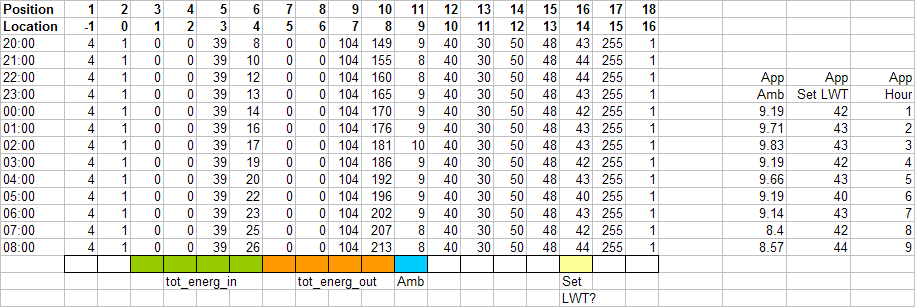
which shows the values after hex2dec conversion over a 12 hour period and at the bottom what I know or think they are. The 04/04 message frequency defaults to hourly, hence hourly intervals.
The chart has also reminded me that it could be either set or actual LWT. Although both are of interest, it is actual LWT I need for the energy out calculation. It has also reminded me that the wired controller shows actual LWT (I pretty sure I know it is, because I can see defrost cycles when they happen), while app shows only shows hourly or daily (averaged? median? who knows?) set LWT.
Midea 14kW (for now...) ASHP heating both building and DHW
07/03/2023 4:53 pm
One way to check would be to switch your system to fixed LWT at the present value, and see if the obtained value changes or remains 'fixed'.
A further test would then be to change the LWT setpoint, say lower it by 5C, and see if the value changes quickly or slowly. If the value reduces immediately by 5C, this would indicate that it is the setpoint.
Topic starter
07/03/2023 5:22 pm
A further test would then be to change the LWT setpoint, say lower it by 5C, and see if the value changes quickly or slowly. If the value reduces immediately by 5C, this would indicate that it is the setpoint.
I think that will be the simpler way to test it, but I will have to be careful with the timing, as I only get one reliable 04/04 message every hour, and I will also make the change large (say low ambient end of the curve down to 35 degrees) so as to make any change pretty obvious. I can also check the value from the message against the wired controller actual LWT at the relevant time. Plan:
(1) 1657 lower weather curve
(2) 1700 04/04 message should arrive, I also take a reading from the wired controller actual LWT
(3) check and compare the values.
Midea 14kW (for now...) ASHP heating both building and DHW

Latest Posts
-
RE: Renewables & Heat Pumps in the News
@editor, I hear that too. I can confirm that out of ...
By ASHP-BOBBA , 4 hours ago
-

End-of-Life Heat Pumps: How Do You Dispose of an ASHP in the UK?
As many of you know, our Global Energy Systems heat pum...
By Mars , 4 hours ago
-
@derbygraham fully agree with James, and it’d be good t...
By Mars , 4 hours ago
-
RE: Indevolt Batteries UK Support & Info Thread
Finally got around to installing and setting up the Sol...
By Mars , 4 hours ago
-

Unfortunately its a function of the physics. Max heat ...
By JamesPa , 5 hours ago
-
RE: Microbore heat pump installs
In principle you are almost certainly right, but in pra...
By JamesPa , 6 hours ago
-
RE: Electricity price predictions
@old_scientist We are a low mileage home, so bulk of ou...
By ChandyKris , 7 hours ago
-

There are just too many unknowns for me to comment on p...
By Transparent , 9 hours ago
-
RE: What is the main ‘dictator’ of Agile’s unit price?
@toodles I keep an eye on wholesale prices and energy m...
By ChandyKris , 9 hours ago
-
RE: Brand and installer questions for ASHP
Strange, perhaps it doesnt use modbus which the third p...
By JamesPa , 11 hours ago
-
RE: Upgrading my system, how far do I go?
For comparison, my PW3 with 11.04kW inverter, will char...
By Old_Scientist , 14 hours ago
-
RE: Changes to Tesla Powerwall Charging Regime?
Elon gate - legendary! I take my hat off to you @toodle...
By Old_Scientist , 17 hours ago
-
RE: Mitsubishi Ecodan not good enough ?
Thanks @goody, appreciate the feedback and sorry you ha...
By marcexec , 1 day ago
-
RE: Minimum and Zero Disrupt Heat Pump Installations
True (first sentence) Thats the reason to consider th...
By JamesPa , 2 days ago
-

RE: High air source heat pump running costs – Vaillant AroTherm Plus
Quite right. I was using a rough guesstimate of doublin...
By Majordennisbloodnok , 2 days ago
-
RE: My Grant R290 9kW Heat Pump Installation
Again, really don't know how accurate this is! &nb...
By petch , 2 days ago
-
RE: MCS Quality Audit – Has Anyone Had One? Did It Lead to Remediation?
@toodles The whole scheme is a shocking waste of money....
By Papahuhu , 2 days ago
-
RE: Anyone concerned about GivEnergy?
Many thanks for your, and the subsequent, answers tk qu...
By KevH , 2 days ago
-

RE: DIY or Don’t Touch? Solarman Smart Meter Install
Yes, and these guys would probably be my preferred inst...
By Batpred , 2 days ago
-
RE: Hot water tank lose heat rapidly on random days
@jamespa Hopefully their reasons are well intended! ...
By Bash , 3 days ago
-
RE: Ecoflow UK Support & Info Thread
As mentioned above, we’ve got our full review of the Ec...
By Mars , 3 days ago
-
RE: Say hello and introduce yourself
@sonosppp welcome to the forums. I see you've posted in...
By Mars , 3 days ago
-
RE: Guidance with installing a new heating system
@bobflux Great, thanks for the advice. The pipe has an ...
By Hamilton , 4 days ago
-
RE: Daikin Altherma 3 LT compressor longevity question
@optimistic-optimiser I have has a Daikin for a few yea...
By madsid , 4 days ago
-
RE: UK DIY Battery: SEPLOS 48V 200Ah x2 + Sunsynk 8K – Safe Installation for Garage Conversion
The rule of thumb is to ensure that you can isolate any...
By Transparent , 4 days ago


