Notifications
Clear all
Air Source Heat Pumps (ASHPs)
65
Posts
8
Users
6
Reactions
4,566
Views

22/12/2025 8:54 pm
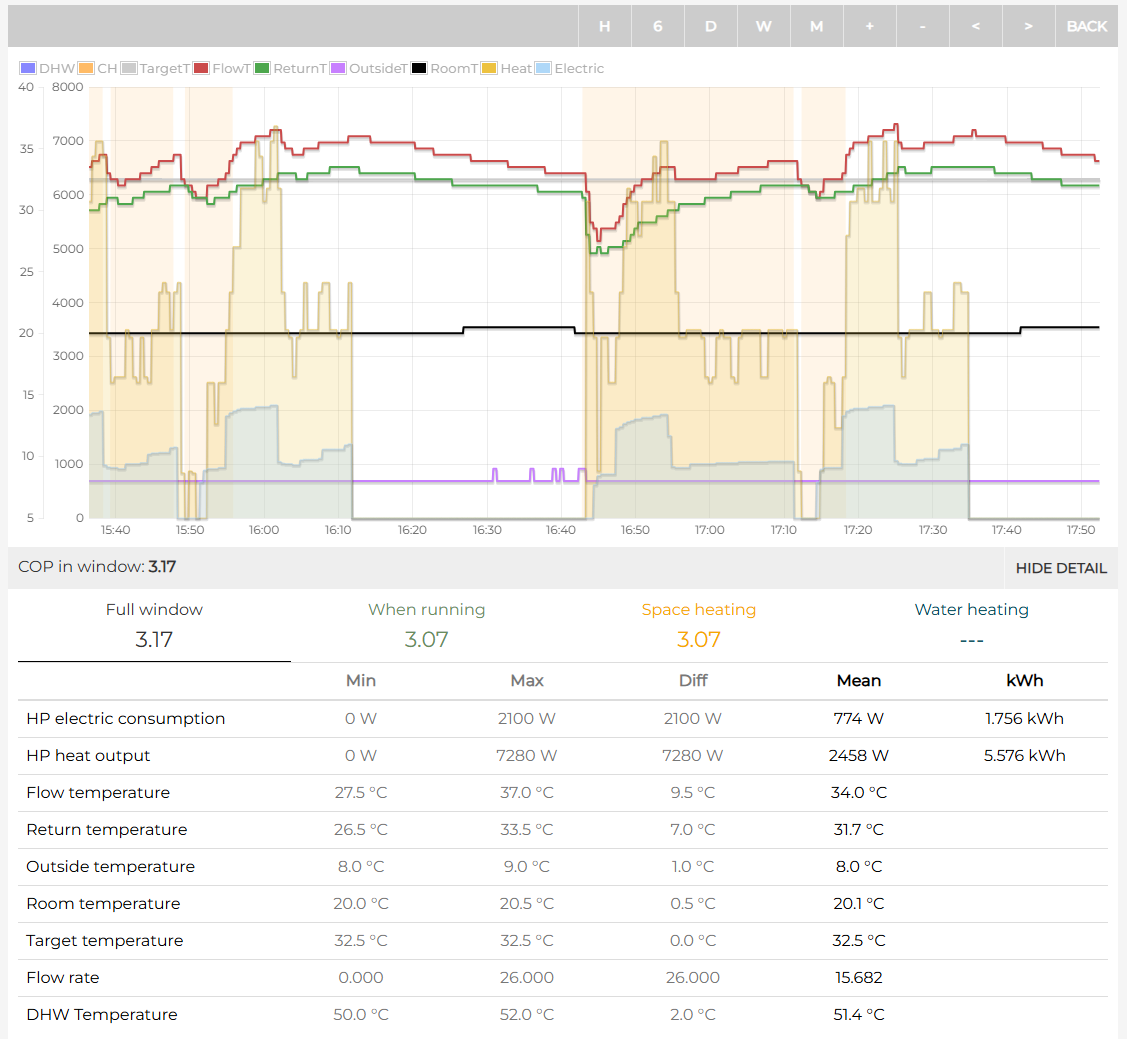
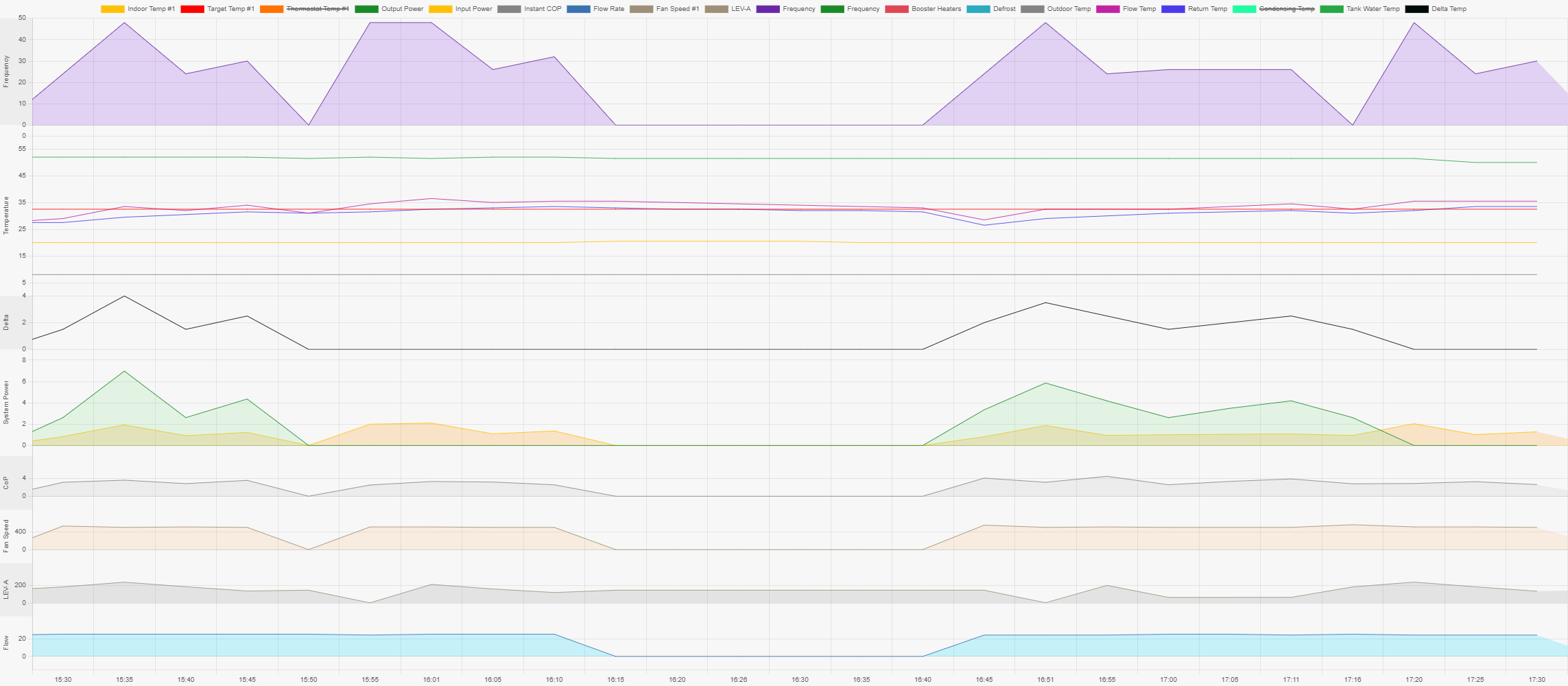
@ecoste For what it's worth, this is my equivalent data for the same time period which had the same external temperature (8°C) as yours was reporting. The outputs are via Mel Pump and the Open Energy Monitor configuration I've set up within Home Assistant. My system was cycling at intervals of around 1hr 20minutes at the time, so the output isn't as stable as yours, but there are various snapshots of data in the output that might be of use as a comparative. I've currently got the tolerance set to +3/-7 on the flow temperature target, rather than the standard +5/-5, which is a change I made at the weekend based on some older Ecodan-related posts I'd read on the forum.
I'd be happy to provide comparative data while you're investigating your own system, if it's of use to you, albeit it's from a system with an overall heating COP of 3.01 to date, so potentially not one that you're looking to emulate. I'll caveat that with the fact that it's saving me around 55% on my energy bills relative to using gas last year, so doing a satisfactory job from a bigger picture.
130m2 4 bed detached house in West Yorkshire
10kW Mitsubishi Ecodan R290 Heat Pump - Installed June 2025
6.3kWp PV, 5kW Sunsynk Inverter, 3 x 5.3kWh Sunsynk Batteries
MyEnergi Zappi Charger for 1 EV (Ioniq5) and 1 PHEV (Outlander)
User of Havenwise (Full control Jun-Dec 2025, DHW only from early Dec)
Subscriber to MelPump App data via CN105 Dongle Kit

23/12/2025 9:08 am
How would you check what the pump thinks the power consumption is?
Sorry I dont know the answer to that as I dont have a Mitsubishi myself. Perhaps @sheriff-fatman knows. I imagine somewhere in the installer section it would appear, or in some kind of 'live monitor' or 'current readings' or some sort, maybe in a 'service' section of the installer menu?. Its almost bound to be there somewhere, heat pumps measure everything!
Thanks for the data. In some ways its too steady, some noise/variation would help us understand whether the limited resolution of the readout was a factor or not. Im sure mother nature will oblige over the next few days. I think the key here is to keep collecting it to see what that tells us. Some really cold weather would be good as, when its cold, factors other than the actual compressor consumption' become less significant and fixed sensor errors ditto.
4kW peak of solar PV since 2011; EV and a 1930s house which has been partially renovated to improve its efficiency. 7kW Vaillant heat pump.
23/12/2025 10:28 am
Sorry I dont know the answer to that as I dont have a Mitsubishi myself. Perhaps @sheriff-fatman knows. I imagine somewhere in the installer section it would appear, or in some kind of 'live monitor' or 'current readings' or some sort, maybe in a 'service' section of the installer menu?. Its almost bound to be there somewhere, heat pumps measure everything!
I have the CN105 'dongle' connected to my system, which I'd recommend as an inexpensive purchase if you want to get as much info as the heat pump will provide to you. I can see the outputs from this in real time via the Home Assistant feed, so can provide a bit of insight into this.
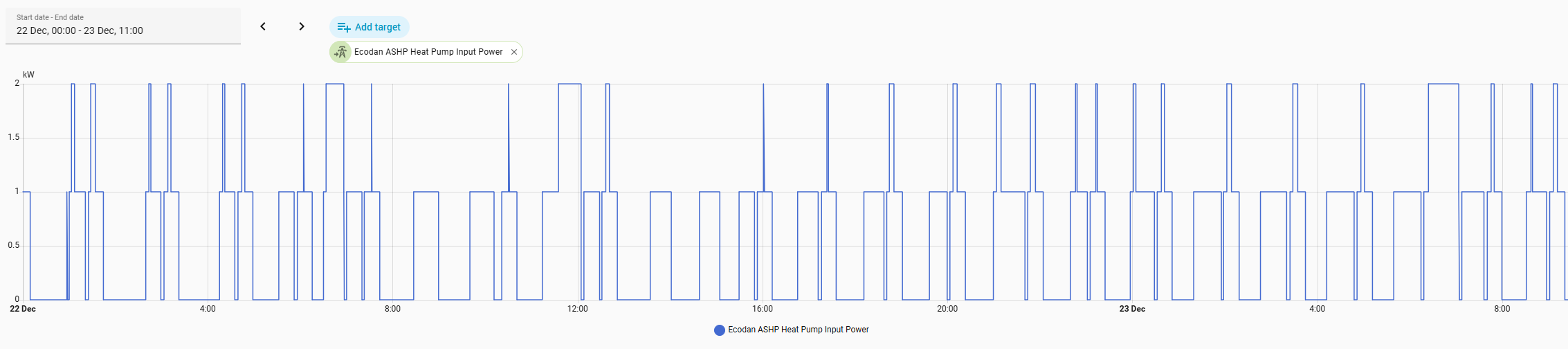
Within the list of data that it spits out there are two items listed as Heat Pump Input Power and Heat Pump Output Power, which immediately gives the impression that you're getting exactly the info you want. However, both only seem to report in full kWh, as the graph of recent input power shows.
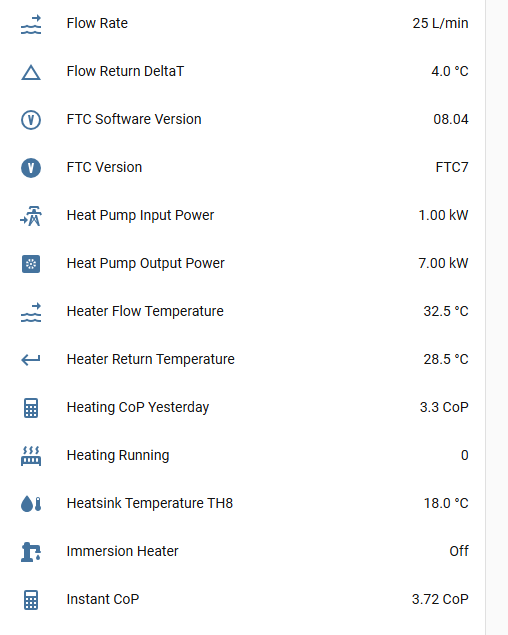
Separately, there are also various figures shown as 'computed' inputs and outputs. I assume the source of this is also directly from the heat pump, rather than anything built into the dongle to create these calculations, but this data is more in line with what you'd expect to see, as there is more variation within the figures shown at 2 decimal places. There are additional, separate outputs showing the figures split by whether they're being used for Heating, DHW or Cooling. Logically, these must simply feed from whichever of the binary settings for each function is set to 1 at that time. In the image below, the input power is going to DHW.
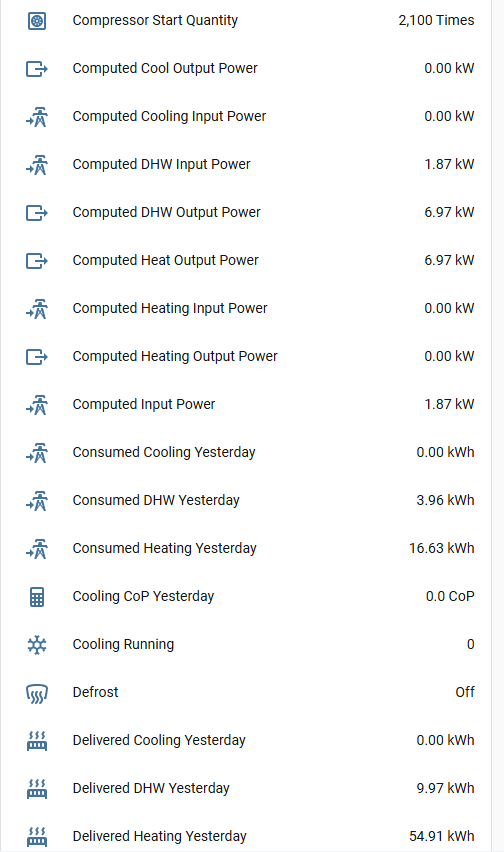
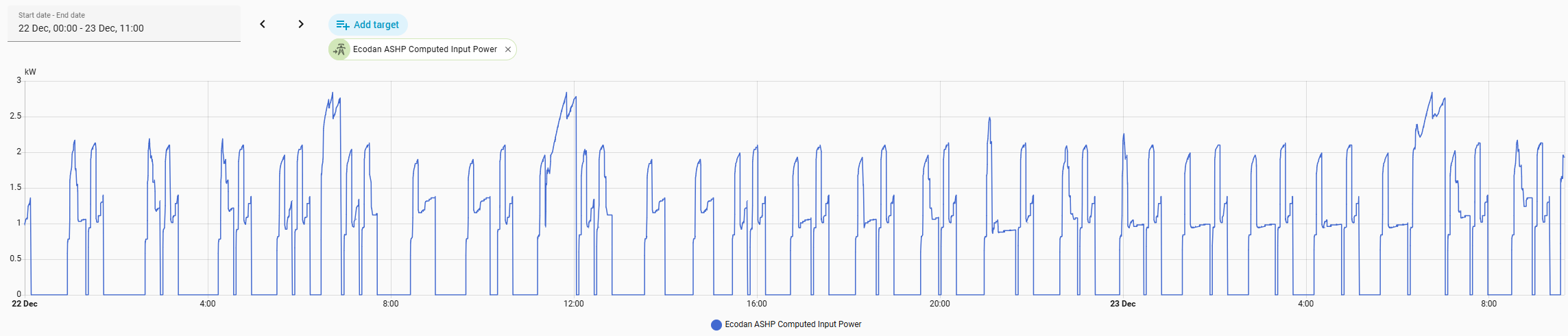
These are some of the raw sources of data I used to create the integration into the Open Energy Monitor data reporting. Doing so was the 'lightbulb' moment for me that the output figures aren't measured, but are simply based on the same theoretical calculations using flow rate, deltaT, etc that you're using in your manual calculations, and the output data is therefore only as good as the quality of the input data going into them. Short of adding one of the expensive flow monitoring kits from Open Energy Monitor the above numbers are the best available option, and there's far more within it than you can see using the reporting within MelCloud or from the controller, but it still feels like the input figures are being estimated in the reporting.
The other obvious limitations are that flow rate is reported as a whole number and the delta T always reports with 0.5°C granularity, which will introduce rounding errors into the calculations, but nothing to the extent that the figures would become unreliable. It will just introduce an additional margin of error into the reporting.
Beyond that, I have an electricity meter fitted near the water cylinder as part of the installation, which I assume is a standard thing, but could be wrong. I can use the readings to sense check the totals against the cumulative system reporting, or to measure the movement between two time points, e.g. to sense check a daily output. It would be helpful if I could interrogate the meter directly, but I have no ability to do so currently. I don't know if the heat pump itself is using this data directly. Logic suggests it should be, as otherwise why is the meter there at all, so perhaps this is the source of the whole number input power figures referred to above, as this would be a logical explanation why the increments are in whole numbers. If so, then it would confirm that the input usage reporting is based on reality, as it is being fed directly from meter data.
This post was modified 2 months ago by Sheriff Fatman
130m2 4 bed detached house in West Yorkshire
10kW Mitsubishi Ecodan R290 Heat Pump - Installed June 2025
6.3kWp PV, 5kW Sunsynk Inverter, 3 x 5.3kWh Sunsynk Batteries
MyEnergi Zappi Charger for 1 EV (Ioniq5) and 1 PHEV (Outlander)
User of Havenwise (Full control Jun-Dec 2025, DHW only from early Dec)
Subscriber to MelPump App data via CN105 Dongle Kit

Topic starter
23/12/2025 1:37 pm
@sheriff-fatman Thank you, food for thought. I think that I am about to be distracted by Christmas. Happy Christmas
23/12/2025 1:50 pm
@sheriff-fatman Thank you, food for thought. I think that I am about to be distracted by Christmas. Happy Christmas
And to you too. Wishing you a very enjoyable festive season not worrying about COPs, and where the only flow rates of relevance are potentially the alcoholic ones!
130m2 4 bed detached house in West Yorkshire
10kW Mitsubishi Ecodan R290 Heat Pump - Installed June 2025
6.3kWp PV, 5kW Sunsynk Inverter, 3 x 5.3kWh Sunsynk Batteries
MyEnergi Zappi Charger for 1 EV (Ioniq5) and 1 PHEV (Outlander)
User of Havenwise (Full control Jun-Dec 2025, DHW only from early Dec)
Subscriber to MelPump App data via CN105 Dongle Kit
1
Page 6 / 6
Prev

Latest Posts
-
Issue with a Grant Air Source Heat Pump & Tado Smart Thermostat
Hi all I'm having some trouble with a Grant ASHP and ...
By Renewables345 , 31 minutes ago
-
RE: Underfloor Heating Installation Issues with Heat Pump
We suffered a water leak last year in two rooms and had...
By MartinHook_UK , 42 minutes ago
-
RE: Testing new controls/monitoring for Midea Clone ASHP
Now seems a good time to summarise the costs and effici...
By benson , 50 minutes ago
-
RE: Heat Pump vs New Gas Boiler for Inherited House - Worth the Extra Cost?
*** I now see @jamespa has already posted but will stil...
By cathodeRay , 2 hours ago
-

RE: Tell us about your Solar (PV) setup
@mk4 Charge to 100%, discharge down to 10%.
By bobflux , 2 hours ago
-
RE: Daikin Altherma 3 LT compressor longevity question
This mess is intriguing: I wonder if this represent...
By bobflux , 3 hours ago
-
RE: Connecting Growatt SPH5000 over wired ethernet rather than wireless
The simplest wired option is usually the Growatt Ethern...
By Jonatan , 8 hours ago
-
RE: Peak Energy Products V therm 16kW unit heat pump not reaching flow temperature
ASHPs do have a minimum compressor speed. The minimum h...
By bobflux , 14 hours ago
-

RE: Electricity price predictions
@jamespa And it seems some of the nasty public cloud...
By Batpred , 15 hours ago
-

RE: Jokes and fun posts about heat pumps and renewables
Technology is rapidly advancing. BBC News reported th...
By Transparent , 18 hours ago
-
What matters for flow and pressure drop is internal dia...
By bobflux , 19 hours ago
-

RE: Do Fridges and Freezers have COP ratings?
@editor Thank you all for your replies and submitted in...
By Toodles , 21 hours ago
-
I know and yes. The secondary deltaT wont necessaril...
By JamesPa , 1 day ago
-
RE: Designing heating system with air to water heat pump in France, near Lyon
Just love the way you put it! 🤣
By Batpred , 2 days ago
-
RE: Safety update; RCBOs supplying inverters or storage batteries
Thank you for sharing. So it seems that your Schneid...
By Batpred , 2 days ago
-

RE: Forum updates, announcements & issues
@upnorthandpersonal thanks for the thoughtful, consider...
By Mars , 2 days ago
-
RE: Solar Power Output – Let’s Compare Generation Figures
@mk4 All 21 panels have their own Enphase IQ7a microinv...
By Toodles , 2 days ago
-
RE: Setback savings - fact or fiction?
Great, so you have proven that MELCloud is consistently...
By RobS , 3 days ago
-
RE: Mitsu PUHZ120Y 'Outdoor Temp 'error?
Thanks David & James It almos...
By DavidAlgarve , 3 days ago
-
RE: Surge protection devices SPDs
@trebor12345 - your original Topic about the right type...
By Transparent , 3 days ago
-
RE: Help needed with Samsung AE120RXYDEG
@tomf I’ve been sent this from a service engineer at Sa...
By Mars , 3 days ago
-
RE: Buying large amp bidirectional RCD and RCBO
Yes... I went through this particular headache and ende...
By bobflux , 4 days ago
-
O-oh! Let's take this as an opportunity to 'pass the ...
By Transparent , 4 days ago