

Notifications
Clear all
Joining the Renewable Heating Hub forums is completely free and only takes a minute. By registering you’ll be able to ask questions, join discussions, follow topics you’re interested in, bookmark useful threads and receive notifications when someone replies. Non-registered members also do not have access to our AI features. When choosing your username, please note that it cannot be changed later, so we recommend avoiding brand or product names. Before registering, please take a moment to read the Forum Rules & Terms of Use so we can keep the community helpful, respectful and informative for everyone. Thanks for joining!
Topic starter
24/02/2023 9:44 am
Here's the local Met Office weather station recorded outdoor temp vs byte_09 for the last 48 hours:
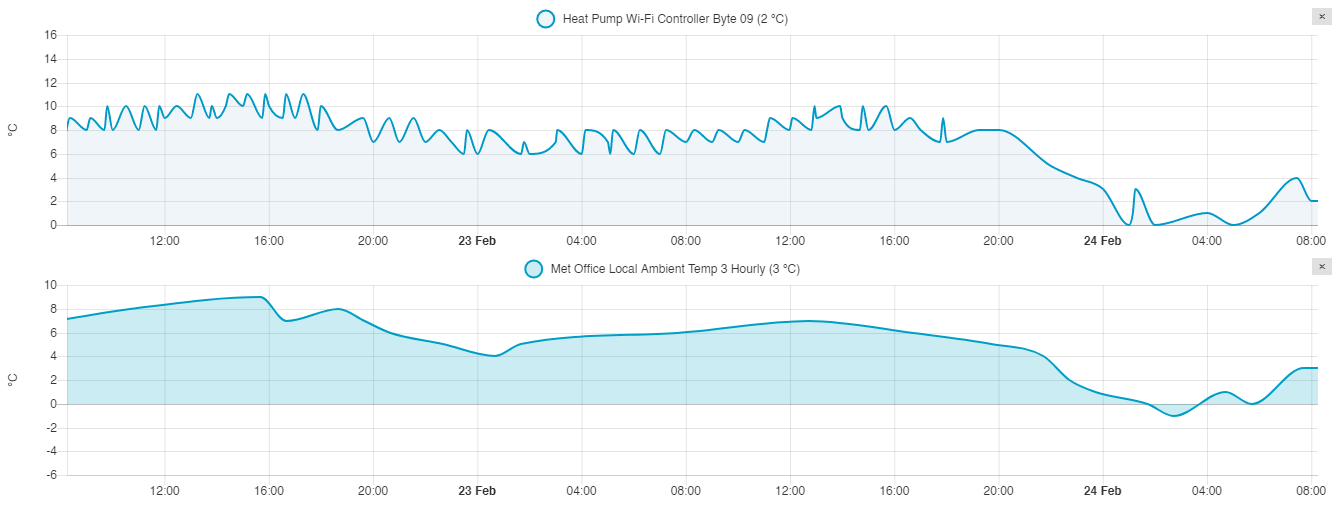
I think that pretty much confirms byte_09 is the Midea ambient temp value.
Midea 14kW (for now...) ASHP heating both building and DHW

24/02/2023 1:12 pm
Hi CathodeRay,
I delved a little deeper into the Python code last night and may have some possible code modifications to try. Could you send a text copy of any routines that you have modified so that we are both looking at the same song sheet.
Topic starter
24/02/2023 1:48 pm
Could you send a text copy of any routines that you have modified so that we are both looking at the same song sheet.
Done!
Midea 14kW (for now...) ASHP heating both building and DHW

Topic starter
24/02/2023 7:23 pm
@derek-m - they are text files, just open them in any text editor. If you use one of the better ones (I use Notepad++), it will do some basic code highlighting and auto-completion for you.
Midea 14kW (for now...) ASHP heating both building and DHW
24/02/2023 8:16 pm
Have you obtained any Type 01 messages recently, and if so did they show any additional data?
Looking at the Type 04 group of messages, the byte, Hex ec to fa, in position 155 gives decimal values of 236 to 250, which would appear to indicate a changing variable. It could not be a temperature, unless it requires decoding with some form of equation, but I wondered if it could be something like 'fan speed'. Is there anything in the controller data that could give some form of indication?
Topic starter
24/02/2023 9:17 pm
Have you obtained any Type 01 messages recently, and if so did they show any additional data?
They (the 03/01messages) are the ones that arrive every minute, so lots of them, but most of the values are static, and I think all the available bytes in the message are already decoded/extracted. Here's recent pair, first the 'Received' message, then the decoded 'Status update':
2023-02-24 19:52:56.182 DEBUG (Heat Pump Wi-Fi Controller) [custom_components.midea_ac_lan.midea.devices.c3.device] [device_id] Received: {'header': 'aa23c300000000000003', 'body': '010975910303281e323041231905371919053c223c14290080', 'message type': '03', 'body type': '01'}
2023-02-24 19:52:56.184 DEBUG (Heat Pump Wi-Fi Controller) [custom_components.midea_ac_lan.midea.core.device] [device_id] Status update: {'zone1_power': True, 'zone2_power': False, 'dhw_power': False, 'disinfect': False, 'fast_dhw': False, 'zone_temp_type': [True, True], 'mode': 3, 'mode_auto': 3, 'zone_target_temp': [40, 30], 'dhw_target_temp': 50, 'room_target_temp': 24.0, 'zone_heating_temp_max': [65, 55], 'zone_heating_temp_min': [35, 25], 'zone_cooling_temp_max': [25, 25], 'zone_cooling_temp_min': [5, 5], 'room_temp_max': 30.0, 'room_temp_min': 17.0, 'dhw_temp_max': 60, 'dhw_temp_min': 20, 'tank_actual_temperature': 41, 'outdoor_temperature': 0, 'zone1_water_temp_mode': True, 'zone2_water_temp_mode': False, 'zone1_room_temp_mode': False, 'zone2_room_temp_mode': False}
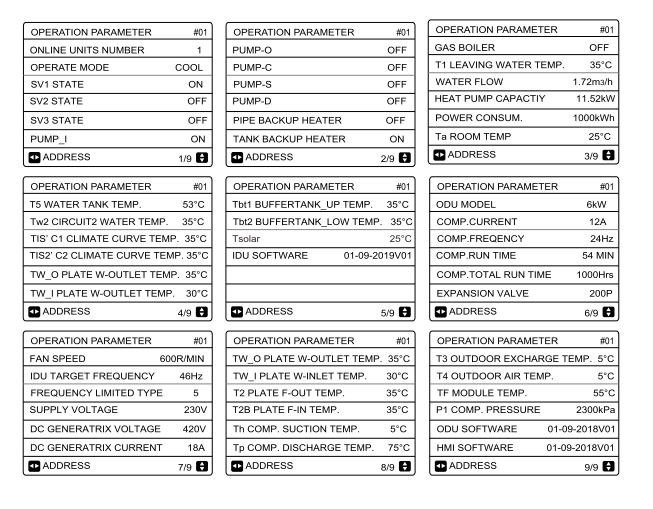
Is there anything in the controller data that could give some form of indication?
Here's a list of all the Operational Paramater pages available in the wired controller. Note that in some cases my wired controller is blank (shows '--') for the value eg on page 3 both T1 LEAVING WATER TEMP and Ta ROOM TEMP are both blank (but the LWT/RWT do show up on page 4 as TW_O PLATE WATER OUTLET TEMP and TW_I PLATE WATER INLET TEMP, TW_O(ut) is LWT, TW_I(n) is RWT and also note the image is wrong, my controller has TW_I PLATE WATER INLET not OUTLET TEMP):
Midea 14kW (for now...) ASHP heating both building and DHW


24/02/2023 10:01 pm
@cathoderay My Lenovo M710q arrived this morning and is all setup for Remote Desktop. When doing nothing it consumes about 8W!
I’m going to get it setup to run my telescope which it will be mounted to. Quite a task. It will then go in the Observatory on the motorised mount.
I’ll then install HA again and set it up to run in the background.
Phil
25/02/2023 11:10 am
I have some thoughts as to what additional code may be required to obtain additional data, though I still don't fully understand how the different parameters are being included in the desired list, or the 'available' list.
If you are agreeable, I would suggest changing the 'indoor_temperature' and 'outdoor_temperature' to 'current_temperature' and 'target_temperature', both of which have been used as parameter names elsewhere. Then see if there are any changes to the data collected.
Topic starter
25/02/2023 12:35 pm
If you are agreeable, I would suggest changing the 'indoor_temperature' and 'outdoor_temperature' to 'current_temperature' and 'target_temperature', both of which have been used as parameter names elsewhere. Then see if there are any changes to the data collected.
Have done so, but only for indoor/current_temperature, target_temperature causes a fatal error ("TypeError: Attempted to reuse key: 'target_temperature'"). The results may also throw some light on whether the parameter names have an inherent meaning inside the code, or are arbitrary labels attached by us to particular data in a specific location. As you know, I think it is the latter, that's why labelling the data at position xx as 'byte_xx' works, as would labelling it 'any_name_xx'.
Will report back when I have some results.
PS target_temperature was used twice, but only in one place, may be able to add it after all
Midea 14kW (for now...) ASHP heating both building and DHW
28/02/2023 12:29 pm
I have been delving ever deeper into the Python code, with a few interesting results, details of which I will provide shortly.
Have you made any progress at your end?

SPONSORS

Degrees of Separation
Latest Posts
-

RE: Why are ASHP installs so expensive?
I've ripped out over 11kw of storage and panel heaters ...
By Singlespeed , 12 minutes ago
-
RE: Jokes and fun posts about heat pumps and renewables
Damn, I pressed the button on my new heat pump too soon...
By ian33a , 4 hours ago
-
RE: Safety study for plug in batteries out to tender - looks like Q3 2027 at best before legal
I think it may depend how much of the world is on fire ...
By EtchedPixels , 8 hours ago
-
RE: Air-to-Air Heat Pumps & Air Conditioning: UK Heating and Cooling Q&A
I hope it's not the same people who make the awful TV s...
By EtchedPixels , 8 hours ago
-
RE: Renewables & Heat Pumps in the News
We need more building inspectors anyway and less self-s...
By EtchedPixels , 9 hours ago
-
RE: Does anyone have experience of a smart water meter?
@majordennisbloodnok That is my thinking precisely, I s...
By Toodles , 16 hours ago
-
RE: Replacing Storage Heaters with a Heat Pump in a Stone Cottage
I found some interesting data about the price of heat p...
By Rob of York , 23 hours ago
-
RE: PV and battery long payback - sense check query
Thanks for all the comments. I finally got to the bott...
By DavidB , 1 day ago
-
RE: Indevolt Batteries UK Support & Info Thread
People following this thread who are hoping that plug i...
By JamesPa , 1 day ago
-
RE: Passiv Smart Thermostat - Help & Forum Support
By Singlespeed , 2 days ago
-
RE: Help me keep the faith with my air source heat pump installation
just had Vaillant over to service the HP and asked abou...
By AdamK , 2 days ago
-
RE: tepeo ZEB UK Support & Info Thread
OK so ZEB is basically a variant on a storage heater, b...
By JamesPa , 3 days ago
-
RE: Heat Geek installations: share your experiences
@editor I suspect that the Heat Geek online quote is a ...
By AndrewJ , 3 days ago
-
RE: Adding additional Solar Panels to a DC coupled battery system
Ah, yes. Thanks for clarifying.
By Transparent , 3 days ago






SPONSORS