Notifications
Clear all

Topic starter
13/01/2026 5:12 pm
I have a newly installed system comprising Midea ASHP, a Hanchu ESS 9.4KW battery together with a solar array.
I have set the battery to charge from the grid on low tariff and to discharge at the time of Peak Tariff using the "user defined" option in the Hanchu app.
What is happening is that if my home is not drawing many KW in the discharge period the battery also discharges to the grid. I don't want this to happen if I can avoid it.
What i want to do is have it discharge into my home over the 3 hr high tariff period without sending anything to the grid. Can I set that up somehow in the Hanchu ESS app.
Currently work mode in the app is set to "User Defined" with a discharge period between 16:00 and 19:00. It charges on the low cost tariff between 02:00 and 05:00.( the charge setting is actually 02:00 to 16:00 to prevent it discharging early)
The other options in the app are; "
Self Consumption Mode" which isn't showing any timer options.
"Backup Energy Mode which isn't showing any timers and "Off-grid Mode which has no timers. How do I achieve my energy consumption goal of using the battery entirely for my home in a set time without feeding back to the grid and, in such a way that it depletes based on home demand over the whole high tariff period. Any thoughts on this would be gratefully received.
Thanks
This topic was modified 2 months ago by Mars
1


14/01/2026 9:09 am
@skd and @irmartini can you guys assist?
Get a copy of The Ultimate Guide to Heat Pumps
Subscribe and follow our YouTube channel!

14/01/2026 9:32 am
I have a newly installed system comprising Midea ASHP, a Hanchu ESS 9.4KW battery together with a solar array.
I have set the battery to charge from the grid on low tariff and to discharge at the time of Peak Tariff using the "user defined" option in the Hanchu app.
What is happening is that if my home is not drawing many KW in the discharge period the battery also discharges to the grid. I don't want this to happen if I can avoid it.
What i want to do is have it discharge into my home over the 3 hr high tariff period without sending anything to the grid. Can I set that up somehow in the Hanchu ESS app.
Currently work mode in the app is set to "User Defined" with a discharge period between 16:00 and 19:00. It charges on the low cost tariff between 02:00 and 05:00.( the charge setting is actually 02:00 to 16:00 to prevent it discharging early)
The other options in the app are; "
Self Consumption Mode" which isn't showing any timer options.
"Backup Energy Mode which isn't showing any timers and "Off-grid Mode which has no timers. How do I achieve my energy consumption goal of using the battery entirely for my home in a set time without feeding back to the grid and, in such a way that it depletes based on home demand over the whole high tariff period. Any thoughts on this would be gratefully received.
Thanks
You do not want to have discharge set at all, turn it off.
That is only for when you want to discharge to the grid !
The system will power your household load from the battery automatically except when your charging from the grid.
This post was modified 2 months ago by Mars
“Anything worth doing, is worth doing right.”
1

14/01/2026 9:54 am
Hi. My Hanchu battery system is controlled by the (Luxpower) inverter's app. I don't use the Hanchu app for any control, only for viewing additional running data on each of the six battery modules.
Sorry that doesn't help with your question.
Mitsubishi Ecodan 11.2kW R32 ASHP; Ecodan DHW cylinder; UFH+rads
20x430W Jinko TOPCON Tiger Neo solar; Luxpower 6+4kW hybrid inverter; 20kWh Hanchu ESS LFP battery storage
PHEV; Zappi charger
1997 stone detached house with updated insulation. 140sqm, maintained at 20-22degC 24/7
1
Topic starter
14/01/2026 7:13 pm
Thank you for your comment. If I turn discharge off so that my settings in the user defined work mode only has a "Charge time period" that corresponds to my low tariff the battery begins to discharge as soon as the charge period is over. As this low tariff period is 02:00 -05:00 in the morning it all goes back to the grid quite quickly because of low demand from the home.
I may be missing something fundamental here? is "user defined" with a fixed low tariff charge period the right option.
The others options available to me in the app are the ones outlined in my first post and none of those let me chose when to charge up my battery. Some research (asking chat GPT free service in Opera browser if that counts) has shown that there is a setting in the inverter but not one I have access to apparently..I have attached what I was fed...
Thanks for any help you can give

14/01/2026 7:36 pm
@countryman-helmsley - I'm noting that you are configuring the Hanchu ESS using an App.
Is that App on a device (Smartphone) which connects via a local (Bluetooth) signal?
Or does the Hanchu connect back to the manufacturer across the internet...
... and the App therefore picks up that data via WiFi?
There are pro's and cons with having such an internet link to the manufacturer.
In this case they might be able to check the battery configuration settings remotely, and therefore see what settings you've got wrong.
The downside is that the ESS unit might not be able to operate without such a link.
That would make use of the battery dependent on Hanchu's internet services.
@editor - see what I've just written about internet dependency over on this other Topic!
Save energy... recycle electrons!
1
14/01/2026 8:52 pm
Is the Hanchu ESS app definitely the only app option available to you for system control?
To achieve what you are aiming for on my Luxpower inverter (not Hanchu, but from the same parent company) I would do what you have done and set to AC charge from the start of the cheap night tariff period until the start of the peak tariff period. The battery always fills within the cheap time window. Thereafter the battery would support house load only (Self Consumption mode) until the next night tariff cycle.
On mine I can set Forced Discharge mode to Disabled, which I guess is similar to the Allow Export On/Off mentioned in your Chat GPT search.
My understanding is that Hanchu batteries are compatible with a number of different inverters and their own proprietary apps.
Mitsubishi Ecodan 11.2kW R32 ASHP; Ecodan DHW cylinder; UFH+rads
20x430W Jinko TOPCON Tiger Neo solar; Luxpower 6+4kW hybrid inverter; 20kWh Hanchu ESS LFP battery storage
PHEV; Zappi charger
1997 stone detached house with updated insulation. 140sqm, maintained at 20-22degC 24/7
15/01/2026 9:00 am
Mine is the same as @skd i have luxpower inverters and its these that control what the battery does and as SKD explained the 'Forced discharge mode' is the setting I was referring to, I have the Hanchu App but that is just for monitoring stats.
What Inverter do you have?
I'm rather surprised your installer did not explain how your system works and show you how to set up what you want, I would give them a call and explain whats happening and what you want to happen, if your everything is WIFI they can probably do it remotely BUT i would ask them to explain and show you how to do it.
@transparent The Hanchu App can do both local mode (bluetooth) normal (wifi) but Wifi is the standard setup.
“Anything worth doing, is worth doing right.”
2
Topic starter
15/01/2026 1:27 pm
@irmartini The app is linked locally to the inverter which has a dongle and connects to my network by wifi and not to the Hanchu web. The app seems to very limited
I have visited the Hanchu Web page but can only see a demo of the program by logging in as a guest. There is a place to enter your log in details but nowhere I can see nowhere to sign up
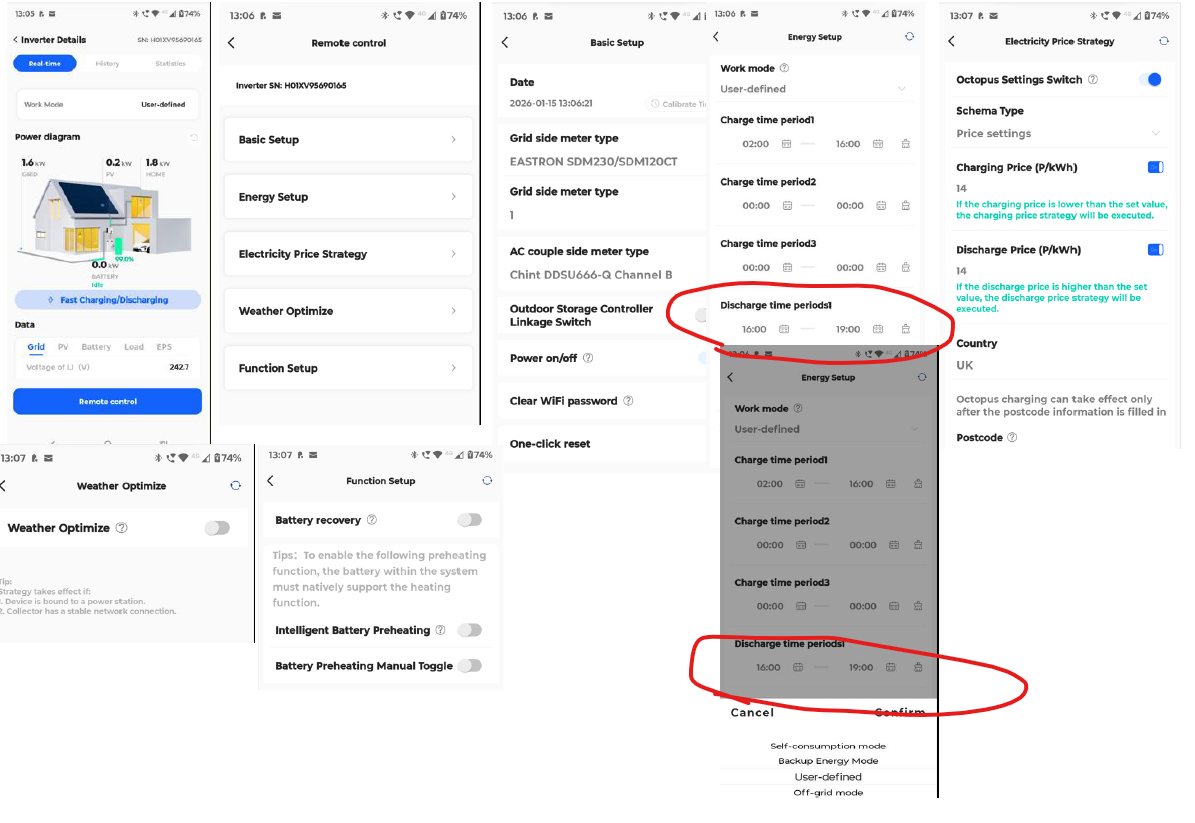
The inverter is a Single Phase Hybrid Inverter model HESS-HY-S 3.68KW. I have attached screen prints showing what is available in each of the menus after pressing remote control and their current status. Advice on what to change on these screens would be gratefully received.
Thanks for all the help to date
15/01/2026 1:38 pm
To start with in the discharge time period set it to 00:00 to 00:00
You do not want any discharge to the grid, I believe that is what that settings is!
“Anything worth doing, is worth doing right.”
Topic starter
15/01/2026 1:45 pm
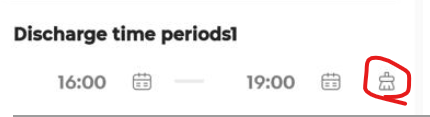
During the set time period the battery feeds into the house, only discharging to the grid if home demand is not as high as battery discharge rate. When i initially set 00 to 00 it seemed to think that this was 'all day' and discharged to the grid immediately after charging! is it possible to slow the discharge rate according to demand? I did think about self consumption but there are no time setting controls there to manage charging on the low tariff.
15/01/2026 1:49 pm
“Anything worth doing, is worth doing right.”
Page 1 / 2
Next

Latest Posts
-

RE: Daikin Altherma 3 LT compressor longevity question
This mess is intriguing: I wonder if this represent...
By bobflux , 45 minutes ago
-
RE: Say hello and introduce yourself
Hi. I'm Mike. Thank you for letting me join. My partn...
By Fretless6 , 3 hours ago
-
RE: Connecting Growatt SPH5000 over wired ethernet rather than wireless
The simplest wired option is usually the Growatt Ethern...
By Jonatan , 5 hours ago
-
RE: Peak Energy Products V therm 16kW unit heat pump not reaching flow temperature
ASHPs do have a minimum compressor speed. The minimum h...
By bobflux , 12 hours ago
-

RE: Electricity price predictions
@jamespa And it seems some of the nasty public cloud...
By Batpred , 12 hours ago
-
RE: Tell us about your Solar (PV) setup
Location: near Lyon, France 12kWp on the roof, 2x Sol...
By bobflux , 13 hours ago
-
RE: Jokes and fun posts about heat pumps and renewables
Technology is rapidly advancing. BBC News reported th...
By Transparent , 15 hours ago
-
What matters for flow and pressure drop is internal dia...
By bobflux , 16 hours ago
-

RE: Do Fridges and Freezers have COP ratings?
@editor Thank you all for your replies and submitted in...
By Toodles , 19 hours ago
-

I know and yes. The secondary deltaT wont necessaril...
By JamesPa , 22 hours ago
-
RE: Designing heating system with air to water heat pump in France, near Lyon
Just love the way you put it! 🤣
By Batpred , 2 days ago
-
RE: Safety update; RCBOs supplying inverters or storage batteries
Thank you for sharing. So it seems that your Schneid...
By Batpred , 2 days ago
-

RE: Forum updates, announcements & issues
@upnorthandpersonal thanks for the thoughtful, consider...
By Mars , 2 days ago
-
RE: Solar Power Output – Let’s Compare Generation Figures
@mk4 All 21 panels have their own Enphase IQ7a microinv...
By Toodles , 2 days ago
-
RE: Setback savings - fact or fiction?
Great, so you have proven that MELCloud is consistently...
By RobS , 3 days ago
-
RE: Mitsu PUHZ120Y 'Outdoor Temp 'error?
Thanks David & James It almos...
By DavidAlgarve , 3 days ago
-
RE: Surge protection devices SPDs
@trebor12345 - your original Topic about the right type...
By Transparent , 3 days ago
-
RE: Help needed with Samsung AE120RXYDEG
@tomf I’ve been sent this from a service engineer at Sa...
By Mars , 3 days ago
-
RE: Buying large amp bidirectional RCD and RCBO
Yes... I went through this particular headache and ende...
By bobflux , 4 days ago
-
O-oh! Let's take this as an opportunity to 'pass the ...
By Transparent , 4 days ago
-
RE: Homely setup on daikin heat pump
@craigh I refer to our somewhat elevated temperature of...
By Toodles , 4 days ago
-
RE: Air source heat pump roll call – what heat pump brand and model do you have?
My turn, this describes the future installation, only t...
By bobflux , 4 days ago