

Notifications
Clear all
Joining the Renewable Heating Hub forums is completely free and only takes a minute. By registering you’ll be able to ask questions, join discussions, follow topics you’re interested in, bookmark useful threads and receive notifications when someone replies. Non-registered members also do not have access to our AI features. When choosing your username, please note that it cannot be changed later, so we recommend avoiding brand or product names. Before registering, please take a moment to read the Forum Rules & Terms of Use so we can keep the community helpful, respectful and informative for everyone. Thanks for joining!
Air Source Heat Pumps (ASHPs)
24
Posts
5
Users
7
Reactions
3,961
Views

22/02/2026 6:41 pm
I looked at the trend in the link for booster - I see the booster on flag set but don’t see any corresponding rise in flow temp gets- makes me think you may not physically have a booster but the option might be enabled on the FTC. Or like me with my immersion heater - you have one but the power to it is switched off. I have noticed with the immersion heater that if the Ecodan decides to switch it on - and does not see any rise in temp it kind of gets into a death loop and just sits there with the immersion symbol (lightning bolt) on the screen but does not then attempt to to restart the heatpump - so you wake up to a cold shower. Could be the booster heater has a similar logic??
This post was modified 8 months ago by Travellingwave
22/02/2026 6:50 pm
Could do to know what control mode you are using - weather comp or Auto adapt - from your trend looks like you are using weather comp but I’m not too familiar with MelPump App.
22/02/2026 8:00 pm
And a picture of cylinder and surrounding pipe work would help.

22/02/2026 8:44 pm
Your DT is to low, you do not have enough heat exchange would be my 1st thought, it might explain the short cycling.
How old is your home as the app says you have an 80m2 home with a 6000w system that actually puts out closer to 7000w. this gives you somewhere around 75w/m2 or higher which is a lot unless your home is very un-insulated. Also that would need to be delivered through 6kW of rads, if you close off half the rads upstairs during the day you only have 3kW of rads, zoning is bad for the system and can cause short cycling in some cases, could be whats happening here. Are you controlling the zones though the Ecodan, at least this way the heat pump would know?
AAC Group Ltd covering the Kent Area for design, supply and installation of ASHP systems, service and maintenance, diagnostics and repairs.
1


Topic starter
27/02/2026 12:43 pm
and thanks for your advice. I've been down with tonsilitis the last few days and even though I thought that it would give me the ideal opportunity to monitor radiators and heatpump throughout the day, it was not possible at all.
Annoyingly it has also been really warm the last few days, so I am not sure it's the best weather to get good data.
Do you know if your rads have been balanced? Do some get hotter than others?
What I did to balance mine is put the Ecodan into fixed flow temp control mode (I think you are currently in Auto Adapt Mode) Once in fixed mode you can set the flow temperature manually to a much higher value - say 50 degc - this makes it easier to feel which radiators are getting either too much or not enough flow as you will be able to feel it better. You can then balance the system- various videos on how to do this - basic idea is to adjust the lock shield valves on each radiator so that water flow is distributed more or less evenly. In your case it is possible that the rads closer to the pump are too open and leading to water short circuiting back to the heatpump meaning the heat pump can’t get rid of the heat hence cycling.
This I have tried and couldn't really find a difference in flow.
Also important that UFH is balanced correctly for same reason.
That could be the culprit and I am not sure how to best check for it. The way the UFH is controlled is not 100% clear to me, as it itself has 2 zones and 2 thermostats.
Ref radiator removal- have you checked system pressure - should be about 1.5 bar, might need topping up if you’ve had a rad off.
This one is often a bit wonky, so it’s the first thing I usually check top it up. Why does it drop in the first place? I’ve searched myself silly looking for leaks.
Ref stopping and needing booster to get back up to temp - that sounds like something not set up right. Personally I would disable any booster heater as it could mask other issues and is costly to run - you should not need it.
I’ll have a look into doing that. It doesn’t usually work, but I think we have an immersion heater in there somewhere. Maybe we don’t. It would explain why it never warms up and just gets stuck in booster mode (with the lightning symbol)
Where is your heatpump control screen by the way , please don’t tell me it’s in the airing cupboard next to the cylinder😱
when you say you have to restart it what are you having to do? Any error messages?
The screen is in a storage cupboard in the bathroom where the old boler used to be. it’s got laundry in it now. Nothing that gets warm. We also have a mobile unit that’s on the floor in the kids room.
I simply restart the it on the main panel or via the Melpump app. There are no error messages, just the lightning symbol.
06/03/2026 8:48 am
Lot going on - I would try to focus on one thing at a time.
So when the system stops working you have the lightning symbol on - to restart it you go to the Ecodan display panel and restart with the power on/off button.
This does sound like a similar issue I have had with our DHW immersion heater. I don’t bother with legionella cycle so I have the power switched of. If I use the DHW continuous mode - then quite often it tries to engage the immersion heater for some reason and then because the power to the immersion is switched of it just sits with the lighting symbol on until you restart the system. I run the DHW in timed mode and it does not have the same issue in this mode.
It may be a similar issue if your FTC has been configured with a booster heater that is not actually fitted.
The booster heater function is enabled via DIP switches inside the FTC6
Which version of FTC do you have?
For FTC6 dip switches are below from the installation manual.
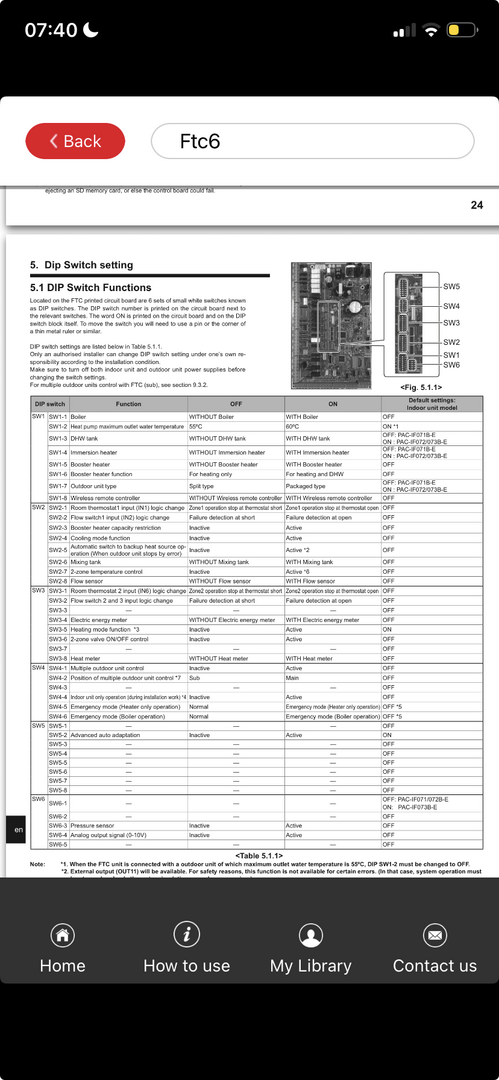
So If you do not have a booster heater SW1-5 should be off.
If you don’t have an immersion heater in the DHW tank - or you don’t use it SW1-4 should be off.
Dont know if you feel able to check this - if not you need to get installer back. Note 240V mains is present inside the FTC so don’t open without switching off first.
If you have MelPump then presumably you have installed the F1p dongle? so have already accessed the FTC controller?
06/03/2026 9:10 am
Photos of cylinder cupboard and UFH manifold would be useful.
Topic starter
09/03/2026 3:59 pm
Lot going on - I would try to focus on one thing at a time.
then quite often it tries to engage the immersion heater for some reason and then because the power to the immersion is switched of it just sits with the lighting symbol on until you restart the system.
Yes, that's exactly what is happening. I've sadly not had time to look at the dip switches.
The booster heater function is enabled via DIP switches inside the FTC6
Which version of do you have?
I've got FTC6 with version 17.0
If you have MelPump then presumably you have installed the F1p dongle? so have already accessed the FTC controller?
Yes, that's the case. I didn't install it but that's how i've been controlling the whole thing over the past year.
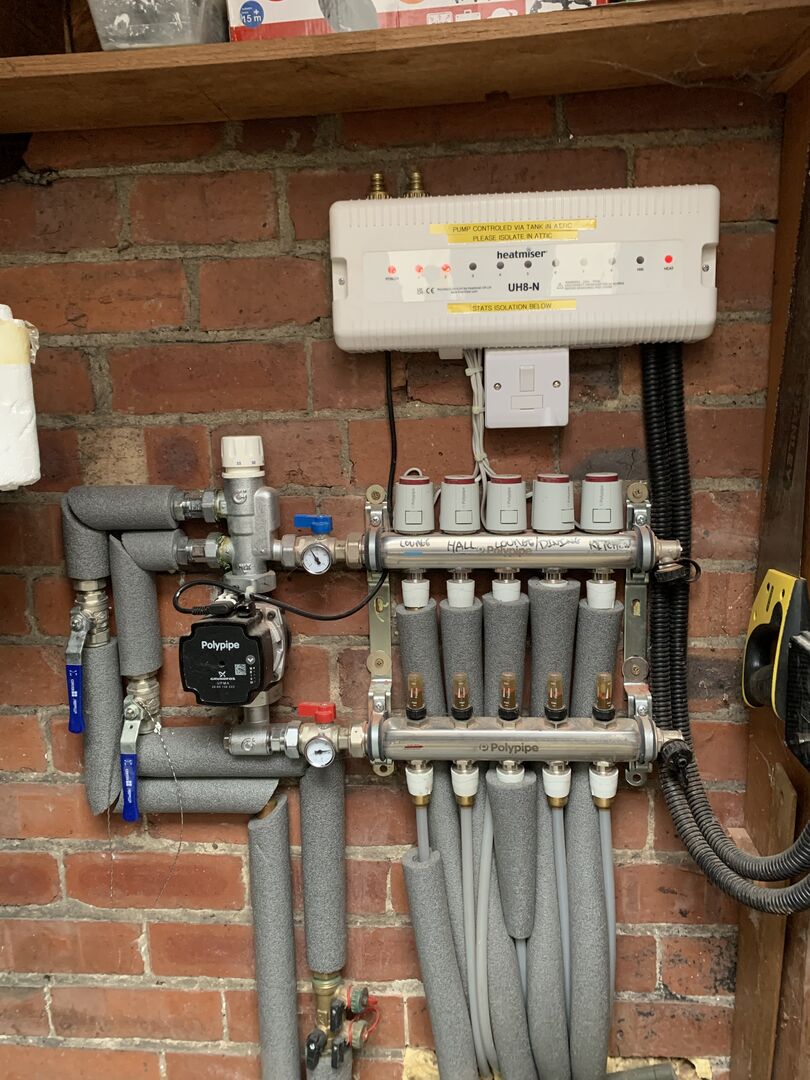
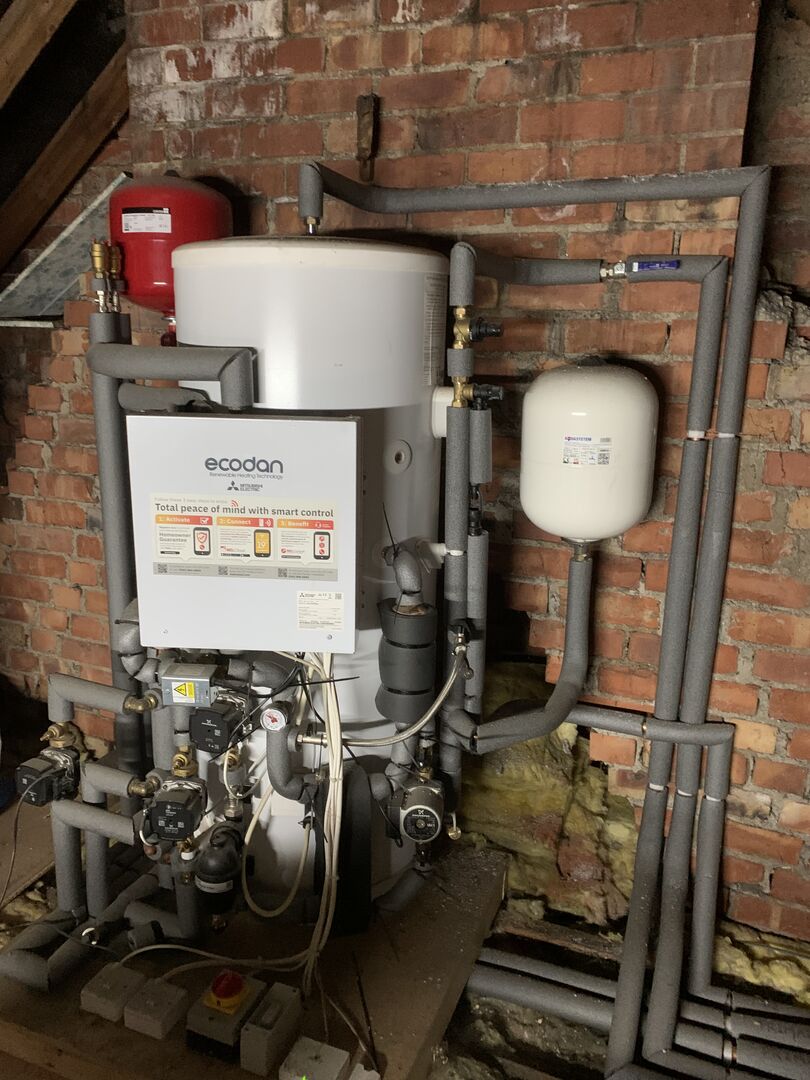
I'm also adding some photos of the manifold and cylinder.

12/03/2026 6:43 pm
looks like you have a thermostatic mixing valve on that UFH manifold. If you do indeed have the two zone setup on the Ecodan then the mixing valve on the UFH is surplus to requirement since the Ecodan will supply water to the UFH at correct temp. I count a total of 5 circulation pumps what are they all doing?
12/03/2026 6:48 pm
looks like you have a thermostatic mixing valve on that UFH manifold. If you do indeed have the two zone setup on the Ecodan then the mixing valve on the UFH is surplus to requirement since the Ecodan will supply water to the UFH at correct temp. I count a total of 5 circulation pumps what are they all doing?
I don’t see anything that looks like a booster heater - so if Ecodan is configured for one this could be your problem with it stopping.
13/03/2026 8:24 am
Those control valves on the UFH manifold could be an issue that might cause cycling- if all the valves close then you will lose a lot of your system emitter capacity. I would take them off or turn the setpoint up so that they stay open. You then have the job to balance your UFH and radiators to give required room temps in conjunction with setting up weather compensation.
2

07/04/2026 11:51 am
Now finally there is a proper data set in a thread available but nobody can see rhyme or rythm in it.
Neither do I, sorry:
A purposeful breeder of Bebra
kept, down in his basement, a zebra.
But then he was dead --
't least to me, since I had
found no second word rhyming on '-ebra'.
What I can make out of the given information is poor:
All rooms get nicely warm, so heat distribution is fine, or, at least, good enough.
dT is small, so there's ample flow.
Adding both, I conclude that there's no reason to touch thermostats or like as a first measure.
FT is generally low enough to provide a good COP. Possibly, there's a tad little variation of FT with outdoor temperature, which may become a bullet point of an improvement list later on.
As already said (and not contradicted by now), the system's cycling is within the limits of proper politeness, thus no excuse for performance that bad. So I think, as a first approximation, this can be left as well.
From the energy report supplied, I added up electricity for a full year to roughly 4500 kWh, with COPs given around 2.2, this makes 10 000 kWh heat. As can be seen in June, July and August, there's some 80 kWh per month to consider for DHW, shy of 200 kWh heat, so for heating only it's like 8000 kWh per anno or 900 W in average. Assuming an overall room temperature of 20°C and a yearly average temperature of outdoor air of 10°C the house may demand 90 W/K, thus will need 2700 W at -10°C (standard requirement?) plus again 240 W for DHW on top (that back-on-an-envelope-calculation is called a 'Weiersmüller' https://de.wikipedia.org/wiki/Heizlast#Heizlastermittlung_nach_Weiersm%C3%BCller).
Hence, in the bottom line, the heat pump may be two times oversized, which at least offers an excuse when cycling. But further, I don't expect it's common for a two times too big pump to act with an SCOP of 2.2, but don't know for certain -- anybody else?
Oversized pump being no really good news, all comfort I can offer is that anyway it would be difficult to find a really smaller one, so (speaking words of wisdom) let it be!
Another solace may be that, even with a poor SCOP around 2, an electricity bill of 4500 kWh per anno is not strikingly much and even when the SCOP could be raised to a typical 4, this would result in a saving of 750 GBP p.a. (at a rate of 33 Pence per kWh). That sum won't justify big moves.
However -- can there be a faulty heat pump, e.g. leaking refrigerant, declining compressor power, failing expansion valve? Somebody's out there with a light to shed on this?
My guessing is that any of such failure would increase in time, at least year by year if not monthly, and such development would be detected when evaluating the datasheets.
My first sight wild guess about the given data was the system being in a 'cycling typhoon' which would occur when dT exceeds the controller's switching hysteresis (is this English at all?): in which case the heat pump would put its scheduled stop as exceeding the desired flow temperature, the cold return would pass the heat exchanger to reach the FT sensor within a minute, this again would feel 'unbearably cold' and immediately restart the pump .... ad infinitum.
However, there is no sign of such an incident, FT nowhere dropping, bad idea of mine.
All I can find in the graphs is a certain enthusiasm of the controller to drive the pump slightly above its necessary rpm and as soon as it exceeds target flow temperature, not surprisingly then, to shut down the pump immediately instead of try running it along a minimum speed of 30 Hz. On the other hand, there are wonderfully long intervals during which the pump runs undisturbed, e.g. in the 'booster' report between 05:40 and 10:20 .... why not always like this? There's a shorter one between 00:20 and 01:35 and another good from 21:05 to 23:05; what makes the system, after a proper long run around 40 Hz, suddenly break into cycling, middle of the night, constant ambient temperature, nobody will open or close windows, turn knobs, and no solar input interferes?
Possibly the devil is in the details, the tracking comes with one dataset every five minutes and in between them a lot may happen .... @GoodbyeGas, can we have a snapshot of a few hours with, let's say, two datasets per minute?
Compressor frequencies, it seems that 36 Hz appear very often and 30 Hz is an absolute limit since no figure between 30 and 0 can be found. On the other hand, 100 Hz get reached somewhere, and driving power not below 35% of nominal would be common for an R290 system. Is it?
So, lacking helpful ideas, my proposal would be to follow previous advice and start trying to tweak the system for longer running cycles .... as much as it is worth the effort.
A typical starter would be try pinning down the compressor to minimum rpm, e.g. by means of a 'silent mode' or like .... @travellingwave, are you familiar enough with the manual to know if there's such a menu or another to limit frequencies?
Secondly, is there a menu item available which inhibits re-start for a given time? German systems have such to satisfy their network operators who can impose stoppage up to two hours.
Third, extending switching hysteresis might help even when raising overall FT level .... try and, in case of error, revoke.
Fourth, a general lowering of supply temperatures together with providing an undisturbed overall flow would be good for everything except comfort and ease .... tbd.
Most of my remarks already had been raised elsewhere, so I'm no way sure if my contribution is one, at all. Did I waste your time? Hopefully not.
Page 2 / 2
Prev
SPONSORS

Degrees of Separation

Latest Posts
-

How quickly would you want/expect heat recovery to take from setback?
Now into year 2 with my Cosy 9. I currently have it se...
By AndrewJ , 9 minutes ago
-
RE: How should the Boiler Upgrade Scheme be reformed?
Not quite, regular A2W heat-pumps need a load of extra ...
By Temperature_Gradient , 12 hours ago
-
RE: Heat Geek installations: share your experiences
one thing i learnt from reading people’s comments and e...
By Batpred , 14 hours ago
-
RE: Cooling/heating with one unit
"The way we use A2A on a cheap overnight EV tariff is t...
By mrkfm , 16 hours ago
-
RE: Do I add Air Con or MVHR to existing A2W ASHP?
We have ‘signed on the dotted line’ today for a Panason...
By Toodles , 17 hours ago
-
RE: Heat pump branding. Clever, contemporary… or a bit too much?
...or it was there and was lost thanks to laziness and ...
By Majordennisbloodnok , 17 hours ago
-
@bobflux Thank you for your response. I am trying to ...
By RonV. , 17 hours ago
-
This post is about how I successfully configured a buff...
By Tony.Stolz , 20 hours ago
-
The installer visited yesterday and suggested the noise...
By JamesChatz , 22 hours ago
-
RE: HeatGeek vs Octopus surveys: puzzling disparity - any ideas why?
Your house sounds a lot like mine. 2 surveyors each sp...
By JamesPa , 1 day ago
-
RE: Heat Geek Zero Disrupt: Are We Sleepwalking Into Another Race to the Bottom?
Thats true only if you do the wrong experiment. Done c...
By JamesPa , 1 day ago
-
RE: battery storage without solar
As of October 1st they need specific qualifications to ...
By EtchedPixels , 2 days ago
-
RE: Renewables & Heat Pumps in the News
With regards to the BUS grant raid, I gave it more thou...
By ASHP-BOBBA , 2 days ago
-
RE: Why are ASHP installs so expensive?
The whole system seems to work on the basis of...
By ian33a , 2 days ago






SPONSORS