
Notifications
Clear all
Joining the Renewable Heating Hub forums is completely free and only takes a minute. By registering you’ll be able to ask questions, join discussions, follow topics you’re interested in, bookmark useful threads and receive notifications when someone replies. When choosing your username, please note that it cannot be changed later, so we recommend avoiding brand or product names. Before registering, please take a moment to read the Forum Rules & Terms of Use so we can keep the community helpful, respectful and informative for everyone. Thanks for joining!
Air Source Heat Pumps (ASHPs)
47
Posts
10
Users
15
Reactions
1,494
Views


08/02/2026 3:49 pm
Edit: I should have said central southern UK, maybe elsewhere it is warm and sunny!
Warm (10C) and sunny in mid Wales!
Get a copy of The Ultimate Guide to Heat Pumps
Subscribe and follow our YouTube channel!
08/02/2026 3:54 pm
Midea 14kW (for now...) ASHP heating both building and DHW

08/02/2026 4:17 pm
So here in Greece due to some days having great weather many people choose to turn heat pump off and let clean air through the house. I mean today we had 18-19 degrees outside
Fair enough. Here in the UK we can only dream about great weather most of the time. Here it is another grey soggy nine degrees outside today.
Edit: I should have said central southern UK, maybe elsewhere it is warm and sunny!
yeah it seems that in the uk running the heat pump all the time is the best choice. I will probably try and setup a HA communication for my own heat pump and see how that goes.
08/02/2026 4:23 pm
I will probably try and setup a HA communication for my own heat pump and see how that goes.
Good luck. If you run into any problems, feel free to come back and ask questions. Or even better, if you get it to work, come back and tell us how you did it!
Midea 14kW (for now...) ASHP heating both building and DHW

08/02/2026 4:56 pm
…
however lately I installed 2 new heat pumps on 2 different homes (different WiFi) and both customers call me back to let me know that the WiFi has disconnected from the app. I tried to stop band steering changed AP, forced 2,4ghz channel and many more
…
I could do with a bit of clarification from you Midea users. Does this particular app communicate directly with the heat pump (or controller) or does it communicate with Midea’s cloud systems?
My reason for asking is that most installations with most brands have a wifi adapter that allows the heat pump’s controller to talk to the manufacturer’s cloud and then the official app that’s installed on various phones and tablets also goes out to the Internet to connect to the same cloud. If Midea works in the same way, any changes to the heat pump’s wifi frequency, channel hopping and so forth would have no effect at all on the ability for the app to connect to the Internet.
If we can understand the topology better, all the HA stuff may be unnecessary, but I obviously can’t be sure at the moment.
105 m2 bungalow in South East England
Mitsubishi Ecodan 8.5 kW air source heat pump
18 x 360W solar panels
1 x 6 kW GroWatt battery and SPH5000 inverter
1 x Myenergi Zappi
1 x VW ID3
Raised beds for home-grown veg and chickens for eggs
"Semper in excretia; sumus solum profundum variat"
08/02/2026 4:59 pm
…
however lately I installed 2 new heat pumps on 2 different homes (different WiFi) and both customers call me back to let me know that the WiFi has disconnected from the app. I tried to stop band steering changed AP, forced 2,4ghz channel and many more
…
I could do with a bit of clarification from you Midea users. Does this particular app communicate directly with the heat pump (or controller) or does it communicate with Midea’s cloud systems?
My reason for asking is that most installations with most brands have a wifi adapter that allows the heat pump’s controller to talk to the manufacturer’s cloud and then the official app that’s installed on various phones and tablets also goes out to the Internet to connect to the same cloud. If Midea works in the same way, any changes to the heat pump’s wifi frequency, channel hopping and so forth would have no effect at all on the ability for the app to connect to the Internet.
If we can understand the topology better, all the HA stuff may be unnecessary, but I obviously can’t be sure at the moment.
MIDEA heat pumps talk to the cloud and the app fetches data from there. With this in mind, on both of my clients we can connect to the heat pump via the app (it says online) but when entering it says 0 degrees and clicking on or off does nothing. Cycling the HP does the trick. The WiFi module on the midea is inside the display.
08/02/2026 5:03 pm
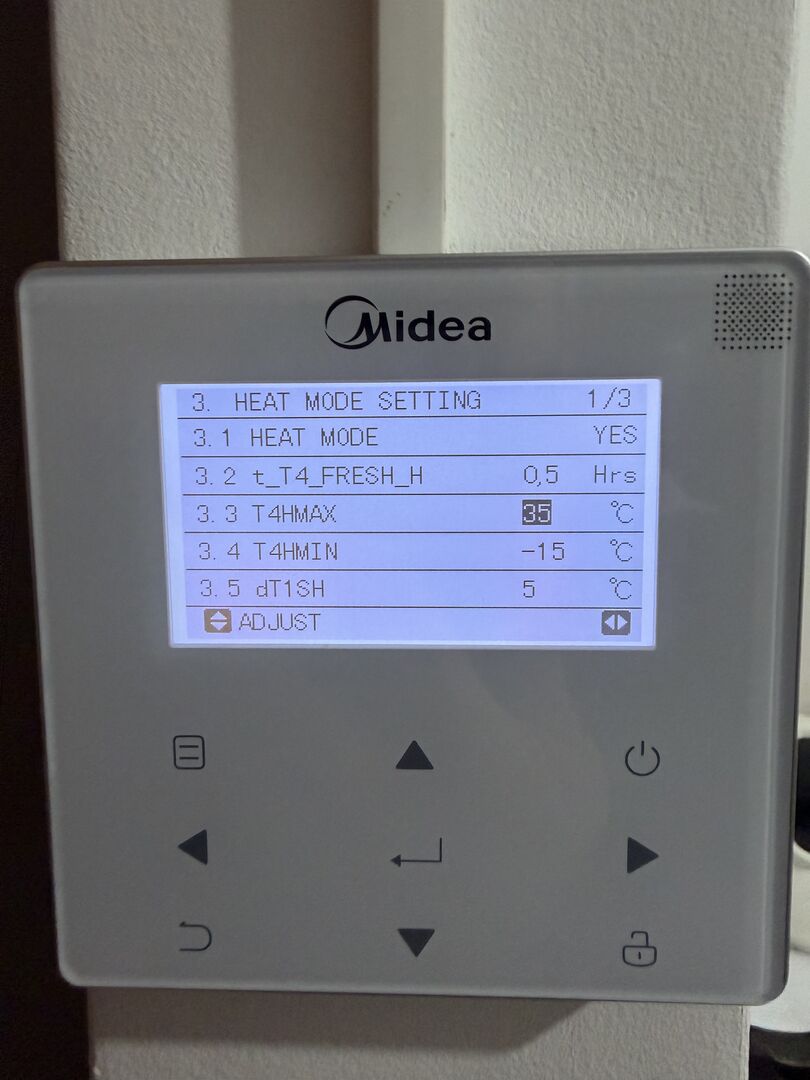
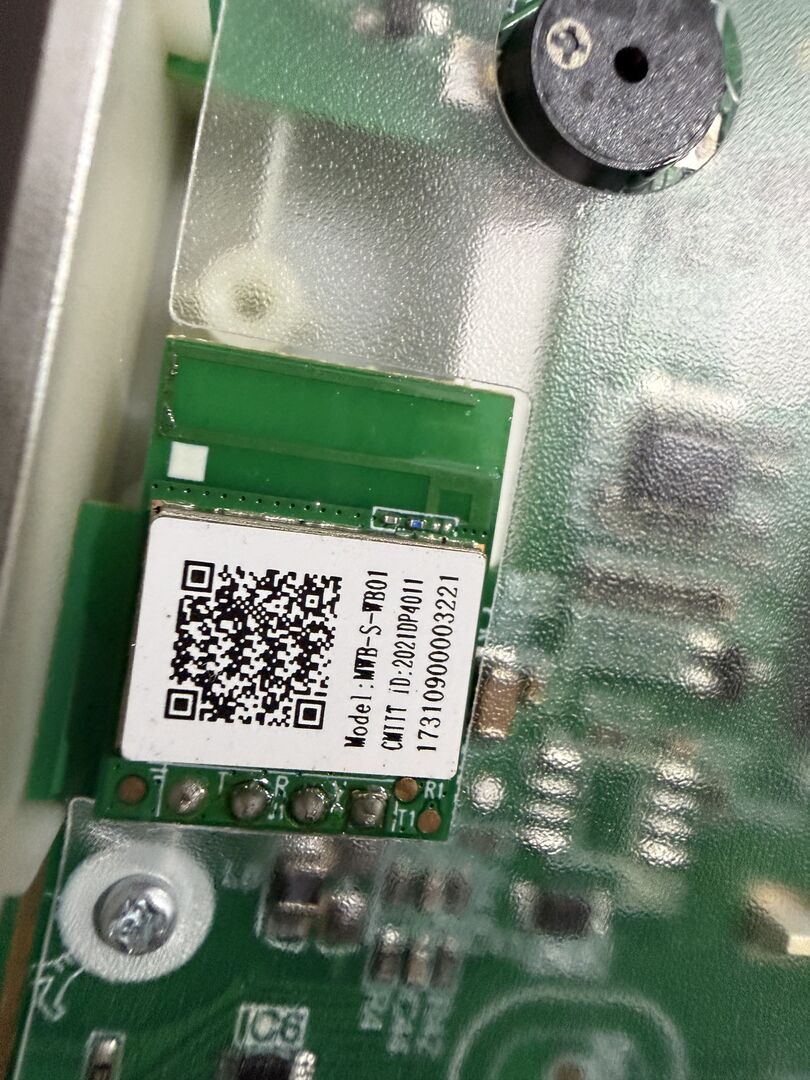
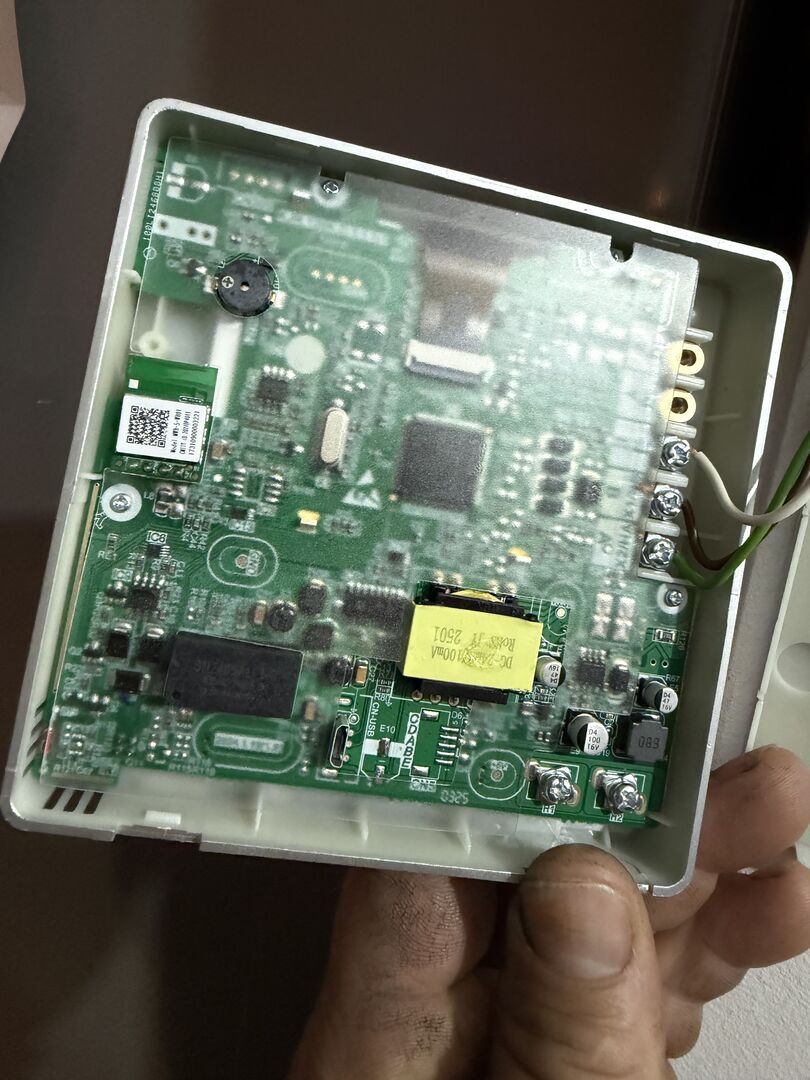
Oh now I come to think, before cycling the HP I tried to reset WiFi etc but resetting does nothing. Intergrated wifi won’t broadcast even after reset and AP mode on. It needs to cycle.
This post was modified 1 month ago by xristostsilis
08/02/2026 5:21 pm
OK, that’s clearer.
Assuming the wifi is provided by the customer’s router, I’d say the next step is to see what the router thinks is the situation when the heat pump isn’t connecting to the cloud. In other words, is the heat pump unable to connect to the router via wifi at all or is it connecting OK but failing to pick up an IP address and/or other network settings via DHCP.
Understandably, I don’t know your comfort level, @xristostsilis, with networking but given your mention about wifi bands and channels I’m assuming you’re not flying totally blind.
105 m2 bungalow in South East England
Mitsubishi Ecodan 8.5 kW air source heat pump
18 x 360W solar panels
1 x 6 kW GroWatt battery and SPH5000 inverter
1 x Myenergi Zappi
1 x VW ID3
Raised beds for home-grown veg and chickens for eggs
"Semper in excretia; sumus solum profundum variat"
09/02/2026 8:58 am
OK, that’s clearer.
Assuming the wifi is provided by the customer’s router, I’d say the next step is to see what the router thinks is the situation when the heat pump isn’t connecting to the cloud. In other words, is the heat pump unable to connect to the router via wifi at all or is it connecting OK but failing to pick up an IP address and/or other network settings via DHCP.
Understandably, I don’t know your comfort level, @xristostsilis, with networking but given your mention about wifi bands and channels I’m assuming you’re not flying totally blind.
I need to check if the HP gets an ip address. That's a good idea. On HP display it has wifi full bars which means "it's connected". Due to this being on a clients home I can't mess too much with wifi settings and stuff. I wish mine had this problem so I could get to the bottom of it. Hmmm. I could install a display from "newer" HP to mine and see if it does this. I also could investigate the PCB between mine and the newer ones. Mine has software from 2021 but from the outside it's the same display. Maybe I should sent an email to Midea back in China and see if they know something about this.. I dont know if I have the time to dig deep into this matter.
09/02/2026 9:58 am
I now see that the display/controller of the heat pump has a micro usb port. so this should support updates. problem is that Midea is no transparent about updates so we have no knowledge on this matter. anyone has an email I could sent to Midea about this?
09/02/2026 10:22 am
OK, that’s clearer.
Assuming the wifi is provided by the customer’s router, I’d say the next step is to see what the router thinks is the situation when the heat pump isn’t connecting to the cloud. In other words, is the heat pump unable to connect to the router via wifi at all or is it connecting OK but failing to pick up an IP address and/or other network settings via DHCP.
Understandably, I don’t know your comfort level, @xristostsilis, with networking but given your mention about wifi bands and channels I’m assuming you’re not flying totally blind.
I need to check if the HP gets an ip address. That's a good idea. On HP display it has wifi full bars which means "it's connected". Due to this being on a clients home I can't mess too much with wifi settings and stuff. I wish mine had this problem so I could get to the bottom of it. Hmmm. I could install a display from "newer" HP to mine and see if it does this. I also could investigate the PCB between mine and the newer ones. Mine has software from 2021 but from the outside it's the same display. Maybe I should sent an email to Midea back in China and see if they know something about this.. I dont know if I have the time to dig deep into this matter.
I'm not suggesting any changes to the client's router, but most routers will be able to provide information about connection status. You're right that if you can check whether the heat pump is getting an IP address that'll help, but even better if (assuming it did pick up an address) you can also check when and compare with the lease expiry on the DHCP server (presumably the router).
Eventually, you have a chain of events, all of which have to succeed for the heat pump to talk to the Internet.
- The heat pump's wifi interface has to get a reasonable signal from the access point
- The heat pump's wifi interface has to be configured with the appropriate SSID (network name) and password to physically connect.
- The heat pump's wifi interface has to find a DHCP server and pick up an IP address, a gateway address and a DNS server address.
- Using the wifi interface, the heat pump has to shout out to its cloud server via its host name, so the DNS server it's told to use needs to convert that name to a network address, the heat pump has to find the gateway and the gateway has to route that request outbound to that address.
I'm sure you're well aware of all this, but this is just to remind you that there are multiple things that can go wrong with the chain. Troubleshooting by breaking down into manageable parts is just as important network-wise as it is with the heat pump's other operations - and that's not intended to sound condescending.
105 m2 bungalow in South East England
Mitsubishi Ecodan 8.5 kW air source heat pump
18 x 360W solar panels
1 x 6 kW GroWatt battery and SPH5000 inverter
1 x Myenergi Zappi
1 x VW ID3
Raised beds for home-grown veg and chickens for eggs
"Semper in excretia; sumus solum profundum variat"
Page 4 / 4
Prev

Latest Posts
-

RE: Solar Power Output – Let’s Compare Generation Figures
Recent daily electricity bills in kWh.
By bobflux , 33 minutes ago
-
RE: Samsung Gen 7 16kW Integrated unit Modbus monitoring
I've been watching this with interest as I would like s...
By JohnnyB , 50 minutes ago
-
RE: Aerotherm 12+12kw cascade huge power utilisation
What the hell. There is exactly one reason to use a h...
By bobflux , 52 minutes ago
-
RE: If a heat pump can only heat DHW to 50C then what? Issue with 18KW Heliotherm heat pump
Thanks for such a comprehensive response!!! ...
By errmm , 2 hours ago
-
RE: Who's your electricity provider and what's your tariff?
@chandykris Thanks, that’s a fair point and I agree th...
By Eliuccio , 6 hours ago
-

As a full price electricity user (nae smart meter signa...
By Abernyte , 11 hours ago
-
Daikin high temperature heat pump
Hello, I have a DAIKIN ERSQ 016AAV1 16KW. I have a BRC2...
By gajolos , 12 hours ago
-
RE: Setback savings - fact or fiction?
I changed the pump power to the actual value to see if ...
By RobS , 13 hours ago
-

RE: NIBE Heat Pump Warranty: What's an Adequate Engineer Attendance Time?
Totally agree. However the manufacturers know that fe...
By JamesPa , 1 day ago
-
-

RE: The law of unintended consequences....
Oh Thank you Major, I was just beginning to wonder wher...
By Toodles , 1 day ago
-

RE: Forum updates, announcements & issues
I know that the notifications are being delivered now w...
By Mars , 1 day ago
-
RE: Advice needed after a successful "leftfield" experiment.....
@pauli I have sent a direct message with the financial ...
By ChandyKris , 1 day ago
-
RE: Octopus Cosy 12 Heat Pump Regret: Incredibly Loud, Poor Heating & Constant Hum - Help!
Does it disappear when the heat pump is off? What abou...
By JamesPa , 2 days ago
-
RE: Fitting heat pump plumbing and pipes in advance?
Great tips, thanks. The PEX/Al/PEX option sounds much m...
By Jonatan , 2 days ago
-
RE: Struggling to get CoP above 3 with 6 kw Ecodan ASHP
Those control valves on the UFH manifold could be an is...
By Travellingwave , 2 days ago
-
RE: Daikin Altherma 3 LT compressor longevity question
Up to a point yes. However every heat pump (and every ...
By JamesPa , 2 days ago
-
RE: New Build ASHP Defects - Looking for Advice, Support & Shared Experiences
Is that a single pair only? If so it may be part if th...
By JamesPa , 2 days ago
-
@batpred, you’re quite right; it does work well. I don’...
By Majordennisbloodnok , 2 days ago
-
RE: Ecodan Cylinder Possible Weeping Around Thermostat Port
Update: Mitsubishi sent an engineer around. It was li...
By Gruff2001 , 2 days ago
-
RE: A Smarter Smart Controller from Homely?
@benson Agreed. I believe the COP gains with homely, i...
By Papahuhu , 2 days ago
-
How to Find All Your Posts and Topics on the Forum – A Quick Guide
If you’ve ever posted something on the forum and then s...
By Mars , 3 days ago
-
RE: Say hello and introduce yourself
@pt151 welcome to the forums, and looking forward to he...
By Mars , 3 days ago
-
Samsung Gen 7 16kW Integrated unit Modbus monitoring
Looking for some assistance to get modbus monitoring wo...
By antonical , 3 days ago


