

Notifications
Clear all
Joining the Renewable Heating Hub forums is completely free and only takes a minute. By registering you’ll be able to ask questions, join discussions, follow topics you’re interested in, bookmark useful threads and receive notifications when someone replies. Non-registered members also do not have access to our AI features. When choosing your username, please note that it cannot be changed later, so we recommend avoiding brand or product names. Before registering, please take a moment to read the Forum Rules & Terms of Use so we can keep the community helpful, respectful and informative for everyone. Thanks for joining!

Topic starter
11/03/2026 7:03 pm
Looking for some assistance to get modbus monitoring working on our Samsung Gen 7 unit. With the aim of putting some sensors in our Home Assistant setup.
I can communicate with the modbus card but find the data and mapping it seem to be a real challenge and the hope of producing a HA sensor showing the realtime COP a pipe dream as I cannot reliably get the LWT RWT and Flow rate. I already have the realtime power from a Shelly Pro em50. But can't get the flow rate.
I have followed the work Glyn did that fed into eamonhub, but it doesn't seem to work with the Gen 7. https://community.openenergymonitor.org/t/emonhub-support-for-samsung-heatpump-monitoring-via-modbus/21154/
Can anyone assist with this? I am sure if we can get it working it will help others looking to do some HA integration/automation.
Any help appreciated.
Cheers
6.5kWp of Solar G98 3.6kW inverter 32kWh battery. Samsung Gen 7 16kW Integrated Unit Newark Cylinders 'Heat Geek' Custom SuperTank and 50Ltr Volumiser Tank.

11/03/2026 10:35 pm
@antonical, this is definitely shaping up to be a sleeves-rolled-up exercise. I thought there’d be a HACS project already for something like this but it seems not.
How comfortable are you with HA already? I want to ask if you’ve explored the modbus HA integration but don’t know if that’s a dumb thing to ask, if you’re thinking “what modbus integration or if you’re somewhere in between. I’d also be interested if you’re currently connecting via a serial connection or via an RS485 to ethernet adapter.
105 m2 bungalow in South East England
Mitsubishi Ecodan 8.5 kW air source heat pump
18 x 360W solar panels
1 x 6 kW GroWatt battery and SPH5000 inverter
1 x Myenergi Zappi
1 x VW ID3
Raised beds for home-grown veg and chickens for eggs
"Semper in excretia; sumus solum profundum variat"
Topic starter
11/03/2026 11:12 pm
6.5kWp of Solar G98 3.6kW inverter 32kWh battery. Samsung Gen 7 16kW Integrated Unit Newark Cylinders 'Heat Geek' Custom SuperTank and 50Ltr Volumiser Tank.
1
Topic starter
12/03/2026 12:18 pm
The setup for this is a Samsung Modbus card. Connected via samsung specification wiring back into the house into a Waveshare RS485 to ETH (B) POE adaptor. This is setup as a server with the following settings. Port 502, 9600, 8, 1, Even. Alow multiple connections.
Cheers
6.5kWp of Solar G98 3.6kW inverter 32kWh battery. Samsung Gen 7 16kW Integrated Unit Newark Cylinders 'Heat Geek' Custom SuperTank and 50Ltr Volumiser Tank.
2

Topic starter
13/03/2026 10:03 am
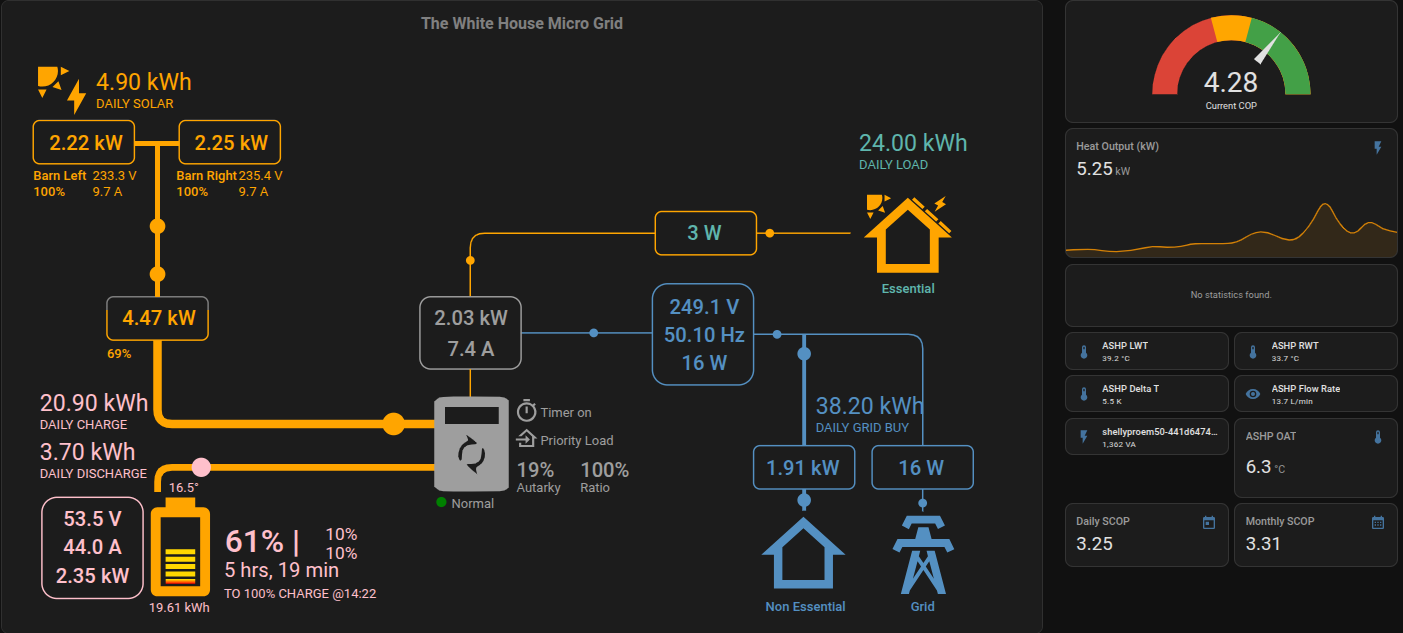
Here is the latest HA monitoring dashboard.
6.5kWp of Solar G98 3.6kW inverter 32kWh battery. Samsung Gen 7 16kW Integrated Unit Newark Cylinders 'Heat Geek' Custom SuperTank and 50Ltr Volumiser Tank.
13/03/2026 10:47 am
That's looking good, @antonical; I really like it. It's reminiscent of the HA energy page in that it gives a clear idea of flows, but it's certainly for a distinctly separate purpose. Clear and intuitive; good job.
105 m2 bungalow in South East England
Mitsubishi Ecodan 8.5 kW air source heat pump
18 x 360W solar panels
1 x 6 kW GroWatt battery and SPH5000 inverter
1 x Myenergi Zappi
1 x VW ID3
Raised beds for home-grown veg and chickens for eggs
"Semper in excretia; sumus solum profundum variat"
Topic starter
13/03/2026 10:58 am
In case anyone is wondering how this is achieved and to contribute back to the community.
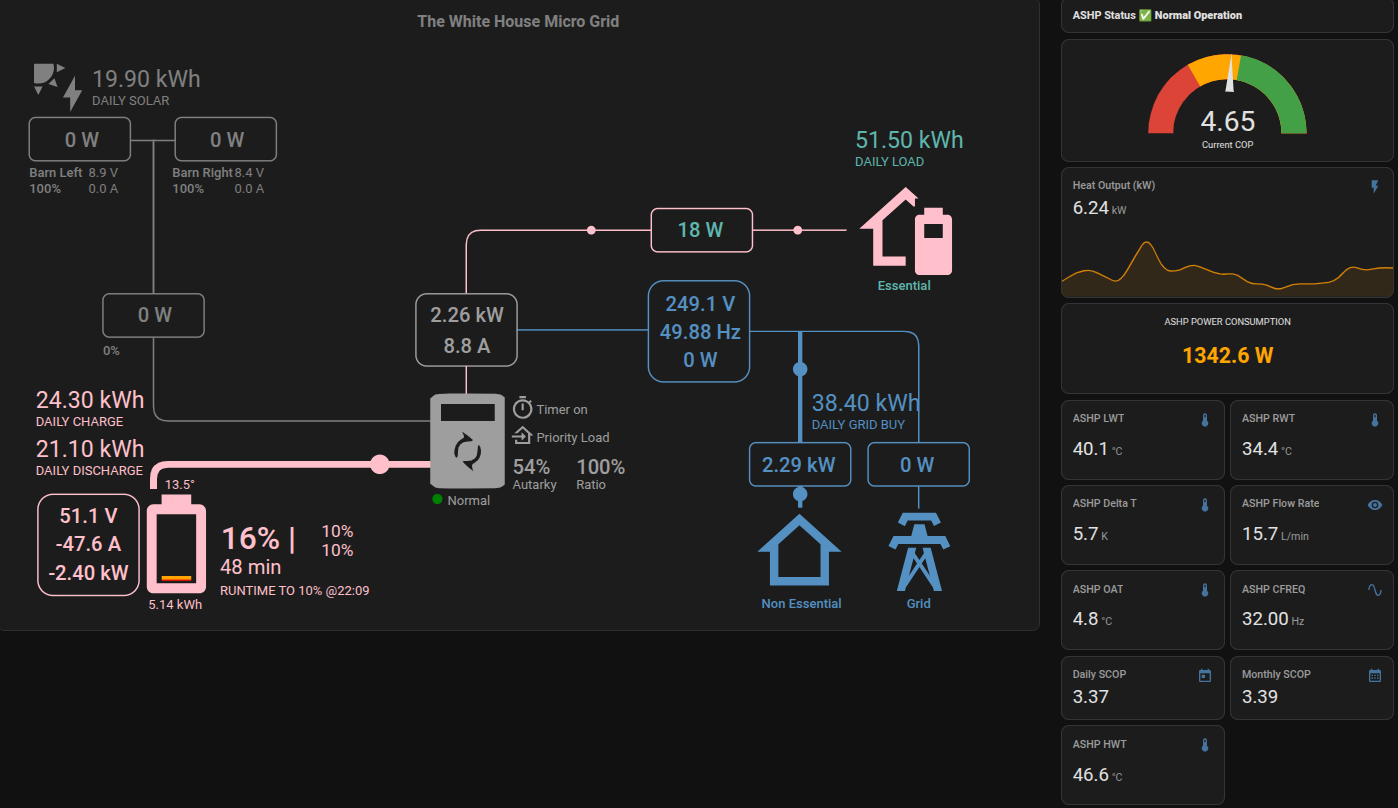
We run HA in a Virtual Machine on our ESXi Server. It could easily be run on an rpi. We have multiple Waveshare RS485 to ETH (B) POE adaptors on site that provide realtime power and electrical data for teh buildings on site Main House, Office, Barns etc. 2 in the small barn where the G98 inverter and solar live. One waveshare in the barn gets the CT data from the main house grid incomer across the network from an OwenBrothers OB115 meter and another Waveshare device that sends the meter data to the inverter in the barn across the wireless mesh network. The other barn Waveshare is the inverter and battery telemetry also on the network. This provides a rock solid CT and telemetry feed into the network. The network is UPS protected so the LAN and metering and the wireless mesh stay up in a power cut (of which we have many per year). The barn loads are all on the backup port and stay up in a power cut.
Onto the ASHP. It is installed outside the kitchen and is a fully integrated unit. It has 2 samsung spec monitoring cables that run back into the house and upto the plant room on the first floor above it. All primary pipework is 35mm with a max run of <6M to the diverter valve and tank. One cable is the Samsung wired remote controller. (total nonsense in reality, as there is a wifi kit that this connects to so it could easily have been a wireless control head) hey ho. We essentially used the old thermostat cabling to power this nonsense head unit. (this restricted our ability to place it somewhere else). Recabling the house would have been an issue. I am looking at alternatives to this.
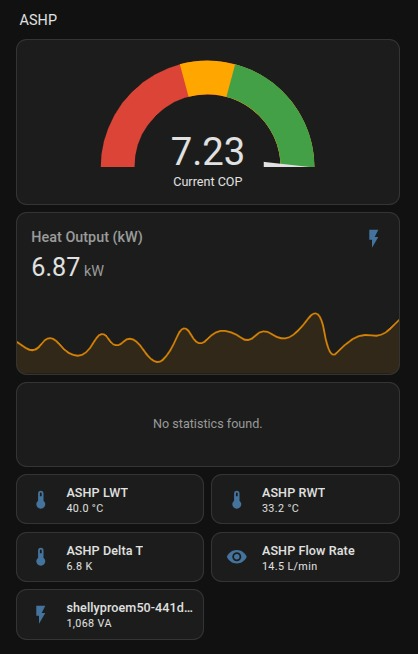
The other cable is the modbus cable from the internal Samsung modbus unit. This runs to another Waveshare in the plant room that links the ASHP to the network and allows me to get the 'realtime' telemetry. Still finding my way with this and can't seem to get the indoor temp or the pump % data to complete my monitoring data. I currently have live data for LWT RWT HWT FR OAT COMPRESSOR % I get the realtime electical power used by the complete ASHP from a Shelly Pro EM50 installed in the Plant Room CU and connected to the live feed on the ASHP RCBO. This allows me to calculate in realtime the COP of the system and various other useful data points and log and dashboard them. I also then log this to a set of virtual utility meters for Daily SCOP Monthly SCOP and Annual SCOP.
Very early days <2 days running data. But looks promising. My plans include calculating actual running costs in £'s for the ASHP and full and discrete property electrical usage (office etc.) as I have all of the site electrical data and TOU Tariff information.
It's cold at this point so a good time to start our journey as in theory the ASHP costs will be higher. I recognise this is a journey we have embarked upon for a full electrified future. But the initial running cost data looks like we are tracking to save approx. 10k Per year on overall site running costs. With solar battery and ashp.
Happy to help anyone with this. Here is the detailed modbus config for HA that is essentially all you need to get the data from the Modbus card once you have connected it to your pc or network. I am sure there are more expert people at configuring HA but this seems to be working for me. A few of these sensors are a WIP like IAT (Indoor Air Temp) IPC (instantaneous Power Consumed) and WOST (Water Out Set Temp) these don't seem to be working with the modbus card.
- name: "samsung_ashp"
    type: tcp
    host: x.x.x.x
    port: 502
    sensors:
      - name: "ASHP LWT"
        unique_id: ashp_lwt
        address: 66
        input_type: holding
        unit_of_measurement: "°C"
        device_class: temperature
        state_class: measurement
        scale: 0.1
        precision: 1
        slave: 1

      - name: "ASHP RWT"
        unique_id: ashp_rwt
        address: 65
        input_type: holding
        unit_of_measurement: "°C"
        device_class: temperature
        state_class: measurement
        scale: 0.1
        precision: 1
        slave: 1

      - name: "ASHP WOST"
        unique_id: ashp_wost
        address: 68
        input_type: holding
        unit_of_measurement: "°C"
        device_class: temperature
        state_class: measurement
        scale: 0.1
        precision: 1
        slave: 1

      - name: "ASHP HWST"
        unique_id: ashp_hwst
        address: 74
        input_type: holding
        unit_of_measurement: "°C"
        device_class: temperature
        state_class: measurement
        scale: 0.1
        precision: 1
        slave: 1
      - name: "ASHP HWT"
        unique_id: ashp_hwt
        address: 75
        input_type: holding
        unit_of_measurement: "°C"
        device_class: temperature
        state_class: measurement
        scale: 0.1
        precision: 1
        slave: 1
      - name: "ASHP OAT"
        unique_id: ashp_oat
        address: 6
        input_type: holding
        unit_of_measurement: "°C"
        device_class: temperature
        state_class: measurement
        scale: 0.1
        precision: 1
        slave: 1
      - name: "ASHP IAT"
        unique_id: ashp_iat
        address: 67
        input_type: holding
        unit_of_measurement: "°C"
        device_class: temperature
        state_class: measurement
        scale: 0.1
        precision: 1
        slave: 1
      - name: "ASHP IPC"
        unique_id: ashp_ipc
        address: 7
        input_type: holding
        unit_of_measurement: "W"
        device_class: power
        state_class: measurement
        scale: 0.1
        precision: 1
        slave: 1

      - name: "ASHP Flow Rate"
        unique_id: ashp_flow_rate
        address: 83
        input_type: holding
        unit_of_measurement: "L/min"
        state_class: measurement
        scale: 0.1
        precision: 1
        slave: 1

utility_meter:
  ashp_heat_daily:
    source: sensor.ashp_total_heat_produced
    cycle: daily
  ashp_elec_daily:
    source: sensor.ashp_total_electricity_consumed
    cycle: daily
  ashp_heat_monthly:
    source: sensor.ashp_total_heat_produced
    cycle: monthly
  ashp_elec_monthly:
    source: sensor.ashp_total_electricity_consumed
    cycle: monthly
  ashp_heat_yearly:
    source: sensor.ashp_total_heat_produced
    cycle: yearly
  ashp_elec_yearly:
    source: sensor.ashp_total_electricity_consumed
    cycle: yearly

template:
  - number:
      - name: "Sunsynk Battery Limit"
        state: "{{ states('sensor.direct_modbus_battery_soc1_cap') | int(20) }}"
        step: 1
        min: 0
        max: 100
        unit_of_measurement: "%"
        set_value:
          - action: modbus.write_register
            data:
              hub: sunsynk_direct
              slave: 1
              address: 268
              value: ["{{ value | int }}"]

  - sensor:
      - name: "ASHP Thermal Power"
        unique_id: ashp_thermal_power
        unit_of_measurement: "kW"
        device_class: power
        state: >
          {% set lwt = states('sensor.ashp_lwt') | float(0) %}
          {% set rwt = states('sensor.ashp_rwt') | float(0) %}
          {% set flow = states('sensor.ashp_flow_rate') | float(0) %}
          {# Formula: LPM * dT * 0.0697 (Specific heat capacity of water) #}
          {{ (flow * (lwt - rwt) * 0.0697) | round(2) }}

      - name: "ASHP Total Heat Produced"
        unique_id: ashp_total_heat_produced
        unit_of_measurement: "kWh"
        device_class: energy           # Move from customize to here
        state_class: total_increasing  # Move from customize to here
        state: >
          {{ (states('sensor.ashp_total_heat_produced') | float(0) + (states('sensor.ashp_thermal_power') | float(0) * 1/60)) | round(4) }}

      - name: "ASHP Total Electricity Consumed"
        unique_id: ashp_total_electricity_consumed
        unit_of_measurement: "kWh"
        device_class: energy           # Move from customize to here
        state_class: total_increasing  # Move from customize to here
        state: >
          {{ (states('sensor.ashp_total_electricity_consumed') | float(0) + (states('sensor.shellyproem50_441d6474e708_energy_meter_0_power') | float(0) / 1000 * 1/60)) | round(4) }}

      - name: "ASHP System COP"
        unique_id: ashp_system_cop
        state: >
          {% set thermal = states('sensor.ashp_thermal_power') | float(0) %}
          {% set electrical = states('sensor.shellyproem50_441d6474e708_energy_meter_0_power') | float(0) / 1000 %}
          {% if electrical > 0.1 %}
            {{ (thermal / electrical) | round(2) }}
          {% else %}
            0.0
          {% endif %}
      - name: "ASHP Delta T"
        unique_id: ashp_delta_t
        unit_of_measurement: "K"
        device_class: temperature
        state_class: measurement
        state: >
          {% set lwt = states('sensor.ashp_lwt') | float(0) %}
          {% set rwt = states('sensor.ashp_rwt') | float(0) %}
          {{ (lwt - rwt) | round(1) }}
      - name: "Daily SCOP"
        unique_id: daily_scop
        state: >
          {% set heat = states('sensor.ashp_heat_daily') | float(0) %}
          {% set elec = states('sensor.ashp_elec_daily') | float(0) %}
          {{ (heat / elec) | round(2) if elec > 0 else 0 }}

      - name: "Monthly SCOP"
        unique_id: monthly_scop
        state: >
          {% set heat = states('sensor.ashp_heat_monthly') | float(0) %}
          {% set elec = states('sensor.ashp_elec_monthly') | float(0) %}
          {{ (heat / elec) | round(2) if elec > 0 else 0 }}

      - name: "Annual SCOP"
        unique_id: annual_scop
        state: >
          {% set heat = states('sensor.ashp_heat_yearly') | float(0) %}
          {% set elec = states('sensor.ashp_elec_yearly') | float(0) %}
          {{ (heat / elec) | round(2) if elec > 0 else 0 }}
Cheers
6.5kWp of Solar G98 3.6kW inverter 32kWh battery. Samsung Gen 7 16kW Integrated Unit Newark Cylinders 'Heat Geek' Custom SuperTank and 50Ltr Volumiser Tank.
1
13/03/2026 11:32 am
Well that's exactly as laid out in the documentation for the modbus integration, @antonical, so I'd say you've got it bang on.
Perhaps more importantly is that it provides a rather more generic reference for anyone wanting to talk modbus with their heat pump. What you've laid out isn't just going to work for Samsung, so if someone can't find an integration written specifically for modbus their heat pump then this should work just as well.
105 m2 bungalow in South East England
Mitsubishi Ecodan 8.5 kW air source heat pump
18 x 360W solar panels
1 x 6 kW GroWatt battery and SPH5000 inverter
1 x Myenergi Zappi
1 x VW ID3
Raised beds for home-grown veg and chickens for eggs
"Semper in excretia; sumus solum profundum variat"

Topic starter
13/03/2026 10:33 pm
@majordennisbloodnok Thanks I hope it helps someone. Still digging to find the Indoor Temperature and Pump percentage I am sure I will find it. It does appear that Samsung changed a bunch of addresses from what is out there on the internet. Will have to go old school and have someone shout the Controller numbers out while I read various registers till we find them.
Here is the latest incarnation of my Monitoring dashboard. It's coming along nicely.
6.5kWp of Solar G98 3.6kW inverter 32kWh battery. Samsung Gen 7 16kW Integrated Unit Newark Cylinders 'Heat Geek' Custom SuperTank and 50Ltr Volumiser Tank.
1

14/03/2026 10:56 pm
I've been watching this with interest as I would like something similar but have no knowledge of what I would need and no time yet to implement it if I did know. I have bookmarked the chat to come back to it when I have the time.
Which Samsung controller unit do you have? My Gen 7 has a tablet built into the MIMs unit not the standard wired controller. It sounds like you have the standard one. Do you think that would make any difference? I have a modus card, bought as I was intending to use Homely but decided I would like more control than that gives.
Topic starter
15/03/2026 7:53 pm
@johnnyb HI,
I have an integrated unit with all components in the outdoor unit. It should be easier to wire into the control unit as its inside. The modbus interface is exactly the same so the code above will work. You will need a RS485 adaptor. There are various types as we have a site wide Lan and Wifi Network we use Wavesahre RS485 to ETH (B) POE devices. BUt you could easily use a usb to RS485 adaptor. The wiring is trivial really just a 2 wire connection A & B matched to the terminals on the Modbus Card. There are many articles online. Check out Glyn Hudson https://github.com/glynhudson/samsung-modbus-mim-b19n which started me on this path.
Happy to help when you get to it.
Cheers
6.5kWp of Solar G98 3.6kW inverter 32kWh battery. Samsung Gen 7 16kW Integrated Unit Newark Cylinders 'Heat Geek' Custom SuperTank and 50Ltr Volumiser Tank.
20/03/2026 12:23 am
@antonical Thank you, I'll post more when I get that far. Fortunately my son has expressed an interest in helping to set it up so I may not need as much help to understand what is need as I initially thought I would.
1

Page 1 / 2
Next

SPONSORS
Degrees of Separation

Latest Posts
-

RE: Heat pump branding. Clever, contemporary… or a bit too much?
I think Heat Geek have done an amazing job on their bra...
By Tomtheheatingengineer , 7 hours ago
-
RE: HeatGeek vs Octopus surveys: puzzling disparity - any ideas why?
I have just had 3 heat loss surveys, one by heat geek o...
By David , 7 hours ago
-
RE: Heat Geek Zero Disrupt: Are We Sleepwalking Into Another Race to the Bottom?
I think that's the key question. After all inverter uni...
By Prunus , 8 hours ago
-
RE: battery storage without solar
As of October 1st they need specific qualifications to ...
By EtchedPixels , 9 hours ago
-
RE: How should the Boiler Upgrade Scheme be reformed?
A unit which uses water to transfer the heat/chill from...
By Temperature_Gradient , 10 hours ago
-
RE: Renewables & Heat Pumps in the News
With regards to the BUS grant raid, I gave it more thou...
By ASHP-BOBBA , 10 hours ago
-
RE: Why are ASHP installs so expensive?
The whole system seems to work on the basis of...
By ian33a , 10 hours ago
-
RE: Missing flow temperature in Heat Geek proposal
Good plan. If you can get half hourly meter readings a...
By JamesPa , 15 hours ago
-
RE: Heat Pumps Without Grants: Would You Have Installed One & Will You Now?
@editor Most certainly. The heat pump was an ideal s...
By Abernyte , 15 hours ago
-
Although regulations may well vary from country to coun...
By Majordennisbloodnok , 16 hours ago
-
RE: Does anyone have experience of a smart water meter?
Yep I caught our slow leak from a £100 bill rise 8)
By EtchedPixels , 16 hours ago
-
RE: Do You Need a Buffer Tank or Low Loss Header for Underfloor Heating in a Large Property?
@jamespa in some cases, failing the Turing test might b...
By GrahamF , 19 hours ago
-
RE: Passiv Smart Thermostat - Help & Forum Support
@energystoragetech The heat capacity of some...
By JamesPa , 21 hours ago
-
RE: tepeo ZEB UK Support & Info Thread
Sorry you are correct, I was remembering figures from t...
By JamesPa , 1 day ago


SPONSORS
