Notifications
Clear all
Air Source Heat Pumps (ASHPs)
380
Posts
21
Users
50
Reactions
59 K
Views
30/01/2026 5:14 pm
WC is enabled (albeit with a “Lizzie” type of curve) as well as the time schedule option with two levels of upper IAT (21 during the day, 18 at night). The 3 degrees are probably a lot but we are still on an experimental stage and wanted to verify the ASHP’s behaviour.
Can you post some photos of your wired controller, if possible where you entered these settings. I am beginning to wonder if you have a different controller.
The 'Lizzie' curve is I take it named after GH's wife, and the general idea behind it is to keep the radiators warm enough to satisfy one's other half. We can come back to that once you have the system running for a while.
The LWT and the flow (m3/h) have been varying during the day (the latter significantly).
That's interesting, on my Midea unit, and on most other Midea ones where I have seen the data, the LWT regularly cycles and so varies a lot, whereas the flow rate is relative stable, and tends to have only two on values, one at just under 1.5m^3/h, and around 1m^3/h. I'm sure I've mentioned it before, slow cycling (~1 per hour), appears to be normal for Midea units.
COP is 4.2 (I guess the sheer size of the 16kw combined with the “Lizzie” curve make it hard to have a larger COP even in such mild weather)
A COP of 4.2 isn't too bad in the real world, but it probably should be higher. Going back to @judith's point about the lower end output and whether the 12, 14 and 16kW units all have the same lower end, it seems they don't. According to the Engineering Data manual, the outputs (and COP and inputs) at 15°C OAT / 30°C LWT (ie a low demand situation) are:
Values are output (W), COP, input (W)

12kW @ 15 OAT 30 LWT

max  14697  6.65    2210
norm  11567  7.32    1579
min  5776  7.68    752

14kW @ 15 OAT 30 LWT

max  15180  5.79    2624
norm  11947  6.37    1875
min  5966  6.68    893

16kW @ 15 OAT 30 LWT

max  19271  6.26    3080
norm  15166  6.89    2201
min  7574  7.22    1048
But as Midea units cycle anyway to modulate output, I am not convinced having too high a minimum output is necessarily a problem.
Do you have the Midea app (MSmarthome or whatever it is called) up and running? There may be something in the historical data that can tell us whether your unit is cycling or not, but I don't have high hopes, the app is cr@p. The only other ways are a wired modbus connection (best), midea_ac_lan with Home Assistant (rather limited but no wiring needed, snoops on the app data, not sure whether there is enough to detect cycling) and set up camp by the wired controller with pencil, paper and stopwatch, and take readings of LWT and RWT at 2 minute intervals over say an hour (very tedious and boring).
Midea 14kW (for now...) ASHP heating both building and DHW

30/01/2026 5:50 pm
We do have the app set up, let’s see what data it gathers (seems to be a day behind though…). And yes, you guessed correctly the Lizzie curve!
I am sure I saw a wide range of flows, from close to 1m3/h to 2m3/h plus intermediate values.
Here is the controller: front page plus the ASHP operation overview (timer and wc icons shown). Midea just turned off because IAT reached 22 (else you would see a compressor and pump icons also)
Apologies for the messy arrangement, I write on a tablet and cannot move the photos as I should.


the menu for the time schedule:


30/01/2026 7:03 pm
@mk4 — it has certainly changed a lot in appearance in a few years! Mine is greyscale, text plus some icons. Yours also has more of the latter, I don't think mine has one that shows weather compensation is on, you have to go in and check the settings to see if it is. This is what mine looks like (home page):

Some of it is rather cryptic. Left hand side is the space heating, and it is on ('compressor' icon, which looks suspiciously like a fossil fuel (petrol) pump, their designers goofed on that one!) but the big 45°C in the middle means nothing, as I am running on weather compensation. Right hand side is the DHW, my tank is currently at 44°C.
Under SCHEDULE in the main menu I have something like but not the same as your third image. I only have one active timer row, and that is the DHW, timed to be on between 1300 and 1400 every day. The rest of the time it just defaults to space heating. Now what I am not sure about is what the Temp column does when you are in weather compensation mode. It could be a ceiling: it will turn the space heating off when the room temp reaches that limit, as you suspect, but strictly speaking that is not how weather compensation works, it doesn't use room temperature at all. Or at least it shouldn't, because it can lead to cycling (on/off) running. Instead, all the control (modulation of output) is done only by adjusting the LWT based on the OAT. I think you may need to do some longer term observations to see exactly how the timer, timer temp setting and weather compensation all interact. It may help to temporarily put some some rather extreme settings in, to make what is happening actually clearer.
Do you have the OPERATIONAL PARAMETER pages? I guess you do, because that is where you will find things like the flow rate, LWT and RWT etc. It might be helpful if you can post a photo of one or more of them.
Lastly, can you set the desired room temp from the main/home page (not in the timer page)? What happens if you do that, try to change the current desired room temp setting manually? I get a 'you can't do this message' because I am in weather compensation mode. Do you get something similar? Or does it just let you change the setting?
Midea 14kW (for now...) ASHP heating both building and DHW
30/01/2026 8:23 pm
@cathoderay
It seems end user functionality has increased over time. BTW they have not changed the relevant icon, it still looks like a petrol pump…
I will post photos of the Operational pages once it switches on (not likely tonight with the setup we have and the warm nights we are experiencing).
The installer was able to set an upper room temp target outside the scheduling (he set it at 26!!!), but I have not been able to find how he did it yet. Will notify you as soon as we find it.
I have also been thinking about the steady flow you are experiencing whereas ours varies a lot. Could it be because of the buffer you are using? We have connected the pump directly to the radiator network. LWT is controlled by the wc mechanism. However the ASHP has also another target to meet: the ΔT between LWT and return water temperature, a parameter that affects the heat dissipated by the radiators. The only way to control this is by modulating the flow. So at least to me, it makes sense to see varying flows. You probably have a very well balanced and fine tuned system, you have perfected the wc and your primary circuit is running at a more or less steady state. I am not sure this explains our different experiences, but it is a theory…
Another reason might be that your ASHP internal circulator has been set to a fixed speed. From what I have read (at least nowadays) midea uses either a wilo or a Simge pump. They can either be modulated by the ASHP or be set to run at fixed speeds (I had to look into internal midea circulator pumps as I was asked to sign off that I undertake the responsibility that flow may not work without installing a buffer)
31/01/2026 9:20 am
it still looks like a petrol pump…
Or at times like a one armed bandit for left handed players. Maybe the joke is meant to be on us!
The installer was able to set an upper room temp target outside the scheduling (he set it at 26!!!), but I have not been able to find how he did it yet. Will notify you as soon as we find it.
On my unit, the room temp is set using the centred number on the left hand panel:

You will note from the image I posted of my wired controller that I have the teardrop icon showing, meaning the number I have, 45°C, is supposed to be the 'Water flow desired temp' ie the Set LWT but it is not, it stays stuck at 45°C, regardless of the actual Set LWT. If I then try to set the 'Room desired temp (left arrow then up and down arrows), I get the 'Weather temp set function is on. Do you want to turn off it?' message which I take to mean weather compensation is on, you will have to turn it off if you want to set a desired room temp, ie control is either by weather compensation or by targeting a desired room temp, ie it is either/or, it can't be both. Logically, this does make sense, if the controller had two targets to meet, a set LWT regardless of room temp, and a set room temp regardless of set LWT, then sooner or later they will get into conflict. Furthermore, I am pretty (but not 100%) sure the target desired room temp mode uses a fixed Set LWT, and modulates by turning on and off, ie runs like a traditional fossil fuel boiler, which is fundamentally at odd with the way weather compensation works.
I have also been thinking about the steady flow you are experiencing whereas ours varies a lot. Could it be because of the buffer you are using? We have connected the pump directly to the radiator network. LWT is controlled by the wc mechanism. However the ASHP has also another target to meet: the ΔT between LWT and return water temperature, a parameter that affects the heat dissipated by the radiators. The only way to control this is by modulating the flow. So at least to me, it makes sense to see varying flows. You probably have a very well balanced and fine tuned system, you have perfected the wc and your primary circuit is running at a more or less steady state. I am not sure this explains our different experiences, but it is a theory…
Another reason might be that your ASHP internal circulator has been set to a fixed speed. From what I have read (at least nowadays) midea uses either a wilo or a Simge pump. They can either be modulated by the ASHP or be set to run at fixed speeds (I had to look into internal midea circulator pumps as I was asked to sign off that I undertake the responsibility that flow may not work without installing a buffer)
I have a plate heat exchanger rather than a buffer, and unlike a buffer, it does have an advantage (hydraulic separation, separates the glycol from the rads and rad crud, not that there is much, from the heat pump) as well as a disadvantage (efficiency hit). I've considered bypassing it, but never got round to doing it, it's in the airing cupboard and there is very little space to work in. The pump in my outdoor unit is a Grundfos, and a while back I did some tests (triggered by the why does it mostly have a fixed flow rate, actually two fixed flow rates, either ~1.4m^3/h or just under 1m^3.h, all the more so when Freedom (historically they were 'Midea UK) said it should modulate) to investigate how it was controlled and I think - I can't find the actual details - the answer was it wasn't controlled, at least not by PWM, it ran at the same speed with and without the PWM cable connected, from which I can only conclude that varying the LWT/RWT delta T is how my heat pump modulates output. But in practice this is hard to see, as it also uses cycling to modulate output, meaning the delta T is forever changing... Here is a rather busy chart from last October which has the flow rate added (plotted as actual flow rate x 10, to make it easier to see what is going on) along with some other variables:
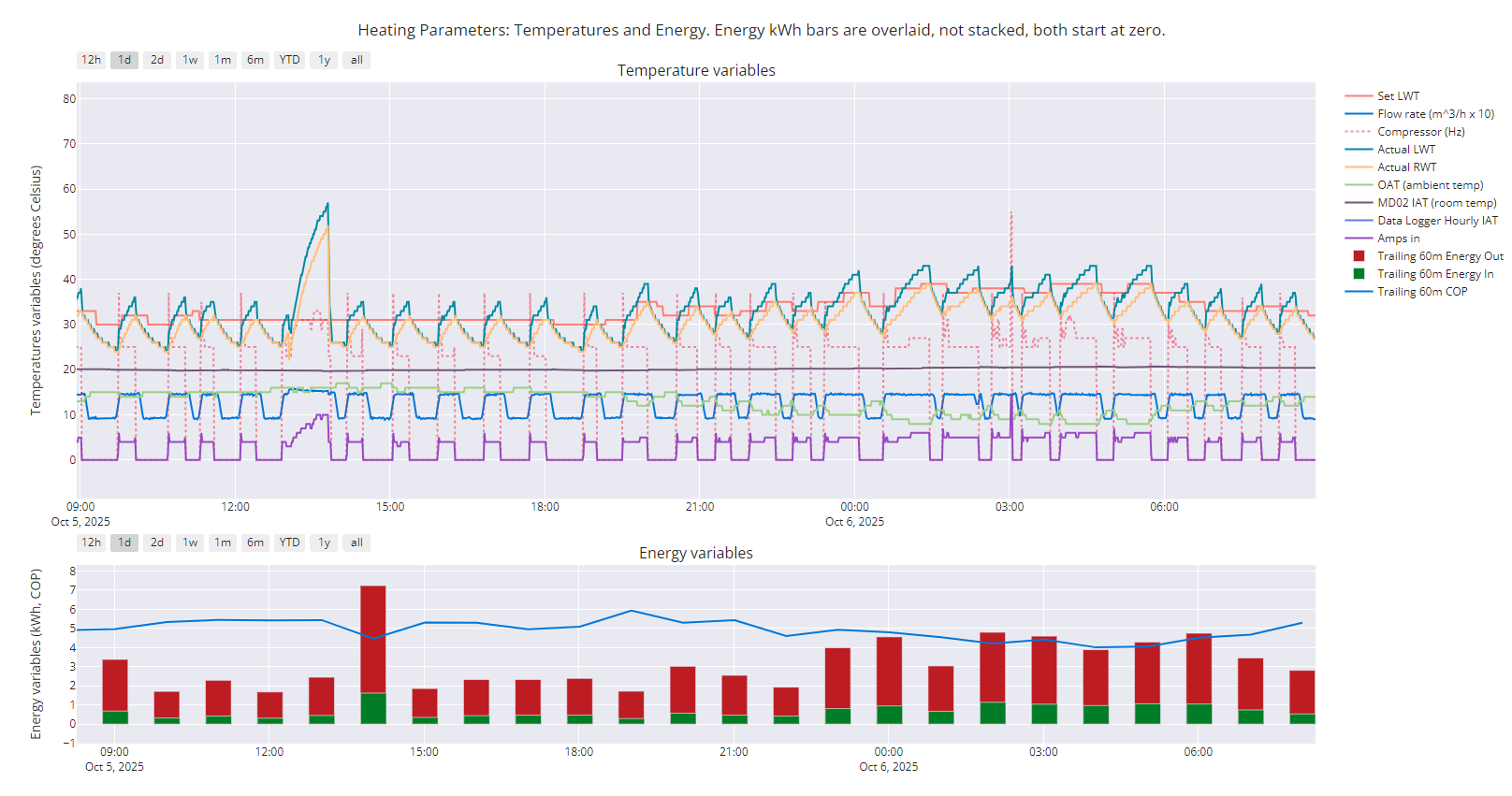
The big spike on the left is DHW heating. Give or take, the flow rate appears to depend on where the heat pump is in a cycle. When the LWT is increasing, the flow rate is at the ~1.4m^3/h value, when it is falling it is at the just under 1m^3/h value. The actual LWT value oscillates around the set LWT, achieving an average close to the set LWT (give or take).
I don't think we know whether your later version of the wired controller has the accessible modbus connection terminals, H1 and H2 (for modbus B- and A+ respectively). If it does, you may want to consider setting up a modbus connection, because with just the wired controller alone you data collection options are very limited. Something to ponder, perhaps!
Midea 14kW (for now...) ASHP heating both building and DHW

31/01/2026 11:11 am
@cathoderay I think the 45 C is the set LWT if you operate on LWT control, not the LWT calculated from the WCC.
Further, IAT set-point, defined at the controller, is an upper IAT limit that cannot be exceeded, not a target. Is like a safeguard, in case the WCC is not calibrated properly.
On the other hand, if you have an on-off type room thermostat, this can only be used as an on-off control only, since it does not relay IAT to the controller. The confusion arises, because MIDEA, and perhaps other brands, use misleading terms for these two thermostats.
Midea MHCV10WD2N7 R290, 5.8kWp energy community solar power.
31/01/2026 11:34 am
I think the 45 C is the set LWT if you operate on LWT control, not the LWT calculated from the WCC.
I agree (see my image and comments above), and the point I was trying to add is that it becomes meaningless when you have weather compensation on. With the tear drop symbol, it shows the (set?) LWT you would have, were you in fixed LWT mode, which you are not. Why make things simple when you can make them complicated!
Further, IAT set-point, defined at the controller, is an upper IAT limit that cannot be exceeded, not a target. Is like a safeguard, in case the WCC is not calibrated properly.
If you mean the 'Room desired temp.' (no tear drop, larger digits) I can't set it on my controller when in weather compensation mode, I get that message 'Weather temp set function...' I referred to earlier. This is my basis for saying my Midea unit is either/or: either weather compensation or fixed LWT. What I can't remember is where you set the fixed LWT, though I do seem to recall I had a trial of fixed LWT running ages ago, so I must have set it then.
On the other hand, if you have an on-off type room thermostat, this can only be used as an on-off control only, since it does not relay IAT to the controller. The confusion arises, because MIDEA, and perhaps other brands, use misleading terms for these two thermostats.
I agree there is still some confusion over this! An external room stat is a on/off control, but it does convey some IAT information, whether the actual IAT is above or below the desired IAT. What is unclear is whether that is also what the wired controller internal room stat, ie acts as an on/off control, or somehow does something else. But what might that something else be?
It is also worth recalling that when running in weather compensation mode there is a very high correlation between my OAT and energy out. If there is anything else controlling the energy out (via the set LWT from the WCC), then it has very little influence in everyday running.
Midea 14kW (for now...) ASHP heating both building and DHW

31/01/2026 11:46 am
I do not use the wired controller as a thermostat. The heat pump itself is on weather compensation and in our livingroom I have a thermostat(*) that controls the heat pump in on/off mode. So basically the heat pump is running all day and when the setpoint of the livingroom is reached, the heat pump is shut off. When the temperature in the livingroom drops below the setpoint, the heat pump will go on again. Our house has a good insulation, so in practice the temperature will often go in the evening above the setpoint (cooking, people presence) and somewhere during the night the heat pump will go on again.
*) I am lying... I do not have a thermostat in my livingroom, but only a temperature sensor. In Home Assistant (HA) I use the generic thermostat (software thermostat) which reads the temp sensor and controls a relay which is attached to the heat pump.
31/01/2026 11:54 am
In my controller, this can be done in service menu:

Also noted:

This post was modified 1 month ago by Tasos
Midea MHCV10WD2N7 R290, 5.8kWp energy community solar power.
31/01/2026 6:05 pm
@tasos — my head is beginning to hurt! I can't really make any sense of that paragraph! The two manuals I have for my unit aren't really any clearer. This is what they have to say, one being the Installation and Owners Manual, the other the Engineering Data manual, both from 2020, both for Mono versions (though split is mentioned at one point):


The settings I currently have are YES NON NON, ie only WATER FLOW TEMP is on. This means, according to the second page above, "WATER FLOW TEMP. sets whether space heating/cooling modes are controlled according to the M thermal Mono’s leaving water temperature. If YES is selected, the user is able to set the M thermal Mono unit’s leaving water temperature set temperature on the user interface’s main screen." But that is the opposite of what actually happens: the LWT is set by the WCC, and I can't set the LWT (I get that !
It is just very remotely possible that buried in here is an explanation of why Midea units cycle. If the phrase "modes are controlled" in the above quote means 'turned on and off' (which it might well, see the tops of both pages), then my unit appears to be set to turn itself off when a LWT I haven't specified is reached, which is exactly what we see with cycling.
I think this needs to be looked into more closely. Having said that, my current settings nonetheless have my heat pump consistently behave as if it is running entirely on weather compensation, and managing to keep the house at the right temperature very well.
Midea 14kW (for now...) ASHP heating both building and DHW
1
31/01/2026 8:30 pm
Friend, I think your set up is a fixed LWT. This is what I understand by reading the 2nd manual page you posted.
According to the same page, in order for you to use wc, you have to enable Room Temp (and disable Water Flow Temp).
And if the (admittedly obscure) manual excerpt posted by @tasos applies to you, once you enable Room Temp, you will:
- be able to choose a wc curve
- be able to apply an offset to the curve i.e. raise (or lower) the curve by x degrees, that is you keep the slope and you just shift it in its entirety up or down the LWT temp axis
- experience what I have been experiencing i.e if the wc happens to raise your IAT up to the room temperature upper limit you defined (or may be plus one degree of that), your ASHP will switch off. Assuming of course you have your wired controller in a living room or so.
31/01/2026 9:40 pm
@cathoderay I tend to agree with Mk4. Why don't you try his suggestions and see what happens.
Midea MHCV10WD2N7 R290, 5.8kWp energy community solar power.

Latest Posts
-
Issue with a Grant Air Source Heat Pump & Tado Smart Thermostat
Hi all I'm having some trouble with a Grant ASHP and ...
By Renewables345 , 30 minutes ago
-
RE: Underfloor Heating Installation Issues with Heat Pump
We suffered a water leak last year in two rooms and had...
By MartinHook_UK , 41 minutes ago
-
RE: Testing new controls/monitoring for Midea Clone ASHP
Now seems a good time to summarise the costs and effici...
By benson , 50 minutes ago
-
RE: Heat Pump vs New Gas Boiler for Inherited House - Worth the Extra Cost?
*** I now see @jamespa has already posted but will stil...
By cathodeRay , 2 hours ago
-

RE: Tell us about your Solar (PV) setup
@mk4 Charge to 100%, discharge down to 10%.
By bobflux , 2 hours ago
-
RE: Daikin Altherma 3 LT compressor longevity question
This mess is intriguing: I wonder if this represent...
By bobflux , 3 hours ago
-
RE: Connecting Growatt SPH5000 over wired ethernet rather than wireless
The simplest wired option is usually the Growatt Ethern...
By Jonatan , 8 hours ago
-
RE: Peak Energy Products V therm 16kW unit heat pump not reaching flow temperature
ASHPs do have a minimum compressor speed. The minimum h...
By bobflux , 14 hours ago
-

RE: Electricity price predictions
@jamespa And it seems some of the nasty public cloud...
By Batpred , 15 hours ago
-

RE: Jokes and fun posts about heat pumps and renewables
Technology is rapidly advancing. BBC News reported th...
By Transparent , 18 hours ago
-
What matters for flow and pressure drop is internal dia...
By bobflux , 19 hours ago
-

RE: Do Fridges and Freezers have COP ratings?
@editor Thank you all for your replies and submitted in...
By Toodles , 21 hours ago
-

I know and yes. The secondary deltaT wont necessaril...
By JamesPa , 1 day ago
-
RE: Designing heating system with air to water heat pump in France, near Lyon
Just love the way you put it! 🤣
By Batpred , 2 days ago
-
RE: Safety update; RCBOs supplying inverters or storage batteries
Thank you for sharing. So it seems that your Schneid...
By Batpred , 2 days ago
-

RE: Forum updates, announcements & issues
@upnorthandpersonal thanks for the thoughtful, consider...
By Mars , 2 days ago
-
RE: Solar Power Output – Let’s Compare Generation Figures
@mk4 All 21 panels have their own Enphase IQ7a microinv...
By Toodles , 2 days ago
-
RE: Setback savings - fact or fiction?
Great, so you have proven that MELCloud is consistently...
By RobS , 3 days ago
-
RE: Mitsu PUHZ120Y 'Outdoor Temp 'error?
Thanks David & James It almos...
By DavidAlgarve , 3 days ago
-
RE: Surge protection devices SPDs
@trebor12345 - your original Topic about the right type...
By Transparent , 3 days ago
-
RE: Help needed with Samsung AE120RXYDEG
@tomf I’ve been sent this from a service engineer at Sa...
By Mars , 3 days ago
-
RE: Buying large amp bidirectional RCD and RCBO
Yes... I went through this particular headache and ende...
By bobflux , 4 days ago
-
O-oh! Let's take this as an opportunity to 'pass the ...
By Transparent , 4 days ago