

Notifications
Clear all
Joining the Renewable Heating Hub forums is completely free and only takes a minute. By registering you’ll be able to ask questions, join discussions, follow topics you’re interested in, bookmark useful threads and receive notifications when someone replies. Non-registered members also do not have access to our AI features. When choosing your username, please note that it cannot be changed later, so we recommend avoiding brand or product names. Before registering, please take a moment to read the Forum Rules & Terms of Use so we can keep the community helpful, respectful and informative for everyone. Thanks for joining!
Topic starter
21/02/2023 6:44 pm
Try modifying the attached file to see if outdoor temperature can be added to the type 01 message.
You posted while I was writing my last post, I will make the changes now.
I believe the first byte in the message indicates the message type, and then the data position selection starts at the following byte, which is designated byte (0), which is why there appears to be an offset of 2.
I meant to say earlier, I think the second byte is heating/DHW status. See my earlier posts on this page, in summary, message start => status update:
at 13:08 yesterday:
0404 => update: {'status_heating': False, 'status_dhw': True, (occurred during a time when this was indeed the case, DHW on so heating was off)
but most of the time it is:
0401 => update: {'status_heating': True, 'status_dhw': False, (also the case, DHW is timed to come on only between 1300 and 1400)
and there is also on occasion:
0400 => update: {'status_heating': False, 'status_dhw': False,
not sure why both were off...
Midea 14kW (for now...) ASHP heating both building and DHW
Topic starter
21/02/2023 7:19 pm
@derek-m - I've added the latest code changes. There was a typo you might like to correct in your version (self.outside_temperature = body[data_offset + 22] instead of self.outdoor_temperature = body[data_offset + 22]) which meant it didn't appear but now it does after correction, but only gets '0' [bold added]:
2023-02-21 18:16:35.792 DEBUG (Heat Pump Wi-Fi Controller) [custom_components.midea_ac_lan.midea.devices.c3.device] [device_id] Received: {'header': 'aa23c300000000000003', 'body': '010975910303281e323041231905371919053c223c14270080', 'message type': '03', 'body type': '01'}
2023-02-21 18:16:35.793 DEBUG (Heat Pump Wi-Fi Controller) [custom_components.midea_ac_lan.midea.core.device] [device_id] Status update: {'zone1_power': True, 'zone2_power': False, 'dhw_power': False, 'disinfect': False, 'fast_dhw': False, 'zone_temp_type': [True, True], 'mode': 3, 'mode_auto': 3, 'zone_target_temp': [40, 30], 'dhw_target_temp': 50, 'room_target_temp': 24.0, 'zone_heating_temp_max': [65, 55], 'zone_heating_temp_min': [35, 25], 'zone_cooling_temp_max': [25, 25], 'zone_cooling_temp_min': [5, 5], 'room_temp_max': 30.0, 'room_temp_min': 17.0, 'dhw_temp_max': 60, 'dhw_temp_min': 20, 'tank_actual_temperature': 39, 'outdoor_temperature': 0, 'zone1_water_temp_mode': True, 'zone2_water_temp_mode': False, 'zone1_room_temp_mode': False, 'zone2_room_temp_mode': False}
Midea 14kW (for now...) ASHP heating both building and DHW

21/02/2023 9:04 pm
@derek-m - I've added the latest code changes. There was a typo you might like to correct in your version (self.outside_temperature = body[data_offset + 22] instead of self.outdoor_temperature = body[data_offset + 22]) which meant it didn't appear but now it does after correction, but only gets '0' [bold added]:
2023-02-21 18:16:35.792 DEBUG (Heat Pump Wi-Fi Controller) [custom_components.midea_ac_lan.midea.devices.c3.device] [device_id] Received: {'header': 'aa23c300000000000003', 'body': '010975910303281e323041231905371919053c223c14270080', 'message type': '03', 'body type': '01'}
2023-02-21 18:16:35.793 DEBUG (Heat Pump Wi-Fi Controller) [custom_components.midea_ac_lan.midea.core.device] [device_id] Status update: {'zone1_power': True, 'zone2_power': False, 'dhw_power': False, 'disinfect': False, 'fast_dhw': False, 'zone_temp_type': [True, True], 'mode': 3, 'mode_auto': 3, 'zone_target_temp': [40, 30], 'dhw_target_temp': 50, 'room_target_temp': 24.0, 'zone_heating_temp_max': [65, 55], 'zone_heating_temp_min': [35, 25], 'zone_cooling_temp_max': [25, 25], 'zone_cooling_temp_min': [5, 5], 'room_temp_max': 30.0, 'room_temp_min': 17.0, 'dhw_temp_max': 60, 'dhw_temp_min': 20, 'tank_actual_temperature': 39, 'outdoor_temperature': 0, 'zone1_water_temp_mode': True, 'zone2_water_temp_mode': False, 'zone1_room_temp_mode': False, 'zone2_room_temp_mode': False}
Thanks for the update.
It would appear that my assumption that data is selected by variable name may not be correct, or it could just be the fact that the chosen name it not correct, maybe try 'outdoor_temp'. You may need to change all other occurrences of outdoor_temperature to outdoor_temp.
Alternatively it could be that some additional code needs to be added to some other routines within the Midea_ac_lan software to achieve the desired result.
I will have a further look through the code and see if there is anything that I have missed.
You found my 'deliberate' error, so passed your observancy test. Well that is my story and I am sticking to it. 😋
Is it possible to 'step' through the Python software, or at least set break points where the collected data can be examined? One of the beauties with PLC systems is that you can actually view the data as the program is running, so it is easy to spot where any incorrect data is appearing.
Topic starter
22/02/2023 11:51 am
@derek - I think it will be outdoor_temperature, the AC (air conditioning) Midea devices use this, and no reason to suppose C3 devices (heat pumps) are any different.
I'm still struggling to see how the variable name comes into the data collection. I've come up with another analogy, and old fashioned steam train. The engine is the first byte, and tells us the train is a steam train. Optionally (but I don't think this is the case) the second byte is the coal tender, doesn't contain any data. If there is just the engine, the data offset is 1, if there is also a tender, the data offset is 2. The remaining carriages have the data, as two characters displayed in each window. There are no labels, just the two characters. The train rolls through the station, and as it does so, the fat controller collects the data by noting down the data at various offsets, as in a certain number of windows down the train. The data in window 10 (offset 12) is invariably the current temperature in Trafalgar Square. He labels that collected data current_temperature_Trafalgar_Square because of where it is, not because there is a label.
I find python, especially when it is running free as it is in midea_ac_lan, very hard to debug. Even running python in an IDE with breakpoints etc is far from easy. The code I was trying to put together to log things to a text file at certain points in the code was an attempt to get some debugging data, eg actual variable values at sertain points in the code, but I haven't got it to run properly yet, so far it only runs part of the code at unexplained times. The code appends lines to a text file but all I get so far is something like this, not the label value pairs I want:
2023-02-20 09:43:15.127953: test write
2023-02-20 09:43:15.245617: test write
2023-02-20 09:46:31.625623: test write
2023-02-20 09:46:31.628321: test write
2023-02-20 09:47:32.628060: test write
2023-02-20 09:48:33.620760: test write
In practice, debugging is done by looking for error messages in the logs, and trying to make sense of them. Often they are painfully obscure, and it takes a lot of googling to make sense of them, let alone find a way to fix the problem. Apart from typos, wrong indents etc, having a variable be the wrong type is a common error, eg trying to do maths on a string.
It took me ages to realise the very common body(data_offset + n) values are not hex values, they are already converted to decimal. If for example there is 0a representing outdoor_temperature at position 11/location 9 in the message string, outdoor_temperature = int(str(body(data_offset + 9)), 16) gets 16 (because 0a is already 10 by the time it appears in body(data_offset +9), so the code, which is python's standard 'why make things simple if you can make them complicated' hex to decimal code, converts 10 (as hex) to decimal, producing 16).
In the short term, I am going to add code to pull the data I believe is the Set LWT from the 04/04 messages, and see how it shapes up over time.
The other thought I had is there are other message types in the code, \core\message.py has this:
class MessageType(IntEnum):
    set = 0x02,
    query = 0x03,
    notify1 = 0x04,
    notify2 = 0x05,
    exception = 0x06,
    querySN = 0x07,
    exception2 = 0x0A,
    querySubtype = 0xA0
which suggests there several message types that we haven't yet managed to interrogate. I did try doing something similar to the current notify1/0x04 code for notify2/0x05 but got nothing useful back.
I am relieved that I passed your observancy test. I shall endeavour to remain vigilant.
Midea 14kW (for now...) ASHP heating both building and DHW


22/02/2023 11:57 am
I’ve ordered a refurbished Lenovo 710q i5 8GB 256 M2 SSD usff PC which I may either use on the telescope to replace an i3 PC that I adapt for HA.
The ASHP is running continuously now, but I’d like to integrate all my home monitoring into one place. I have programmed in Java and other Objects Oriented languages.
Phil
Topic starter
22/02/2023 12:04 pm
@filipe - although much of the 'how to' has ended up ad hoc in this thread, I am going to try and write it up in a more structured way in my Beginner's Guide to Heat Pump Monitoring thread. I have rather foolishly not fully documented every step I took as i went along, so I am going to have to dig deep in my memory to detail all the steps. I'm already about half way through the next post, which is how to get HA running after it has been installed. Needless to say, the standard HA instructions don't work... But such annoyances are the irritations that make HA such a joy to work with.
Midea 14kW (for now...) ASHP heating both building and DHW
1
22/02/2023 1:18 pm
Using your analogy of the train, there may be 20 carriages, but the fat controller has been told to only collect a copy of the data from 10 of them. I suspect that you may be correct that each carriage always contains the same data, and that the carriages are always in the same order, so carriage 9 should always contain 'outdoor temperature'.
The fat controller takes a copy of the data from the selected carriages, and puts these copies into a new train (the message), which only has sufficient carriages for each piece of data, which may not be in the same order as in the previous train.
So the first problem is how do we find out what data is available for collection from the original train? Is there a list in Python or HA, and if so what is the order within the list?
The next problem is how do we tell the fat controller what data to collect, and which carriage it is located in?
It may then be necessary to decide where to place the data in the second train.
When the second train arrives at its destination, it is necessary to process the data (decipher) and guide it to the correct location within HA.
I have been looking at some of the main routines within midea_ac_lan, which may throw some light on the first problem. Below I have attached a copy of the climate.py file, where I have highlighted any reference to temperature with red text, along with the different classes to which they apply. The fact that 'indoor temperature' and 'outdoor temperature' are not defined under 'class C3' may mean that the fat controller has difficulty finding them.
Have a look and let me know what you think. I would suggest if we try to find the various temperature measurements and settings, this may make the structure and order of the data stream more understandable.
1
Topic starter
22/02/2023 8:57 pm
@derek-m - still trying to make sense of that climate.py code. One observation: the DHW tank actual temperature isn't defined in that climate.py code, but the fat controller still manages to find it. BTW, I like your development of the train analogy!
The other approach with data we can get, but don't know what it is, is to look for patterns that are likely candidates for a particular parameter. As you know, I have a strong suspicion that position 11/location 9 in the 04/04 message is ambient/outdoor temp. Here's a plot for today's hourly values from both 'byte_09' and the app ambient temp:
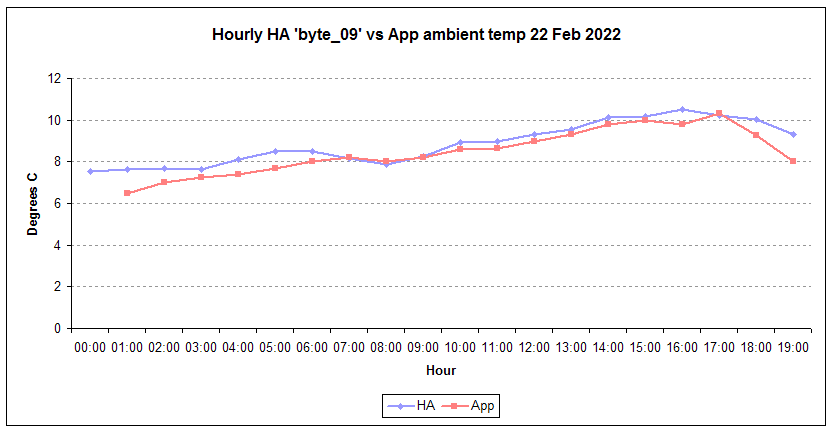
They are not in perfect harmony, but are not that far off. Once we have more varied hourly temps, the picture should become clearer.
Midea 14kW (for now...) ASHP heating both building and DHW

22/02/2023 9:14 pm
If you wish you could try adding the blue coloured code in the attached climate file and see what results are produced.
From my limited Python knowledge, it would appear that message request and processing are carried out in the three routines backports, core and devices, located in midea_ac_lan/custom_components/midea_ac_lan/midea/. These programs appear to pull in the list of required data either from other Python routines or possibly HA, which I have no way of checking. When you set up HA what information do you have to enter?
23/02/2023 1:19 am
I think that I am wrong about the data selection being based upon the variable names, unless it is done by HA.
Your addition of self.byte_09 would appear to discount variable names.
I have modified the attached file to see if there is any further data that can be collected and deciphered.
Topic starter
23/02/2023 11:24 am
@derek-m - thanks. I think the midea_devices.py and C3\device.py files will also need corresponding additions for the mods to work. Will add them and see what I get. I may also need to reduce the number of self.byte entries, the code crashes if it asks for something that doesn't exist.
Midea 14kW (for now...) ASHP heating both building and DHW
23/02/2023 11:42 am
@derek-m - thanks. I think the midea_devices.py and C3\device.py files will also need corresponding additions for the mods to work. Will add them and see what I get. I may also need to reduce the number of self.byte entries, the code crashes if it asks for something that doesn't exist.
I realise that it is a pain having to reload and restart your system when changing the software, but I would suggest, as a test, just initially adding the proposed modifications.

SPONSORS

Degrees of Separation
Latest Posts
-

RE: Indevolt Batteries UK Support & Info Thread
@editor Hi, To resolve this, please tap on the A...
By Indevolt Tech , 1 hour ago
-
RE: How will removing the standing charge on gas bills benefit heat pumps?
@toodles GIGO always stands! My Cosy 6, as you can...
By Watcher , 10 hours ago
-
RE: How much of your renewable and home setup would still work if the internet went down?
Interestingly we had an internet outage about a month a...
By Rob of York , 16 hours ago
-
RE: Double or Triple Glazed Windows?
Posted by: @singlespeed With 9 years repairing windo...
By Rob of York , 17 hours ago
-
@transparent we’re still running a secure version of PH...
By Mars , 20 hours ago
-
RE: How quickly would you want/expect heat recovery to take from setback?
Much longer than that here. The heating isn't even on. ...
By bobflux , 1 day ago
-
RE: Passiv Smart Thermostat - Help & Forum Support
Obviously the weather is changeable but there's a defin...
By Singlespeed , 1 day ago
-
RE: The Changing Jet Stream Could Challenge UK Air Source Heat Pumps
@rob-of-york I must admit that when we had a Daikin hea...
By Toodles , 2 days ago
-
RE: Forum updates, announcements & issues
Get the Renewable Heating Hub heads-up on WhatsApp. I...
By Mars , 2 days ago
-
RE: Safety study for plug in batteries out to tender - looks like Q3 2027 at best before legal
@editor I pointed out to the one of the Fuse execs that...
By dansus , 2 days ago
-
RE: 15kw pump for 225m2 1990's house - over kill?
@seaviews As well as loft insulation, there are othe...
By Rob of York , 2 days ago
-
RE: BT cuts you off, Plusnet blames Openreach... welcome to “seamless” broadband switching
Both of which (in most cases) use Openreach for the las...
By JamesPa , 2 days ago
-
RE: Renewables & Heat Pumps in the News
Yes, this is a swiss and german standard I believe, Vai...
By Batpred , 2 days ago
-
RE: Octopus Cosy 12 Heat Pump Regret: Incredibly Loud, Poor Heating & Constant Hum - Help!
@editor FWIW my problem was resolved, eventually, after...
By BigFish , 3 days ago





SPONSORS

