

Notifications
Clear all
Joining the Renewable Heating Hub forums is completely free and only takes a minute. By registering you’ll be able to ask questions, join discussions, follow topics you’re interested in, bookmark useful threads and receive notifications when someone replies. Non-registered members also do not have access to our AI features. When choosing your username, please note that it cannot be changed later, so we recommend avoiding brand or product names. Before registering, please take a moment to read the Forum Rules & Terms of Use so we can keep the community helpful, respectful and informative for everyone. Thanks for joining!
Air Source Heat Pumps (ASHPs)
143
Posts
16
Users
53
Reactions
47.3 K
Views

29/06/2026 9:36 am
@majordennisbloodnok Thanks, I have signed up for the Octopus Charge Pack so the HA and Predbat is partially a fall back position if that doesnt work out as well as hoped. Currently Im struggling with the energy dashboard. I would like to see my export as reported by the home mini and I think the sensor I need should be called "Current Accumulated Consumption Export Electricity" but I can only see one that is called "Previous Acc........." 🙁
House-3 bed partial stone bungalow, 5kW Samsung Gen 6 ASHP (Self install)
6.9 kWp of PV
10kWh DC coupled battery
Blog: https://thegreeningofrosecottage.weebly.com/
Heatpump Stats: http://heatpumpmonitor.org/system/view?id=60

29/06/2026 10:03 am
@bontwoody - the Major is your man here, and I see he has already replied. No one knows HA better than he does.
Humbled by the confidence in me, but there are many who are better versed than me. I will admit, though, that I do have a good grounding in the right context - integrating home heating systems, energy systems and big ticket domestic energy consuming items. Happy to help @bontwoody if needed, but also very happy to admit my limitations.
105 m2 bungalow in South East England
Mitsubishi Ecodan 8.5 kW air source heat pump
18 x 360W solar panels
1 x 6 kW GroWatt battery and SPH5000 inverter
1 x Myenergi Zappi
1 x VW ID3
Raised beds for home-grown veg and chickens for eggs
"Semper in excretia; sumus solum profundum variat"
1
29/06/2026 10:20 am
@majordennisbloodnok Thanks, I have signed up for the Octopus Charge Pack so the HA and Predbat is partially a fall back position if that doesnt work out as well as hoped. Currently Im struggling with the energy dashboard. I would like to see my export as reported by the home mini and I think the sensor I need should be called "Current Accumulated Consumption Export Electricity" but I can only see one that is called "Previous Acc........." 🙁
I know you're still familiarising with HA, so since I don't know how far along your understanding is I'm going to ask the next question using all the normal HA terms, but shout if I need to dial back on the terminology.
Are you using the Home Assistant Octopus Energy integration by BottlecapDave that is available in HACS? I'm guessing so, but just want to make sure. I don't have a Home Mini, so I'm going to have to rely on documentation.
105 m2 bungalow in South East England
Mitsubishi Ecodan 8.5 kW air source heat pump
18 x 360W solar panels
1 x 6 kW GroWatt battery and SPH5000 inverter
1 x Myenergi Zappi
1 x VW ID3
Raised beds for home-grown veg and chickens for eggs
"Semper in excretia; sumus solum profundum variat"
29/06/2026 11:47 am
@majordennisbloodnok Hi, yes I am. I do actually have feeds in my Emonpi for import and export so Im just wondering if I should give them a go instead 🙂
House-3 bed partial stone bungalow, 5kW Samsung Gen 6 ASHP (Self install)
6.9 kWp of PV
10kWh DC coupled battery
Blog: https://thegreeningofrosecottage.weebly.com/
Heatpump Stats: http://heatpumpmonitor.org/system/view?id=60

29/06/2026 12:00 pm
@majordennisbloodnok Hi, yes I am. I do actually have feeds in my Emonpi for import and export so Im just wondering if I should give them a go instead 🙂
Sounds like a sensible alternative. Personally, for my energy page I use my inverter's figures for today's import and export as well as its figures for energy into and out of the battery. As such, that then provides a local and real-time viewpoint as well as a cross reference with which to check Octopus' figures. I know the Home Mini should also be providing local real-time data but at the end of the month that leaves you with checking Octopus against Octopus which is not ideal.
I will happily admit there are plenty of minor discrepancies between the Octopus figures and the inverter figures, normally related to the time offset applied to the smart meter. However, over the month they balance out properly; May this year had my inverter declaring 423.24 kWh consumed and 174.97 kWh exported whilst Octopus declared 423.244 kWh in and 174.98 kWh out. That level of agreement is pretty good, I'd say, and the independent corroboration of what Octopus are claiming gives me confidence.
105 m2 bungalow in South East England
Mitsubishi Ecodan 8.5 kW air source heat pump
18 x 360W solar panels
1 x 6 kW GroWatt battery and SPH5000 inverter
1 x Myenergi Zappi
1 x VW ID3
Raised beds for home-grown veg and chickens for eggs
"Semper in excretia; sumus solum profundum variat"
29/06/2026 12:20 pm
@majordennisbloodnok Thats actually excellent agreement. Unfortunately I have 2 inverters. The other is an older model without any interface im aware of. The method detailed in this link seems awfully involved to get the export https://medium.com/@chamikaw/why-you-should-switch-to-octopus-energy-if-you-have-home-assistant-733cd877dfee
House-3 bed partial stone bungalow, 5kW Samsung Gen 6 ASHP (Self install)
6.9 kWp of PV
10kWh DC coupled battery
Blog: https://thegreeningofrosecottage.weebly.com/
Heatpump Stats: http://heatpumpmonitor.org/system/view?id=60
29/06/2026 2:12 pm
...
Unfortunately I have 2 inverters. The other is an older model without any interface im aware of.
...
In that case, as you say, your EmonPi is probably the easiest alternative to relying on the Home Mini.
Specifically, you're looking for the two figures; the entity that gives the total imported from the grid today and the entity that gives the total exported to the grid today.
...
The method detailed in this link seems awfully involved to get the export https://medium.com/@chamikaw/why-you-should-switch-to-octopus-energy-if-you-have-home-assistant-733cd877dfee/p >
I read it and it's very similar to how I'm calculating several import/export leccy details from the figures provided by my EV wallbox. The thing about HA helpers is that they are a bit like Excel formulae; they're individually actually very simple but in order to do some more complex stuff with them you often need several helpers based on other helpers, and the link you've found is a good example. One helper to get the absolute of a value that might be positive or negative and another one to sum lots of those values using an integral function. Because of the number of steps described, it looks more complex than it is until the "aha" moment clicks for you and you see the underlying plan.
Nonetheless, if you can get the data from the EmonPi, that'd be preferable both for simplicity and also because you then don't have Octopus marking their own homework at the end of the month. It's also preferable since approximating consumption using integrals is never as accurate as actually measuring consumption directly.
Incidentally, I did do a quick search but I can't seem to find if you posted what your two inverters are or not. Are you able to provide some details?
This post was modified 4 months ago by Majordennisbloodnok
105 m2 bungalow in South East England
Mitsubishi Ecodan 8.5 kW air source heat pump
18 x 360W solar panels
1 x 6 kW GroWatt battery and SPH5000 inverter
1 x Myenergi Zappi
1 x VW ID3
Raised beds for home-grown veg and chickens for eggs
"Semper in excretia; sumus solum profundum variat"
29/06/2026 2:20 pm
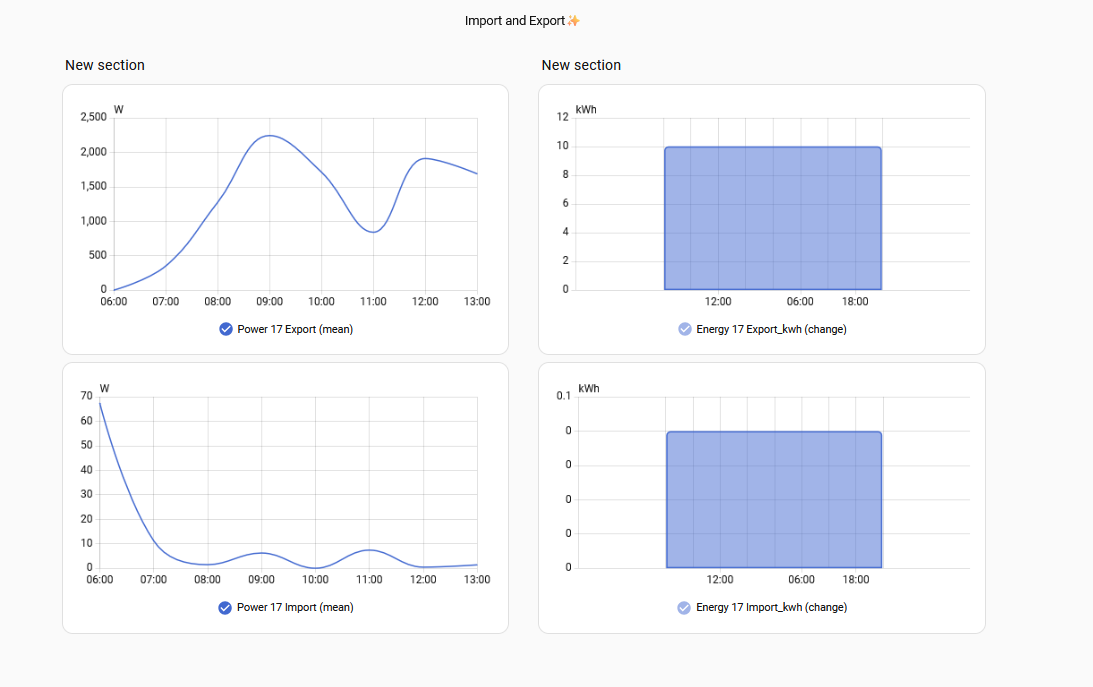
@majordennisbloodnok Yes, I see what you mean about helpers. The terminology is a bit different but the same functionality is present in emonpi. Im making some headway now with the import and export figures 🙂 The newer inverter is a Huawai 2000, the older a Fronius
This post was modified 4 months ago by bontwoody
House-3 bed partial stone bungalow, 5kW Samsung Gen 6 ASHP (Self install)
6.9 kWp of PV
10kWh DC coupled battery
Blog: https://thegreeningofrosecottage.weebly.com/
Heatpump Stats: http://heatpumpmonitor.org/system/view?id=60

29/06/2026 3:54 pm
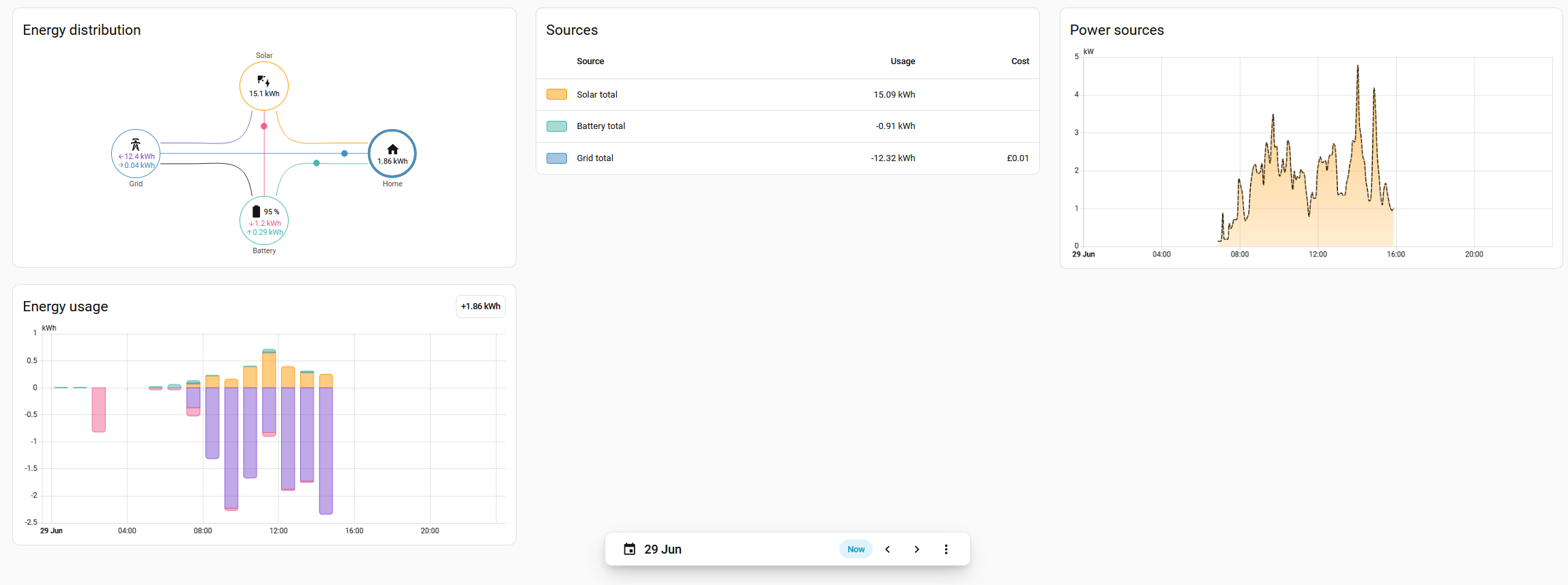
OK, Im happy with the energy dashboard now.
I think the next think I would like to know how to do is force discharge the battery with the Huawei integration, Can you help? 🙂
House-3 bed partial stone bungalow, 5kW Samsung Gen 6 ASHP (Self install)
6.9 kWp of PV
10kWh DC coupled battery
Blog: https://thegreeningofrosecottage.weebly.com/
Heatpump Stats: http://heatpumpmonitor.org/system/view?id=60
29/06/2026 4:52 pm
Well done, @bontwoody; looks good.
Before we get to the force discharge, there are a few things I'd like to clarify if I may, please.
- You mentioned a Huawei 2000. Is that the Huawei Sun2000? If so, are you using the huawei_solar integration or are you using an integration that relies on Huawei's cloud?
- You also mentioned a Fronius but you didn't say which model.
- Both inverters, so far as I can see, suggest they have the capability to accept modbus connections. Certainly, the Huawei does, but it would be good to understand if the Fronius does as well.
- You may have said in another thread, but can you give details of the batteries you have and which inverters they're connected to?
Whilst you're taking a squizz at that, I'd suggest first target is probably better as getting the inverter to charge from grid rather than discharge to it since with a 5kWh battery you're more often likely to want it topped up than discharge it. Nonetheless, the two are closely linked so it doesn't matter much either way. I will need to know which integration you're using, though, before I can read up. However, if it is the integration I linked to above then it looks like you'd need to do a wee bit of revisiting of the integration's setup process and select "Elevate permissions", which would, I think, expose services like huawei_solar.forcible_discharge and so forth.
Alternatively, it's possible, when you look at the "Working Mode" of the inverter, that there is an option for discharging to grid. When we've determined the particular integration then a few screenshots might be helpful.
105 m2 bungalow in South East England
Mitsubishi Ecodan 8.5 kW air source heat pump
18 x 360W solar panels
1 x 6 kW GroWatt battery and SPH5000 inverter
1 x Myenergi Zappi
1 x VW ID3
Raised beds for home-grown veg and chickens for eggs
"Semper in excretia; sumus solum profundum variat"
29/06/2026 5:21 pm
@majordennisbloodnok Thanks again :-)Yes its the sun 2000 and it is the inverter that is DC coupled to my 10kWh (now) Luna battery. The fronius just goes to the grid so im not too worried about connecting to it really. Its in an inaccessable loft at the moment so I cant check the model.I am using the Huawei_solar integration and I found this code which might be useful:
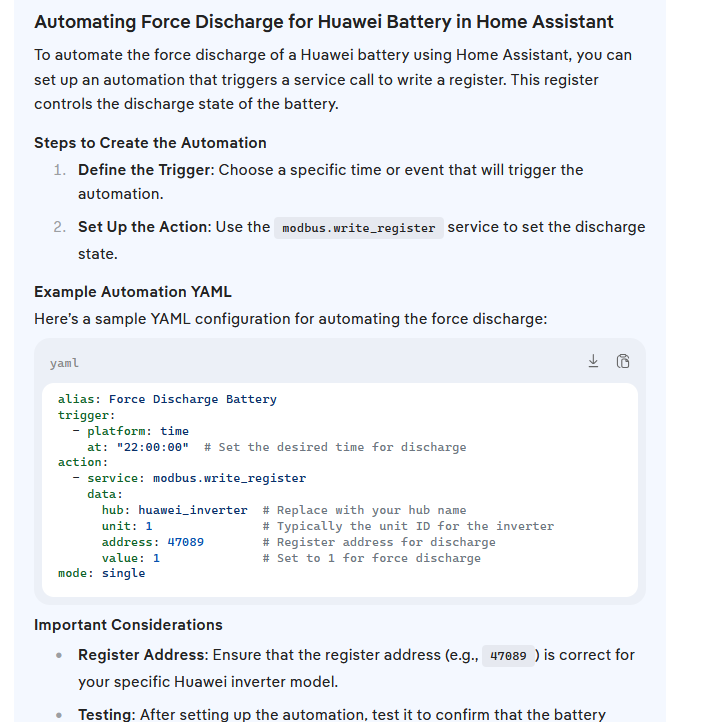
Im having a problem trying to get my head around what goes in yaml, but I see they have include file syntax so there can be many yaml files, but im given to understand not all code goes in there as some is stored with entities. Is that correct?
House-3 bed partial stone bungalow, 5kW Samsung Gen 6 ASHP (Self install)
6.9 kWp of PV
10kWh DC coupled battery
Blog: https://thegreeningofrosecottage.weebly.com/
Heatpump Stats: http://heatpumpmonitor.org/system/view?id=60
29/06/2026 8:32 pm
@bontwoody, let's just combine what you found with the documentation I read at https://github.com/wlcrs/huawei_solar/wiki/Force-charge-discharge-battery#forcible-charge.
If you go to Settings, Automations & Scenes and then click the Create automation button in the bottom right corner of the screen, that'll bring up a dialogue box where you can select "Create new automation" and be presented with the standard blank "New automation screen" with three blue buttons on it (Add trigger, Add condition, Add action).
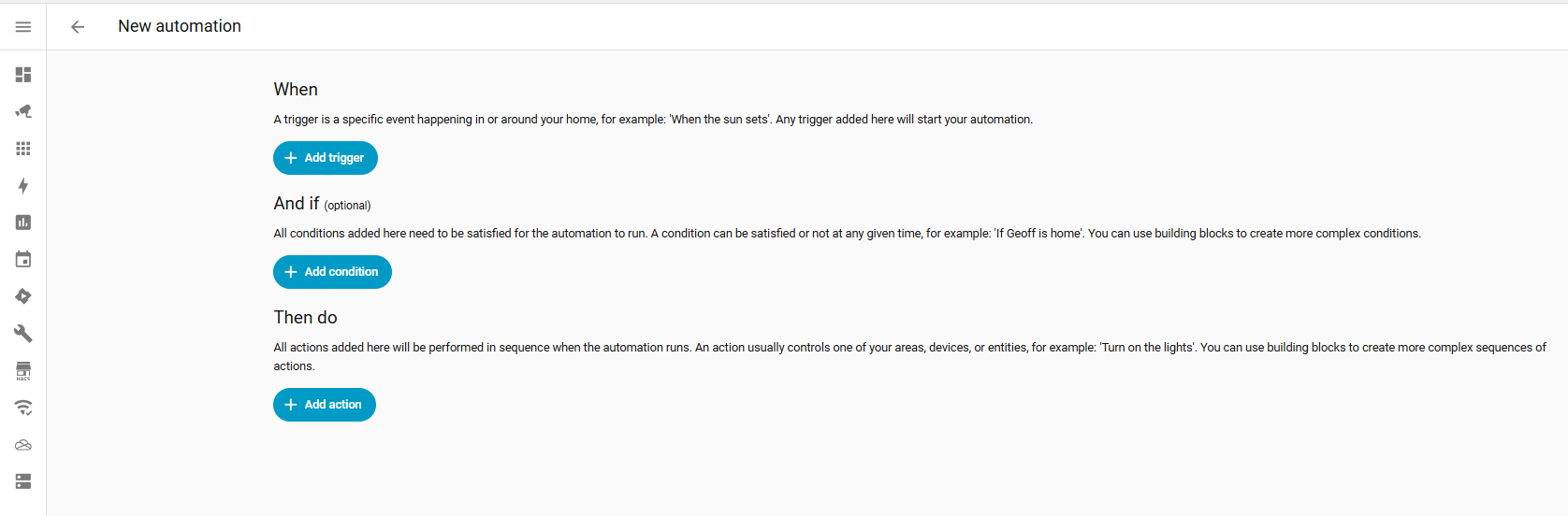
If you look to the bar where it says "New automation" at the top, there is a vertical ellipsis (three dots in a vertical line) on the right hand side. Click on them and you will see an option for "Edit in YAML", which will change the screen's appearance totally. In there, as an example, I've typed in most of the YAML you found, but with a different action.

If you then click the vertical ellipsis again and select "Edit in visual editor", you'll be able to see how what that YAML looks like in more GUI-type terms and you'll be able to see how you can amend the trigger and conditions to suit.
Just to give you some other options so you can see different ways of implementing things, you could also add a button card to one of your dashboards and point that button at your "Force Discharge Battery" automation so that as well as the automation starting by whatever trigger and conditions you choose, you could also kick it off manually from your dashboard.
The documentation has gaps but it also looks as if, were you to want to use the forcible_discharge_soc option (forcibly discharging to a predefined state of charge), the YAML for the automation would look more like this...
alias: Force Discharge Battery
description: ""
triggers:
  - at: "22:00:00"
    trigger: time
actions:
  - action: huawei_solar.forcible_discharge
    data:
      target_soc: 20
mode: single
...since you need to specify the state of charge you want to discharge to.
I would also, if I were you, set up another automation where the action is stop_forcible_charge (without a trigger) so that whilst your testing you can stop the inverter from charging or discharging again as soon as you've verified your automations are working OK. If you don't set this last automation up, you'll have to wait until your inverter has got to that target state of charge before you can do anything much else.
Does that help?
105 m2 bungalow in South East England
Mitsubishi Ecodan 8.5 kW air source heat pump
18 x 360W solar panels
1 x 6 kW GroWatt battery and SPH5000 inverter
1 x Myenergi Zappi
1 x VW ID3
Raised beds for home-grown veg and chickens for eggs
"Semper in excretia; sumus solum profundum variat"


SPONSORS

Degrees of Separation

Latest Posts
-

RE: 15kw pump for 225m2 1990's house - over kill?
@editor sorry should have been clearer - the whole hous...
By Carpenterstation , 4 hours ago
-
RE: Safety study for plug in batteries out to tender - looks like Q3 2027 at best before legal
Maybe this is why Octopus and Fuse are hell bent on plu...
By dansus , 5 hours ago
-
RE: Indevolt Batteries UK Support & Info Thread
@editor Manually setting the charging times and rates o...
By dansus , 6 hours ago
-
RE: How much of your renewable and home setup would still work if the internet went down?
Ours is similar to James, but with a few optional tweak...
By Batpred , 8 hours ago
-
RE: Renewables & Heat Pumps in the News
Yes, this is a swiss and german standard I believe, Vai...
By Batpred , 9 hours ago
-
RE: BT cuts you off, Plusnet blames Openreach... welcome to “seamless” broadband switching
My Vodafone FTTP broadband was down for a month when I ...
By JamesPa , 13 hours ago
-
RE: Octopus Cosy 12 Heat Pump Regret: Incredibly Loud, Poor Heating & Constant Hum - Help!
@editor FWIW my problem was resolved, eventually, after...
By BigFish , 16 hours ago
-
My heating has been off and DHW on throughout the summe...
By DavidAlgarve , 18 hours ago
-
RE: Anyone concerned about GivEnergy?
The GivE forum seemed to have survived the collapse of ...
By downfield , 19 hours ago
-
RE: How quickly would you want/expect heat recovery to take from setback?
@singlespeed I had better explain how my radiators are ...
By Toodles , 20 hours ago
-
RE: Cooling/heating with one unit
@mrkfm The Solo has a small capacity and only suitable ...
By dgclimatecontrol , 20 hours ago
-
First you need to know how much thermal energy you'll n...
By bobflux , 1 day ago
-
RE: Renewable Heating Hub Homeowners' Q&A Podcast
Come for the low-carbon homes. Stay for George Clarke’s...
By Mars , 3 days ago
-
RE: How should the Boiler Upgrade Scheme be reformed?
Not quite, regular A2W heat-pumps need a load of extra ...
By Temperature_Gradient , 4 days ago
-
RE: Heat Geek installations: share your experiences
one thing i learnt from reading people’s comments and e...
By Batpred , 4 days ago






SPONSORS