
Notifications
Clear all

Topic starter
03/02/2026 2:35 pm
@jamespa Thanks. Yes I get a DECT station with the yealink handsets.
It’s a bit of a pain I have to “waste” one of the mesh stations to act as a router rather than as an extender, it means I need to buy 3 and not 2. So be it.

03/02/2026 2:44 pm
OK, it might be best, @papahuhu, if you give some specific details about the box you have connected to the wall that is the link between your home network and the Internet. You mentioned VM hub and I took that to mean a Virgin Media Hub 5 or similar, which doesn't have an RJ45 port.
In the meantime, I'll clarify.
Yes, RJ45 is the name of the plug/socket combination that allows you to plug a network cable into something. This is an RJ45 plug.
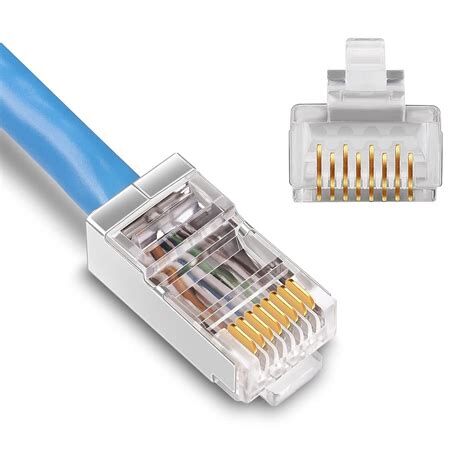
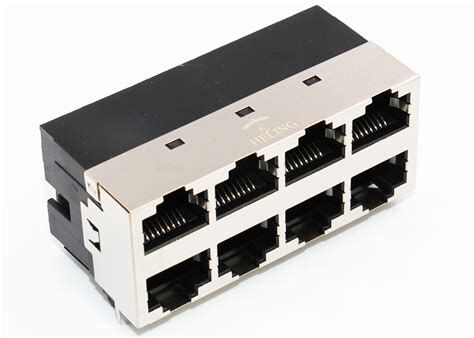
What it goes into is an RJ45 socket, and you're quite right that almost all networks these days using these kind of cables are Ethernet networks, so the plug and socket are often referred to as ethernet plugs and ethernet sockets.
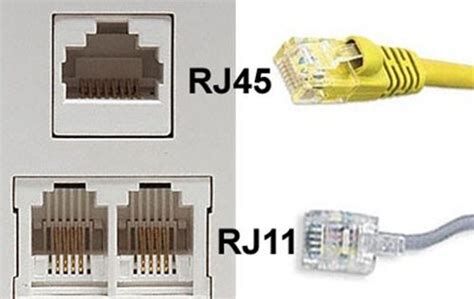
This is to differentiate it from the smaller RJ11 plug that was common with telephones.
The important thing here is that an IP phone is a network device, so needs to physically plug into the network (I'm sure there are wifi variations, but something wired guarantees good speed and minimal latency, so is much preferred). As a result, your hub, whatever it is, needs to have a physical socket for the network lead to plug into. If it does, you don't need to change the hub at all. If it doesn't, that's when you need to find some way of producing a socket and the most obvious one is to swap your current hub for a router/hub that does have such sockets.
I'm certainly not suggesting you change the mode that your hub is operating in because if it's working fine then it should continue doing what it does. The only time I'd expect you to need to mess about with anything in the hub's configuration is if the port you need to plug the phone into is disabled in some way.
I'm fairly sure you're also getting confused about the term "router". The only thing likely to be acting as a router is the VM hub thingy you've got since it takes all the traffic on your network that wants to get to the outside world and "routes" it through your broadband connection; the mesh boxes aren't routers as such. Unless I'm misunderstanding what you're saying, the VM hub could be run like a modem, in which case your PC would be plugged straight into the hub and the hub would only wake up whenever your PC wanted to get onto t'Interweb. That's not what you need.
If this has clarified, great. Otherwise, I'll wait until you say what the details are of the VM hub you're talking about so I can look up the thing itself and see what capabilities it has.
105 m2 bungalow in South East England
Mitsubishi Ecodan 8.5 kW air source heat pump
18 x 360W solar panels
1 x 6 kW GroWatt battery and SPH5000 inverter
1 x Myenergi Zappi
1 x VW ID3
Raised beds for home-grown veg and chickens for eggs
"Semper in excretia; sumus solum profundum variat"
1
Topic starter
03/02/2026 2:52 pm
@majordennisbloodnok VM hub 5. I read that I needed to switch it to run on modem mode on the VM tech pages in order to facilitate non VM VOIP provision. Also that switching to modem mode disabled all Ethernet ports except port 1.
This post was modified 4 weeks ago by Papahuhu

03/02/2026 4:08 pm
@majordennisbloodnok VM hub 5. I read that I needed to switch it to run on modem mode on the VM tech pages in order to facilitate non VM VOIP provision. Also that switching to modem mode disabled all Ethernet ports except port 1.
Unless you have already a diagram/description of a supported setup I think you might be best to draw a diagram of the proposed setup. Somewhere you do need a router otherwise you cant connect to the internet. Furthermore that router needs to be connected correctly to both the outside world and your network, and (probably) be configured with your ISP details, unless the modem does the authentication which is possible. I cant see how switching to modem mode per se 'allows non VM VOIP provision' but it is possible that this is the case - more or less anything is possible with ISP supplied routers becuse they do silly things with them!.
This post was modified 4 weeks ago 2 times by JamesPa
4kW peak of solar PV since 2011; EV and a 1930s house which has been partially renovated to improve its efficiency. 7kW Vaillant heat pump.
03/02/2026 4:38 pm
I agree with @jamespa that a picture would be good. His summary of what needs to be is also bang on.
All that said, I think there are some things that look a little clearer even if not crystal yet.
Firstly, this idea of switching to modem mode. I believe this is only necessary (if it's necessary even in this instance) to get the VM hub to be the bit of kit that is connecting to the VOIP provider, as would be the case if you wanted to plug an analogue phone into the RJ11 port of the VM hub and get the hub itself doing the converting of analogue to VOIP - oh, and only even then if the VOIP provider isn't Virgin Media themselves. If you are buying an IP phone and plugging it into one of the RJ45 (ethernet) ports, it is the phone itself that is being set up to talk to your VOIP provider's servers, and all the VM hub is doing is routing network traffic. In essence, if your PC can get out to t'interweb through the VM hub, so can the IP phone and there should be absolutely no need to get the VM hub into modem mode at all. Think of an IP phone as just another computer and it should be easier to wrap your head around.
Secondly, the ethernet ports. I've taken a look at the spec of the VM hub 5 and it says it has four ethernet ports in total - one 2.5Gbps and three 1Gbps. I don't know how many of them are occupied already in your home but all you need is one spare for the phone. All I would suggest is that you don't use the fastest one for the phone; it won't harm but it would be a complete waste since your phone won't be using faster network speeds than your broadband's maximum anyway.
Coming back to the idea of thinking of your IP phone as a computer also allows you an easy way to troubleshoot. If you can get a computer, turn off its wifi, plug a network cable into it and into the spare port of your hub and then surf the Internet, you're golden. Replacing the computer with the IP phone then means you can get onto the IP phone and fiddle with the settings exactly as A&A documentation says.
105 m2 bungalow in South East England
Mitsubishi Ecodan 8.5 kW air source heat pump
18 x 360W solar panels
1 x 6 kW GroWatt battery and SPH5000 inverter
1 x Myenergi Zappi
1 x VW ID3
Raised beds for home-grown veg and chickens for eggs
"Semper in excretia; sumus solum profundum variat"
Topic starter
03/02/2026 5:25 pm
Thanks.
I only ordered the hub yesterday, it’s not here yet. Because of the complicated arrangement I have with the VM rep ( he was doing a fiddle in which they are providing a hub 5 instead of a hub 4 (to give me Wi-if 6) and get me a social tariff when we technically don’t qualify for one), I need to get the equipment and mid speed service and only then can I switch out tariff the following day.
I was trying to get the remaining necessary hardware to have to hand to both add third party VOIP and third party mesh.
The rep advised that I would need to switch to modem mode to get it to work with 3rd party VOIP, so when I checked I found this:
Third-party VoIP often fails on the Virgin Media Hub 5 due to restricted NAT settings, SIP ALG (Application Layer Gateway) interference on port 5060, or firewall restrictions. To fix this, try setting the Hub 5 to modem mode and using a separate router, or ensure third-party SIP traffic is not being blocked.
I’ve no idea what they are talking about, but perhaps I’m best waiting for the hardware and having a fiddle to see if it might work without doing this. Appreciate the advice.
03/02/2026 5:36 pm
Third-party VoIP often fails on the Virgin Media Hub 5 due to restricted NAT settings, SIP ALG (Application Layer Gateway) interference on port 5060, or firewall restrictions. To fix this, try setting the Hub 5 to modem mode and using a separate router, or ensure third-party SIP traffic is not being blocked.
Hmm. Basically they have tied it down in a way that might frustrate VOIP. To make matters worse, because of the way VOIP works, there are 4 separate things that could go wrong namely:
- outbound signalling (essentially setting up the connection when you dial a number)
- inbound signalling (setting up the connection when someone dials your number)
- outbound media (your voice once you are connected following the signalling phase)
- inbound media (the third party voice once you are connected following the signalling phase)
When I had a 4G dongle for a while (whilst Vodafone were messing up my broadband) 1-3 worked, but not 4, with the result that calls connected, the other party could hear me but I couldn't hear the other party.
perhaps I’m best waiting for the hardware and having a fiddle to see if it might work without doing this.
Yes thats what I would do. There is some discussion here and it looks like some have got it to work without switching to modem mode.
A&A say they wont provide support for any NAT situation, which is a bit of a pain but entirely understandable. However they do give good configuration details here
This post was modified 4 weeks ago 3 times by JamesPa
4kW peak of solar PV since 2011; EV and a 1930s house which has been partially renovated to improve its efficiency. 7kW Vaillant heat pump.
1
Topic starter
03/02/2026 6:47 pm
Ta, will do.
worst case I will be on a 30 day contract, so can exit without too much pain and already have telephony via mobile. I was with NTL/VM for 20 years prior to being able to also fly in a fibre broadband line to give me choices, I left them because they were a nightmare and why I would only switch if they gave me that monthly contract.
I may be pleasantly surprised 😆
sorry for going round in circles, Im happy splicing in a modified section of DNA into a virus but give me funny looking cables and lights blinking at me and I’m lost.

03/02/2026 7:45 pm
Third-party VoIP often fails on the Virgin Media Hub 5 due to restricted NAT settings, SIP ALG (Application Layer Gateway) interference on port 5060, or firewall restrictions. To fix this, try setting the Hub 5 to modem mode and using a separate router, or ensure third-party SIP traffic is not being blocked.
Hmm. Basically they have tied it down in a way that might frustrate VOIP. To make matters worse, because of the way VOIP works, there are 4 separate things that could go wrong namely:
I understand what you say..
And it seems that I had a similar experience to yours, but with VM! So I now have a router that takes a sim card, just in case..
Just thought worth mentioned that when I had VM, the VM hub was working as a router for most f the time and could make SIP calls without any issue. So unless the restriction they mention is for receiving calls, this is not always an issue. I also had a landline phone plugged onto it for the VM line.
My first option in case of issues would be to adjust the port filtering. VM casually suggesting changing the hub to modem mode, when most people do not have a suitable spare router to try out, is "interesting".
8kW Solis S6-EH1P8K-L-PLUS hybrid inverter; G99: 8kw export; 16kWh Seplos Fogstar battery; Ohme Home Pro EV charger; 100Amp head, HA lab on mini PC
Topic starter
03/02/2026 9:44 pm
@batpred thanks
yes, we used an analogue phone with an older version of the hub too, it used to plug into a specific phone port. But that was when we had contracted digital phone services from VM as a provider. I’m trying to use third party services this time.
I need to avoid sounding xenophobic, because I try my best not to be. However, VM managed to place their customer services in the one location that can neither speak nor understand the English language and with VM you need to speak to customer services a lot. Many, many occasions I couldn’t understand a word of what they were saying. After 40 minutes of being on hold only for it to be incomprehensible would do nothing for my hypertension. Or worse still, the action taken would end up being nothing like you thought you had agreed upon. They were the worst of the worst.
This post was modified 4 weeks ago by Mars
03/02/2026 10:21 pm
VM is not alone in their abuse of the term 'customer service' and their approach to their call centres. My experience with Vodafone was similarly awful. They appear to employ lots of people who are taught very little about Vodafone's own (apparently extremely rigid) systems so either read, and keep repeating, a very constrained script or make it up. Most are just useless. The occasional person I encountered clearly wanted to do a good job, but was prevented from doing so by lack of flexibility/information from from/about the company they work for. I cant imagine these staying very long because the job would just be too frustrating.
In the end I lost fibre broadband and landline for a whole month just because I wanted to port my (VOIP) phone number to another provider. I also spent a significant proportion of that month on the phone talking to the Vodafone idiots. Vodafone did provide a 4G dongle to restore some sort of internet connection, but it didn't work with their own router (fortunately I have my own), was slow because the mobile reception at home is poor, and was incompatible with VOIP (hence losing my landline completely for the month). It was also incompatible with the VPN I use to access my network when I am away from home. Even now they haven't sorted the contractual issues and I doubt they ever will in any real sense, I will be forced for the remainder of a 2 year contract to keep escalating until they get the bills right.
Frankly its appalling, but I suppose its my own fault for choosing one of the cheaper providers. When the contract comes to an end I will move even if it costs me more as a result.
4kW peak of solar PV since 2011; EV and a 1930s house which has been partially renovated to improve its efficiency. 7kW Vaillant heat pump.
1


03/02/2026 10:28 pm
For nothing more than reference, our mobile and broadband contracts are with ee and when there’s an issue, usually billing, the call centres are all in the uk with Brits on the phones and stuff gets sorted quickly and painlessly.
Get a copy of The Ultimate Guide to Heat Pumps
Subscribe and follow our YouTube channel!

Latest Posts
-
Issue with a Grant Air Source Heat Pump & Tado Smart Thermostat
Hi all I'm having some trouble with a Grant ASHP and ...
By Renewables345 , 29 minutes ago
-
RE: Underfloor Heating Installation Issues with Heat Pump
We suffered a water leak last year in two rooms and had...
By MartinHook_UK , 40 minutes ago
-
RE: Testing new controls/monitoring for Midea Clone ASHP
Now seems a good time to summarise the costs and effici...
By benson , 48 minutes ago
-

RE: Heat Pump vs New Gas Boiler for Inherited House - Worth the Extra Cost?
*** I now see @jamespa has already posted but will stil...
By cathodeRay , 2 hours ago
-

RE: Tell us about your Solar (PV) setup
@mk4 Charge to 100%, discharge down to 10%.
By bobflux , 2 hours ago
-
RE: Daikin Altherma 3 LT compressor longevity question
This mess is intriguing: I wonder if this represent...
By bobflux , 3 hours ago
-
RE: Connecting Growatt SPH5000 over wired ethernet rather than wireless
The simplest wired option is usually the Growatt Ethern...
By Jonatan , 7 hours ago
-
RE: Peak Energy Products V therm 16kW unit heat pump not reaching flow temperature
ASHPs do have a minimum compressor speed. The minimum h...
By bobflux , 14 hours ago
-
RE: Electricity price predictions
@jamespa And it seems some of the nasty public cloud...
By Batpred , 15 hours ago
-

RE: Jokes and fun posts about heat pumps and renewables
Technology is rapidly advancing. BBC News reported th...
By Transparent , 18 hours ago
-
What matters for flow and pressure drop is internal dia...
By bobflux , 19 hours ago
-

RE: Do Fridges and Freezers have COP ratings?
@editor Thank you all for your replies and submitted in...
By Toodles , 21 hours ago
-
I know and yes. The secondary deltaT wont necessaril...
By JamesPa , 1 day ago
-
RE: Designing heating system with air to water heat pump in France, near Lyon
Just love the way you put it! 🤣
By Batpred , 2 days ago
-
RE: Safety update; RCBOs supplying inverters or storage batteries
Thank you for sharing. So it seems that your Schneid...
By Batpred , 2 days ago
-

RE: Forum updates, announcements & issues
@upnorthandpersonal thanks for the thoughtful, consider...
By Mars , 2 days ago
-
RE: Solar Power Output – Let’s Compare Generation Figures
@mk4 All 21 panels have their own Enphase IQ7a microinv...
By Toodles , 2 days ago
-
RE: Setback savings - fact or fiction?
Great, so you have proven that MELCloud is consistently...
By RobS , 3 days ago
-
RE: Mitsu PUHZ120Y 'Outdoor Temp 'error?
Thanks David & James It almos...
By DavidAlgarve , 3 days ago
-
RE: Surge protection devices SPDs
@trebor12345 - your original Topic about the right type...
By Transparent , 3 days ago
-
RE: Help needed with Samsung AE120RXYDEG
@tomf I’ve been sent this from a service engineer at Sa...
By Mars , 3 days ago
-
RE: Buying large amp bidirectional RCD and RCBO
Yes... I went through this particular headache and ende...
By bobflux , 4 days ago
-
O-oh! Let's take this as an opportunity to 'pass the ...
By Transparent , 4 days ago


