Notifications
Clear all
Joining the Renewable Heating Hub forums is completely free and only takes a minute. By registering you’ll be able to ask questions, join discussions, follow topics you’re interested in, bookmark useful threads and receive notifications when someone replies. When choosing your username, please note that it cannot be changed later, so we recommend avoiding brand or product names. Before registering, please take a moment to read the Forum Rules & Terms of Use so we can keep the community helpful, respectful and informative for everyone. Thanks for joining!

Topic starter
26/11/2025 11:09 pm
Well that sounds positive. When you say modbus sensors, what does that mean?
How did you set this up, what equipment did you buy/attach to the inverter?
In my case, I have Home Assistant (HA) running in an old pc. HA connects to my local network. @majordennisbloodnok published a great overview here on how to start HA, other hardware options like raspberry pi etc. But in brief, in HA you can run integrations. I had deployed someone's code to have an integration to Solis inverters using modbus (a protocol for that local interface).
As for what hardware I used:
My Solis inverter came with a USB dongle that has wifi, gprs and bluetooth (S2-WL-ST USB) . This also has an ethernet port (that connects to that modbus interface). I just had to use a normal ethernet cable (with RJ45 ends) to connect the dongle to the local network. I also had to make sure that the IP address given to the Solis is fixed in my local network hub (because I setup modbus to use that IP address).
The deployment of someone else's code to use modbus is made fairly simple in HA, you typically do not need to change code, it is a matter of configuring some parameters when you first create that integration. HA also makes it simpler to apply updates, etc. But the updates also build up, so you could also "go it alone" and just run the code separately.
8kW Solis S6-EH1P8K-L-PLUS hybrid inverter; G99: 8kw export; 16kWh Seplos Fogstar battery; Ohme Home Pro EV charger; 100Amp head, HA lab on mini PC

26/11/2025 11:47 pm
Thanks. Well I didn't know the Solis dongle had an RJ45 port. I've just noticed the base cap and upon unscrewing it there is the RJ45 port!
I'll take a look at this over the next few days, so you might find me asking a couple more questions!
Topic starter
27/11/2025 9:52 am
No worries
Modbus may also work over the dongle WiFi access.
Essentially it is available on TCP port 502..
I had a better look and the HA Solis integration has over 500 software "sensors" for my inverter (model dependent). Between ones you can use to control/update parameters on the Solis and ones that allow to read every 10 seconds (by default, I think you can change this).
This post was modified 4 months ago by Batpred
8kW Solis S6-EH1P8K-L-PLUS hybrid inverter; G99: 8kw export; 16kWh Seplos Fogstar battery; Ohme Home Pro EV charger; 100Amp head, HA lab on mini PC
27/11/2025 10:54 am
Thanks.
Hardware wise, you just used a standard network cable from the dongle to a router/switch? We have a mesh wifi box right next to the inverter in the garqge which has a spare network port I could use to access our home network.
Would I then potentially be able connect wirelessly to our Samsung tablet that I believe should have no problem running Home Assistant?
Could that be all the hardware needed and then it's just a matter of getting the software/settings etc setup?
Topic starter
27/11/2025 4:06 pm
Thanks.
Hardware wise, you just used a standard network cable from the dongle to a router/switch? We have a mesh wifi box right next to the inverter in the garage which has a spare network port I could use to access our home network.
Yes, I just used a normal network cable. I think it may even work using the wifi the dongle connects to, important to allocate the IP address to the MAC address.
Worth you looking more into Home Assistant, plenty of articles here.
8kW Solis S6-EH1P8K-L-PLUS hybrid inverter; G99: 8kw export; 16kWh Seplos Fogstar battery; Ohme Home Pro EV charger; 100Amp head, HA lab on mini PC

27/11/2025 4:24 pm
Just one word of caution, @bash…
From what I can gather from @batpred’s post, the RJ45 socket on the wifi dongle is actually a physical network socket and so will, obviously, be OK with a cable from it being plugged straight into a network switch. However, the RJ45 sockets on the inverter itself are definitely not network sockets and so most certainly should NOT be plugged directly into a network.
Not expecting that to be what you intended but just thought I ought to clarify just in case.
105 m2 bungalow in South East England
Mitsubishi Ecodan 8.5 kW air source heat pump
18 x 360W solar panels
1 x 6 kW GroWatt battery and SPH5000 inverter
1 x Myenergi Zappi
1 x VW ID3
Raised beds for home-grown veg and chickens for eggs
"Semper in excretia; sumus solum profundum variat"
27/11/2025 5:02 pm
Thanks.
I was pleasantly surprised that the Solis dongle itself has an in-built network port hidden under the screw cap, an unexpected bonus!
Topic starter
27/11/2025 5:21 pm
@majordennisbloodnok Good point! Just in case anyone reading this in the future needs that clarity.
The sockets below are also for RJ45 but they are not ethernet, some of them work with the RS485 protocol. The ethernet RJ45 socket is available in some dongles.
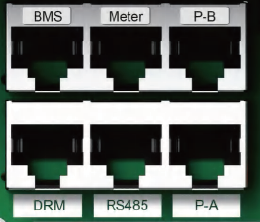
For me, the dongle itself was the first unexpected bonus when I unpacked the inverter!
The next bonus was Solis AI! It does the job pretty well.
Some of the servers that host it seem a bit overloaded (not least with agile development..), so it may not update the inverter every three hours or so. So do not press the support engineers too hard!
8kW Solis S6-EH1P8K-L-PLUS hybrid inverter; G99: 8kw export; 16kWh Seplos Fogstar battery; Ohme Home Pro EV charger; 100Amp head, HA lab on mini PC
01/12/2025 5:50 pm
I've had a bit of time to look into this today.
I have tried to get connected to the dongle via a data cable to manually change the IP address (if I need to do that).
Connecting via a network cable to the dongle I am asked for the username and password on 10.10.10.254
Looking at the manual it suggests admin and 123456789 but this isn't accepted. I don't remember changing it when installing the inverter.
It mentions in the manual to change to ipv4, but I'm not sure if that is an issue?
Any ideas? Thanks.
Topic starter
02/12/2025 11:43 am
I have tried to get connected to the dongle via a data cable to manually change the IP address (if I need to do that).
I just used the default, the IP address is best assigned automatically by your internet hub or router like any other device on your home LAN.
After that, you login onto your internet hub or router (there's usually a login and password, this varies depending on manufacturer, there may be a sticker on it with the details). There you make sure you set that the IP address your inverter was given is permanently dedicated/assigned to the inverter ethernet MAC address. This is configured in your hub, these days they always have this option (and it works until the hub is replaced or reset).
8kW Solis S6-EH1P8K-L-PLUS hybrid inverter; G99: 8kw export; 16kWh Seplos Fogstar battery; Ohme Home Pro EV charger; 100Amp head, HA lab on mini PC
Topic starter
02/12/2025 1:08 pm
Just a quick update on Solis AI.
This essentially uses information on consumption, battery charge, tariffs, local production and weather data to:
- minimise importing electricity except during
- maximise "profit" of exporting, optimising based on price and ability to store production in the battery
The owner can set and adjust these priorities via Soliscloud. The options available do not seem very stable. Solis states that Solis AI takes a month of local data to reach a stable point where it is driving the inverter based on predicted use.
The logic runs on cloud servers and at least once every three hours, the local "registers" in the inverter are adjusted. These "registers" are the times to start and stop charging the battery, import/export, using battery, etc.
8kW Solis S6-EH1P8K-L-PLUS hybrid inverter; G99: 8kw export; 16kWh Seplos Fogstar battery; Ohme Home Pro EV charger; 100Amp head, HA lab on mini PC
02/12/2025 1:15 pm
I've had a bit of time to look into this today.
I have tried to get connected to the dongle via a data cable to manually change the IP address (if I need to do that).
Connecting via a network cable to the dongle I am asked for the username and password on 10.10.10.254
Looking at the manual it suggests admin and 123456789 but this isn't accepted. I don't remember changing it when installing the inverter.
It mentions in the manual to change to ipv4, but I'm not sure if that is an issue?
Any ideas? Thanks.
Looking at the Solis support web site, this article (Solis WIFI Configuration : Service Center) suggests the password of 123456789 is just an example and that the actual password will be the serial number of the wifi dongle.
10.10.10.254 is already an IPv4 address so this won't be getting in the way of you logging in initially. Once you're logged in you should, from what the documentation says, have somewhere where you can set a manual IP address, and that's where you'd need to tell it to use an IPv4 address (i.e. one that has four numbers separated by full stops).
105 m2 bungalow in South East England
Mitsubishi Ecodan 8.5 kW air source heat pump
18 x 360W solar panels
1 x 6 kW GroWatt battery and SPH5000 inverter
1 x Myenergi Zappi
1 x VW ID3
Raised beds for home-grown veg and chickens for eggs
"Semper in excretia; sumus solum profundum variat"

Latest Posts
-

RE: Octopus Cosy 12 Heat Pump Regret: Incredibly Loud, Poor Heating & Constant Hum - Help!
Balancing is a long process and its possible to mess th...
By JamesPa , 2 hours ago
-
RE: Daikin Altherma 3 LT compressor longevity question
Up to a point yes. However every heat pump (and every ...
By JamesPa , 3 hours ago
-
Thanks everyone for the help, Havenwise now diasbled. q...
By Boycey , 5 hours ago
-
RE: Advice needed after a successful "leftfield" experiment.....
@pauli Depending on whether you can get an EV tariff, I...
By ChandyKris , 6 hours ago
-
-
RE: New Build ASHP Defects - Looking for Advice, Support & Shared Experiences
Is that a single pair only? If so it may be part if th...
By JamesPa , 7 hours ago
-
RE: Solar Power Output – Let’s Compare Generation Figures
@technogeek I think you are correct, but, it didn’t inf...
By Papahuhu , 8 hours ago
-
@batpred, you’re quite right; it does work well. I don’...
By Majordennisbloodnok , 8 hours ago
-

@Mars at the time of writing heating oil is £1.28 / ltr...
By TechnoGeek , 9 hours ago
-
RE: Ecodan Cylinder Possible Weeping Around Thermostat Port
Update: Mitsubishi sent an engineer around. It was li...
By Gruff2001 , 11 hours ago
-
RE: A Smarter Smart Controller from Homely?
@benson Agreed. I believe the COP gains with homely, i...
By Papahuhu , 12 hours ago
-
RE: Samsung Gen 7 16kW Integrated unit Modbus monitoring
The setup for this is a Samsung Modbus card. Connected ...
By antonical , 13 hours ago
-

RE: Forum updates, announcements & issues
@davidalgarve, if the emails are more than roughly a mo...
By Mars , 14 hours ago
-
How to Find All Your Posts and Topics on the Forum – A Quick Guide
If you’ve ever posted something on the forum and then s...
By Mars , 14 hours ago
-
RE: If a heat pump can only heat DHW to 50C then what? Issue with 18KW Heliotherm heat pump
Sorry to hear that but I'm not surprised TBH. Stratifi...
By JamesPa , 15 hours ago
-
RE: Say hello and introduce yourself
@pt151 welcome to the forums, and looking forward to he...
By Mars , 1 day ago
-
RE: Setback savings - fact or fiction?
The answer was in two parts in my reply, the second par...
By RobS , 1 day ago
-
Samsung Gen 7 16kW Integrated unit Modbus monitoring
Looking for some assistance to get modbus monitoring wo...
By antonical , 1 day ago
-
Ecodan control return to Melpump from Havenwise trial. settings check
Hi, Just got control back after being on the hav...
By Boycey , 1 day ago
-
RE: Refrigerant R32, is it now banned in the EU from 1st Jan 2027 for monobloc ASHPs?
I wonder if heat pump manufacturers will tone these sit...
By JamesPa , 1 day ago
-
RE: Who’s Caved and Switched the Heating On Already?
@editor yesterday we used 12kW of electricity for heat,...
By Judith , 1 day ago
-
RE: Rate the quality of your heat pump design and installation
Loss assessments can be a very serious case of GIGO. I...
By JamesPa , 2 days ago
-
RE: Who's your electricity provider and what's your tariff?
@jamespa Just bizarre. This is our data. I really don't...
By antonical , 2 days ago
-
RE: Mitsubishi Ecodan 11.2kW review
I think you said its an 11.2kW model and your house is ...
By JamesPa , 2 days ago