

Notifications
Clear all
Joining the Renewable Heating Hub forums is completely free and only takes a minute. By registering you’ll be able to ask questions, join discussions, follow topics you’re interested in, bookmark useful threads and receive notifications when someone replies. Non-registered members also do not have access to our AI features. When choosing your username, please note that it cannot be changed later, so we recommend avoiding brand or product names. Before registering, please take a moment to read the Forum Rules & Terms of Use so we can keep the community helpful, respectful and informative for everyone. Thanks for joining!

Topic starter
26/11/2025 11:09 pm
Well that sounds positive. When you say modbus sensors, what does that mean?
How did you set this up, what equipment did you buy/attach to the inverter?
In my case, I have Home Assistant (HA) running in an old pc. HA connects to my local network. @majordennisbloodnok published a great overview here on how to start HA, other hardware options like raspberry pi etc. But in brief, in HA you can run integrations. I had deployed someone's code to have an integration to Solis inverters using modbus (a protocol for that local interface).
As for what hardware I used:
My Solis inverter came with a USB dongle that has wifi, gprs and bluetooth (S2-WL-ST USB) . This also has an ethernet port (that connects to that modbus interface). I just had to use a normal ethernet cable (with RJ45 ends) to connect the dongle to the local network. I also had to make sure that the IP address given to the Solis is fixed in my local network hub (because I setup modbus to use that IP address).
The deployment of someone else's code to use modbus is made fairly simple in HA, you typically do not need to change code, it is a matter of configuring some parameters when you first create that integration. HA also makes it simpler to apply updates, etc. But the updates also build up, so you could also "go it alone" and just run the code separately.
8kW Solis S6-EH1P8K-L-PLUS hybrid inverter; G99: 8kW export; 16kWh Seplos Fogstar battery; Ohme Home Pro EV charger; Vaillant Arotherm Pro 7kW; 100Amp head, HA lab on mini PC

26/11/2025 11:47 pm
Thanks. Well I didn't know the Solis dongle had an RJ45 port. I've just noticed the base cap and upon unscrewing it there is the RJ45 port!
I'll take a look at this over the next few days, so you might find me asking a couple more questions!
Topic starter
27/11/2025 9:52 am
No worries
Modbus may also work over the dongle WiFi access.
Essentially it is available on TCP port 502..
I had a better look and the HA Solis integration has over 500 software "sensors" for my inverter (model dependent). Between ones you can use to control/update parameters on the Solis and ones that allow to read every 10 seconds (by default, I think you can change this).
This post was modified 11 months ago by Batpred
8kW Solis S6-EH1P8K-L-PLUS hybrid inverter; G99: 8kW export; 16kWh Seplos Fogstar battery; Ohme Home Pro EV charger; Vaillant Arotherm Pro 7kW; 100Amp head, HA lab on mini PC
27/11/2025 10:54 am
Thanks.
Hardware wise, you just used a standard network cable from the dongle to a router/switch? We have a mesh wifi box right next to the inverter in the garqge which has a spare network port I could use to access our home network.
Would I then potentially be able connect wirelessly to our Samsung tablet that I believe should have no problem running Home Assistant?
Could that be all the hardware needed and then it's just a matter of getting the software/settings etc setup?

Topic starter
27/11/2025 4:06 pm
Thanks.
Hardware wise, you just used a standard network cable from the dongle to a router/switch? We have a mesh wifi box right next to the inverter in the garage which has a spare network port I could use to access our home network.
Yes, I just used a normal network cable. I think it may even work using the wifi the dongle connects to, important to allocate the IP address to the MAC address.
Worth you looking more into Home Assistant, plenty of articles here.
8kW Solis S6-EH1P8K-L-PLUS hybrid inverter; G99: 8kW export; 16kWh Seplos Fogstar battery; Ohme Home Pro EV charger; Vaillant Arotherm Pro 7kW; 100Amp head, HA lab on mini PC

27/11/2025 4:24 pm
Just one word of caution, @bash…
From what I can gather from @batpred’s post, the RJ45 socket on the wifi dongle is actually a physical network socket and so will, obviously, be OK with a cable from it being plugged straight into a network switch. However, the RJ45 sockets on the inverter itself are definitely not network sockets and so most certainly should NOT be plugged directly into a network.
Not expecting that to be what you intended but just thought I ought to clarify just in case.
105 m2 bungalow in South East England
Mitsubishi Ecodan 8.5 kW air source heat pump
18 x 360W solar panels
1 x 6 kW GroWatt battery and SPH5000 inverter
1 x Myenergi Zappi
1 x VW ID3
Raised beds for home-grown veg and chickens for eggs
"Semper in excretia; sumus solum profundum variat"
27/11/2025 5:02 pm
Thanks.
I was pleasantly surprised that the Solis dongle itself has an in-built network port hidden under the screw cap, an unexpected bonus!
Topic starter
27/11/2025 5:21 pm
@majordennisbloodnok Good point! Just in case anyone reading this in the future needs that clarity.
The sockets below are also for RJ45 but they are not ethernet, some of them work with the RS485 protocol. The ethernet RJ45 socket is available in some dongles.
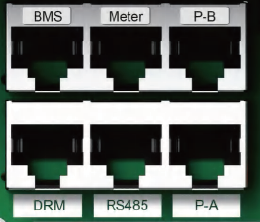
For me, the dongle itself was the first unexpected bonus when I unpacked the inverter!
The next bonus was Solis AI! It does the job pretty well.
Some of the servers that host it seem a bit overloaded (not least with agile development..), so it may not update the inverter every three hours or so. So do not press the support engineers too hard!
8kW Solis S6-EH1P8K-L-PLUS hybrid inverter; G99: 8kW export; 16kWh Seplos Fogstar battery; Ohme Home Pro EV charger; Vaillant Arotherm Pro 7kW; 100Amp head, HA lab on mini PC

01/12/2025 5:50 pm
I've had a bit of time to look into this today.
I have tried to get connected to the dongle via a data cable to manually change the IP address (if I need to do that).
Connecting via a network cable to the dongle I am asked for the username and password on 10.10.10.254
Looking at the manual it suggests admin and 123456789 but this isn't accepted. I don't remember changing it when installing the inverter.
It mentions in the manual to change to ipv4, but I'm not sure if that is an issue?
Any ideas? Thanks.
Topic starter
02/12/2025 11:43 am
I have tried to get connected to the dongle via a data cable to manually change the IP address (if I need to do that).
I just used the default, the IP address is best assigned automatically by your internet hub or router like any other device on your home LAN.
After that, you login onto your internet hub or router (there's usually a login and password, this varies depending on manufacturer, there may be a sticker on it with the details). There you make sure you set that the IP address your inverter was given is permanently dedicated/assigned to the inverter ethernet MAC address. This is configured in your hub, these days they always have this option (and it works until the hub is replaced or reset).
8kW Solis S6-EH1P8K-L-PLUS hybrid inverter; G99: 8kW export; 16kWh Seplos Fogstar battery; Ohme Home Pro EV charger; Vaillant Arotherm Pro 7kW; 100Amp head, HA lab on mini PC
Topic starter
02/12/2025 1:08 pm
Just a quick update on Solis AI.
This essentially uses information on consumption, battery charge, tariffs, local production and weather data to:
- minimise importing electricity except during
- maximise "profit" of exporting, optimising based on price and ability to store production in the battery
The owner can set and adjust these priorities via Soliscloud. The options available do not seem very stable. Solis states that Solis AI takes a month of local data to reach a stable point where it is driving the inverter based on predicted use.
The logic runs on cloud servers and at least once every three hours, the local "registers" in the inverter are adjusted. These "registers" are the times to start and stop charging the battery, import/export, using battery, etc.
8kW Solis S6-EH1P8K-L-PLUS hybrid inverter; G99: 8kW export; 16kWh Seplos Fogstar battery; Ohme Home Pro EV charger; Vaillant Arotherm Pro 7kW; 100Amp head, HA lab on mini PC
02/12/2025 1:15 pm
I've had a bit of time to look into this today.
I have tried to get connected to the dongle via a data cable to manually change the IP address (if I need to do that).
Connecting via a network cable to the dongle I am asked for the username and password on 10.10.10.254
Looking at the manual it suggests admin and 123456789 but this isn't accepted. I don't remember changing it when installing the inverter.
It mentions in the manual to change to ipv4, but I'm not sure if that is an issue?
Any ideas? Thanks.
Looking at the Solis support web site, this article (Solis WIFI Configuration : Service Center) suggests the password of 123456789 is just an example and that the actual password will be the serial number of the wifi dongle.
10.10.10.254 is already an IPv4 address so this won't be getting in the way of you logging in initially. Once you're logged in you should, from what the documentation says, have somewhere where you can set a manual IP address, and that's where you'd need to tell it to use an IPv4 address (i.e. one that has four numbers separated by full stops).
105 m2 bungalow in South East England
Mitsubishi Ecodan 8.5 kW air source heat pump
18 x 360W solar panels
1 x 6 kW GroWatt battery and SPH5000 inverter
1 x Myenergi Zappi
1 x VW ID3
Raised beds for home-grown veg and chickens for eggs
"Semper in excretia; sumus solum profundum variat"

SPONSORS

Degrees of Separation
Latest Posts
-

RE: The Changing Jet Stream Could Challenge UK Air Source Heat Pumps
There are a collection of tools around on the internet ...
By EtchedPixels , 1 hour ago
-
RE: 15kw pump for 225m2 1990's house - over kill?
@seaviews I have read you latest response re buffer ...
By JamesPa , 2 hours ago
-
RE: How will removing the standing charge on gas bills benefit heat pumps?
The BUS grant funding for 2026/27 will run out at the c...
By Rob of York , 13 hours ago
-
-
@editor Ouch, sorry to re start the tick. I had assume...
By DavidB , 2 days ago
-
RE: Say hello and introduce yourself
@e-a-west as the good Major said, welcome to the forums...
By Mars , 2 days ago
-
RE: How much of your renewable and home setup would still work if the internet went down?
Yes I actually have a copy of a tool that whenever a ce...
By EtchedPixels , 3 days ago
-
RE: Indevolt Batteries UK Support & Info Thread
@editor Hi, To resolve this, please tap on the A...
By Indevolt Tech , 3 days ago
-
RE: Double or Triple Glazed Windows?
Posted by: @singlespeed With 9 years repairing windo...
By Rob of York , 4 days ago
-
@transparent we’re still running a secure version of PH...
By Mars , 4 days ago
-
RE: How quickly would you want/expect heat recovery to take from setback?
Much longer than that here. The heating isn't even on. ...
By bobflux , 4 days ago
-
RE: Passiv Smart Thermostat - Help & Forum Support
Obviously the weather is changeable but there's a defin...
By Singlespeed , 4 days ago
-
RE: Forum updates, announcements & issues
Get the Renewable Heating Hub heads-up on WhatsApp. I...
By Mars , 4 days ago
-
RE: Safety study for plug in batteries out to tender - looks like Q3 2027 at best before legal
@editor I pointed out to the one of the Fuse execs that...
By dansus , 4 days ago





SPONSORS

