
Notifications
Clear all
Safety, Regulations, Tools, Plumbing & DIY Installations
86
Posts
13
Users
13
Reactions
2,929
Views

22/12/2025 3:32 pm
Not sure my wife'd like a smoke-filled house every time we wanted some honey on our Scotch pancakes.
Yes, it can be very addictive and difficult to break the habit.
But I don't allow mine to smoke indoors...

Save energy... recycle electrons!
1

22/12/2025 4:20 pm
@transparent They’d be the Pyro Nicotinus strain I imagine?
Toodles, heats his home with cold draughts and cooks food with magnets.

22/12/2025 5:21 pm
I also enjoy the challenge of getting the best out of solar, batteries and ASHP, although my wife is less sure about my enthusiasm to tinker.
On a slight tangent, I also dabble in Smart home gadgetry, but am conscious that if I were to disappear one day, it would be important that the property should not be difficult/ impossible for the next owner to operate.
With that in mind, I have two rules:
1 all devices must work with Apple Homekit natively i.e. no 3rd party apps or hubs required and
1a preferably also be Matter and Thread-compliant
2 any device controlling a power socket or light must have a physical switch that is still fully functional as a backup
OK that's 3 rules
This is because one increasingly reads about smart home hardware suppliers discontinuing support for the smart devices, often with little notice. Apple, I feel (and probably Google as well, although they aren't blameless on this front) is more likely to stay the course with Homekit, and is rumoured to be readying a significant upgrade for release in 2026.
Getting to the point:
You can now get miniature relays that sit behind a normal light switch and act as a remote/wireless two-way switch.
In other words, you can still use the physical switch if nearby, to change the state of the lamp but you can also use Homekit, either as a simple switch, or more usefully as part of a timed / programmed group of actions or a scene.
I've tried a few of these relays, but have settled on the Sonoff MiniR4M. They just about fit in a 25mm deep wall box - although 35mm is less tight - and the "M" at the end signifies Matter compliance. Sonoff also make a lot of Zigbee devices.
They pair easily on wifi and have so far proved very reliable. I have about 12 switches thus equipped, and have been able to remove the outside "dusk to dawn" sensors and simply set the outside lights to come on an hour after sunset until midnight or whenever.
After that, movement detectors (I use Eve Motion which are Matter compatible) by the front gate and at points around the garden will also trigger all the outside lights to switch on for a defined period without any complicated wiring arrangements.
I know that all the HA veterans will be laughing at the simplicity of this, but if you don't need the power of HA it works well, and at low cost. The MiniR4M relays are about £12 - less if you buy multiples.
This post was modified 2 months ago by downfield
Mitsubishi Zubadan 14kW with Mixergy 210l DHW in 220m2 barn property. 24 solar panels = 9kWp with GivEnergy 5.0kW Hybrid inverter and 19kWh GivE batteries. Jaga Strada fan-assisted rads throughout. Landvac vacuum glazing/triple glazed windows.
22/12/2025 5:35 pm
@downfield Matter is a new concept hereabouts; we have just purchased two Eufy E25 Robot Vacuum / Mop floor cleaners (one downstairs and one upstairs M’lud) and note that they support Matter. I shall have to investigate this some more (especially as Amazon Alexa smart speaker systems seemed to have been dumbed down in the last year and now are cloth-eared and have a slower response than of old). I too have found a proliferation of apps for different smart devices and have seen at least one of these apps go under. I do wonder how my better half would cope if that No: 49 Omnibus were to run over me as she is not ‘tech savvy’ to any great degree.☹️ Regards, Toodles.
Toodles, heats his home with cold draughts and cooks food with magnets.

Topic starter
22/12/2025 5:42 pm
One of the likely triggers for us tinkerers looking into extending our systems is, of course, what other people have done already. In the spirit of "I'll show you mine if you show me yours", then, here's a summary of what I'm doing with my setup.
At the heart of it all is a dedicated (quite old) mini PC running Home Assistant. Over and above what HA discovered on initial setup, the key components are as follows.
Monitored hardware:
- Mitsubishi Ecodan via
- an HA integration to Mitsi's Melcloud API and
- MQTT with a local dongle connected to the heat pump's CN105 socket.
- Growatt inverter and battery via
- modbus via an ethernet to modbus adapter to the RS485 port of the inverter
- an HA integration to the Growatt API
- MyEnergi Zappi EV wallbox via the CJNE/ha-myenergi integration with the MyEnergi API
- VW ID3 via the robinostlund/homeassistant-volkswagencarnet integration with Volkswagen's VW Connect API
- Hikvision DVR and attached CCTV camera via the maciej-or/hikvision_next integration.
- Shelly smoke alarms via the standard Shelly integration.
- HP Colour Laserjet MFP via the elad-bar/ha-hpprinter custom integration
- Ecowitt gateway and attached soil moisture sensors via the standard Ecowitt integration.
- Various TP-Link smart plugs via the standard TP-Link integration.
- Eufy X8 robot vacuum via damacus/robovac custom integration (N.B. this is currently not working and I'd love to know why).
Monitored data feeds:
- Octopus tariffs via the BottlecapDave/HomeAssistant-OctopusEnergy integration to Octopus' API and viewed with the help of the lozzd/octopus-energy-rates-card custom Home Assistant card for Octopus.
- Weather forecasts from the Met.no and Met Office standard integrations
- Current weather information via the OpenWeatherMap standard integration
- Sun direction and elevation information via the urbanframe/sunlight-intensity custom integration.
- Carbon intensity of imported electricity via the Electricity Maps integration
- Solar PV forecast via the standard Forecast.Solar integration and the BJReplay/ha-solcast-solar custom integration.
Automations set up:
- Weekly full backup of Home Assistant to OneDrive
- CCTV motion detection. If my wife and I are both not at home, we will get a Home Assistant notification and also an email with a snapshot from the video feed.
- Home battery charging
- Automatically start charging the battery from the grid if the half-hourly import price goes negative. Similarly, if it goes positive again, tell the battery to stop charging from grid.
- Start and stop battery grid charging at specific date/times (manually configurable in the Home Assistant dashboard) to allow ad-hoc control.
- Start charging the battery from grid at 2pm if it's less than 50% charged (it takes 2 hours to fully charge, being only a 6kWh battery). Similarly, start the battery charging from grid at 3pm if it's less than 75% charged. Obviously, on sunny days these rules will not be triggered. All of this is to ensure the battery is charged enough by 4pm to take us over the 4-7pm expensive stretch.
- Given 4-7pm is the most expensive part of the Octopus day, there is a separate rule to say that, whatever else may have been configured, tell the battery to stop charging from grid at 4pm.
- Octopus notifications
- Notify us of new upcoming Octopus saving sessions
- Notify us if the half-hourly import price will go negative in the next half hour.
- EV charging
- Start the EV charging from grid at a specific date/time (manually configurable in the Home Assistant dashboard) to allow ad-hoc control. This will start charging at the full 7kWh fast charge mode.
- When the EV is charging, set the home battery's minimum charge level to 90% so that the car doesn't deplete the home battery. Similarly, set the home battery's minimum charge level back to 10% when the car is no longer charging.
- Irrespective of anything else, tell the car to stop charging at 4pm to avoid any chance of charging during the peak price period.
- If we are exporting to grid at a rate of more than 2kW (enough to cover the background home consumption plus the wall box's minimum consumption rate), if the EV's charge level is less than its target charge level, the EV is actually connected and it isn't already charging, tell the EV to start charging on the Eco+ setting. This means the wall box will vary the charge rate to the EV according to how much the solar panels are producing, but if the solar PV rate drops below the minimum the wall box can handle then charging will be paused rather than pulling the minimum rate from the grid.
- Heating
- Our East-facing wall is basically all glazing, so we get a lot of solar gain on sunny days. Therefore, thanks to the new CN105 dongle's little hidden easter eggs, if the sun goes above 10 degrees, the East wall is no longer in shade and there is less than 10% cloud cover we set a solar gain offset of -1 degree to the WC curve. Similarly, if the sun drops below 10 degrees, the East wall goes into shade or the cloud cover increases above 10% then this offset is removed. These parameters are work in progress.
- We live in a rural setting on fairly high ground, so the house is a little exposed. If the apparent temperature (Open Weather Map's "feels like") is more than a degree different from Open Weather Map's actual temperature, set the wind chill offset of the WC curve to half the positive difference (i.e. if feels like is 3 and actual is 6, the difference is 3, so set the wind chill offset to +1.5). This is also work in progress and I expect to take wind direction into account too.
- Greenhouse
- Turn the propagating lights on at a manually configured start time (assuming it's before sunrise) and turn them off again half an hour after sunrise. Similarly, turn them on again half an hour before sunset and turn them off again at a second manually configured end time. This is to ensure the greenhouse's day is at an optimum length for propagating seedlings in the spring.
- Notify if the planters in the greenhouse are getting too dry. In time this automation will be supplemented by some automated watering using a water butt pump, some soaker hose and a smart socket or similar.
Addons (extra applications that are installed to run within the Home Assistant bubble)
- DNSMasq-DHCP. My Home Assistant server is more reliable than my router at providing DHCP and DNS forwarding, and this addon makes it easier for me to manage reserved DHCP addresses. The load is taken off my router, so it can concentrate on just being a router.
- Mosquitto broker. The absolutely bog standard MQTT server for interacting with Home Assistant. This is what allows me to get HA talking with my heat pump.
- Unifi Network Application. My wifi access points are Ubiquiti, and this addon allows me to run the management application locally on my network from a central point.
- NetAlertX. This is a network scanner which allows me to detect the presence of any new unexpected devices.
- OneDrive backup. Self explanatory; allows me to back up Home Assistant to OneDrive.
- Cloudflared. This is a brilliant bit of kit that links into a service Cloudflare provide free of charge. It means I've set up a Cloudflare tunnel so that I can get the Home Assistant app on my phone to talk to my HA server even when I'm not at home. It is far more secure than trying to punch holes through my firewall and is also more secure than Home Assistant Cloud (as well as being free, which the latter is not).
- Bookstack. With all this stuff going on, I need to keep it all documented. Bookstack is a very simple and easy to use wiki application.
- MariaDB and phpMyAdmin. @cathoderay would probably hate this, but databases are my home ground and so I run my Home Assistant on top of a MySQL database rather than SQLite. MariaDB is the appropriate flavour of MySQL for HA and phpMyAdmin is the user interface for querying it.
- Samba share. If I want to move files between my HA server and my other computers, this makes HA folders visible across the network.
- Tandoor. I love my cooking and Tandoor is a recipe management database. To use something like this on the Internet, you normally have to subscribe to a service in order to store more than a handful of recipes, but installing it like this means I've got all the functionality without any of the restrictions.
- Emby. This has turned my HA server into a streaming media server too, so I can store all our music on the network and play it on the hifi system.
- Openproject. Overkill, perhaps, but occasionally I have a far more extensive project of work to carry out - upcoming bathroom alterations and upgrade is a good example. I can map out and manage the whole project in this application, including the management of contractors (i.e. builders) as resources within that project. Not for everyone, but I've managed enough projects at work to know the value of this functionality to me.
OK, I wonder if that's tickled anyone's creativity muscles. Anything that I've implemented that any of you might decide to use, as is or suitably adapted?
105 m2 bungalow in South East England
Mitsubishi Ecodan 8.5 kW air source heat pump
18 x 360W solar panels
1 x 6 kW GroWatt battery and SPH5000 inverter
1 x Myenergi Zappi
1 x VW ID3
Raised beds for home-grown veg and chickens for eggs
"Semper in excretia; sumus solum profundum variat"

22/12/2025 5:55 pm
@cathoderay would probably hate this
Each to his own, dear Major, each to his own! By the way, I think the idea behind this topic/thread is excellent, and am not at all surprised it has got off to a flying start.
Midea 14kW (for now...) ASHP heating both building and DHW
22/12/2025 6:00 pm
@cathoderay I think we might see contributions from a Mr. Kludge and Mr. H. Robinson perhaps? 😉
Toodles, heats his home with cold draughts and cooks food with magnets.

22/12/2025 6:14 pm
- Various TP-Link smart plugs via the standard TP-Link integration.
OK, I wonder if that's tickled anyone's creativity muscles. Anything that I've implemented that any of you might decide to use, as is or suitably adapted?
I'm still in the early stages of HA, as you're aware, but have got a few Tapo smart plugs located on various sockets, and will likely add further over time.
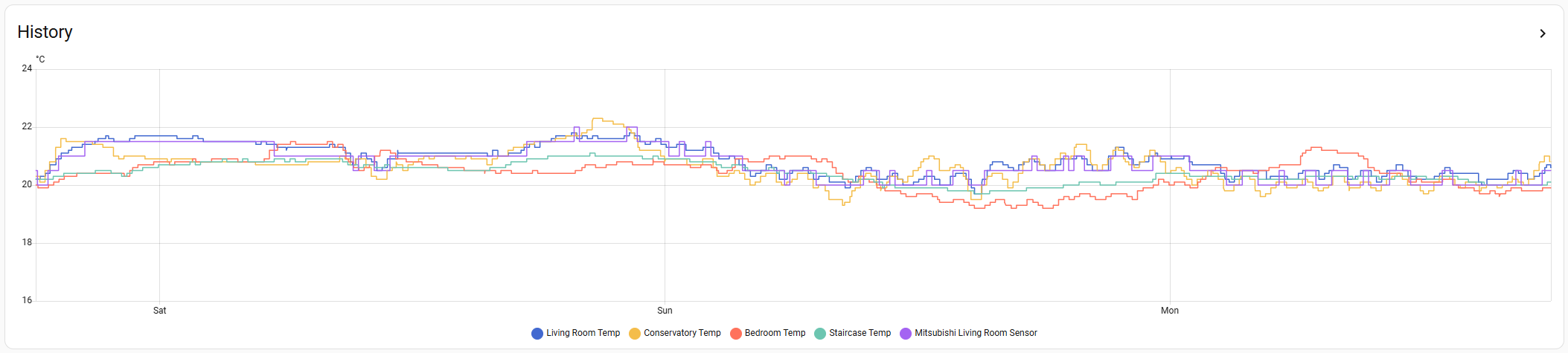
I've also got 4 of their temperature & humidity sensors located in various areas of the house so that I can track temperature across them, alongside what the Mitsubishi controller is reading from the living room. Currently, it's living room, conservatory, staircase (original site for the Mitsi controller, as the theoretical coolest area) and our bedroom. Again I'll look to extend this further into both of the kids bedrooms, essentially to be an early warning as to any potential radiator balancing issues, or warnings that any of them need bleeding.
I'm sure that it's a fairly common thing that others also monitor in various ways. I did it originally after installation via a cheap pack of 8 Amazon hygrometers, which are still dotted around the house, but having access to the history is useful. I have it on a 72 hour view currently, which gives me enough visibility to check on the impact of ongoing bits of system tinkering.
This post was modified 2 months ago by Sheriff Fatman
130m2 4 bed detached house in West Yorkshire
10kW Mitsubishi Ecodan R290 Heat Pump - Installed June 2025
6.3kWp PV, 5kW Sunsynk Inverter, 3 x 5.3kWh Sunsynk Batteries
MyEnergi Zappi Charger for 1 EV (Ioniq5) and 1 PHEV (Outlander)
User of Havenwise (Full control Jun-Dec 2025, DHW only from early Dec)
Subscriber to MelPump App data via CN105 Dongle Kit
22/12/2025 6:29 pm
One potential project on my future wish list will be to potentially convert the blinds we have in our living room and the ones that we're adding into the conservatory in January converted to motorised ones that can be set to trigger via timers. The living room has a bay window requiring 3 of them to be closed and opened, which isn't a huge issue. However, they might be tricky, as they're vertical blinds with 'wands' to control them, and the motorised kits all seem to be for roller or venetian blinds so I've yet to find an option that would work for them.
For the conservatory, the bi-fold doors will get 'perfect fit' inserts into the glazed areas, which will naturally stay with manual operation. The window glazing frames are too shallow for this to be an option, so they're getting roller blinds. These are restricted to a maximum width, so we'll end up with 6 of them to cover the full glazed, non-doorway area. The quote to include motorising them with the installation added around £1,000 to the installation price, so we opted against it as a bit of a non-essential luxury. I'll investigate whether it's something that can be integrated via a motorised kit at a later stage, and at what cost, but having an automated schedule to drop them at sunset for insulation purposes, if nothing else, would be a 'nice to have' option down the line.
130m2 4 bed detached house in West Yorkshire
10kW Mitsubishi Ecodan R290 Heat Pump - Installed June 2025
6.3kWp PV, 5kW Sunsynk Inverter, 3 x 5.3kWh Sunsynk Batteries
MyEnergi Zappi Charger for 1 EV (Ioniq5) and 1 PHEV (Outlander)
User of Havenwise (Full control Jun-Dec 2025, DHW only from early Dec)
Subscriber to MelPump App data via CN105 Dongle Kit
22/12/2025 7:07 pm
Growatt inverter and battery via modbus via an ethernet to modbus adapter to the RS485 port of the inverter
Let me point out that I'm changing away from using Growatt inverters, and replacing them with equivalent units by SunSynk.
There were two main issues when using a parallel set of Growatt units that had commands sent to them using Modbus over RS485
1: Inconsistent responses to Modbus commands:
Eg A command to tell the inverter-set to charge a battery from the grid would be executed correctly,
but the command to change back to solar-input wasn't obeyed. The inverters all remained connected to the grid.
The switch to revert to 'Solar First' required the mains incomer to be interrupted.
That was achievable by having relays on those incomers, also operated by the same microcontroller, but it shouldn't be necessary.
2: Unreliable responses to fault conditions:
Eg An internal fault on one inverter in the set would be reported on its inbuilt LCD panel.
The manual states that such a fault would cause the entire set to cease operating.
The faulty inverter should be isolated, and the remaining inverters re-started manually.
What actually occurred was that the other inverters continued to operate.
I'm not confident with that being 'safe'.
It's quite likely that these shortcomings only manifested when the inverters were connected as parallel units.
Others here on the forum with single inverters might find that they operate correctly.
But I thought these 'errors' should be noted here on this Tinkerers topic.
Save energy... recycle electrons!
22/12/2025 7:10 pm
For the conservatory, the bi-fold doors will get 'perfect fit' inserts into the glazed areas,
Please clarify:
Are you replacing those glazed units with new ones which have integral blinds between the glass layers?
Or have you found a company which retro-fits blinds into sealed glazing units?
Save energy... recycle electrons!
22/12/2025 7:24 pm
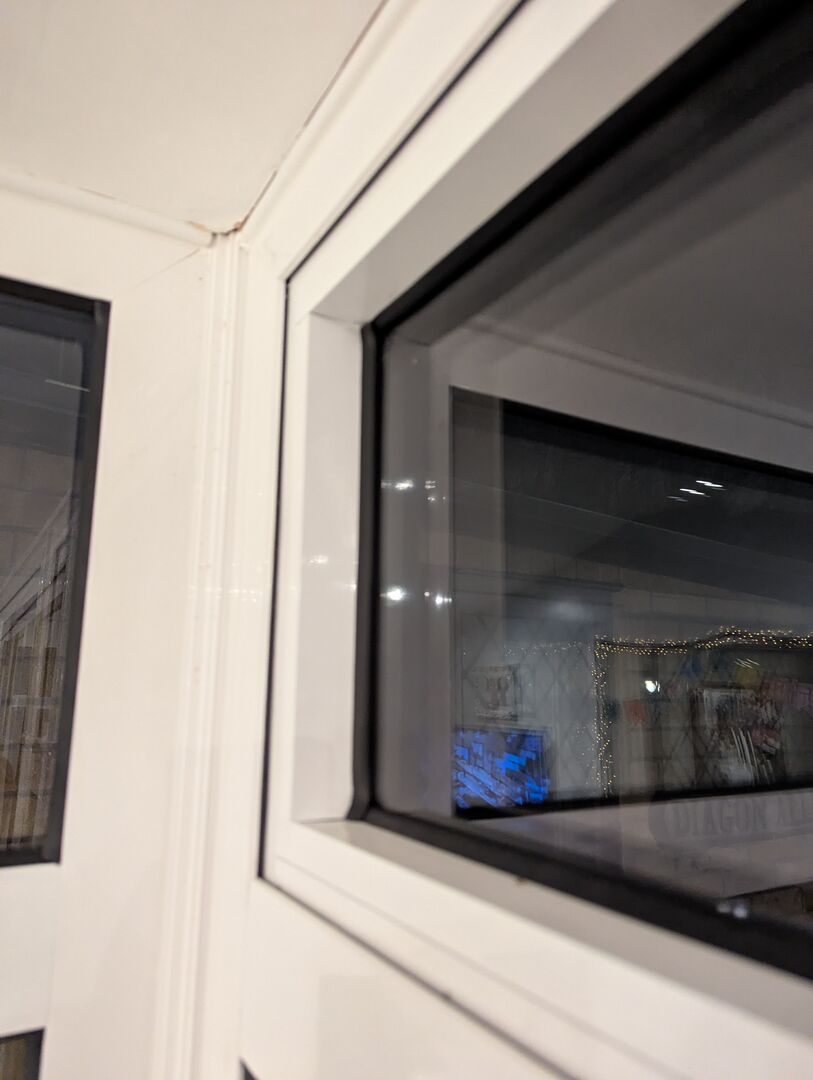
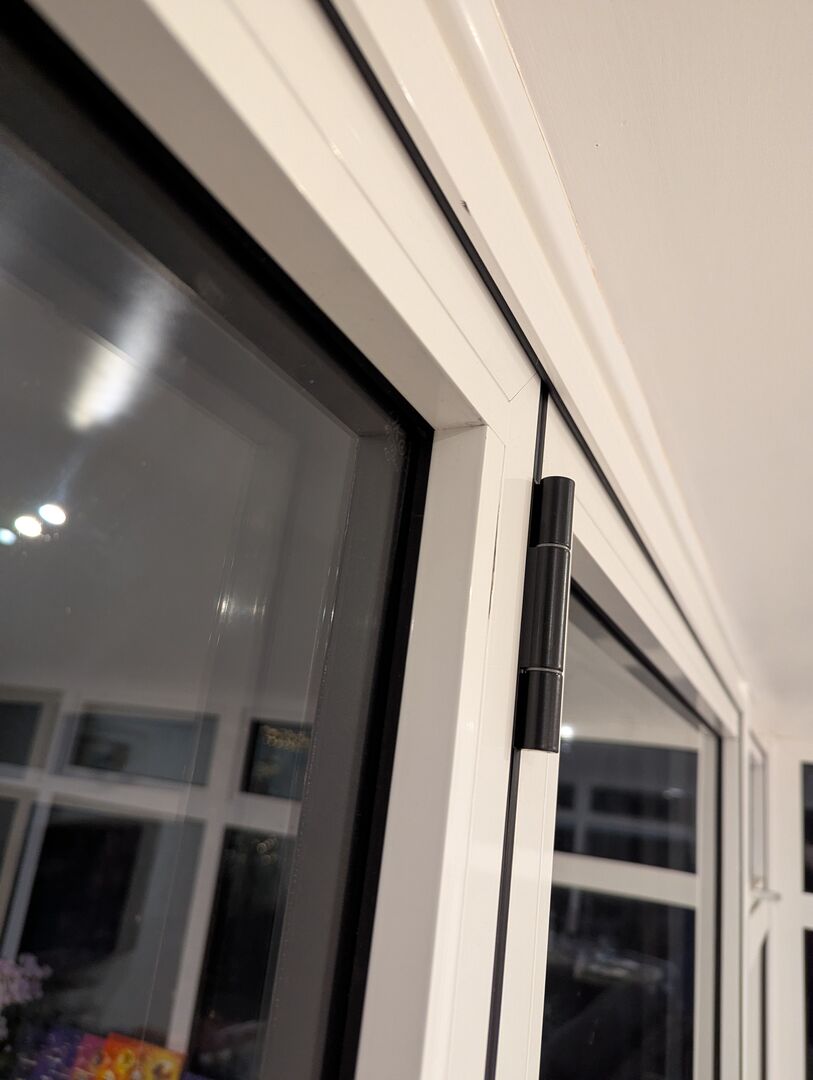
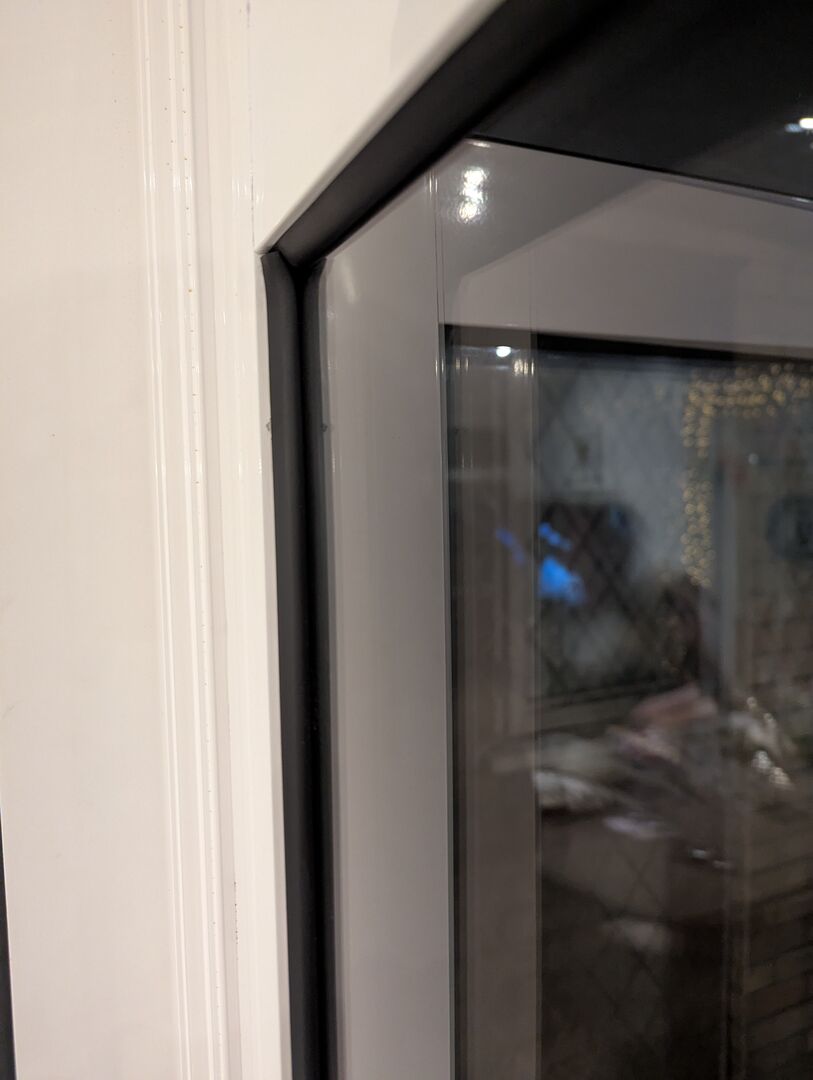
@transparent Neither. These are just measured pulled down blinds which fit into the door frames and are operated via a handle at the bottom, so there's no obvious mechanism to motorise this.
The conservatory was re-glazed and re-roofed in July, and have no coverings over the glazed areas currently. We're adding them as the final part of the project.
The bi-fold doors have a recess in the frames to allow those kinds of blinds, but only the upper opening sections of the windows have a similar recess. The other glazed areas are much more shallow.
This post was modified 2 months ago by Sheriff Fatman
130m2 4 bed detached house in West Yorkshire
10kW Mitsubishi Ecodan R290 Heat Pump - Installed June 2025
6.3kWp PV, 5kW Sunsynk Inverter, 3 x 5.3kWh Sunsynk Batteries
MyEnergi Zappi Charger for 1 EV (Ioniq5) and 1 PHEV (Outlander)
User of Havenwise (Full control Jun-Dec 2025, DHW only from early Dec)
Subscriber to MelPump App data via CN105 Dongle Kit

Latest Posts
-

RE: Daikin Altherma 3 LT compressor longevity question
This mess is intriguing: I wonder if this represent...
By bobflux , 20 minutes ago
-
RE: Say hello and introduce yourself
Hi. I'm Mike. Thank you for letting me join. My partn...
By Fretless6 , 2 hours ago
-
RE: Connecting Growatt SPH5000 over wired ethernet rather than wireless
The simplest wired option is usually the Growatt Ethern...
By Jonatan , 5 hours ago
-
RE: Peak Energy Products V therm 16kW unit heat pump not reaching flow temperature
ASHPs do have a minimum compressor speed. The minimum h...
By bobflux , 11 hours ago
-

RE: Electricity price predictions
@jamespa And it seems some of the nasty public cloud...
By Batpred , 12 hours ago
-
RE: Tell us about your Solar (PV) setup
Location: near Lyon, France 12kWp on the roof, 2x Sol...
By bobflux , 12 hours ago
-
RE: Jokes and fun posts about heat pumps and renewables
Technology is rapidly advancing. BBC News reported th...
By Transparent , 15 hours ago
-
What matters for flow and pressure drop is internal dia...
By bobflux , 16 hours ago
-
RE: Do Fridges and Freezers have COP ratings?
@editor Thank you all for your replies and submitted in...
By Toodles , 18 hours ago
-

I know and yes. The secondary deltaT wont necessaril...
By JamesPa , 22 hours ago
-
RE: Designing heating system with air to water heat pump in France, near Lyon
Just love the way you put it! 🤣
By Batpred , 2 days ago
-
RE: Safety update; RCBOs supplying inverters or storage batteries
Thank you for sharing. So it seems that your Schneid...
By Batpred , 2 days ago
-

RE: Forum updates, announcements & issues
@upnorthandpersonal thanks for the thoughtful, consider...
By Mars , 2 days ago
-
RE: Solar Power Output – Let’s Compare Generation Figures
@mk4 All 21 panels have their own Enphase IQ7a microinv...
By Toodles , 2 days ago
-
RE: Setback savings - fact or fiction?
Great, so you have proven that MELCloud is consistently...
By RobS , 3 days ago
-
RE: Mitsu PUHZ120Y 'Outdoor Temp 'error?
Thanks David & James It almos...
By DavidAlgarve , 3 days ago
-
RE: Surge protection devices SPDs
@trebor12345 - your original Topic about the right type...
By Transparent , 3 days ago
-
RE: Help needed with Samsung AE120RXYDEG
@tomf I’ve been sent this from a service engineer at Sa...
By Mars , 3 days ago
-
RE: Buying large amp bidirectional RCD and RCBO
Yes... I went through this particular headache and ende...
By bobflux , 4 days ago
-
O-oh! Let's take this as an opportunity to 'pass the ...
By Transparent , 4 days ago
-
RE: Homely setup on daikin heat pump
@craigh I refer to our somewhat elevated temperature of...
By Toodles , 4 days ago
-
RE: Air source heat pump roll call – what heat pump brand and model do you have?
My turn, this describes the future installation, only t...
By bobflux , 4 days ago


