

Notifications
Clear all
Joining the Renewable Heating Hub forums is completely free and only takes a minute. By registering you’ll be able to ask questions, join discussions, follow topics you’re interested in, bookmark useful threads and receive notifications when someone replies. Non-registered members also do not have access to our AI features. When choosing your username, please note that it cannot be changed later, so we recommend avoiding brand or product names. Before registering, please take a moment to read the Forum Rules & Terms of Use so we can keep the community helpful, respectful and informative for everyone. Thanks for joining!
Air Source Heat Pumps (ASHPs)
306
Posts
12
Users
61
Reactions
65.9 K
Views
18/02/2026 7:32 pm
By leaving the serviceman settings completely alone, turning off weather comp settings and running on set outlet flow temps I am hoping it will run a bit better.
Interesting. Basically a DIY weather compensation setup with fine tuning based on the IAT, if I have understood right. I don't see anything wrong with the idea at all, and if it avoids the turn my heat pump off without asking 'feature' then you will certainly have avoid a nuisance. I wonder, how often do you run the checks?
The only thing I might mention is making sure the logic can't somehow take the Set LWT too high (>60°C). I do this by only adding to or subtracting from a baseline, not the current Set LWT, and make sure the sum of the baseline plus the increments doesn't put my heat pump Set LWT over 60 degrees.
It will be very interesting to hear how you get on.
Midea 14kW (for now...) ASHP heating both building and DHW

Topic starter
18/02/2026 7:39 pm
@cathoderay it is currently set to run the checks every 15 minutes. What I really like in home assistant is that there seems to be a solution for almost every problem. For example, I queried how defrost cycles would affect it and sure enough there is a workaround for that. I have set up a filter helper which then averages out the OAT sensor over a half hour period so if the 15 minute check happens to coincide with a defrost run, it won't suddenly and erroneously drop the outlet flow temp. It will run it's calculation based upon the smoothed out sensor readings (the average outdoor temp over that half hour period).
As for the upper and lower limits the offset calculator can only go to a maximum of +5 and -5 from the set 'curve' value.
This post was modified 8 months ago by benson

18/02/2026 7:49 pm
- second automation will adjust this outlet flow temp value if needed. For example, if the IAT is outside of our indoor temp comfort zone which might happen if it is particularly windy (today for example), it will offset the flow temp value by +2. If it is even further out of this temp comfort zone it will boost it further with an offset of +3. The same logic will apply at the other end so if it overshoots it will adjust by -2.
What you are actually implementing is a closed loop control idea, rather than the "open loop" WCC curve approach. It has been my postulate all along that this is the preferable method and I am sure your experimentation will show this.
However, your control logic is necessarily rather crude, I understand you may not have experience with PI controls etc. But classic PI requires a model of the process, which is not available. If you want to take it further, I would suggest a linguistic fuzzy PI control (OK it sounds exotic). This is what I am trying to do at the moment, but since I do not have an appropriate temp sensor, I am simulating.
Good overall work though !
Midea MHCV10WD2N7 R290, 5.8kWp energy community solar power.
1
18/02/2026 7:52 pm
@benson — good point about the defrosts, as you know they push up the OAT, which is actually the AIT, Air Intake Temp, by several degrees, which could erroneously lower the Set LWT by several degrees. I think your setup, being independent of the wired controller logic, could also be relatively easy to set up to use the true OAT, got from an independent sensor.
This post was modified 8 months ago by cathodeRay
Midea 14kW (for now...) ASHP heating both building and DHW
1

Topic starter
19/02/2026 9:47 am
@tasos it was likely your post mentioning running outside of WCC settings that gave me the idea. Whilst initially I was surprised and quite pleased with regard to how one set curve could keep my IAT steady, it has become clear that the odd windy and cold day will cause me issues. Yesterday was particularly bad in this regard and IAT was dropping- I had the day off from work so I thought it was as good a time as any just to bite the bullet and look to move across. Gemini wrote all of the automations for me in yaml.
Id be interested to know how yours develops. For me, a comfort offset based on IAT seems sufficient rather than needing to incorporate weather forecasting as well (assuming that is what you are looking at when you say my setup is quite basic?)
Anyway all seems to be working well so far with my set up. Nice and steady outlet flow temps and COP seems good.
@cathoderay yes the OAT according to the ashp sensor will actually rise a few degrees during defrosts as you know so that would have no doubt caused some issues. A completely separate outdoor sensor is certainly an option. For now the smoothed out sensor readings seem to be doing the job. My hope as said is that this will result in much smoother operating when the automations run and adjust the outlet flow temp when overshooting, and in particular undershooting so I don’t get the prolonged drops in heating output.
19/02/2026 11:56 am
Id be interested to know how yours develops. For me, a comfort offset based on IAT seems sufficient rather than needing to incorporate weather forecasting as well (assuming that is what you are looking at when you say my setup is quite basic?)
I meant the following rule you mentioned using:
"second automation will adjust this outlet flow temp value if needed. For example, if the IAT is outside of our indoor temp comfort zone which might happen if it is particularly windy (today for example), it will offset the flow temp value by +2. If it is even further out of this temp comfort zone it will boost it further with an offset of +3. The same logic will apply at the other end so if it overshoots it will adjust by -2."
What this actually amounts to, is a simple proportional (to the error) rule. This has the drawback of not achieving zero steady state error. However, it is simple and wouldn't need any modifications, if you are satisfied with its performance.
Of course one could incorporate OAT in the control logic, but this one level higher also.
By the way, what type of temperature sensor are you using for IAT ?
I need a wireless, modbus one, to do proper testing.
Midea MHCV10WD2N7 R290, 5.8kWp energy community solar power.
Topic starter
19/02/2026 7:00 pm
@tasos the OAT is incorporated into the control logic. This is what sets the outlet flow temp in the first instance.
I use a load of Tapo temp and humidity sensors in various rooms of my house. It is the hallway one which directly influences the comfort adjustment automation. I was considering using an average of all of the sensors combined, but at present the hallway one will do the job that I need, I think.
20/02/2026 7:30 am
@benson I see, I misunderstood obviously. So you set LWT according to OAT, but not in WCC mode.
You don't intend to use IAT using similar logic, I presume. Not even for comparison purpose ? In this way, you could easily incorporate setback periods by lowering target IAT. Just a thought.
Midea MHCV10WD2N7 R290, 5.8kWp energy community solar power.

20/02/2026 9:04 am
So you set LWT according to OAT, but not in WCC mode.
The way I see it, it is weather compensation, but done through custom code, rather than using the Midea internal control logic.
You don't intend to use IAT using similar logic, I presume.
Again as I see it, the IAT is used to fine tune the Set LWT if/when the IAT overshoots or undershoots, in the same way that my auto-adapt script does the same thing.
Midea 14kW (for now...) ASHP heating both building and DHW
Topic starter
20/02/2026 9:45 am
@cathoderay yes that is it in a nutshell.
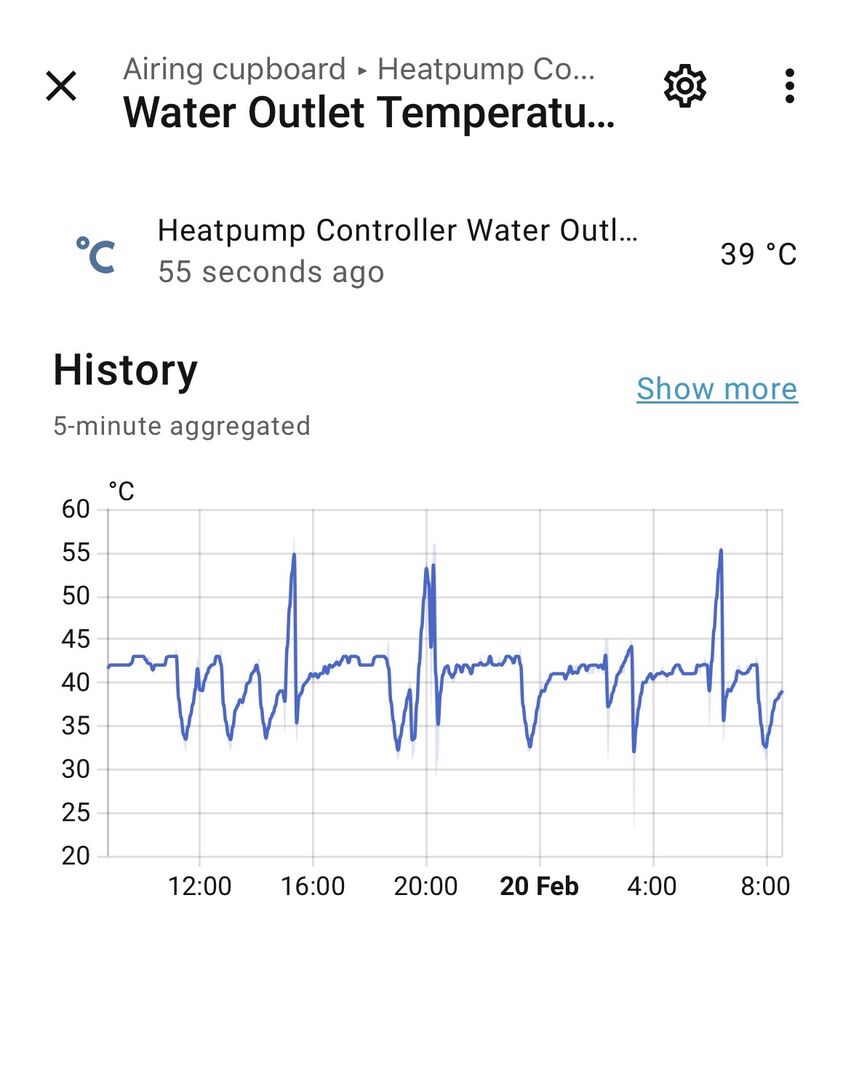
I am keeping a close eye on things. Initial observations
- the actual outlet temp is a little less steady, even when the actual set temp is steady. On the graph below on weather comp those space heating graph peaks would be smoother lines.
- I’ve had to reduce my ‘curve’ settings compared with what I had set up in custom curve 9 as the house was overheating.
- consumption seems a little up compared with a day of similar average OAT earlier this month but this may be linked to above.
20/02/2026 10:24 am
@benson — as @tasos suggests, plotting multiple variables can be very useful. Set LWT, actual LWT, RWT, OAT and IAT on one chart gives a comprehensive picture of what is going on. Maybe there is a HA add-on that can do such things. If not, you will either have to read from the HA database (it looks like pandas can read sqlite databases), or export as CSV to do the plots. Plotly, which is what I use, can do the plots with relatively simple code.
That plot is a bit all over the place. The period around midday looks like normal-ish Midea cycling. The three high peaks look like DHW reheats to me. If one mentally removes them from the plot, one sort of has extended normal Midea cycling. Adding other variables to the plot as above may make things clearer.
Midea 14kW (for now...) ASHP heating both building and DHW


SPONSORS

Degrees of Separation
Latest Posts
-

RE: New Build 3 Phase or 1Phase
Not so. 1: It's now the case that the Service Fuse wi...
By Transparent , 1 hour ago
-
RE: How will removing the standing charge on gas bills benefit heat pumps?
I think it has an enormous impact on air/air users. The...
By EtchedPixels , 8 hours ago
-
@editor Ouch, sorry to re start the tick. I had assume...
By DavidB , 1 day ago
-
RE: Say hello and introduce yourself
@e-a-west as the good Major said, welcome to the forums...
By Mars , 1 day ago
-
RE: How much of your renewable and home setup would still work if the internet went down?
Yes I actually have a copy of a tool that whenever a ce...
By EtchedPixels , 2 days ago
-
RE: Indevolt Batteries UK Support & Info Thread
@editor Hi, To resolve this, please tap on the A...
By Indevolt Tech , 2 days ago
-
RE: Double or Triple Glazed Windows?
Posted by: @singlespeed With 9 years repairing windo...
By Rob of York , 2 days ago
-
@transparent we’re still running a secure version of PH...
By Mars , 3 days ago
-
RE: How quickly would you want/expect heat recovery to take from setback?
Much longer than that here. The heating isn't even on. ...
By bobflux , 3 days ago
-
RE: Passiv Smart Thermostat - Help & Forum Support
Obviously the weather is changeable but there's a defin...
By Singlespeed , 3 days ago
-
RE: The Changing Jet Stream Could Challenge UK Air Source Heat Pumps
@rob-of-york I must admit that when we had a Daikin hea...
By Toodles , 3 days ago
-
RE: Forum updates, announcements & issues
Get the Renewable Heating Hub heads-up on WhatsApp. I...
By Mars , 3 days ago
-
RE: Safety study for plug in batteries out to tender - looks like Q3 2027 at best before legal
@editor I pointed out to the one of the Fuse execs that...
By dansus , 3 days ago
-
RE: 15kw pump for 225m2 1990's house - over kill?
@seaviews As well as loft insulation, there are othe...
By Rob of York , 3 days ago





SPONSORS
