

Notifications
Clear all
Joining the Renewable Heating Hub forums is completely free and only takes a minute. By registering you’ll be able to ask questions, join discussions, follow topics you’re interested in, bookmark useful threads and receive notifications when someone replies. Non-registered members also do not have access to our AI features. When choosing your username, please note that it cannot be changed later, so we recommend avoiding brand or product names. Before registering, please take a moment to read the Forum Rules & Terms of Use so we can keep the community helpful, respectful and informative for everyone. Thanks for joining!
Air Source Heat Pumps (ASHPs)
306
Posts
12
Users
61
Reactions
61.7 K
Views

Topic starter
19/03/2026 12:24 pm
Ok some more info on the new setup which may be of interest- specifically the comfort offset automation which adjusts the flow temperature if the IAT is outside of the comfort parameters, and an interesting observation over the last couple of days now that it is a bit warmer.
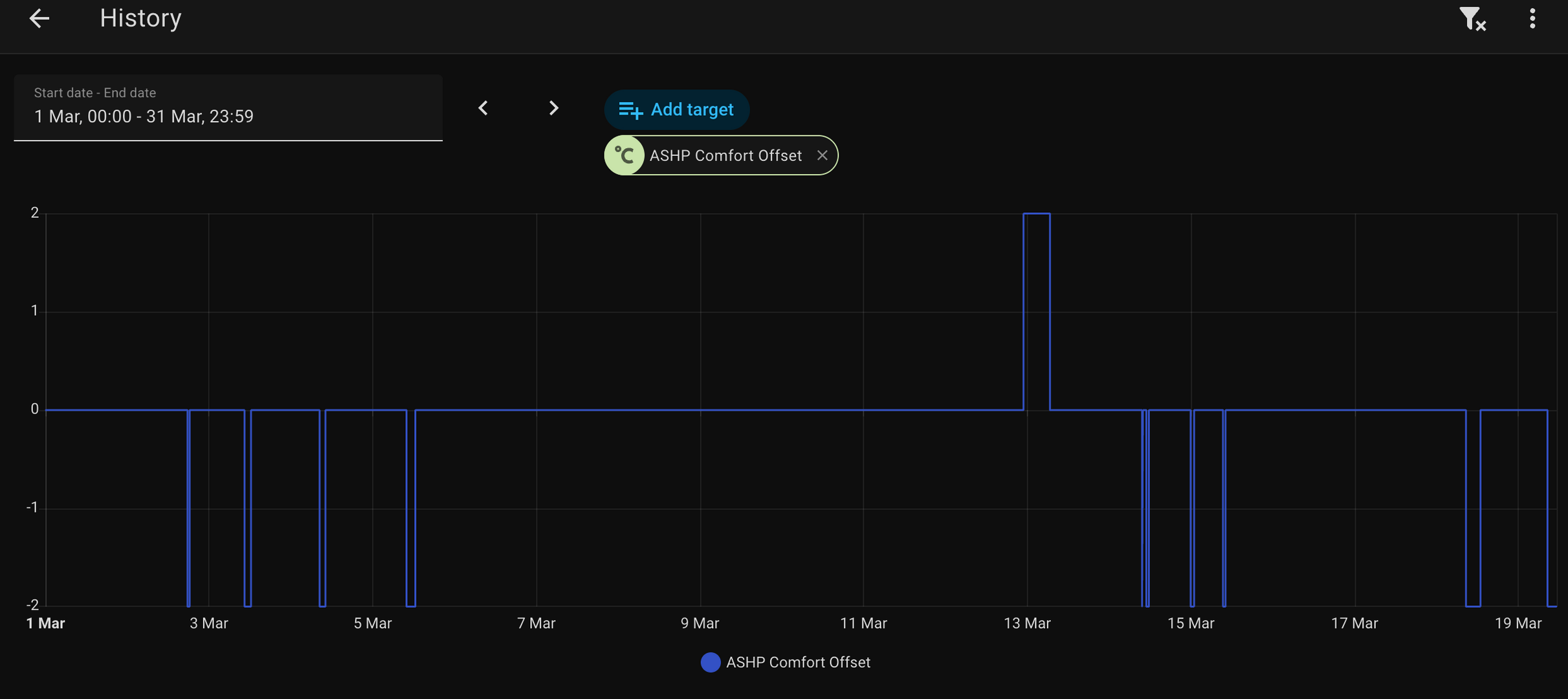
The above shows the comfort offset history for the month, so it will adjust the LWT by 2 degrees C either way, depending if the IAT is undershooting or overshooting. It hasn't actually run that much, which is what I was hoping/expecting. On 13th March it must have been windy and needed a boost. On the other days where it has offset -2, this will be down to solar gain.
What the adjustment effectively does when warmer, is that it turns the ashp off- so if the set LWT is then below 29 degrees C which is the lowest temp that it will run. This actually works perfectly. As per this graph (red arrow where the comfort offset has pushed the set LWT below 29)
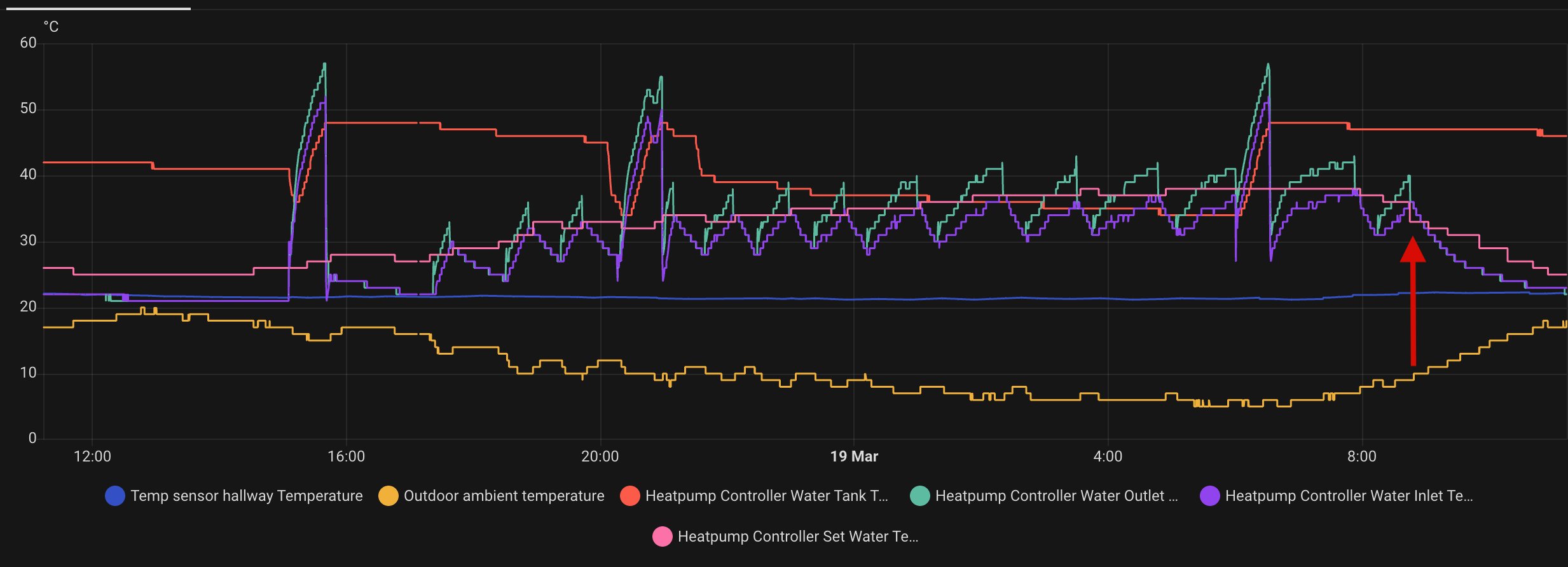
I think now I can confidently say this is our ideal setup in terms of control strategy, and I can probably leave as it is.
19/03/2026 7:26 pm
@benson — well done! My auto-adapt does pretty much the same thing, infrequent but useful adjustments. The advantage of using our own code is that we can tweak it to achieve control that works for our particular setup.
Midea 14kW (for now...) ASHP heating both building and DHW
2
Topic starter
20/03/2026 11:27 am
My auto-adapt does pretty much the same thing, infrequent but useful adjustments.
I presumed when Gemini was writing the automation code for me, that it was data farming from your forum posts about your set up 😆
It does work well- thanks for all of your help, and everyone else who has advised along the way.
1
20/03/2026 8:08 pm
I presumed when Gemini was writing the automation code for me, that it was data farming from your forum posts about your set up
Spooky! I think you already know I don't use AI much, but if I did, and found myself asking it a question and finding the answer seemed curiously familiar, I might end up thinking I need to start taking the tablets again!
It does work well- thanks for all of your help
A pleasure, and thank you for documenting what you have done here. I am sure the other who have contributed have also been glad to do so.
Midea 14kW (for now...) ASHP heating both building and DHW
1


20/03/2026 8:32 pm
@cathoderay For what is worth, it was recently pointed out to me, in a Greek heat pump forum, that certain high-end manufacturers, like Hitachi or Daikin, do indeed offer an IAT compensation mode.
So I had a look at a Hitachi Yutaki ASHP manual and indeed there is an option of room temperature compensation, which I quote:
"Room Temperature Compensation
If room compensation is enabled, the calculated OTC supply set-point is adjusted based on the difference between room temperature and room set-point in order to reduce the room error. The amount of room influence can be adjusted by the room temperature compensation factor setting (can be adjusted, default 2).
Example
Compensation factor = 2,
SR1 (room set-point) = 20,
TR1 (room temperature) = 23
=> S1 (supply set-point) reduced by 2 * (23 – 20) = 6C "
Even though this is a rather crude approach, I think it does show the future, which is very well predicted by your reported actions here.
Midea MHCV10WD2N7 R290, 5.8kWp energy community solar power.
20/03/2026 8:42 pm
@tasos — despite what Gemini may have been up to, I don't claim any originality for what I did, which was simply to implement a basic feedback loop! I had the idea of such a DIY implementation after hearing about Ecodan's auto adapt mode, and thinking setting up something similar in python should be very straight forward (and it turns out it is). I haven't done the same thing for forecast weather, because a forecast is only a forecast, but I am sure it could be done without too much extra effort ('if forecast windchill > X then increase LWT by 1°' etc) by anyone who wanted to add it.
Midea 14kW (for now...) ASHP heating both building and DHW
1
Page 26 / 26
Prev

SPONSORS
Degrees of Separation

Latest Posts
-

RE: Heat pump branding. Clever, contemporary… or a bit too much?
I think Heat Geek have done an amazing job on their bra...
By Tomtheheatingengineer , 7 hours ago
-
RE: HeatGeek vs Octopus surveys: puzzling disparity - any ideas why?
I have just had 3 heat loss surveys, one by heat geek o...
By David , 7 hours ago
-
RE: Heat Geek Zero Disrupt: Are We Sleepwalking Into Another Race to the Bottom?
I think that's the key question. After all inverter uni...
By Prunus , 9 hours ago
-
RE: battery storage without solar
As of October 1st they need specific qualifications to ...
By EtchedPixels , 10 hours ago
-
RE: How should the Boiler Upgrade Scheme be reformed?
A unit which uses water to transfer the heat/chill from...
By Temperature_Gradient , 10 hours ago
-
RE: Renewables & Heat Pumps in the News
With regards to the BUS grant raid, I gave it more thou...
By ASHP-BOBBA , 10 hours ago
-
RE: Why are ASHP installs so expensive?
The whole system seems to work on the basis of...
By ian33a , 11 hours ago
-
RE: Missing flow temperature in Heat Geek proposal
Good plan. If you can get half hourly meter readings a...
By JamesPa , 16 hours ago
-
RE: Heat Pumps Without Grants: Would You Have Installed One & Will You Now?
@editor Most certainly. The heat pump was an ideal s...
By Abernyte , 16 hours ago
-
Although regulations may well vary from country to coun...
By Majordennisbloodnok , 17 hours ago
-
RE: Does anyone have experience of a smart water meter?
Yep I caught our slow leak from a £100 bill rise 8)
By EtchedPixels , 17 hours ago
-
RE: Do You Need a Buffer Tank or Low Loss Header for Underfloor Heating in a Large Property?
@jamespa in some cases, failing the Turing test might b...
By GrahamF , 20 hours ago
-
RE: Passiv Smart Thermostat - Help & Forum Support
@energystoragetech The heat capacity of some...
By JamesPa , 22 hours ago
-
RE: tepeo ZEB UK Support & Info Thread
Sorry you are correct, I was remembering figures from t...
By JamesPa , 1 day ago




SPONSORS