

Notifications
Clear all
Joining the Renewable Heating Hub forums is completely free and only takes a minute. By registering you’ll be able to ask questions, join discussions, follow topics you’re interested in, bookmark useful threads and receive notifications when someone replies. Non-registered members also do not have access to our AI features. When choosing your username, please note that it cannot be changed later, so we recommend avoiding brand or product names. Before registering, please take a moment to read the Forum Rules & Terms of Use so we can keep the community helpful, respectful and informative for everyone. Thanks for joining!
Air Source Heat Pumps (ASHPs)
380
Posts
21
Users
50
Reactions
138.2 K
Views

Topic starter
20/01/2023 5:15 pm
After lots of help from @derek-m around balancing the system I am now looking for some advice on how best to set weather compensation.
We have moved into a 4 bed new build with a Midea ASHP and underfloor heating throughout and individual thermostats in each room.
I have looked at the manual and on YouTube but still rather confused as to the best way to set weather compensation. On the main panel I have found the option to select the weather compensation curves- when I click through it says ‘zone 1 high temp mode’ and ‘zone 2 low temp mode’- I have found the high and low temp curves in the manual but unsure which I should be selecting?
I also came across a video on YouTube about setting for weather compensation within the serviceman settings?
Thank for everyone’s kind help,
Katie
1
Topic starter
20/01/2023 7:09 pm
@batalto thank you 👍🏻
It doesn’t change the flow temp on the front of the control panel- is that correct?
any idea what temps to start at and how to adjust?
complete novice here!
thanks- Katie
1

20/01/2023 7:18 pm
@curlykatie no it won't. They'll look the same. Have you logged in to see what your current settings are?
As a warning, when you make a change it turns off both your hot water and your heating. You'll need to turn them back on at the front panel. Don't learn like I did when we had no hot water in the morning once
2

Topic starter
20/01/2023 9:07 pm
@batalto thanks for the warning!!
so I’ve turned off the weather compensation setting on the controller and adjusted the settings on ‘serviceman’ to 45 degrees at -2 and 32degrees at 15… not if this is a reasonable starting point?! The front panel is still saying flow temp of 50- so how do I know if it’s working to my new settings?!
also, if I find this is too warm, which part of the curve do I adjust initially and by how much?
thank you 👍🏻
20/01/2023 9:18 pm
- @curlykatie yeah that flow temp on the front panel stays the same as it's run on and off from the stat.
You can see details in the operation menu - page 8 of 9. At least I think this is the right one off the top of my head. You can check the manual if you want to double check
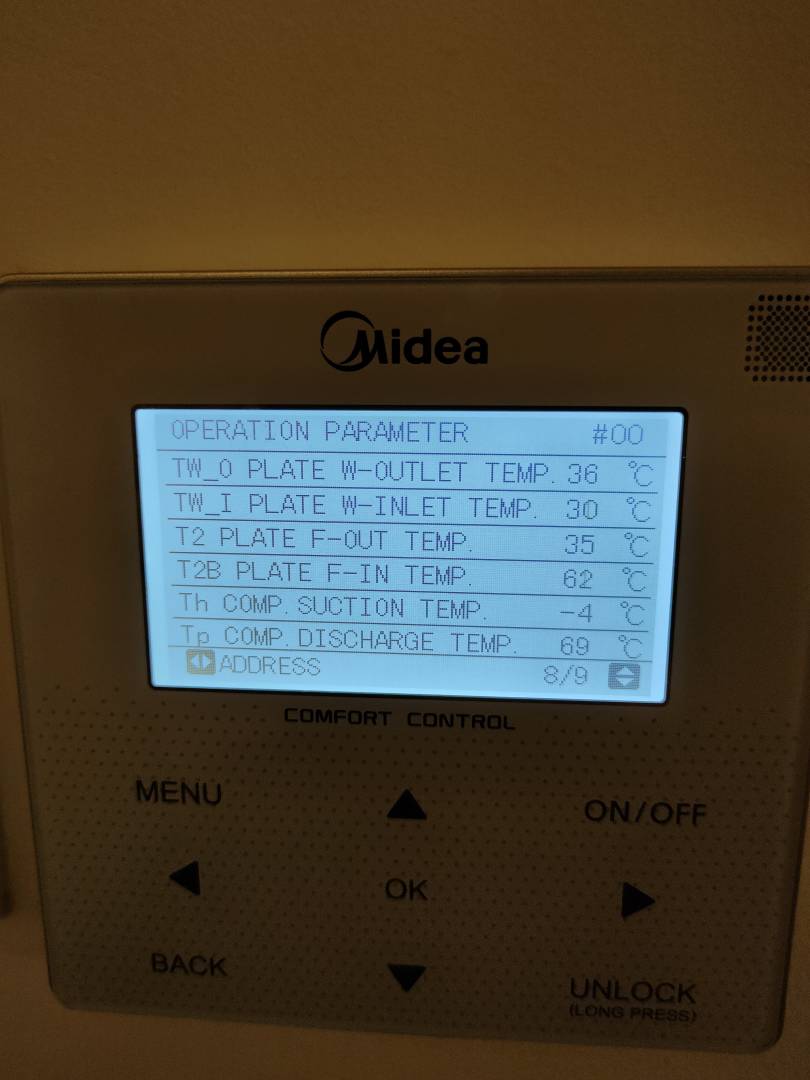
Also probably worth getting the app as well.
Topic starter
20/01/2023 9:38 pm
@batalto great- thank you.
I’ve got the app but it doesn’t seem to have much on it so not sure if I’ve got the right one!
20/01/2023 9:57 pm
@curlykatie it's kind of buried. Go to three dots at the top right, then electric consumption, you can look at those graphs. Then there is even more hidden in the top right dots; where you can find history data!
Bar that you can't find much else in the app. Still, better than nothing. Cathode ray is currently investigating if he can find some more detailed info by extracting it from the ASHP directly.
1

Topic starter
22/01/2023 8:31 am
@batalto more questions!
I am really confused as to whether the system is running on the weather compensation that I set in serviceman or not. I have attached a few pictures of the settings I have selected, along with some of the operation parameters screen.
On the operation screen, what numbers should I be interested in?!
My concern is on the operation parameters screen the climate curve data is blank. The app would also indicate that it is working at a fixed flow rate temp of 40 as per the front control screen (pic also included).
I’ve read through the manual but even more confused!
thanks for your help,
katie
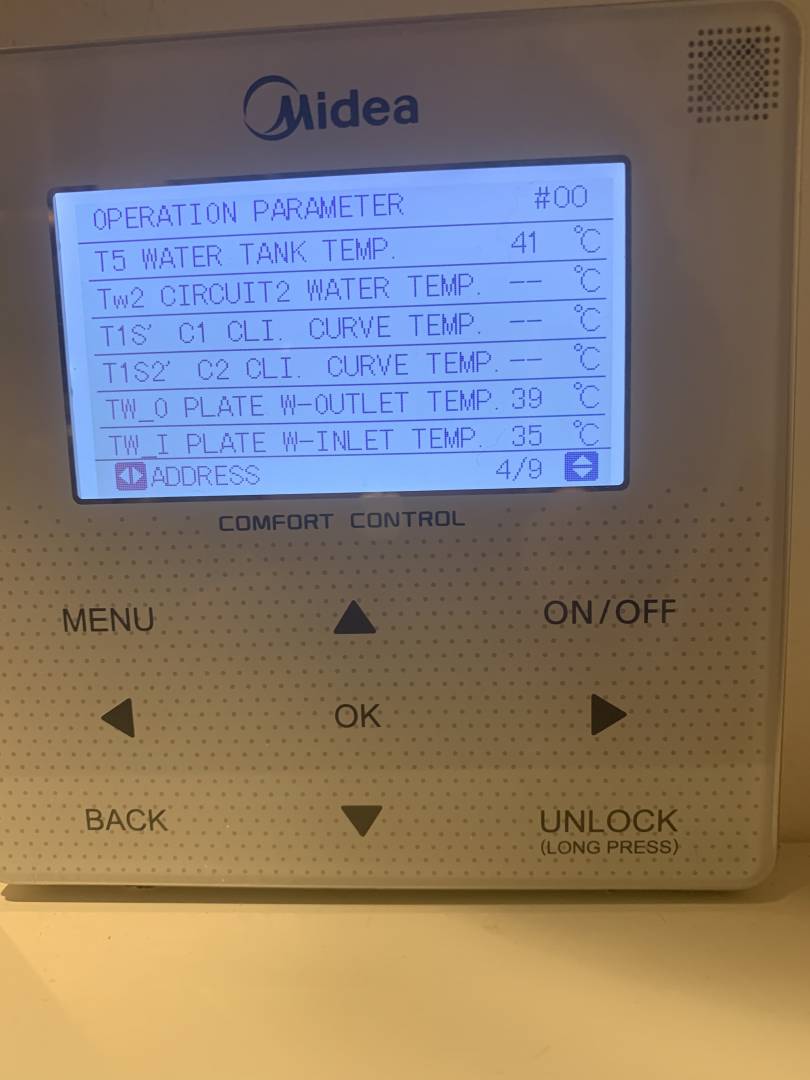


22/01/2023 9:41 am
Looks like it's fine. Might be a little low. It's 40°@-2 and 25°@15. See how you get on and tweak from there
22/01/2023 10:11 am
@curlykatie - the Midea controller/menus are a nightmare both to read and use. That said, as @batalto says, your screens look about right, perhaps a little on the low side - I am currently on 55@-4 / 35@15, for rads not UFH.
A couple of other comments: your DHW is currently off (as in off at the mains type of off), no squggles next to the tap on the RHS. This is probably because you have been in to the For Serviceman menu, exiting that menu turns off DHW and possibly the heating as well. Your DHW will not heat in this state, you need to turn the DHW on (tap right then tap On/Off to get the squiggles). That will mean it's on, but only in the sense that an immersion heater might be on, but not actually heating, because of a timer or the fact the hot water has not cooled enough to trigger the heater to become active. Very occasionally, I have had the DHW On/Off actually cause the DHW heating to come on. It's Midea, it's idiosyncratic.
On your Front Page view of the controller, in addition to telling you the DHW is off, on the RHS the 41 is your current DHW tank actual temp. On the LHS, that number with the tear drop symbol (very appropriate, they'll be tears before bedtime if I know anything about Midea's ways of working) is meaningless. Occasionally it changes, it may reflect what the leaving water temp would be if you weren't in weather comp mode. However it is very useful for confirming you are in weather comp mode: tap left and then try changing the number upwards or downwards. If you get a message saying you are in weather temp set function mode, do you want to turn it off or Chinglese to that effect then you are in weather comp mode, just use the Back button to leave things as they are.
Midea 14kW (for now...) ASHP heating both building and DHW
2
Topic starter
22/01/2023 10:13 am
@batalto fab- thank you!
Which numbers am I looking at on the operation screen which will indicate the actual flow temperature?
what does the fixed temp of 40 on the front screen relate to? I thought this would change as the flow temp adjusted to ambient temp?
Page 1 / 32
Next
SPONSORS

Degrees of Separation
Latest Posts
-

RE: Free app: run the immersion / heat pump from Growatt battery & solar surplus – no Home Assistant
Please bear in mind, everyone, that in order to use thi...
By Majordennisbloodnok , 2 hours ago
-
RE: The good, the bad and the not that great – my heat pump installation
@burtis Thanks for posting this and Im so pleased you ...
By JamesPa , 4 hours ago
-
RE: I need help with Ecodan ASHP
@f1p It turns out there have been a solar panel install...
By Andris , 16 hours ago
-
RE: 15kw pump for 225m2 1990's house - over kill?
@seaviews your installer would be right to say that the...
By GrahamF , 16 hours ago
-
RE: Vaillant ecoTEC Plus - Flow Temp and Set Up
@trebor12345 That curve looks healthy to me. I woul...
By JamesPa , 18 hours ago
-
RE: Tradespeople on Their Phones: What’s Acceptable When They’re Working in Your Home?
Actually, that's a very important point. I've only ev...
By Majordennisbloodnok , 1 day ago
-
RE: The Changing Jet Stream Could Challenge UK Air Source Heat Pumps
@susannasaunders can I just add to @rob-of-york s comm...
By JamesPa , 1 day ago
-
RE: Aerotherm and weather compensation
These are likely inked. The basic explanation is tha...
By JamesPa , 1 day ago
-
RE: Electrical works for air to air heat pump
agree with above. I have not had extra costs added wh...
By Batpred , 1 day ago
-
Good to hear that you found a solution. Absolutely a...
By Batpred , 1 day ago
-
RE: Are there any comparisons of DHW heat stores around?
@sarahemmm I have done things the opposite way round I ...
By Toodles , 2 days ago
-
RE: How will removing the standing charge on gas bills benefit heat pumps?
The BUS grant funding for 2026/27 will run out at the c...
By Rob of York , 3 days ago
-
-
RE: Say hello and introduce yourself
@e-a-west as the good Major said, welcome to the forums...
By Mars , 5 days ago







SPONSORS