

Notifications
Clear all
Joining the Renewable Heating Hub forums is completely free and only takes a minute. By registering you’ll be able to ask questions, join discussions, follow topics you’re interested in, bookmark useful threads and receive notifications when someone replies. Non-registered members also do not have access to our AI features. When choosing your username, please note that it cannot be changed later, so we recommend avoiding brand or product names. Before registering, please take a moment to read the Forum Rules & Terms of Use so we can keep the community helpful, respectful and informative for everyone. Thanks for joining!

Topic starter
12/06/2026 1:24 pm
I think I should be removing the // in front of the username and password? Apologies if it is an obvious question! If I remove them the code change to a red font.
#define MQTT_SERVER "192.168.1.165"//**IP address here of your MQTT server**
#define MQTT_USERNAME ""//enter username here
#define MQTT_PASSWORD ""//enter password here
#define MQTT_PORT 1883
//#define MQTT_ENCRYPTED // uncomment if MQTT connection is encrypted via TLS

12/06/2026 1:27 pm
...
@majordennisbloodnok - How do I create an additional user for the module you suggested? Would this be the user I add to the code on the ESP board? Thanks.
...
You have two choices, but the easiest is to wander down the left-hand side of the screen to the Settings cog, then go to People. From there, you can click at the top on Users and then use the bottom right blue button to Add User. There you can provide a name and password, and the important bit is to turn on "local access only" and make sure "Administrator" is turned off. That'll mean the user you create will have to be connected to your local network to gain access to your HA instance and even then won't be able to do any admin stuff.
Oh, and yes you then add the user and password you've just created to the code on the ESP board.
In the Raomin code I noticed it is set to query the data every 30 seconds. HA I believe is every 10 seconds. Would it be sensible to change the ESP code to query the data every 10 seconds to match HA?
From what I understand (and from what @f1p observed earlier), ESPAltherma only provides read-only data and does not allow you to change running values, although I may be wrong. If that's the case, there's IMHO little value in querying as often as 10 seconds; all you need is an interval that lets you see the data as close to real time as you decide you want. The fact HA has a refresh rate of 10 seconds simply means that whenever the ESPAltherma updates its output HA will see that change quickly.
If I am wrong, however, and it is possible to change some running values on the heat pump, it would make sense for ESPAltherma to be set to query as frequently as HA. That way, if you make a change you'll see the results of that change as quickly as it's applied.
105 m2 bungalow in South East England
Mitsubishi Ecodan 8.5 kW air source heat pump
18 x 360W solar panels
1 x 6 kW GroWatt battery and SPH5000 inverter
1 x Myenergi Zappi
1 x VW ID3
Raised beds for home-grown veg and chickens for eggs
"Semper in excretia; sumus solum profundum variat"
12/06/2026 1:34 pm
I think I should be removing the // in front of the username and password? Apologies if it is an obvious question! If I remove them the code change to a red font.
#define MQTT_SERVER "192.168.1.165"//**IP address here of your MQTT server**
#define MQTT_USERNAME ""//enter username here
#define MQTT_PASSWORD ""//enter password here
#define MQTT_PORT 1883
//#define MQTT_ENCRYPTED // uncomment if MQTT connection is encrypted via TLS
Not quite. The // simply means all the text after it on that line is ignored as code, so it's just a way of either adding helpful comments to your code or, as in the case of the last line above, temporarily removing a line altogether from the code's point of view without actually losing what the line says if you want to add it back in at some later point.
In the example above, the username and password should be typed in between the relevant double quotes:
#define MQTT_USERNAME "DennisB" //enter username here
#define MQTT_PASSWORD "S0m3th1ngM0r3C0mpl1cat3dThanPa55w0rd" //enter password here
By doing it that way, you'll still have the text "enter username here" in the code just in case #define MQTT_USERNAME wasn't descriptive enough.
105 m2 bungalow in South East England
Mitsubishi Ecodan 8.5 kW air source heat pump
18 x 360W solar panels
1 x 6 kW GroWatt battery and SPH5000 inverter
1 x Myenergi Zappi
1 x VW ID3
Raised beds for home-grown veg and chickens for eggs
"Semper in excretia; sumus solum profundum variat"
Topic starter
12/06/2026 1:34 pm
Thanks. I believe it is read only and I also have no interest in even trying to change anything using HA, I just want to calculate COP and see stuff like when a defrost happens.
As I'd need to calculate the COP by cross referencing the Shelly and ESP data, would it matter that the data feed is every 30 seconds from the HP?
I am assuming if I poll the HP data every 10 seconds it will generate more data to store on the HA server? Will it matter? I have a 512GB SSD in the HA laptop.

Topic starter
12/06/2026 1:36 pm
Not quite. The // simply means all the text after it on that line is ignored as code, so it's just a way of either adding helpful comments to your code or, as in the case of the last line above, temporarily removing a line altogether from the code's point of view without actually losing what the line says if you want to add it back in at some later point.
In the example above, the username and password should be typed in between the relevant double quotes:
#define MQTT_USERNAME "DennisB" //enter username here
#define MQTT_PASSWORD "S0m3th1ngM0r3C0mpl1cat3dThanPa55w0rd" //enter password here
By doing it that way, you'll still have the text "enter username here" in the code just in case #define MQTT_USERNAME wasn't descriptive enough.
Thanks. I should have worked that out myself 😆
12/06/2026 1:39 pm
...
As I'd need to calculate the COP by cross referencing the Shelly and ESP data, would it matter that the data feed is every 30 seconds from the HP?
...
No, it'll be fine.
...
I am assuming if I poll the HP data every 10 seconds it will generate more data to store on the HA server? Will it matter? I have a 512GB SSD in the HA laptop.
Actually, no. HA will looking for the latest value every 10 seconds, so so if ESPAltherma is providing data every 10 seconds it just means every time HA looks the value will be different. Otherwise, HA will be storing newvalue, samevalue, samevalue, newvalue, samevalue, samevalue and so on.
Oh, and I almost forgot to mention; HA only keeps those 10 second interval values for about 3 weeks after which it stores a rather more sparse set of values for longer term stats. As a result, your database will be far smaller than it might otherwise be. My HA installation, for instance, sits on a 256Gb volume, so 512Gb will be plenty.
This post was modified 4 months ago by Majordennisbloodnok
105 m2 bungalow in South East England
Mitsubishi Ecodan 8.5 kW air source heat pump
18 x 360W solar panels
1 x 6 kW GroWatt battery and SPH5000 inverter
1 x Myenergi Zappi
1 x VW ID3
Raised beds for home-grown veg and chickens for eggs
"Semper in excretia; sumus solum profundum variat"
Topic starter
12/06/2026 1:54 pm
I have changed the HA user (the one I setup at the start with Admin access) to local access only. Is that enough to keep it secure? I don't need to be accessing the data if I am away.
12/06/2026 2:19 pm
I have changed the HA user (the one I setup at the start with Admin access) to local access only. Is that enough to keep it secure? I don't need to be accessing the data if I am away.
This is your decision, but I would set up a new user specifically for the module. That way:
- If you have to disable that user for any reason, the only thing it affects is ESPAltherma data being written to HA until you have time to amend the code with new credentials.
- The user you set up has limited rights, so anything done with that user will not be able to completely trash your HA instance.
- Since ESPAltherma is the only thing using that user, you'll be able to set a ridiculous password that'd be a pain to type in manually. Almost all my passwords are randomly generated combinations of upper case, lower case, symbols and numerals that are longer than 25 characters, and the only ones that aren't like that are for web sites that idiotically impose limits that make those criteria impossible.
Admittedly my professional background makes me more paranoid than most so I'm incorporating more safeguards than the average punter but given it's just as easy to do that for you in this instance I'd personally go the whole hog.
105 m2 bungalow in South East England
Mitsubishi Ecodan 8.5 kW air source heat pump
18 x 360W solar panels
1 x 6 kW GroWatt battery and SPH5000 inverter
1 x Myenergi Zappi
1 x VW ID3
Raised beds for home-grown veg and chickens for eggs
"Semper in excretia; sumus solum profundum variat"
Topic starter
12/06/2026 2:56 pm
Thanks, this makes sense. I'll create another usure for the ESP Board and amend the PlatofrmIO code with that user before I upload it later today when the board arrives.
1
Topic starter
12/06/2026 8:00 pm
The M5StickC turned up a couple of hours ago, I flashed the Raomin ESPAltherma code and have fitted it inside the Daikin HP.
Much to my surprise it seems to be all working perfectly!
I can see the data in MQTT under devices. All the entities I chose are displaying the figures I'd have expected!
Now I think I need to get this data onto my dashboard. What would be the best way to do this?
Thanks.
14/06/2026 9:30 am
Sorry about the delay getting back to this, @bash.
...
Now I think I need to get this data onto my dashboard. What would be the best way to do this?
Not having a Daikin and therefore not having used ESPAltherma myself, I'm working on Home Assistant generics. However, my guess is that the simplest would be to go to Settings, Devices and Services, click on the MQTT device and then click on Daikin Altherma via ESPAltherma to get to the screen that shows all the entities you are now collecting. This screen will look something like the one below (that, in my case, shows MQTT entities for my Mitsi Ecodan).
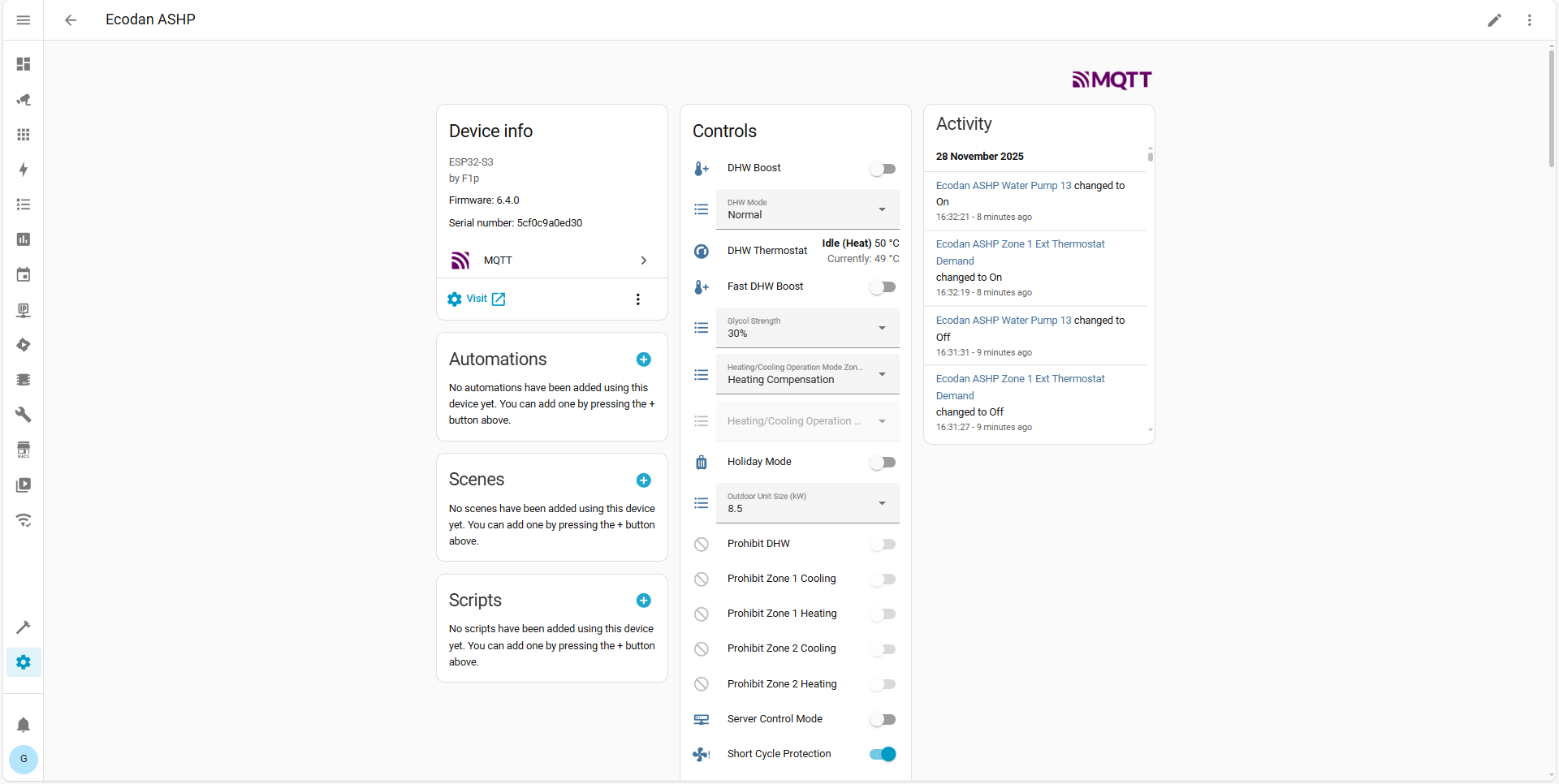
That middle column is the one that contains all the entities, grouped into the entity types. In my example, all the control entities are first, in a "Controls" section, and then scrolling down all the sensors are in a separate "Sensors" section. At the bottom left corner of each section are the words "Add to dashboard" in blue, and clicking that link adds all that section's entities to the dashboard you choose. You can then navigate to that dashboard and edit it to remove any entities you don't want and perhaps play about with ordering or changing the card used to display them.
Thinking a little more high-level, I don't know how your Home Assistant setup looks already, so I may be saying things you already know. However, in my setup I have an "Overview" dashboard that has multiple tabs across the top; the first being the true overview and then others for more detailed information about specific things. If you set up a dashboard with multiple tabs, the process I mentioned earlier about adding stuff to a dashboard will not only prompt you for which dashboard but also which tab. If I were in your position, I would have a tab dedicated to your ESPAltherma entities and populate it exactly as I've described, then decide which select few are key entities to have more readily available and add them to another "key info" tab that perhaps contains non-heat pump info too - some battery and inverter stuff, some temperature stuff, maybe even some tariff stuff - as a quick reference page. Remember that you can add an entity in more than one place, so having a complete dump of all of them on one tab is not a problem.
105 m2 bungalow in South East England
Mitsubishi Ecodan 8.5 kW air source heat pump
18 x 360W solar panels
1 x 6 kW GroWatt battery and SPH5000 inverter
1 x Myenergi Zappi
1 x VW ID3
Raised beds for home-grown veg and chickens for eggs
"Semper in excretia; sumus solum profundum variat"
14/06/2026 9:44 am
@bash, something we haven't touched on already relates to your Home Assistant installation overall. You mentioned your old laptop and that's a perfect use for old kit; even better that you can turn the screen off and have minimal power draw. However, things do go wrong and since it is old kit that increases the chances. I would strongly suggest you look at various methods for taking regular backups and storing them off the laptop. Personally, I use an addon called OneDrive Backup that takes regular full automatic backups and stores them on OneDrive. About a fortnight ago, the SSD in my HA box started getting errors and shortly after the box wouldn't boot properly. I replaced the SSD, reinstalled HA, restored my setup from backup and was up and running again very quickly, demonstrating not only that keeping backups is not just a good idea theoretically but also that the process works in practice.
105 m2 bungalow in South East England
Mitsubishi Ecodan 8.5 kW air source heat pump
18 x 360W solar panels
1 x 6 kW GroWatt battery and SPH5000 inverter
1 x Myenergi Zappi
1 x VW ID3
Raised beds for home-grown veg and chickens for eggs
"Semper in excretia; sumus solum profundum variat"


SPONSORS
Degrees of Separation
Latest Posts
-

RE: Indevolt Batteries UK Support & Info Thread
@editor Hi, To resolve this, please tap on the A...
By Indevolt Tech , 2 hours ago
-
RE: How will removing the standing charge on gas bills benefit heat pumps?
@toodles GIGO always stands! My Cosy 6, as you can...
By Watcher , 11 hours ago
-
RE: How much of your renewable and home setup would still work if the internet went down?
Interestingly we had an internet outage about a month a...
By Rob of York , 17 hours ago
-
RE: Double or Triple Glazed Windows?
Posted by: @singlespeed With 9 years repairing windo...
By Rob of York , 18 hours ago
-
@transparent we’re still running a secure version of PH...
By Mars , 21 hours ago
-
RE: How quickly would you want/expect heat recovery to take from setback?
Much longer than that here. The heating isn't even on. ...
By bobflux , 2 days ago
-
RE: Passiv Smart Thermostat - Help & Forum Support
Obviously the weather is changeable but there's a defin...
By Singlespeed , 2 days ago
-
RE: The Changing Jet Stream Could Challenge UK Air Source Heat Pumps
@rob-of-york I must admit that when we had a Daikin hea...
By Toodles , 2 days ago
-
RE: Forum updates, announcements & issues
Get the Renewable Heating Hub heads-up on WhatsApp. I...
By Mars , 2 days ago
-
RE: Safety study for plug in batteries out to tender - looks like Q3 2027 at best before legal
@editor I pointed out to the one of the Fuse execs that...
By dansus , 2 days ago
-
RE: 15kw pump for 225m2 1990's house - over kill?
@seaviews As well as loft insulation, there are othe...
By Rob of York , 2 days ago
-
RE: BT cuts you off, Plusnet blames Openreach... welcome to “seamless” broadband switching
Both of which (in most cases) use Openreach for the las...
By JamesPa , 2 days ago
-
RE: Renewables & Heat Pumps in the News
Yes, this is a swiss and german standard I believe, Vai...
By Batpred , 2 days ago
-
RE: Octopus Cosy 12 Heat Pump Regret: Incredibly Loud, Poor Heating & Constant Hum - Help!
@editor FWIW my problem was resolved, eventually, after...
By BigFish , 3 days ago





SPONSORS