

Notifications
Clear all
Joining the Renewable Heating Hub forums is completely free and only takes a minute. By registering you’ll be able to ask questions, join discussions, follow topics you’re interested in, bookmark useful threads and receive notifications when someone replies. Non-registered members also do not have access to our AI features. When choosing your username, please note that it cannot be changed later, so we recommend avoiding brand or product names. Before registering, please take a moment to read the Forum Rules & Terms of Use so we can keep the community helpful, respectful and informative for everyone. Thanks for joining!

05/01/2025 7:08 pm
@boycey what you have there is really bad cycling 10 times an hour.
if you increased the flow rate this will have only worsened it as it has less time to get rid of the heat to the UFH causing the return temp to be too high and the HP can’t modulate down any further.
Set your thermostat in the bedroom to the maximum temp you want it to be so you don’t overheat.
turn the the pump speed back down to 2 have you ever tried 1? What flow rate do you get with it set at 1?
Then see what happens at a range of milder OAT’s. If it’s still cycling more than a couple of times an hour then you will need to increase min flow temp up a bit.
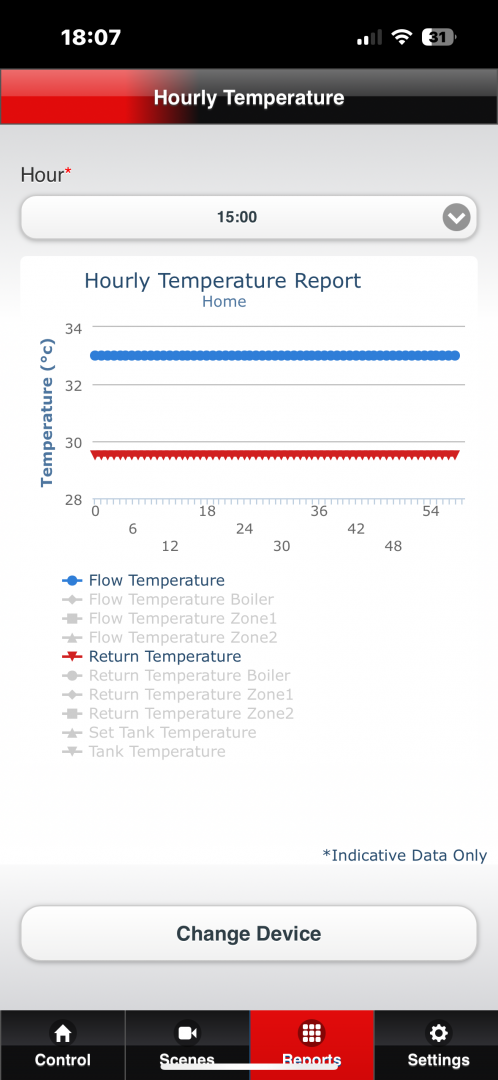
This my ecodan for an hour this afternoon at 11C outside at 32C flow

Topic starter
05/01/2025 7:18 pm
@sunandair stats set as above so there is just one set above bedroom comfort level, so that the circulation pump operates, I will then set that stat to a set back at night which will turn of the circulation pump and then the HP, .. I hope. No actuators, just the above, so hw will circulate everywhere. and then use WC for flow temp. Make sense?
There was a mesh steainer. And a few tiny bits in there.
I'm trying to get the sales team to get a service done, obviously Xmas has held that up. We shall see. I'm happy finding my way around the ftc6, it's just knowing what settings things are best at
Topic starter
05/01/2025 7:27 pm
@gary yes pump was on speed 1 for a few days. And yes u I understand what your dying re putting flow rate up. What size HP have you got? UFH ? I just seem to struggle to get that deltaT bigger.
Are you using stats or open loop just running on flow temp
What have you set your WC to?
Are you SE uk as at 11c today, I'm on south coast had same oat
05/01/2025 7:38 pm
It’s an 8.5kw ecodan UFH and rads.
WC set at 32C at 3C, 45C at -10C.
Running on weather comp with thermostat set to 22C in the hallway. Once it gets to 22C which it has just done this evening for the first time in a few weeks it has turned the heat pump off.
Do not worry about delta T, you can see from the chart I sent it was only 3C at these lower flow temps I only get delta T of 5 plus when I get upto 40C.
if your heat pump is happy running at pump speed 1 without it giving flow errors then use it. That will get you the the largest delta T


06/01/2025 11:26 am
”*
All actuators taken off all stats set to 17c except one in bedroom set to 21c 6am to 11pm, and setback to 19c 11pm to 6am. But I am getting graphs like I attached this morning every hour now except when dhw is on. “*
?
It's a newbuild, although system was put in 2yrs ago, we are first ones living here, I checked the y strainer.. circulation pump set to 2 for 9 L/M. The flow rate sheet I have shows 7 loops set between 1 and 2 L/M each adding up to 9 L/M.
Above highlight
does this mean you have certain areas not operating above 17c and only one area trying to get heating up to 21c? what % of the whole area floor area is operating at 17c? Or have I misunderstood this description?
thanks
Also was there any debris in the y-strainer, was there a mesh strainer actually in the y strainer housing…. Sometimes these are removed and not replaced… just checking.
PS as it’s a new build and you are the first occupier I think it would be worth pressing for service and induction on how to operate it.. by a Mitsubishi accredited installer.
hi @boycey I’ve read your latest reply. Not sure what you mean by “stats as above” I would suggest you find out if it’s ever been commissioned and if not then get them to set it up. since it’s been installed as a new build and again it would help for you to have a proper handover induction on how it has been set up.
good luck
Topic starter
06/01/2025 12:04 pm
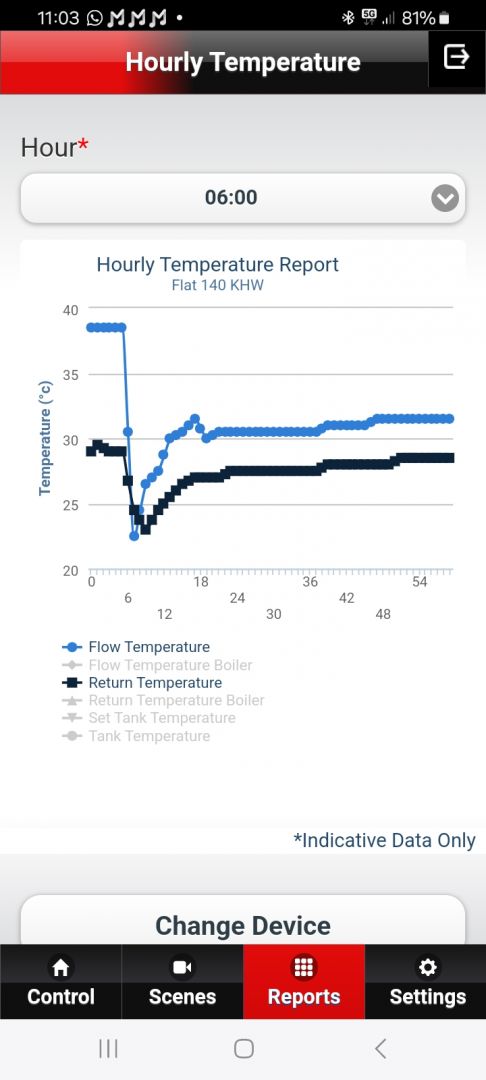
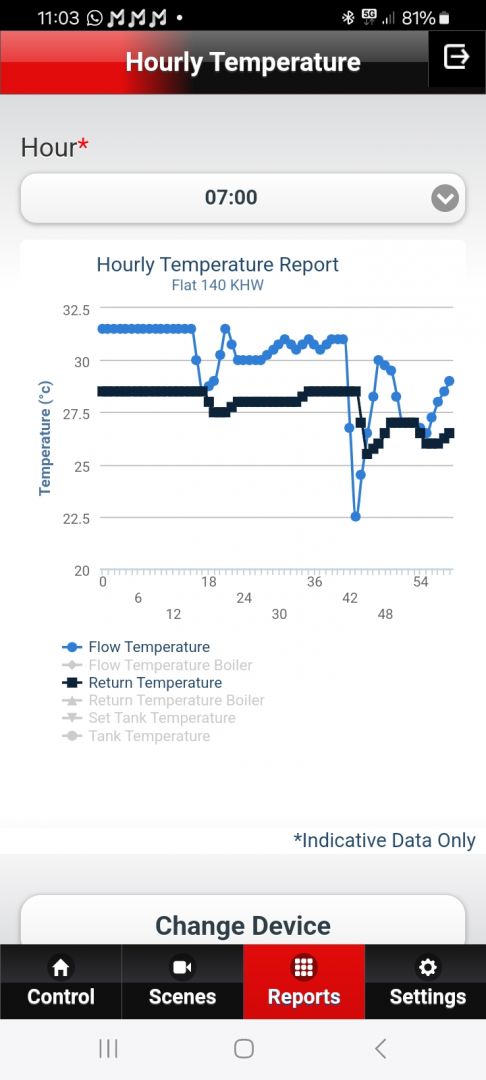
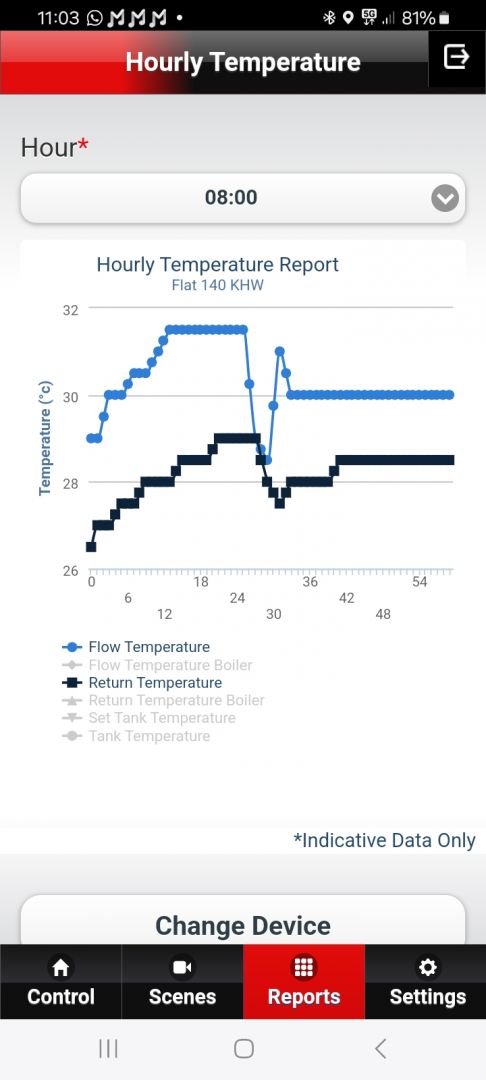
@sunandair I meant as I had already mentioned. It was commissioned, I have been l, like most here trying to get it set up efficiently. Ie take the actuators of so it open loop, use one stat only as an over heat limiter, run flow temp as low as possible, "low and slow". But in doing so my graphs have been as I've posted, lots of cycling etc.
Yesterday I decided to use the one stat to set a setback last night, set it to 19c from 9pm-6am, interesting the room temp in all rooms only dropped by half a deg, this is with 11c oat but high winds, we are on the sea front so get the weather off the sea, (no snow for us atm) so that is encouraging, I will have to test like this when it gets a colder snap again. But I guess we have a very low heat loss. We are on the 9th floor, so I guess we must get some sort of benefit from flats below us, as apposed to ufh that's on the ground albeit insulated.
We were back up to set temp from 6am by about 8.30-9am. So maybe I just need to put it stat on timed for a couple of times a day, keeping the floor topped up.. I'll post a couple of graphs from this morning see how they look.


05/04/2026 8:59 am
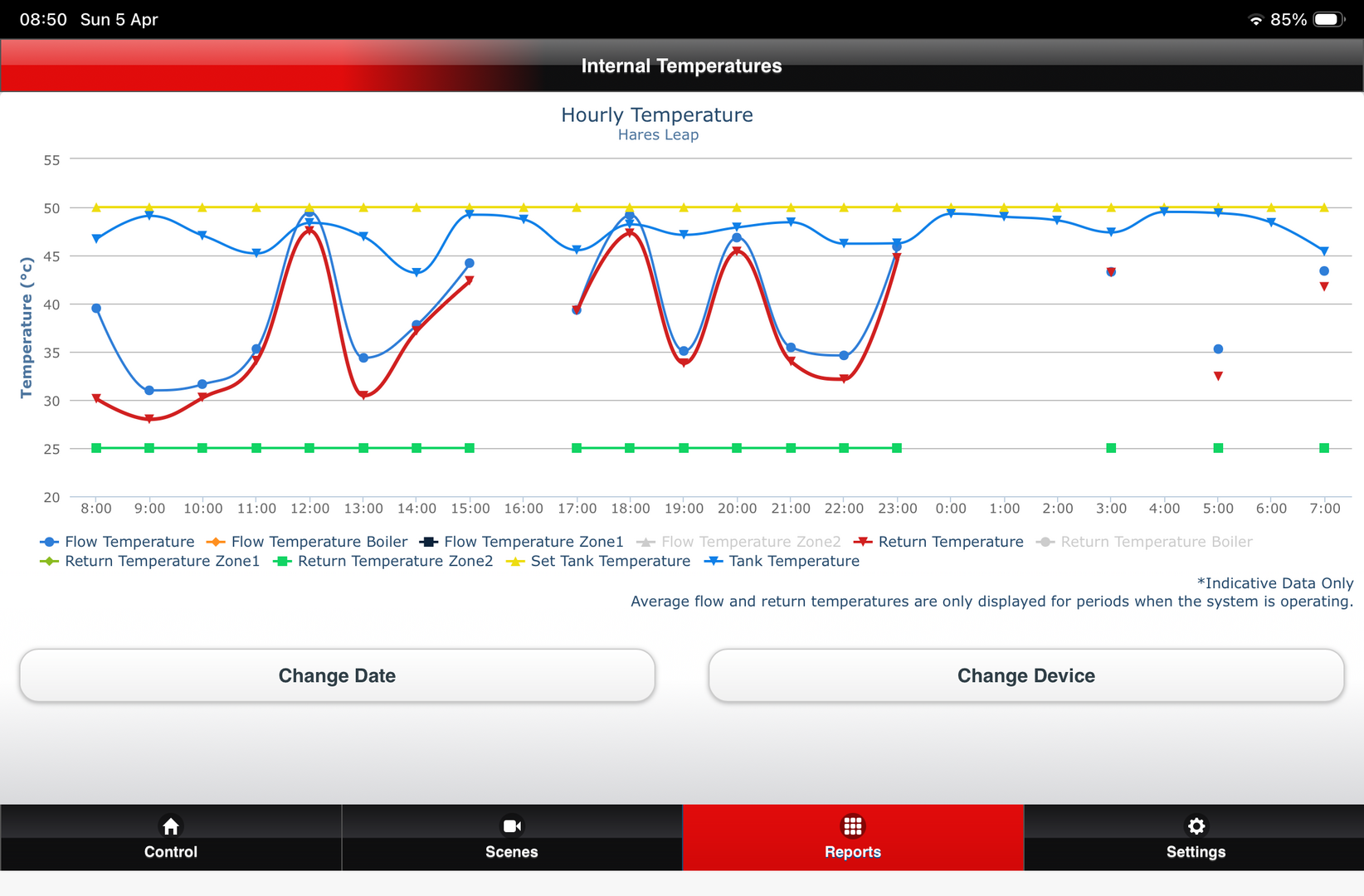
Hopefully someone on this thread will be able to advise. We have a newly installed Mitsubisi Ecodan ASHP for our new build home which is A rated. All working fine but I am trying to understand the melcloud report graphs. Our internal temp graph 24H has started showing gaps, is this because the system is not demanding heat from the ASHP as the outside temperature is rising. We are UFH throughout, set on weather comp mode and ECO HW. Graph attached. Any advice greatly appreciated.

05/04/2026 10:18 am
@stantong Hi. When my ecodan was installed I was, like you, struggling to interpret the MELcloud graphs. I would suggest having a look at the MEL pump app.
It certainly gives the average user a clearer picture of what's going on with your pump. It's available on android and via the web.
I think there is a trial period and then an ongoing cost but I think it's worth it.
You can run both Mel Pump and the Mitsubishi MelCloud at the same time.
Install 13 April 2024 - 4 Bedroom Brick Detached - Heat Loss 9,281w, Design 45c at -2 - Ecodan 11.2kw R32 - 25L Buffer - 250L Telford Tempest HP DHW - All 16 radiators replaced - Auto Adapt - Mel-Pump app - Octopus Cosy Fixed
10 March 2026 - now 2 x Sigenstor 10 batteries with 8kw Inverter
1
05/04/2026 1:14 pm
Many thanks. I will take a look. Do you know if the gaps in my graphs are normal for this time of year. Up to now the graphs have always been continuous lines.

05/04/2026 3:18 pm
It's really difficult to tell anything from that, the timescale is too long, there are gaps in data and no information on operating modes
To share a MELPump detailed report which allows us to review interactivity with the chart and at a higher resolution timescale would be far more beneficial in supporting you
Page 4 / 4
Prev

SPONSORS
Degrees of Separation

Latest Posts
-

RE: Heat pump branding. Clever, contemporary… or a bit too much?
I think Heat Geek have done an amazing job on their bra...
By Tomtheheatingengineer , 5 hours ago
-
RE: HeatGeek vs Octopus surveys: puzzling disparity - any ideas why?
I have just had 3 heat loss surveys, one by heat geek o...
By David , 6 hours ago
-
RE: Heat Geek Zero Disrupt: Are We Sleepwalking Into Another Race to the Bottom?
I think that's the key question. After all inverter uni...
By Prunus , 7 hours ago
-
RE: battery storage without solar
As of October 1st they need specific qualifications to ...
By EtchedPixels , 8 hours ago
-
RE: How should the Boiler Upgrade Scheme be reformed?
A unit which uses water to transfer the heat/chill from...
By Temperature_Gradient , 8 hours ago
-
RE: Renewables & Heat Pumps in the News
With regards to the BUS grant raid, I gave it more thou...
By ASHP-BOBBA , 9 hours ago
-
RE: Why are ASHP installs so expensive?
The whole system seems to work on the basis of...
By ian33a , 9 hours ago
-
RE: Missing flow temperature in Heat Geek proposal
Good plan. If you can get half hourly meter readings a...
By JamesPa , 14 hours ago
-
RE: Heat Pumps Without Grants: Would You Have Installed One & Will You Now?
@editor Most certainly. The heat pump was an ideal s...
By Abernyte , 14 hours ago
-
Although regulations may well vary from country to coun...
By Majordennisbloodnok , 15 hours ago
-
RE: Does anyone have experience of a smart water meter?
Yep I caught our slow leak from a £100 bill rise 8)
By EtchedPixels , 15 hours ago
-
RE: Do You Need a Buffer Tank or Low Loss Header for Underfloor Heating in a Large Property?
@jamespa in some cases, failing the Turing test might b...
By GrahamF , 18 hours ago
-
RE: Passiv Smart Thermostat - Help & Forum Support
@energystoragetech The heat capacity of some...
By JamesPa , 20 hours ago
-
RE: tepeo ZEB UK Support & Info Thread
Sorry you are correct, I was remembering figures from t...
By JamesPa , 1 day ago




SPONSORS

