

Notifications
Clear all
Joining the Renewable Heating Hub forums is completely free and only takes a minute. By registering you’ll be able to ask questions, join discussions, follow topics you’re interested in, bookmark useful threads and receive notifications when someone replies. Non-registered members also do not have access to our AI features. When choosing your username, please note that it cannot be changed later, so we recommend avoiding brand or product names. Before registering, please take a moment to read the Forum Rules & Terms of Use so we can keep the community helpful, respectful and informative for everyone. Thanks for joining!
Air Source Heat Pumps (ASHPs)
232
Posts
23
Users
27
Reactions
115.1 K
Views

16/07/2023 10:02 pm
I came across this video which is an interesting example of heat pump control within Home Assistant
1

16/08/2023 12:06 pm
Hi all
Recently had a Samsung AE140BXYDGG heat pump installed and have installed the modbus mim-b19n interface to link to Home Assistant. Before coming accross this thread I have been pulling my hair out as I'm new to modbus.
I have connected the modbus interface to a waveshare rs485 to ethernet adapter and have added some code from this thread into HA and I get 2 switches for hot water and heating plus the dhw temp sensor. Can anyone help with the code for the other sensors?
I see there is also a python script to modify the modbus interface. Can this be done over ip or do I need to connect by usb to my pi running HA?
Thanks in advance for any help 😀

17/08/2023 11:35 am
Hi all
Recently had a Samsung AE140BXYDGG heat pump installed and have installed the modbus mim-b19n interface to link to Home Assistant. Before coming accross this thread I have been pulling my hair out as I'm new to modbus.
I have connected the modbus interface to a waveshare rs485 to ethernet adapter and have added some code from this thread into HA and I get 2 switches for hot water and heating plus the dhw temp sensor. Can anyone help with the code for the other sensors?
I see there is also a python script to modify the modbus interface. Can this be done over ip or do I need to connect by usb to my pi running HA?
Thanks in advance for any help 😀
Before trying to accomplish some form of on - off control via HA or otherwise, I would suggest that you consider the benefits of Weather Compensation (WC) control.
How technical are you? Do you understand the internal workings of a digital control system?
23/08/2023 6:29 am
Before trying to accomplish some form of on - off control via HA or otherwise, I would suggest that you consider the benefits of Weather Compensation (WC) control.
How technical are you? Do you understand the internal workings of a digital control system?
Hi, I'm new to modbus but not far from being able to read all the available sensors. I just need help getting these other sensors into HA then HA can do the automations.

23/08/2023 9:04 am
What sensors are you trying to monitor and what kind of automation are you trying to achieve within HA?
23/08/2023 10:23 am
@derek-m thank you
This is my current config, I'm just trying to see as many sensors as possible. It is at a holiday home so I just want to have control remotely. I am not sure what automations yet just integrate into HA before I leave..
# samsung ashp
modbus:
  - name: "Samsung ASHP"
    type: tcp
    host: 172.16.1.115
    port: 502
    sensors:
      - name: "DHW Temp"
        slave: 1
        address: 75
        input_type: holding
        unit_of_measurement: °C
        state_class: measurement
        count: 1
        scale: 0.1
        offset: 0
        precision: 1
    switches:
      - name: Under Floor Heating
        unique_id: samsung_gen6_14kw_heating
        slave: 1
        address: 52
        command_on: 1
        command_off: 0
        verify:
          input_type: holding
          delay: 10
          address: 52
          state_on: 1
          state_off: 0
      - name: Hot Water
        unique_id: samsung_gen6_14kw_hot_water
        slave: 1
        address: 72
        command_on: 1
        command_off: 0
        verify:
          input_type: holding
          delay: 10
          address: 72
          state_on: 1
          state_off: 0
23/08/2023 11:47 am
One way to start would be to read each consecutive 16 bit Modbus register in turn and then try to decipher the information that is being stored. If you obtain some data by this method I may be able to help with the deciphering process.


07/09/2023 4:40 pm
@tomc are you adding a 120ohm resistor on the MIM-B19N between A+B terminals? I know Homely's install requires it and I see the USB adaptor you shared has a 120ohm on its A+B terminals.
How about ground, are you connecting that at both ends and if so what to?
Finally, are you using shielded/unshielded Cat5 or Beldren and what's your approx run length?
Hi @steven,
could you please say which contacts you used in the outdoor unit for the MIM-B19N
10/09/2023 7:58 am
is there a way to insert select switch for register 73 in ESPHome, I tried with number function and it works fine but a switch would be great.
0: Eco
1: Standard
2: Power
3: Force (for the EHS only)
Others: Ignored
14/09/2023 7:29 pm
@kocta This is my configuration.yaml code which is very much based on the work of others here
# Samsung Heat Pump Modbus Connection
modbus:
- name: "samsung"
type: serial
baudrate: 9600
bytesize: 8
method: rtu
parity: E
port: /dev/ttyUSB0
stopbits: 1
switches:
- name: Heating
unique_id: samsung_gen6_8kw_heating
slave: 1
address: 52
command_on: 1
command_off: 0
verify:
input_type: holding
delay: 10
address: 52
state_on: 1
state_off: 0
- name: Hot Water
unique_id: samsung_gen6_8kw_hot_water
slave: 1
address: 72
command_on: 1
command_off: 0
verify:
input_type: holding
delay: 10
address: 72
state_on: 1
state_off: 0
sensors:
- name: "Heat Pump Outdoor Temperature"
scan_interval: 60
slave: 1
address: 5
state_class: measurement
scale: 0.1
unit_of_measurement: °C
precision: 1
data_type: int16
# - name: "Heat Pump Status"
# scan_interval: 60
# slave: 1
# address: 52
# data_type: int16
- name: "Heat Pump Mode"
slave: 1
address: 53
data_type: int16
- name: "Heat Pump Outdoor Error Code"
scan_interval: 60
slave: 1
address: 1
data_type: int16
- name: "Heat Pump Indoor Error Code"
scan_interval: 60
slave: 1
address: 63
data_type: int16
- name: "Heat Pump Defrost Status"
scan_interval: 60
slave: 1
address: 2
data_type: int16
- name: "Heat Pump Target Indoor Temperature"
scan_interval: 60
slave: 1
address: 58
state_class: measurement
scale: 0.1
unit_of_measurement: °C
precision: 1
data_type: int16
- name: "Heat Pump Indoor Temperature"
scan_interval: 60
slave: 1
address: 59
state_class: measurement
scale: 0.1
unit_of_measurement: °C
precision: 2
data_type: int16
- name: "Heat Pump Return Temperature"
unique_id: ss_heat_pump_return_temperature
scan_interval: 60
slave: 1
address: 65
state_class: measurement
scale: 0.1
unit_of_measurement: °C
precision: 1
data_type: int16
- name: "Heat Pump Flow Temperature"
unique_id: ss_heat_pump_flow_temperature
scan_interval: 60
slave: 1
address: 66
state_class: measurement
scale: 0.1
unit_of_measurement: °C
precision: 1
data_type: int16
- name: "Heat Pump Water Out Set Temperature"
scan_interval: 60
slave: 1
address: 68
state_class: measurement
scale: 0.1
unit_of_measurement: °C
precision: 1
data_type: int16
- name: "Heat Pump Hot Water Status"
slave: 1
address: 72
- name: "Heat Pump Hot Water Mode"
scan_interval: 60
slave: 1
address: 73
data_type: int16
- name: "Heat Pump Hot Water Set Temperature"
scan_interval: 60
slave: 1
address: 74
state_class: measurement
scale: 0.1
unit_of_measurement: °C
precision: 1
data_type: int16
- name: "Heat Pump Hot Water Temperature"
scan_interval: 60
slave: 1
address: 75
state_class: measurement
scale: 0.1
unit_of_measurement: °C
precision: 1
data_type: int16
- name: "Heat Pump Flow Rate"
unique_id: ss_heat_pump_flow_rate
scan_interval: 60
slave: 1
address: 87
state_class: measurement
scale: 0.1
precision: 1
data_type: int16
- name: "Heat Pump Discharge Temperature"
scan_interval: 60
slave: 1
address: 60
state_class: measurement
scale: 0.1
unit_of_measurement: °C
precision: 1
data_type: int16
- name: "Heat Pump Heating Discharge Set Temperature"
scan_interval: 60
slave: 1
address: 62
state_class: measurement
scale: 0.1
unit_of_measurement: °C
precision: 1
data_type: int16
- name: "Heat Pump Immersion Heater Mode"
scan_interval: 60
slave: 1
address: 85
data_type: int16
- name: "Heat Pump 3way valve position"
scan_interval: 60
slave: 1
address: 89
data_type: int16
This is the script I run from an automation which is scheduled or triggered by pressing a Zigbee button I attached to the front of the DHW cylinder to boost the hot water
alias: Boost Hot Water
sequence:
  - service: modbus.write_register
    data:
      hub: samsung
      address: 72
      slave: 1
      value: 1
    alias: Turn Hot Water On
  - service: modbus.write_register
    data:
      hub: samsung
      address: 73
      slave: 1
      value: 1
    alias: Set Hot Water Mode to Standard
  - service: modbus.write_register
    data:
      hub: samsung
      address: 74
      slave: 1
      value: 500
    alias: Set Hot Water Temp to 50°C
  - delay:
      hours: 0
      minutes: 30
      seconds: 0
      milliseconds: 0
    alias: Delay for 30 mins
  - service: modbus.write_register
    data:
      hub: samsung
      address: 72
      slave: 1
      value: 0
    alias: Turn Hot Water Off
  - service: modbus.write_register
    data:
      hub: samsung
      address: 73
      slave: 1
      value: 0
    alias: Set Hot Water Mode to Eco
  - service: modbus.write_register
    data:
      hub: samsung
      address: 74
      slave: 1
      value: 450
    alias: Set Hot Water Temp to 45°C
mode: restart
icon: tc:heat-index
15/09/2023 9:53 am
The main part is "modbus.write_register" and the payload associated with that.
thank you . Big clue. thank you again. you're running these as HA commands with the modbus connected physically directly to and controlled from your HA machine? you're not using ESPHOME or ESP devices?
would you mind testing if the modbus.write_register HA command is able to succesfully change target flow temp? (register 68) ?
@iancalderbank I have come back to this a number of times but always thought I was doing something wrong. My system was initially set up to use Water Law and when I try to write to register 68, nothing happens - as expected from the information here.
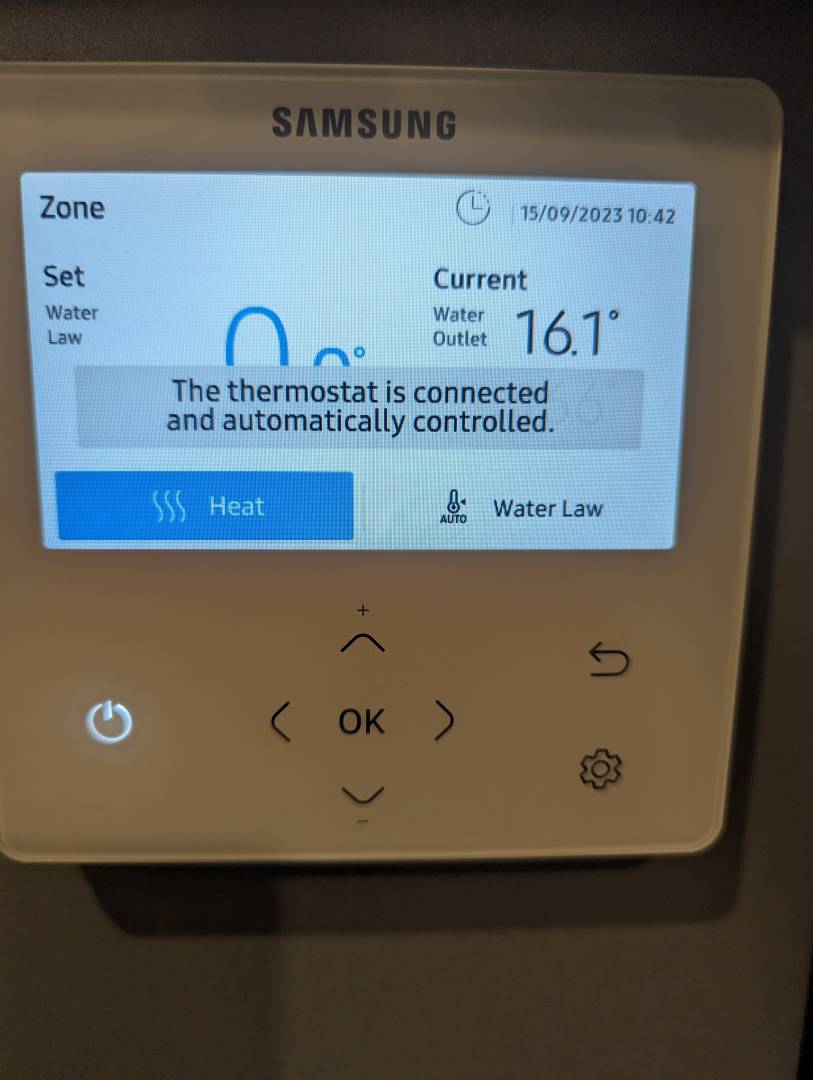
My problem is I cannot figure out how to change my system into non-Water Law mode. I have included a picture of my heating screen below and when I move the blue selection to "Heat" and click OK, I get the following message: "The thermostat is connected and automatically controlled" and then nothing happens. The "Water Law" text remains below the word "Set" on the left hand side and the value remains at 0.0°.
If you, or anyone else, can point my in the right direction to change the settings then I will certainly try to write to register 68 again.


SPONSORS

Degrees of Separation
Latest Posts
-

RE: Are there any comparisons of DHW heat stores around?
@etchedpixels Since I was encouraged to move to a co...
By SarahEmmm , 13 minutes ago
-
RE: Electrical works for air to air heat pump
Good afternoon, Subject to which brand and c...
By ASHP-BOBBA , 40 minutes ago
-
RE: The Changing Jet Stream Could Challenge UK Air Source Heat Pumps
@hml1827 1962 / 3 winter is remembered by me as my last...
By Toodles , 49 minutes ago
-
RE: 15kw pump for 225m2 1990's house - over kill?
@seaviews I have read you latest response re buffer ...
By JamesPa , 17 hours ago
-
RE: How will removing the standing charge on gas bills benefit heat pumps?
The BUS grant funding for 2026/27 will run out at the c...
By Rob of York , 1 day ago
-
-
@editor Ouch, sorry to re start the tick. I had assume...
By DavidB , 3 days ago
-
RE: Say hello and introduce yourself
@e-a-west as the good Major said, welcome to the forums...
By Mars , 3 days ago
-
RE: How much of your renewable and home setup would still work if the internet went down?
Yes I actually have a copy of a tool that whenever a ce...
By EtchedPixels , 3 days ago
-
RE: Indevolt Batteries UK Support & Info Thread
@editor Hi, To resolve this, please tap on the A...
By Indevolt Tech , 4 days ago
-
RE: Double or Triple Glazed Windows?
Posted by: @singlespeed With 9 years repairing windo...
By Rob of York , 4 days ago
-
@transparent we’re still running a secure version of PH...
By Mars , 4 days ago
-
RE: How quickly would you want/expect heat recovery to take from setback?
Much longer than that here. The heating isn't even on. ...
By bobflux , 5 days ago
-
RE: Passiv Smart Thermostat - Help & Forum Support
Obviously the weather is changeable but there's a defin...
By Singlespeed , 5 days ago








SPONSORS