

Notifications
Clear all
Joining the Renewable Heating Hub forums is completely free and only takes a minute. By registering you’ll be able to ask questions, join discussions, follow topics you’re interested in, bookmark useful threads and receive notifications when someone replies. Non-registered members also do not have access to our AI features. When choosing your username, please note that it cannot be changed later, so we recommend avoiding brand or product names. Before registering, please take a moment to read the Forum Rules & Terms of Use so we can keep the community helpful, respectful and informative for everyone. Thanks for joining!
Air Source Heat Pumps (ASHPs)
207
Posts
15
Users
54
Reactions
82.8 K
Views
Topic starter
15/04/2023 11:58 am
@cashback - impressive work. Time will tell whether you end up with a warm feeling on the inside or a red face on the outside ;-).
One thing I am pretty sure I have established (because of the read-write-read-write-read tests I did) is that you can using simple python minimalmodbus code set the upper and lower LWT on the weather comp curve. This means you have direct real time control of the LWT,which has great potential. This goes beyond your four current controls which I think are all in effect toggles/switches, as opposed to something that can set (write) a value. Might be worth seeing if you can add that capability.
Midea 14kW (for now...) ASHP heating both building and DHW

15/04/2023 12:12 pm
you can using simple python minimalmodbus code set the upper and lower LWT on the weather comp curve. This means you have direct real time control of the LWT,which has great potential. This goes beyond your four current controls which I think are all in effect toggles/switches, as opposed to something that can set (write) a value. Might be worth seeing if you can add that capability.
Indeed, I have experimented with this, however the Node-RED Home Assistant integration doesn't have the capability to add number inputs as controls, only toggle switches (hence why I am minded to go down the full blown client library and proper integration route).
I did create something that will bridge Home Assistant inputs to modbus via Node-RED but it's not very portable at all, hence not sharing here.
Topic starter
15/04/2023 12:31 pm
Has anyone made sense of the TF Module Temperature ("Feedback on outdoor unit, unit: °C") on address 135?
Perhaps try plotting the TF Module Temperature over time, and with other variables, to see if any pattern emerges? Also worth having a look at the manuals, to see if the 'TF Module' (more Midea mumbo jumbo) is defined anywhere. Most Midea temps are T followed by a number, so it may be that TF is the odd one out. If its units are degrees C, then presumably it is a temperature, but of what?
Midea 14kW (for now...) ASHP heating both building and DHW

15/04/2023 7:29 pm
The Modbus register 135 module temperature feedback is not marked as a measured value, probably calculated. It is displayed in operating parameters 9/9. The hydraulic or heat exchanger is referred to as a module. It could also mean the monoblock completely.
Found this some days ago for midea clones https://github.com/marekorok/modbus-midea/blob/main/modbus-esp8266.yaml. But can't judge, ordered such a small calculator esp8266 for a test.

15/04/2023 7:32 pm
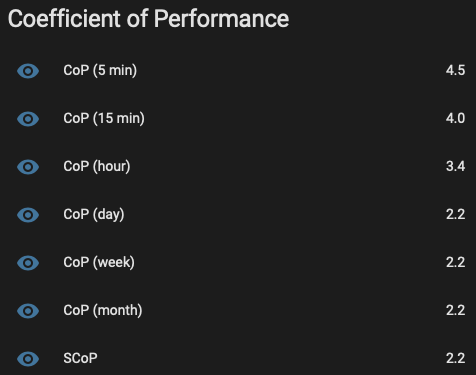
I have Home Assistant calculating CoP over a few intervals now.
This is using power consumption from the Shelly, and a trapezoidal Riemann Sum of the heat output (as reported via Modbus). The figures for 1 day and longer are skewed because the electrical power meter is a few hours older than the heat meter.
I elected to use the Shelly over the energy in reported from modbus because of the imprecision, and also because the energy spent on the ancillaries (like the pump and heating controls) should be fairly constant, and also counts towards energy required to heat my home.
1
Topic starter
15/04/2023 8:28 pm
Found this some days ago for midea clones
Thanks, but link goes to 404 - any possibility you could re-post a correct link?
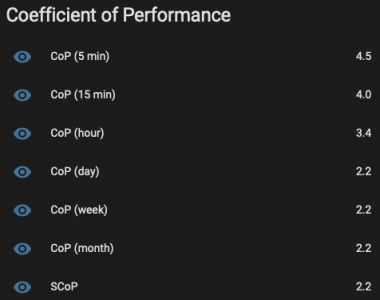
@cashback - this interestingly shows what I have suspected, longer intervals produce more credible COPs (though your much longer intervals may strain credibility the other way!). I am still collecting data, and will soon, see how my hourly COPs compare to my daily COPs. If some of the errors are random, then on a short time frame they may skew the results, but cancel out over longer time frames.
The figures for 1 day and longer are skewed because the electrical power meter is a few hours older than the heat meter.
I'm not sure how this happens: if you are doing the COP calculation on data covering the interval, whatever it is, and the data is complete for the interval, then the fact a meter is 'older' than another one shouldn't make any difference.
Midea 14kW (for now...) ASHP heating both building and DHW
15/04/2023 10:42 pm
The figures for 1 day and longer are skewed because the electrical power meter is a few hours older than the heat meter.
I'm not sure how this happens: if you are doing the COP calculation on data covering the interval, whatever it is, and the data is complete for the interval, then the fact a meter is 'older' than another one shouldn't make any difference.
It's down to how the Home Assistant Statistics sensors are configured - they're measuring the change between two points, the meter sensors are less than 1 day old, so the oldest readings on the heat and energy meters are different right now because, as you pointed out, the data must be complete for them to be representative. Once the data is older than 1 day/week/month/year then each of those sensors will become representative.
15/04/2023 10:49 pm
To your first point:
this interestingly shows what I have suspected, longer intervals produce more credible COPs (though your much longer intervals may strain credibility the other way!)
For the shorter ones (5 and 15 minutes, and to some extent, one hour) it all depends where in the cycle you are at that point in time. At the start of the cycle, the CoP is < 1. Mid/end-cycle, short term CoP is at its greatest. When you're spanning the end of the cycle, the short term CoP is ridiculous high (next to no power going in, but the emitters still have heat to give off from the circulating water). The short term ones are useful for seeing how CoP changes over the course of a day, or the peak CoP mid-cycle.
Ask me in a year what the SCoP looks like!

Topic starter
16/04/2023 8:36 am
It's down to how the Home Assistant Statistics sensors are configured - they're measuring the change between two points, the meter sensors are less than 1 day old, so the oldest readings on the heat and energy meters are different right now because, as you pointed out, the data must be complete for them to be representative. Once the data is older than 1 day/week/month/year then each of those sensors will become representative.
Yes, that all makes sense, it was how I had HA calculate kWh and COPs using statistics and templates. For example, to calculate the 24 hour trailing COP based on total energy in/out I had in configuration.yaml:
sensor:
  - platform: statistics
    name: "kWh used in last 24 hours"
    entity_id: sensor.device_id_total_energy_consumption
    state_characteristic: change
    max_age:
      hours: 24

  - platform: statistics
    name: "kWh produced in last 24 hours"
    entity_id: sensor.device_id_total_produced_energy
    state_characteristic: change
    max_age:
      hours: 24


template:
  - sensor:
      - name: "Trailing 24h COP"
        unique_id: my_trailing_24h_cop
        unit_of_measurement: "COP"
        state_class: measurement
        state: >
          {%set used = states('sensor.kwh_used_in_last_24_hours') %}
          {%set produced = states('sensor.kwh_produced_in_last_24_hours') %}
          {{ ((int(produced)/int(used)) | string )[0:4] }}
If I remember correctly, you have to add the state_class: measurement line to the template sensor to get HA to log the values to the statistics table in the database - not exactly intuitive. Compare the above to the HA free python code I am currently using. After loading (I use pandas) the last 60 lines of mideadata.csv (the minute data file), all I need is:
    midea_kWh_in = df.energy_in.max() - df.energy_in.min()

    midea_kWh_out = df.energy_out.max() - df.energy_out.min()

    ## deal with zero energy in
    midea_60m_COP = 0
    if midea_kWh_in > 0:
        midea_60m_COP = round(midea_kWh_out / midea_kWh_in, 2)
Not only is this much shorter, it is also much more human readable: compare the code used in each method to do the actual COP calculation, or the convoluted HA voodoo needed to get a sensibly rounded result with the much clearer basic python round(number, decimal places). In the code, df in the data frame holding the 60 lines of data in orderly rows (minutes x 60) and columns (the parameters, with a header row at the top), such that df.energy_in.max() is the max value in the energy_in column etc. The first two lines of code subtract the minimum value from the maximum value (note no need to specify row) to get the hour's usage, the last line of code calculates the COP, with a zero/if preamble to deal with the zero energy in case (to avoid divide by zero errors). The data then gets written to the hourly data csv file. Being a csv file, it is both robust and extremely easy to read and indeed write to without getting tangled up in the spider's web of a relational database.
Writing my own code also means I can implement a simple way of allocating the energy in/out and so COP to space or DHW heating. By getting (via modbus) the position of the three way diverter valve, I know for each minute which mode the unit is running in. For each mode, have a column in which 0 means not running in that mode, and 1 means running in that mode, and then multiply the energy/COP values by those column values. If 0, the value becomes 0, if 1, the full value gets allocated. Over short time frames, there are, as you mentioned, over-run problems eg immediately after a DHW heating spell in mild weather the space heating LWT is ridiculously high, making the calculated energy out and so COP ridiculously high. I am still working on ways to deal with this (possibly a time offset, ie for each energy out value, divided by the energy in value from two minutes ago). Our current calculations assume instant transfer of the energy in to energy out, which of course is not what happens in real life, there is a lag.
I'm going to set up the code to record 24 hour (daily) values today, and in a few days time will be able to compare the daily values with the hourly values. I'm hoping they will turn out to be much smoother and generally saner.
I know I do bang on about this, but my code is much simpler and much more accessible to beginners, and that is why I continue to plug it rather than HA.
Midea 14kW (for now...) ASHP heating both building and DHW
Topic starter
16/04/2023 8:41 am
@gorm - thanks very much for posting the link. Following it, I see it needs 462 lines of not easy to read or maintain code to access a Midea clone over modbus. I think you already know what I am going to say: it is too complicated!
Midea 14kW (for now...) ASHP heating both building and DHW
16/04/2023 10:02 am
May be, but also be the author know what he down. I dont know so much about this.
We will see, I looked in Visual Studio. There are about 3600 lines.

SPONSORS

Degrees of Separation

Latest Posts
-

RE: Heat pump branding. Clever, contemporary… or a bit too much?
I think Heat Geek have done an amazing job on their bra...
By Tomtheheatingengineer , 4 hours ago
-
RE: HeatGeek vs Octopus surveys: puzzling disparity - any ideas why?
I have just had 3 heat loss surveys, one by heat geek o...
By David , 5 hours ago
-
RE: Heat Geek Zero Disrupt: Are We Sleepwalking Into Another Race to the Bottom?
I think that's the key question. After all inverter uni...
By Prunus , 6 hours ago
-
RE: battery storage without solar
As of October 1st they need specific qualifications to ...
By EtchedPixels , 7 hours ago
-
RE: How should the Boiler Upgrade Scheme be reformed?
A unit which uses water to transfer the heat/chill from...
By Temperature_Gradient , 7 hours ago
-
RE: Renewables & Heat Pumps in the News
With regards to the BUS grant raid, I gave it more thou...
By ASHP-BOBBA , 8 hours ago
-
RE: Why are ASHP installs so expensive?
The whole system seems to work on the basis of...
By ian33a , 8 hours ago
-
RE: Missing flow temperature in Heat Geek proposal
Good plan. If you can get half hourly meter readings a...
By JamesPa , 13 hours ago
-
RE: Heat Pumps Without Grants: Would You Have Installed One & Will You Now?
@editor Most certainly. The heat pump was an ideal s...
By Abernyte , 13 hours ago
-
Although regulations may well vary from country to coun...
By Majordennisbloodnok , 14 hours ago
-
RE: Does anyone have experience of a smart water meter?
Yep I caught our slow leak from a £100 bill rise 8)
By EtchedPixels , 14 hours ago
-
RE: Do You Need a Buffer Tank or Low Loss Header for Underfloor Heating in a Large Property?
@jamespa in some cases, failing the Turing test might b...
By GrahamF , 17 hours ago
-
RE: Passiv Smart Thermostat - Help & Forum Support
@energystoragetech The heat capacity of some...
By JamesPa , 19 hours ago
-
RE: tepeo ZEB UK Support & Info Thread
Sorry you are correct, I was remembering figures from t...
By JamesPa , 1 day ago




SPONSORS
