

Notifications
Clear all
Joining the Renewable Heating Hub forums is completely free and only takes a minute. By registering you’ll be able to ask questions, join discussions, follow topics you’re interested in, bookmark useful threads and receive notifications when someone replies. Non-registered members also do not have access to our AI features. When choosing your username, please note that it cannot be changed later, so we recommend avoiding brand or product names. Before registering, please take a moment to read the Forum Rules & Terms of Use so we can keep the community helpful, respectful and informative for everyone. Thanks for joining!

Topic starter
05/03/2025 9:39 pm
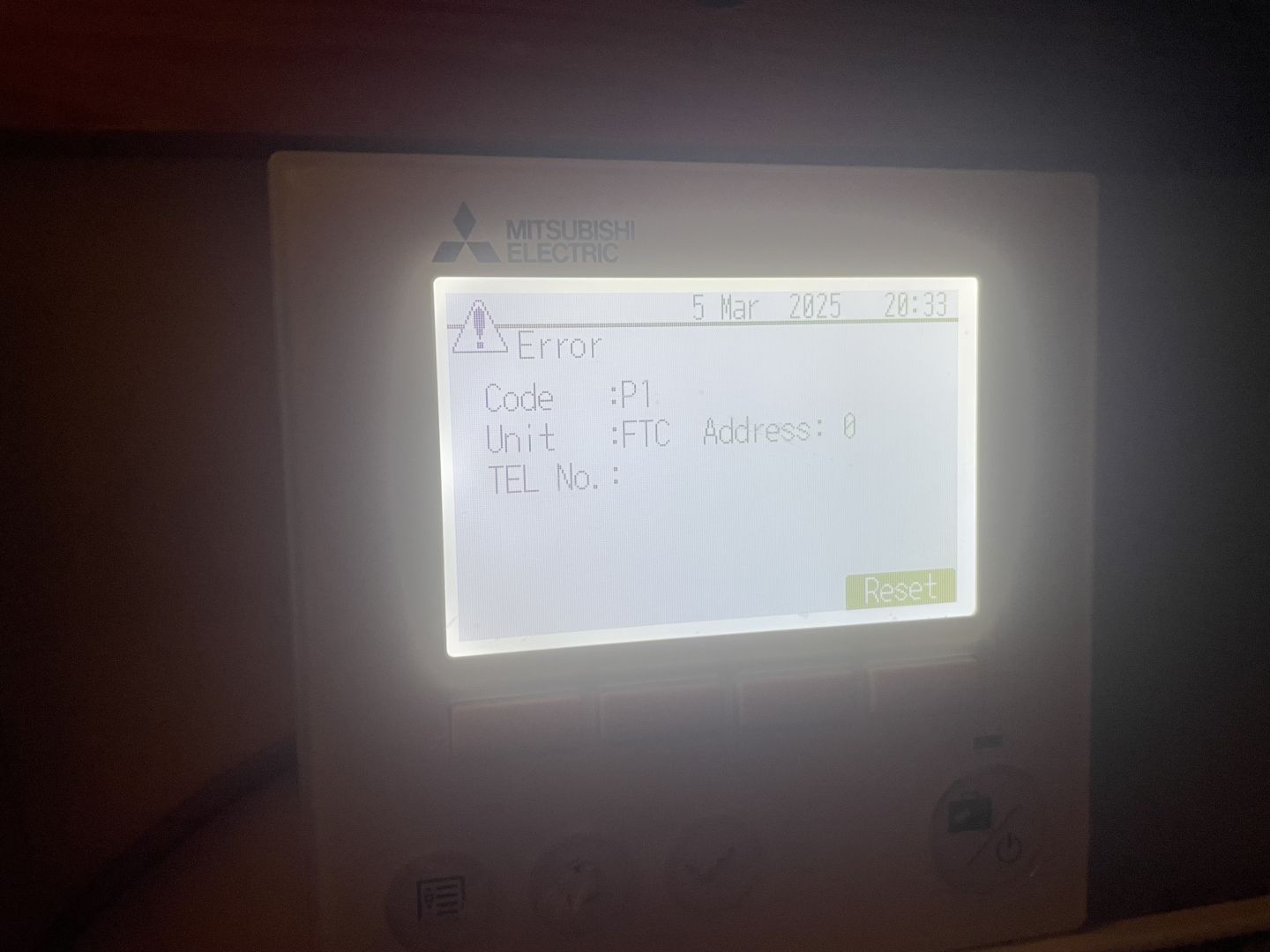
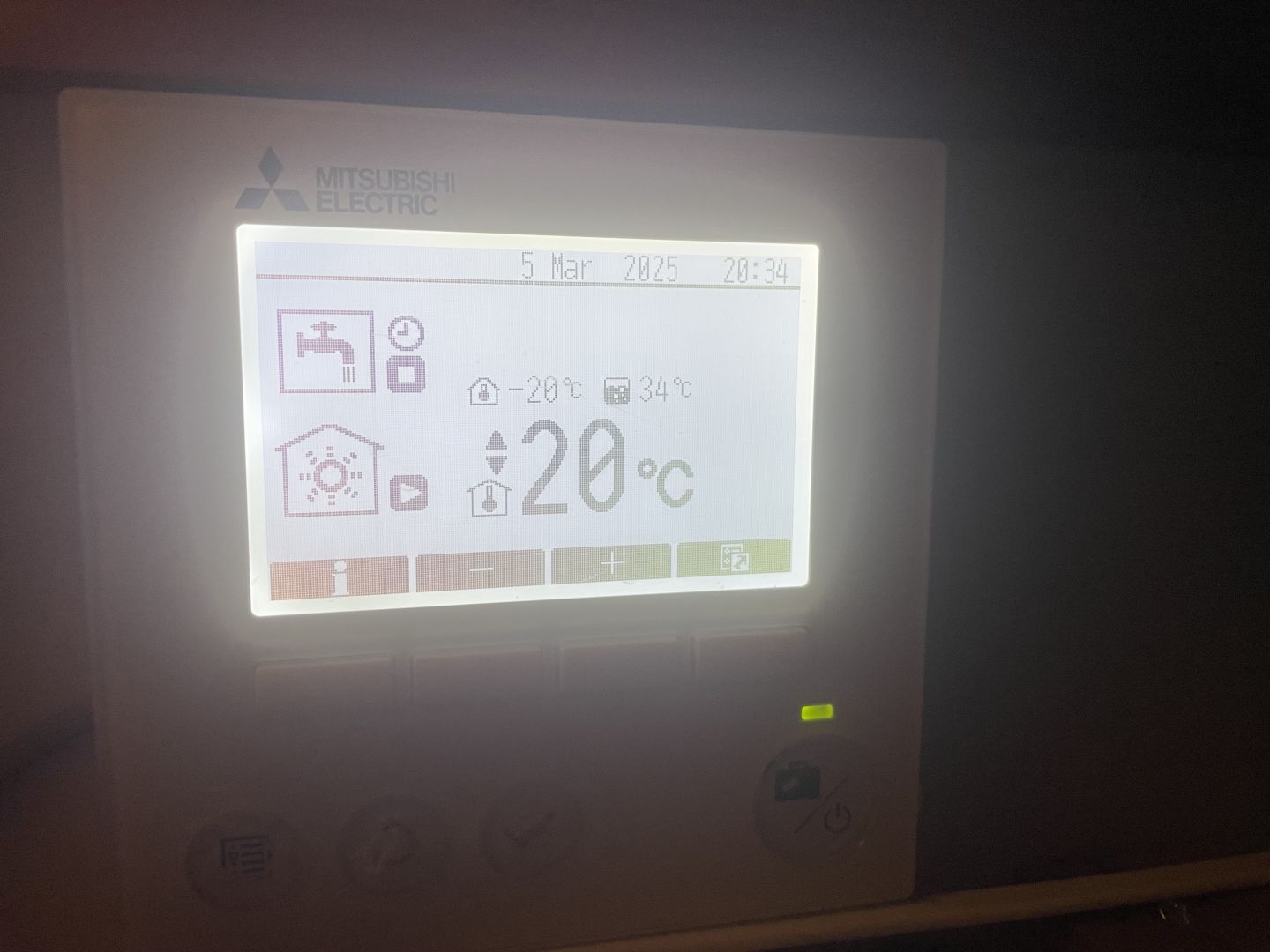
Running through my ecodan setting and I seem to of pressed something I shouldn’t as the picture below shows the room temperature as
-20 .
im also getting a code P1 as shown.

06/03/2025 8:57 am
That is the target room temperature and if its showing -20C then its not getting a temperature signal from the thermistor.
Are you using the main controller to measure the temperature, i.e. the unit in your image or do you have a wireless controller as well?
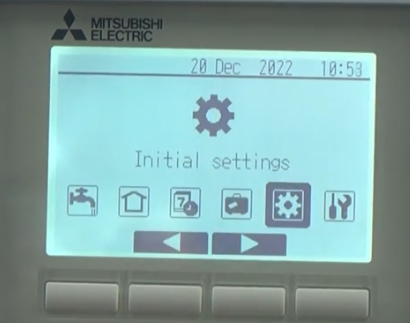
If you are using the main controller go to initial settings, then into room sensor settings, sensor settings and it should show MAIN RC, if its showing something else then that is what you have changed and its needs changing back to MAIN RC.
Topic starter
06/03/2025 9:04 am
@gary Firstly thanks for you reply. Iv been in a bit of a panic as apparently I fiddle too much according the the better half and that one day I’m genna muck something up😉
I do have a wireless controller that I control the room temperature from and I’m using auto adapt.
When browsing through the settings I’m sure it was on TH1 but I have this morning tried already the MAIN RC and right now everything seems fine.
Watch this space!!👍
Topic starter
06/03/2025 9:11 am
And fair play to Mitsubishi support as they’ve already replied to my email from last night with the reply below.
A P1 error where the controller is looking for a sensor which doesn’t exist on the system, it’s a default setting which normally takes place if there has been a power cut
Carry out a power reset on the system to clear the fault from the indoor & outdoor unit
Power reset here
Ask the caller
What is controlling the Zone? The main controller, 3rdparty controller, Mitsubishi wireless stat or a thermistor (A thermistor is a cable which is connected to the system to read the temperature)
- Press and hold the POWER/HOLIDAY button in the bottom right hand corner of the Mitsubishi controller until SYSTEM SHUTDOWN comes up and select YES
- Press the bottom left MENU button
- Using the directional arrows highlight the INITIAL SETTINGS icon and select with the TICK button
- Scroll down to the option ROOM SENSOR SETTING and select with the tick button
- Select the SENSOR SETTING in the options with the tick button
If it’s a 2 zone set up, an extra setting will show up here to select which zone
- Select the SENSOR SETTING option with the tick button
- Change the sensor option by pressing the cycle button until it displays either
MAIN RC – If using the main controller or any third party thermostats
ROOM RC (1 to 8) – If using a Mitsubishi wireless thermostat
TH1 – If using a thermistor (This will default after a power cut, we don’t normally use it in the UK)
- Confirm using the TICK button
- Once confirmed use the back button to exit the menu and turn the system back on with the Power/briefcase button
- Make sure the heating mode is correct Changing Heating Modes
If the ROOM RC isn't there, it needs dipswitch SW1-8 by your installers. If that’s on go into ROOM RC Select and make sure the appropriate zone is selected

06/03/2025 9:26 am
If you have a Mitsubishi wireless controller then it should be set to Room RC not Main RC, if you use Main RC it will now be using the main controller's temperature to control the house temp where as before it sounds like it was using the wireless controller.
Topic starter
06/03/2025 9:33 am
My mistake. Room RC is what I selected 👍👍

SPONSORS

Degrees of Separation

Latest Posts
-

RE: Heat pump branding. Clever, contemporary… or a bit too much?
I think Heat Geek have done an amazing job on their bra...
By Tomtheheatingengineer , 4 hours ago
-
RE: HeatGeek vs Octopus surveys: puzzling disparity - any ideas why?
I have just had 3 heat loss surveys, one by heat geek o...
By David , 4 hours ago
-
RE: Heat Geek Zero Disrupt: Are We Sleepwalking Into Another Race to the Bottom?
I think that's the key question. After all inverter uni...
By Prunus , 6 hours ago
-
RE: battery storage without solar
As of October 1st they need specific qualifications to ...
By EtchedPixels , 7 hours ago
-
RE: How should the Boiler Upgrade Scheme be reformed?
A unit which uses water to transfer the heat/chill from...
By Temperature_Gradient , 7 hours ago
-
RE: Renewables & Heat Pumps in the News
With regards to the BUS grant raid, I gave it more thou...
By ASHP-BOBBA , 7 hours ago
-
RE: Why are ASHP installs so expensive?
The whole system seems to work on the basis of...
By ian33a , 8 hours ago
-
RE: Missing flow temperature in Heat Geek proposal
Good plan. If you can get half hourly meter readings a...
By JamesPa , 13 hours ago
-
RE: Heat Pumps Without Grants: Would You Have Installed One & Will You Now?
@editor Most certainly. The heat pump was an ideal s...
By Abernyte , 13 hours ago
-
Although regulations may well vary from country to coun...
By Majordennisbloodnok , 14 hours ago
-
RE: Does anyone have experience of a smart water meter?
Yep I caught our slow leak from a £100 bill rise 8)
By EtchedPixels , 14 hours ago
-
RE: Do You Need a Buffer Tank or Low Loss Header for Underfloor Heating in a Large Property?
@jamespa in some cases, failing the Turing test might b...
By GrahamF , 17 hours ago
-
RE: Passiv Smart Thermostat - Help & Forum Support
@energystoragetech The heat capacity of some...
By JamesPa , 19 hours ago
-
RE: tepeo ZEB UK Support & Info Thread
Sorry you are correct, I was remembering figures from t...
By JamesPa , 1 day ago




SPONSORS
