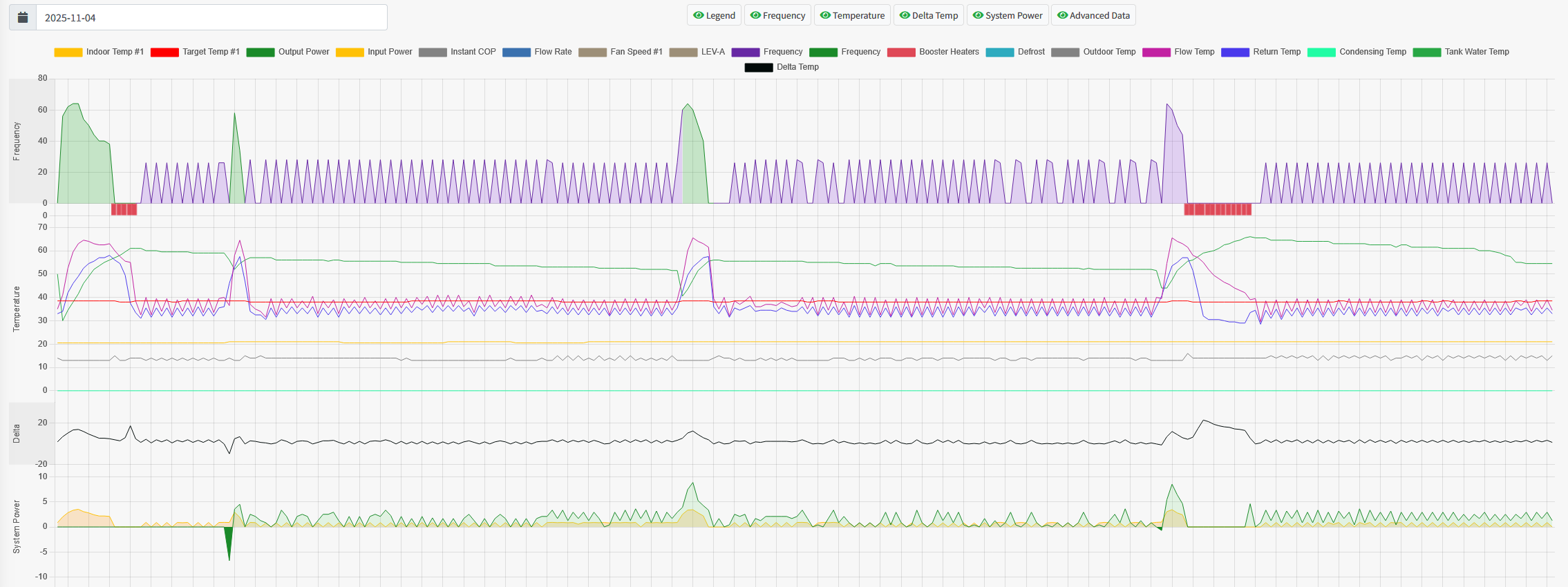
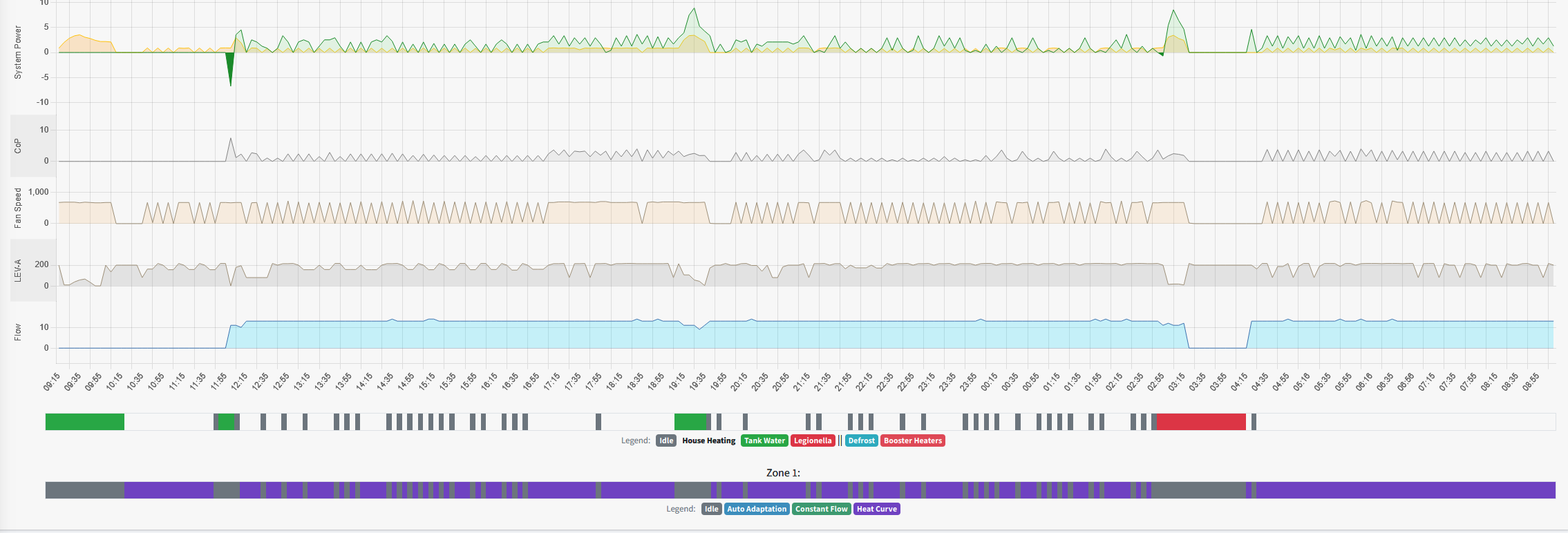
@sand There have been some doubts about the accuracy, but "Consumed Energy" and "Delivered Energy" figures are available on the FTC 5/6 unit if you have one
342sq m "Upside down" house in Algarve. Portugal
Mitsubishi PUHZ-120YUK 12kW ASHP
12 Solar Panels Growatt Inverter
2 x Growatt 7.5kW Batteries
Fronius EV Charger
Kia e- Niro 64kW
Hi yes we have FTC 5 but no flow meter was supplied so no energy reads. As we don't have this information on melcloud I just wondered if it just duplicates the info, but gives much more data, or would it be able to provide this information.
@sand Yes. The COP is reported and you can split it into DHW and Heating by using the appropriate energy figures in the energy tab.
House-2 bed partial stone bungalow, 5kW Samsung Gen 6 ASHP (Self install)
6.9 kWp of PV
5kWh DC coupled battery
Blog: https://thegreeningofrosecottage.weebly.com/
Heatpump Stats: http://heatpumpmonitor.org/system/view?id=60
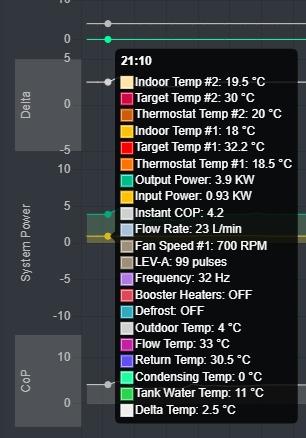
I have now managed to tweak a few DIP switches to get all the required data through now and I have to say Im really impressed with the dongle (Mitsubishi Ecodan Heat Pump to MQTT/Home Assistant and MELCloud WiFi or Ethernet) and the data displayed in Melpump. For the price its a real bargain. Here are some screen shots.
It has really diagnosed some of the issues at this facility so that I can go about fixing them.
@editor would you like a write up of this for your articles?
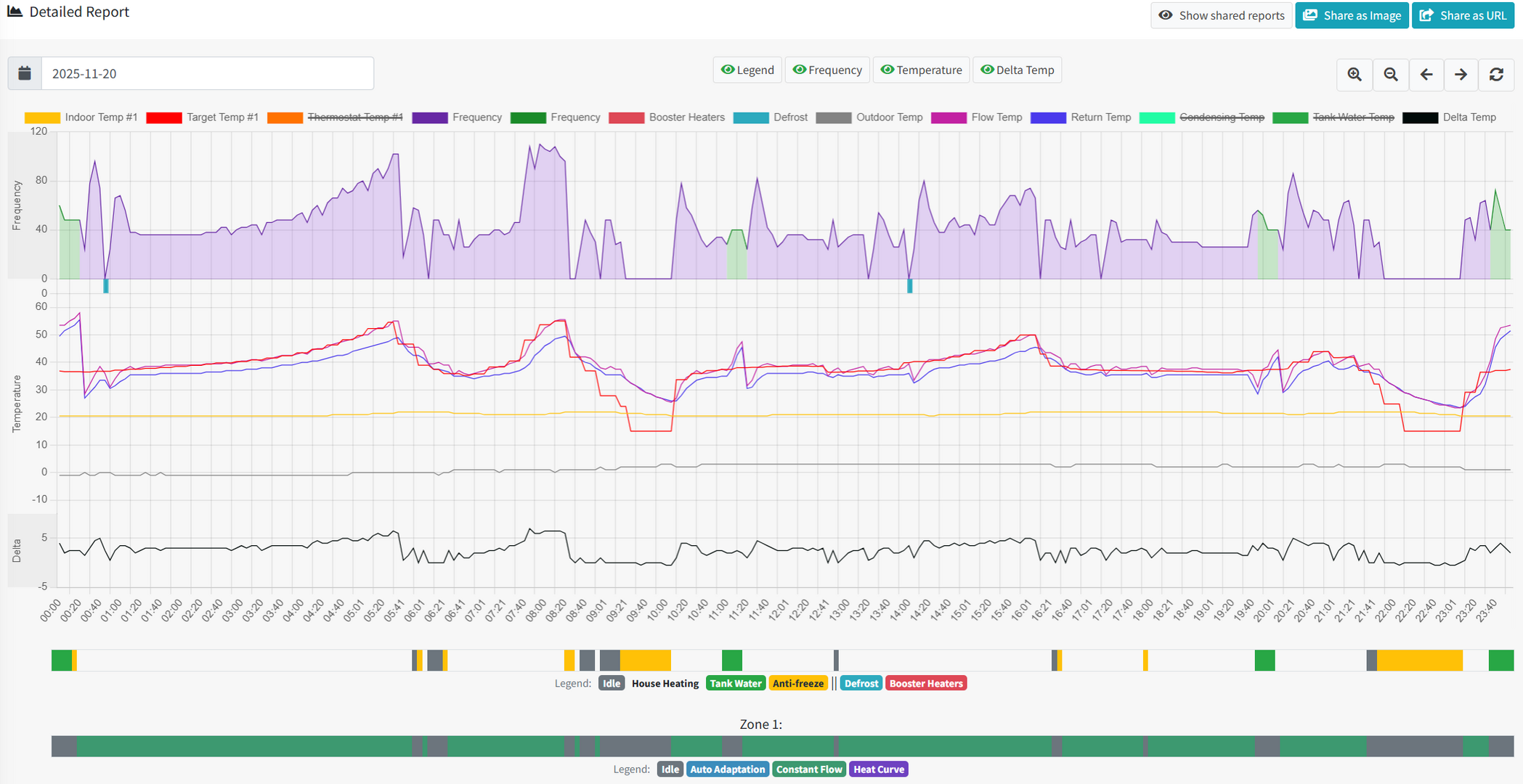
This is really useful to see, now that I've started to use MelPump myself, as it highlights both the different levels of information available with and without the dongle, and also how differently my system is running compared to yours (which I've written about at length in my installation thread elsewhere on this forum).
I've attached an equivalent screenshot, for comparison. Looking at it, the common data looks to be the first page down to Delta T, plus the two status colour bars at the bottom of the second page. The information between these is the additional data provided via the dongle connection.
I'm finding the information I have incredibly useful, but seeing your screenshot does make me kind of envious for the missing bits!
130m2 4 bed detached house in West Yorkshire 10kW Mitsubishi Ecodan R290 Heat Pump - Installed June 2025 6.3kWp PV, 5kW Sunsynk Inverter, 3 x 5.3kWh Sunsynk Batteries MyEnergi Zappi Charger for 1 EV (Ioniq5) and 1 PHEV (Outlander) User of Havenwise (Full control Jun-Dec 2025, DHW only from early Dec) Subscriber to MelPump App data via CN105 Dongle Kit
@sheriff-fatman Im well impressed with it for the money. I had to remotely intervene in the heat pumps running during the cold snap when ut was impossible to physically get to site. A godsend!
House-2 bed partial stone bungalow, 5kW Samsung Gen 6 ASHP (Self install)
6.9 kWp of PV
5kWh DC coupled battery
Blog: https://thegreeningofrosecottage.weebly.com/
Heatpump Stats: http://heatpumpmonitor.org/system/view?id=60
Hi yes we have FTC 5 but no flow meter was supplied so no energy reads. As we don't have this information on melcloud I just wondered if it just duplicates the info, but gives much more data, or would it be able to provide this information.
With the adapter Instantaneous input power estimation will be displayed, because it's computed by compressor size, speed and flow temperature.
Output power requires a flow meter in the calculation - in theory if you have an analogue flow meter you could inject the known running value. It's not something available today, but it could be a feature request now! 😊
I've reached the point where I'm very interested in adding the dongle, but I'm still concerned about what's involved in doing this, and the available information on this is limited, and somewhat contradictory.
The information on Mel Pump says to remove the cover on the hydrobox by removing a couple of screws. I found a video on YouTube where the guys has to remove 4 screws to remove one panel, and then proceeds to remove the top cover too, as the video talks about removing the control board completely, so goes beyond what's described to access the CN105 port (so manages to look even scarier as a result).
There's a bit at the end of the video where there's a close up of the board, and I can't obviously see that there's a CN105 port on this particular board, which has me questioning whether I'm even looking at the correct board.
If someone could enlighten me further on what's involved, better still via photos or a video clip, then I can at least assess whether it's a task I want to take on.
Also, in terms of switching the heat pump off prior to this, the user guidance suggests that this is done from the touchscreen panel via the on/off option that appears there. Is this correct for this task or is there something 'bigger scale' needed such as using the red rotary switch that is installed near the heat pump?
Potentially stupid questions, I realise, but I'm very much a non-techy when it comes to the heat pumps themselves, and removing the panel to access a circuit board in the heat pump is not a task I'm going to consider lightly. The eBay feedback of "easy", "2-minute job" is reassuring to some extent, but I suspect its coming from people who aren't simply regular end users, as I am.
Video link for reference:
130m2 4 bed detached house in West Yorkshire 10kW Mitsubishi Ecodan R290 Heat Pump - Installed June 2025 6.3kWp PV, 5kW Sunsynk Inverter, 3 x 5.3kWh Sunsynk Batteries MyEnergi Zappi Charger for 1 EV (Ioniq5) and 1 PHEV (Outlander) User of Havenwise (Full control Jun-Dec 2025, DHW only from early Dec) Subscriber to MelPump App data via CN105 Dongle Kit
I am in a very similar boat to you. I've actually purchased the dongle, and as soon as it arrived, my confidence deserted me. I occasionally look at the box with a screwdriver in hand and just deflate. 😀
However, I understood that the dongle fits the indoor control box as opposed to the main ASHP.
This video you have posted is of the outdoor control board which is incorrect and why you can't see the CN105 connector. The control board you are looking for is located at the indoor unit, within the Hydrobox case behind where the main controller screen is located, you do not need to remove any circuit boards.
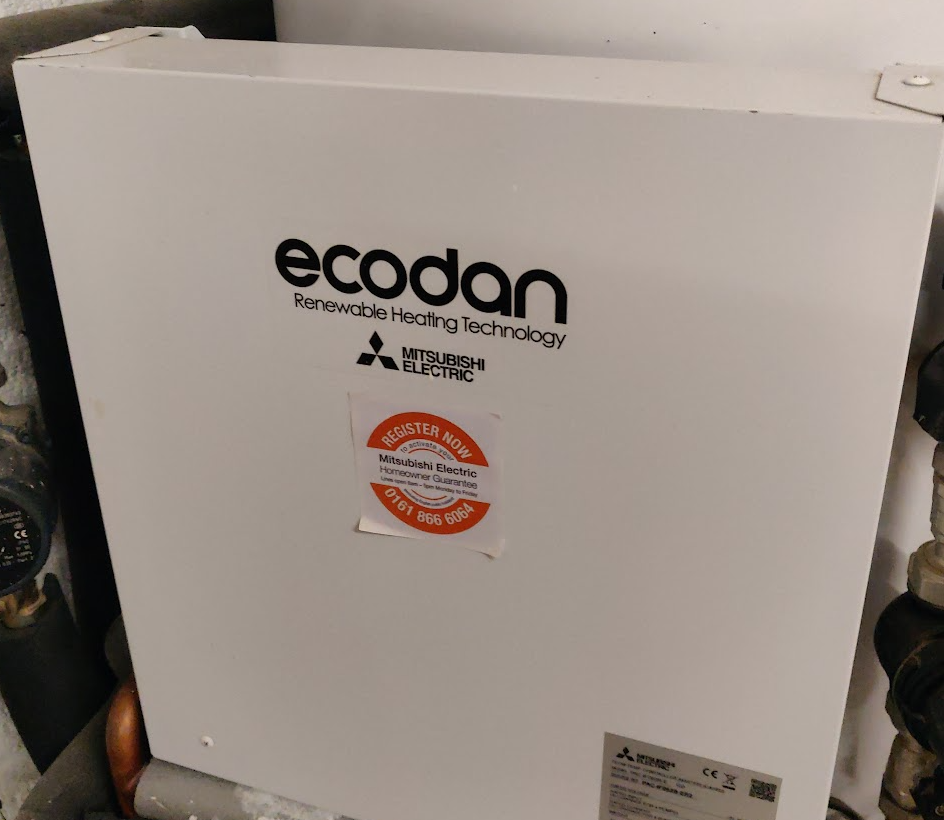
For non-Hydrobox users its located in the square white box that all the wires are heading to:
For electrical safety, turn the unit controller off at the screen and then also at your circuit breaker.
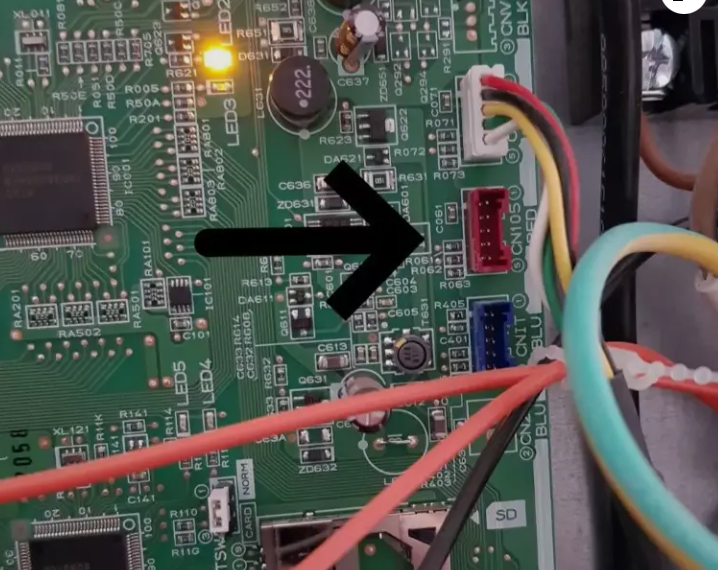
Opening the case will reveal the main circuit board - located to the far right side in around the middle is the CN105 plug and probably occupied by your MELCloud Adapter
From here it's a swap around of plugs and route cables: The MELCloud adapter that was plugged into CN105 moves to the new adapter spare port marked "EXT" and the supplied cable with the Adapter plugs into CN105.
Close up, power back on at the breaker and then the controller.
@f1p Thanks. I have to say that it isn't obvious (to me at least) which bit of kit was being referred to, but I'm glad it's not the heat pump itself.
Sods law that my hydrobox is right at the back of the plant room behind the cylinder, so not the easiest place to get to, but it's a much less daunting prospect with the extra clarity.
I did do a search of hydrobox prior to posting, but everything just brought up the Mitsubishi pre-plumbed cylinder units (which has one of these built onto it, now that I know what I'm looking for) so didn't improve clarity. Searches for CN105 just brought up videos of people dismantling Mitsubishi aircon units, which reconfirmed the fear that I'd need to access the main unit itself.
Hopefully this also clears up any confusion for other non-techies such as myself.
130m2 4 bed detached house in West Yorkshire 10kW Mitsubishi Ecodan R290 Heat Pump - Installed June 2025 6.3kWp PV, 5kW Sunsynk Inverter, 3 x 5.3kWh Sunsynk Batteries MyEnergi Zappi Charger for 1 EV (Ioniq5) and 1 PHEV (Outlander) User of Havenwise (Full control Jun-Dec 2025, DHW only from early Dec) Subscriber to MelPump App data via CN105 Dongle Kit