My buffer tank has been converted to a volumiser, but it has never been fitted with a thermocouple.
MelCloud gives"Tank Temperature", which appears to be the DHW tank, but in addition it provides data for "Mixing Tank Temperature".
The latter doesn't seem to vary much from 25C, so what is this connected to and can it be more usefully employed?
Similarly, "Set Tank Temperature" doesn't very often vary from an unrecognisable 10C, so where is this getting its information?
342sq m "Upside down" house in Algarve. Portugal
Mitsubishi PUHZ-120YUK 12kW ASHP
12 Solar Panels Growatt Inverter
2 x Growatt 7.5kW Batteries
Fronius EV Charger
Kia e- Niro 64kW
Mixing tank temp shows 25C when not connected, I believe. Certainly mine does.
I did think about getting a separate temp probe from Mitsi to install in the buffer tank, but then I also had mine converted to a volumiser and so it is at the flow temp and no need for an additional sensor.
BTW post conversion my Ecodan is running with zero cycling and currently only pausing for the defrost cycles.
Mitsubishi Zubadan 14kW with Mixergy 210l DHW in 220m2 barn property. 24 solar panels = 9kWp with GivEnergy 5.0kW Hybrid inverter and 19kWh GivE batteries. Jaga Strada fan-assisted rads throughout. Landvac vacuum glazing/triple glazed windows.
MelCloud gives"Tank Temperature", which appears to be the DHW tank, but in addition it provides data for "Mixing Tank Temperature".
The latter doesn't seem to vary much from 25C, so what is this connected to and can it be more usefully employed?
Similarly, "Set Tank Temperature" doesn't very often
Hi Dave, the set tank temperature shows the temperature your DHW is set at. So it stays at a fixed temperature and doesn’t vary. you can then compare the actual tank temperature which does vary as hot water is used.
The mixing tank temperature is unused except in sutuations where a mixing tank is used.
useful tip
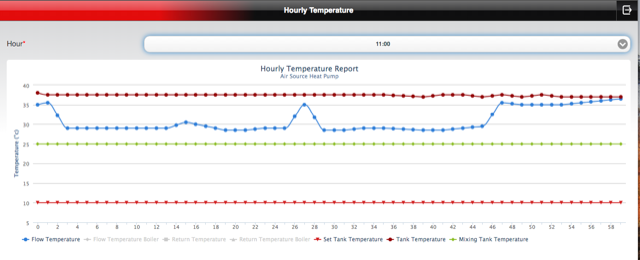
I switch on the Mixing Tank and the Set Tank on my MELCloud graphs because they create a display field that is of a constant graph scale. In other words it’s easier to compare graphs if they appear at the same scale. See attached examples… one shows 5degC scale while the other shows a massive scale change because the horizontal graph lines have been removed.
So when viewing subtle differences in delta T or flow temperature it’s handy to keep to identical display scales…. Hope this is useful 👍
I also had mine converted to a volumiser and so it is at the flow temp and no need for an additional sensor.
Hi downfield,
Sounds like you’ve got a result with the volumiser….. I’m curious about where you installed the volumiser…. From the above description did you install it on the flow side…..? And was it after the 3 port valve? Also what volume was the buffer?
Yes very pleased with the change from buffer to volumiser.
Andrew Millward (Watford based) did the work and advised fitting on the flow side, which seems to work. My "logic" for this is that on a defrost cycle the HP uses warm water from the returning flow and so the volumiser has plenty of warm water to send into the house.
Volumiser is 100 litre capacity.
My Ecodan is oversized at 14kW - heat loss during the recent cold snap was about 8.5kW at 0C outside temp.
So I was surprised there was only one cycle every 75 mins even when the temps were 12 - 15C
Mitsubishi Zubadan 14kW with Mixergy 210l DHW in 220m2 barn property. 24 solar panels = 9kWp with GivEnergy 5.0kW Hybrid inverter and 19kWh GivE batteries. Jaga Strada fan-assisted rads throughout. Landvac vacuum glazing/triple glazed windows.
@sunandair Hi Sun and Air. I am not sure I understand this:
"the set tank temperature shows the temperature your DHW is set at. So it stays at a fixed temperature and doesn’t vary. you can then compare the actual tank temperature which does vary as hot water is used"
My DHW is set for 52C.
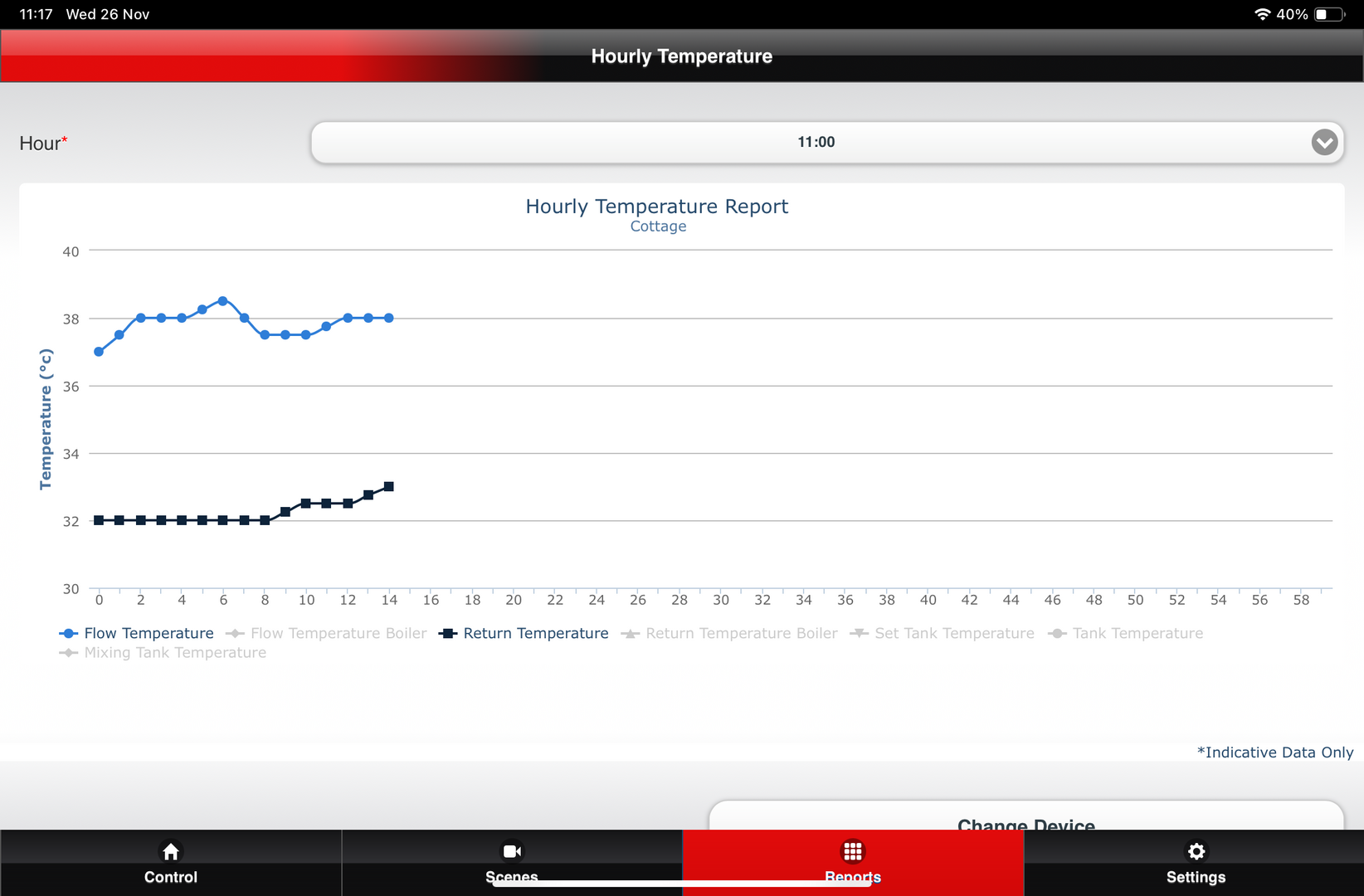
I am attaching a similar screenshot to yours at 11:00 this morning
However, I am on a trial with Havenwise so maybe they are changing figures. e.g. the "Set temperature" for room heating on my Mitsu wireless controller is currently reading 29.5C when the required room temperature on the Havenwise app is 22C
This post was modified 3 months ago by DavidAlgarve
342sq m "Upside down" house in Algarve. Portugal
Mitsubishi PUHZ-120YUK 12kW ASHP
12 Solar Panels Growatt Inverter
2 x Growatt 7.5kW Batteries
Fronius EV Charger
Kia e- Niro 64kW
@sunandair Hi Sun and Air. I am not sure I understand this:
"the set tank temperature shows the temperature your DHW is set at. So it stays at a fixed temperature and doesn’t vary. you can then compare the actual tank temperature which does vary as hot water is used"
My DHW is set for 52C.
I am attaching a similar screenshot to yours at 11:00 this morning
However, I am on a trial with Havenwise so maybe they are changing figures. e.g. the "Set temperature" for room heating on my Mitsu wireless controller is currently reading 29.5C when the required room temperature on the Havenwise app is 22C
It's a good tip, actually, @davidalgarve. All @sunandair is saying is that the Melcloud app adapts the Y axis scale to fit the data points. That's great if you want to magnify any variation but if you're wanting to look at a graph that uses a consistent scale over weeks, months or perhaps even years then adding the set mixing tank temperature (which doesn't change) as another series effectively standardises the Y axis scale for every time period you want to look at.
105 m2 bungalow in South East England
Mitsubishi Ecodan 8.5 kW air source heat pump
18 x 360W solar panels
1 x 6 kW GroWatt battery and SPH5000 inverter
1 x Myenergi Zappi
1 x VW ID3
Raised beds for home-grown veg and chickens for eggs
"Semper in excretia; sumus solum profundum variat"
However, I am on a trial with Havenwise so maybe they are changing figures. e.g. the "Set temperature" for room heating on my Mitsu wireless controller is currently
Yes it may be that your setup has changed the “set tank temp” output and used it for something else or it’s simply not being used which is why it appears at a low temperature default setting. What I do know is that our set DHW target temperature corresponds to this label. Anyway hopefully you get the idea. These bar lines can help to control the scale of the display just a small observation that may help.
However, I am on a trial with Havenwise so maybe they are changing figures. e.g. the "Set temperature" for room heating on my Mitsu wireless controller is currently reading 29.5C when the required room temperature on the Havenwise app is 22C
How is your trial going? I am also on the initial trial and, whilst it hasn't quite been a week yet and it is very cold here, all of my COP figures on the Havenwise app (Total, Heating and Hot Water) have gone down, where I had hoped they would increase.
Retrofitted 11.2kw Mitsubishi Ecodan to new radiators commissioned November 2021.
14 x 500w Monocrystalline solar panels.
@sunandair Hi Sun and Air. I am not sure I understand this:
"the set tank temperature shows the temperature your DHW is set at. So it stays at a fixed temperature and doesn’t vary. you can then compare the actual tank temperature which does vary as hot water is used"
My DHW is set for 52C.
I am attaching a similar screenshot to yours at 11:00 this morning
However, I am on a trial with Havenwise so maybe they are changing figures. e.g. the "Set temperature" for room heating on my Mitsu wireless controller is currently reading 29.5C when the required room temperature on the Havenwise app is 22C
This is Havenwise moving the MelCloud settings so that they don't interfere with their system instructions. Room temperature is set to maximum (29.5) and DHW will be at 10°C until the times when you've called for a scheduled re-heat, at which point it will change until the re-heat has been completed. The setting at 10°C then prevents the hysteresis re-heating kicking in.
I've learned this from my time having Havenwise run my system, so I'm used to both now. I also have a mixing tank temperature at a flat 25°C, which is due to this not being in use on my system.
130m2 4 bed detached house in West Yorkshire 10kW Mitsubishi Ecodan R290 Heat Pump - Installed June 2025 6.3kWp PV, 5kW Sunsynk Inverter, 3 x 5.3kWh Sunsynk Batteries MyEnergi Zappi Charger for 1 EV (Ioniq5) and 1 PHEV (Outlander) User of Havenwise (Full control Jun-Dec 2025, DHW only from early Dec) Subscriber to MelPump App data via CN105 Dongle Kit
I am struggling to keep the faith. More than a week passed and the system was learning nothing, at which point I was told that a Shelly H & T would be better than the Mitsu Wireless Controller, which had previously been said to be required.
Eventually after I decided to move the wireless controller to the coldest room in the house (our bedroom, downstairs) we saw some progress, but the target temperature of 22C was rarely met and flow temp was not as high as it might be. After buying more Shelly H & T's to spread around the house, I have chosen another downstairs room to position the wireless controller. So we are back into a learning phase and not so warm.
In addition, like you, I am getting significantly lower COP figures than previously and that is after changing the buffer tank to volumiser and deleting a pump.
I would like some relevant data to see why the disappointing performance, hence an interest in MelPump, but I can't say that I welcome using this in talking to Havenwise
342sq m "Upside down" house in Algarve. Portugal
Mitsubishi PUHZ-120YUK 12kW ASHP
12 Solar Panels Growatt Inverter
2 x Growatt 7.5kW Batteries
Fronius EV Charger
Kia e- Niro 64kW
That all makes more sense! The MelCloud data is already far from ideal and it is a pity that Havenwise can't find a way of controlling without having to make the "Set temperature" figure irrelevant for both room heating and DHW.
342sq m "Upside down" house in Algarve. Portugal
Mitsubishi PUHZ-120YUK 12kW ASHP
12 Solar Panels Growatt Inverter
2 x Growatt 7.5kW Batteries
Fronius EV Charger
Kia e- Niro 64kW