Notifications
Clear all

03/12/2025 1:40 pm
Okay good,
For awareness that usually people do this the other way around and purchase the device with the MELPump firmware which makes it easier to connect as it has limited fields and automatically creates that integration to the melpump account.
There are instructions included on how to later convert to run with Home Assistant - where the conversion update would copy the required fields and populate the mqtt.melpump.com automatically
You have ended up with exactly the same result, except support@melpump would of needed to provide you with the same information i did above.
(And might be worth sending an update that this is now resolved)

Topic starter
03/12/2025 2:25 pm
...
I have no issue in starting the paid subscription early, as the trial version has already done its job in showing me that I wanted access to this data, but I'll need to figure out which one of the two that I should be activating.
...
Glad the connectivity is now sorted, which is great.
As for above, I'll also point out that it largely depends on what you want to do with access to the data. You're already getting it into Home Assistant so you could do all your pretty graphs and so forth locally without having to pay for a Melpump subscription. However, if the Melpump service (app or web site) provides added value to you then of course subscribing will be sensible.
105 m2 bungalow in South East England
Mitsubishi Ecodan 8.5 kW air source heat pump
18 x 360W solar panels
1 x 6 kW GroWatt battery and SPH5000 inverter
1 x Myenergi Zappi
1 x VW ID3
Raised beds for home-grown veg and chickens for eggs
"Semper in excretia; sumus solum profundum variat"
03/12/2025 2:38 pm
Of course, and you are able to use any combination and chop & change as you wish
1

03/12/2025 3:12 pm
Glad the connectivity is now sorted, which is great.
As for above, I'll also point out that it largely depends on what you want to do with access to the data. You're already getting it into Home Assistant so you could do all your pretty graphs and so forth locally without having to pay for a Melpump subscription. However, if the Melpump service (app or web site) provides added value to you then of course subscribing will be sensible.
A 12 month subscription to Mel Pump will cost me £26, which I can live with for the convenience of reporting it provides me for now. That will likely buy me sufficient time to get to grips with Home Assistant to get through the learning curve to potentially move from it in a year or so's time.
For now, I'm interested in what my new heat pump installation is doing, how it's running overall under Havenwise control and whether, ultimately I'll have the confidence in my own tinkering to run it under pure weather compensation and compare the efficiencies of each to one another. Havenwise is a bit of a comfort blanket in that regard as a new owner, but I've become fascinated by what their algorithms are doing, as it's not pure WC control but is achieving decent cost savings so far, relative to prior gas usage. What I lack is an equivalent comparative for the heat pump under pure WC control, which might prove to be more efficient, but would require more fine-tuning in terms of room temperature targets, relative to the internal thermostat model that Havenwise uses, so there's perhaps a convenience vs efficiency trade-off to be considered further down the line.
Ultimately, if it's not become obvious, I'm something of a geek for stats and data, and I think I've pretty much maxed out now on what it's feasible to get out of the heat pump. Ironically, it is making me start to question how well the energy produced data is being calculated, as this seems to be some form of internal system calculation, rather than anything that is directly measurable. For the usage data, I have the on-wall meter next to the cylinder to provide a basis for comparison, but I don't think there's an equivalent for the production figure, and any calculation of CoP is ultimately reliant on that number being accurate too. As of 1pm this afternoon I have a new source of data to try to better understand that.
130m2 4 bed detached house in West Yorkshire
10kW Mitsubishi Ecodan R290 Heat Pump - Installed June 2025
6.3kWp PV, 5kW Sunsynk Inverter, 3 x 5.3kWh Sunsynk Batteries
MyEnergi Zappi Charger for 1 EV (Ioniq5) and 1 PHEV (Outlander)
User of Havenwise (Full control Jun-Dec 2025, DHW only from early Dec)
Subscriber to MelPump App data via CN105 Dongle Kit
Topic starter
03/12/2025 3:33 pm
Glad the connectivity is now sorted, which is great.
As for above, I'll also point out that it largely depends on what you want to do with access to the data. You're already getting it into Home Assistant so you could do all your pretty graphs and so forth locally without having to pay for a Melpump subscription. However, if the Melpump service (app or web site) provides added value to you then of course subscribing will be sensible.
A 12 month subscription to Mel Pump will cost me £26, which I can live with for the convenience of reporting it provides me for now. That will likely buy me sufficient time to get to grips with Home Assistant to get through the learning curve to potentially move from it in a year or so's time.
For now, I'm interested in what my new heat pump installation is doing, how it's running overall under Havenwise control and whether, ultimately I'll have the confidence in my own tinkering to run it under pure weather compensation and compare the efficiencies of each to one another. Havenwise is a bit of a comfort blanket in that regard as a new owner, but I've become fascinated by what their algorithms are doing, as it's not pure WC control but is achieving decent cost savings so far, relative to prior gas usage. What I lack is an equivalent comparative for the heat pump under pure WC control, which might prove to be more efficient, but would require more fine-tuning in terms of room temperature targets, relative to the internal thermostat model that Havenwise uses, so there's perhaps a convenience vs efficiency trade-off to be considered further down the line.
Ultimately, if it's not become obvious, I'm something of a geek for stats and data, and I think I've pretty much maxed out now on what it's feasible to get out of the heat pump. Ironically, it is making me start to question how well the energy produced data is being calculated, as this seems to be some form of internal system calculation, rather than anything that is directly measurable. For the usage data, I have the on-wall meter next to the cylinder to provide a basis for comparison, but I don't think there's an equivalent for the production figure, and any calculation of CoP is ultimately reliant on that number being accurate too. As of 1pm this afternoon I have a new source of data to try to better understand that.
Absolutely understand. I should add that I wasn't suggesting you "shouldn't" subscribe; only clarifying that you didn't "have" to subscribe just because you had the dongle. Might seem obvious but worth underlining. As you say, £26 is not a lot for the ready-made reporting, particularly whilst you're getting to grips with a new piece of software in the background.
Just to throw a bit of a curved ball, though, I've been playing a little more with that CN105 jobby and found @f1p's provided a bit of an unexpected easter egg. It seems the dongle provides the capability for doing weather compensation duties itself instead of relying on Mitsi's WC curve. The main reason one might do that is that using the Mitsi in-house display it's only possible to set the maximum and minimum points on the curve and one intermediate point whereas the dongle's curve can have as many intermediate points as you wish. Not saying anyone should use this functionality but it's there if it proves useful. The caveat is that changing the dongle's weather compensation settings is a bit technically involved so not particularly accessible to anyone unless they're quite IT literate; not difficult to do but most certainly not user-friendly to any technophobes.
105 m2 bungalow in South East England
Mitsubishi Ecodan 8.5 kW air source heat pump
18 x 360W solar panels
1 x 6 kW GroWatt battery and SPH5000 inverter
1 x Myenergi Zappi
1 x VW ID3
Raised beds for home-grown veg and chickens for eggs
"Semper in excretia; sumus solum profundum variat"
03/12/2025 4:08 pm
Glad the connectivity is now sorted, which is great.
As for above, I'll also point out that it largely depends on what you want to do with access to the data. You're already getting it into Home Assistant so you could do all your pretty graphs and so forth locally without having to pay for a Melpump subscription. However, if the Melpump service (app or web site) provides added value to you then of course subscribing will be sensible.
A 12 month subscription to Mel Pump will cost me £26, which I can live with for the convenience of reporting it provides me for now. That will likely buy me sufficient time to get to grips with Home Assistant to get through the learning curve to potentially move from it in a year or so's time.
For now, I'm interested in what my new heat pump installation is doing, how it's running overall under Havenwise control and whether, ultimately I'll have the confidence in my own tinkering to run it under pure weather compensation and compare the efficiencies of each to one another. Havenwise is a bit of a comfort blanket in that regard as a new owner, but I've become fascinated by what their algorithms are doing, as it's not pure WC control but is achieving decent cost savings so far, relative to prior gas usage. What I lack is an equivalent comparative for the heat pump under pure WC control, which might prove to be more efficient, but would require more fine-tuning in terms of room temperature targets, relative to the internal thermostat model that Havenwise uses, so there's perhaps a convenience vs efficiency trade-off to be considered further down the line.
Ultimately, if it's not become obvious, I'm something of a geek for stats and data, and I think I've pretty much maxed out now on what it's feasible to get out of the heat pump. Ironically, it is making me start to question how well the energy produced data is being calculated, as this seems to be some form of internal system calculation, rather than anything that is directly measurable. For the usage data, I have the on-wall meter next to the cylinder to provide a basis for comparison, but I don't think there's an equivalent for the production figure, and any calculation of CoP is ultimately reliant on that number being accurate too. As of 1pm this afternoon I have a new source of data to try to better understand that.
Absolutely understand. I should add that I wasn't suggesting you "shouldn't" subscribe; only clarifying that you didn't "have" to subscribe just because you had the dongle. Might seem obvious but worth underlining. As you say, £26 is not a lot for the ready-made reporting, particularly whilst you're getting to grips with a new piece of software in the background.
Just to throw a bit of a curved ball, though, I've been playing a little more with that CN105 jobby and found @f1p's provided a bit of an unexpected easter egg. It seems the dongle provides the capability for doing weather compensation duties itself instead of relying on Mitsi's WC curve. The main reason one might do that is that using the Mitsi in-house display it's only possible to set the maximum and minimum points on the curve and one intermediate point whereas the dongle's curve can have as many intermediate points as you wish. Not saying anyone should use this functionality but it's there if it proves useful. The caveat is that changing the dongle's weather compensation settings is a bit technically involved so not particularly accessible to anyone unless they're quite IT literate; not difficult to do but most certainly not user-friendly to any technophobes.
Yes, it is certainly an advanced feature and quite difficult to get user friendly interface within the limits of Home Assistant - with time i will try and make it more accessible (Another option is closing the gap between this and full auto-adapt, so something along the lines of Active Mode in Vaillant systems)
I would add this is on the development roadmap for MELPump in the form of a web-page based designer page, so accessibility to users will be increased when it is available.
14/12/2025 9:42 am
Just to throw a bit of a curved ball, though, I've been playing a little more with that CN105 jobby and found @f1p's provided a bit of an unexpected easter egg. It seems the dongle provides the capability for doing weather compensation duties itself instead of relying on Mitsi's WC curve. The main reason one might do that is that using the Mitsi in-house display it's only possible to set the maximum and minimum points on the curve and one intermediate point whereas the dongle's curve can have as many intermediate points as you wish. Not saying anyone should use this functionality but it's there if it proves useful. The caveat is that changing the dongle's weather compensation settings is a bit technically involved so not particularly accessible to anyone unless they're quite IT literate; not difficult to do but most certainly not user-friendly to any technophobes.
@sheriff-fatman might be interested in this, following his post here
So far, albeit, based on only around a week of usage, the big surprise of the change has been to see that the weather compensation control, driven by external temperature, has provided a noticeably more stable internal temperature than the Havenwise control, which is driven by an internal thermostat reading. It was helpful that the WC settings left behind by the installers were actually pretty reasonable (45°C flow at -7°C and 25°C flow at 20°C) and I had a good amount of actual flow rate data from the Havenwise control to be able to estimate the logical adjustments to this, so it has required minimal tweaking so far to produce heat in the comfortable range that I'm looking for. That in itself has been a worthwhile learning exercise.
There are some major benefits of considering the adapters onboard compensation curve over the Mitsi one:
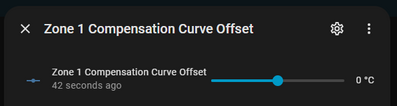
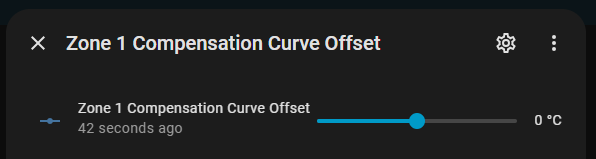
- There is no method of being able to adjust your Offset +/- remotely (only on the main controller), be that if you are trying to tune or optimise a curve for your property or to use with dynamic electricity tarriffs as a form of setback
By bringing the compensation curve onto the adapter, you can then use Home Assistant to adjust the offset
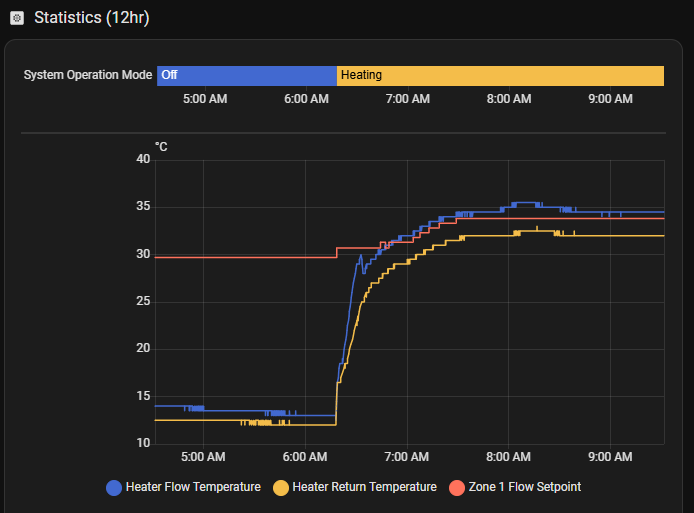
- Mitsibuishi Auto-Adapt uses the "Thermo Diff." setting to allow the Flow Temperature to overshoot the Flow Setpoint by up to +5C (default)


The tolerance of flow temp overshoot in fixed flow or the curve in the controller is far less and hence many users find they have increased cycling in these modes, particularly in milder conditions
Enabling the adapters "Short Cycle Protection" mode when in the onboard curve will let the adapter perform a similar function, allowing the pump in some conditions to reach an equilibrium - where the increase in setpoint stop that overshoot cycling and also then lets the compressor settle back to a minimum frequency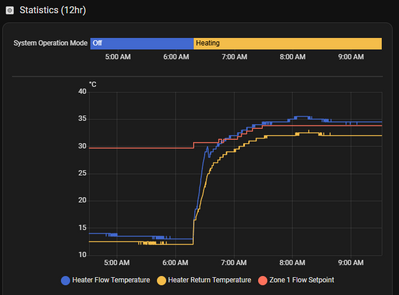
This results in some fantastic CoP figures being achievable


This post was modified 2 months ago by F1p
1
Topic starter
15/12/2025 12:12 pm
OK, @sheriff-fatman, the question has been raised. Are you interested in some fiddling with custom WC curves? Certainly a far more technically involved process than amending the Mitsi controller but I'm happy to give a bit of a walk-through if you're up for it - no pressure, though.
105 m2 bungalow in South East England
Mitsubishi Ecodan 8.5 kW air source heat pump
18 x 360W solar panels
1 x 6 kW GroWatt battery and SPH5000 inverter
1 x Myenergi Zappi
1 x VW ID3
Raised beds for home-grown veg and chickens for eggs
"Semper in excretia; sumus solum profundum variat"
15/12/2025 1:31 pm
OK, @sheriff-fatman, the question has been raised. Are you interested in some fiddling with custom WC curves? Certainly a far more technically involved process than amending the Mitsi controller but I'm happy to give a bit of a walk-through if you're up for it - no pressure, though.
I think it would be a good education / experiment to give this a go, as I can see exactly the behaviour that @f1p describes in the current WC cycles, as per the snapshot below for the last 6 hours. The point at which the compressor overshoots looks to be pretty much 5°C on each cycle, so potentially being able to intervene to reduce this tolerance looks like a worthwhile exercise to try to attempt.
NB: Getting this data configured within HA is my greatest n00b HA achievement so far, so I'm managing to bumble around and do some things I want, while still not quite getting the right outputs with others, but this felt like an achievement at the time.
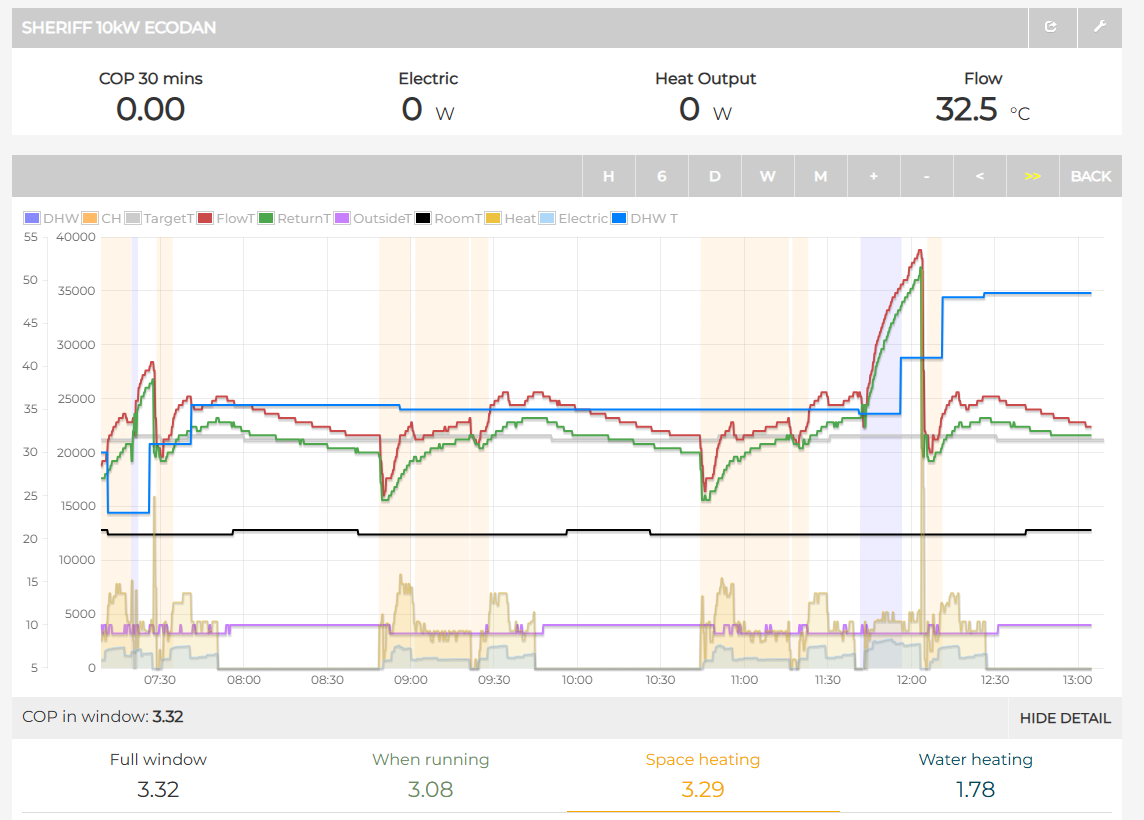
The first issue to address looks likely to be actually seeing the WC curve detail in HA, as there's nothing obvious (to me at least) within the long list of things that pulled through on setup that looks like a heat curve setting. I can see that it displays as the active control mode, but I can't see the details of the curve in anywhere that I've looked so far.
Snapshot below of what I've referring to (NB: this isn't the full list) but I've also noticed that short-cycle protection mode is already set to be 'on' within this. That potentially was me manually clicking it on after the recent dongle disconnect where I was trying to get things working again (after restart the Ecodan ASHP switch had to be set back to on, so I did a quick run down the list to check various statuses, and it seemed a logical button to set to the on mode). That was all done a few days ago once @f1p had helped to get the connection working again.

Definitely up for the challenge now that my confidence with the system is growing, but am happy to be 'hand-held' to some extent as I suspect there's greater potential for me to do something stupid at this level of detail.
130m2 4 bed detached house in West Yorkshire
10kW Mitsubishi Ecodan R290 Heat Pump - Installed June 2025
6.3kWp PV, 5kW Sunsynk Inverter, 3 x 5.3kWh Sunsynk Batteries
MyEnergi Zappi Charger for 1 EV (Ioniq5) and 1 PHEV (Outlander)
User of Havenwise (Full control Jun-Dec 2025, DHW only from early Dec)
Subscriber to MelPump App data via CN105 Dongle Kit
Topic starter
15/12/2025 5:30 pm
OK, no problem. Here goes....
Firstly, a quick outline so you can see what the overall plan is.
Although a fair part of the reason for the dongle in the first place was to see stuff in Home Assistant, what we're going to do now doesn't use HA much at all. If we want to do any automating based on this new WC curve, we may well get back to HA but for now it's largely geekery outside the HA umbrella.
As I said in an earlier post, and as @f1p confirmed, there's an extra bit of functionality within the dongle's coding. For what it's worth, the documentation is here, and all I'm doing is repeating key parts of it in my own words. In order to start using it, we basically need to do three things:
- Switch the heat pump from "Heating compensation" mode (i.e. weather compensation curve) to "Heating flow" mode (i.e. fixed flow temperature). This sounds counter-intuitive but makes sense when we look at it further in a bit.
- Give the dongle your preferred WC curve so it knows how you want it to behave at any given outside air temperature.
- Tell the dongle to enable the use of the WC curve.
Once we've done this, there are some extras we can also look at, but let's wait for a bit before dealing with them.
It's also easier to understand these steps if we also take a quick look at that means of communication the dongle's using - MQTT, so I'm going to go down a bit of a rabbit hole here; apologies for the brief sidestep. Basically, MQTT is all about sending messages (that happen to contain text), and those messages are sent to what are called topics. When you initially put in the username, password and hostname for your HA server into the dongle to set it up, you may or may not remember that you also left unchanged a default value for the Primary MQTT Base Topic (the default was Ecodan/ASHP). This means that when HA receives the message it knows the message is all about Ecodan stuff and, in particular, ASHP stuff. It also so happens that the dongle sends those messages with an extra "branch" to it (/Status), so the actual topic it's sending the message to is Ecodan/ASHP/Status. You can probably see from here that it's forming a kind of hierarchy, and understandably within "Status", there are more subtopics such as Zone1, Configuration, WiFiStatus, Advanced and so on. If we want to use MQTT to change something about the heat pump, we still need to work with the Ecodan/ASHP topic, but we're not changing the Status (since that's only a kind of read-only snapshot of what the current state of affairs is), we want to change stuff in the Ecodan/ASHP/Command topic (i.e. how things SHOULD be from now on).
In order to actually read and send these MQTT messages, the most straightforward way to do it initially is using a piece of software called MQTT Explorer, which can be downloaded and installed from https://mqtt-explorer.com
So now we get to the step-by-step.
- Firstly, download MQTT Explorer and install it onto your PC.
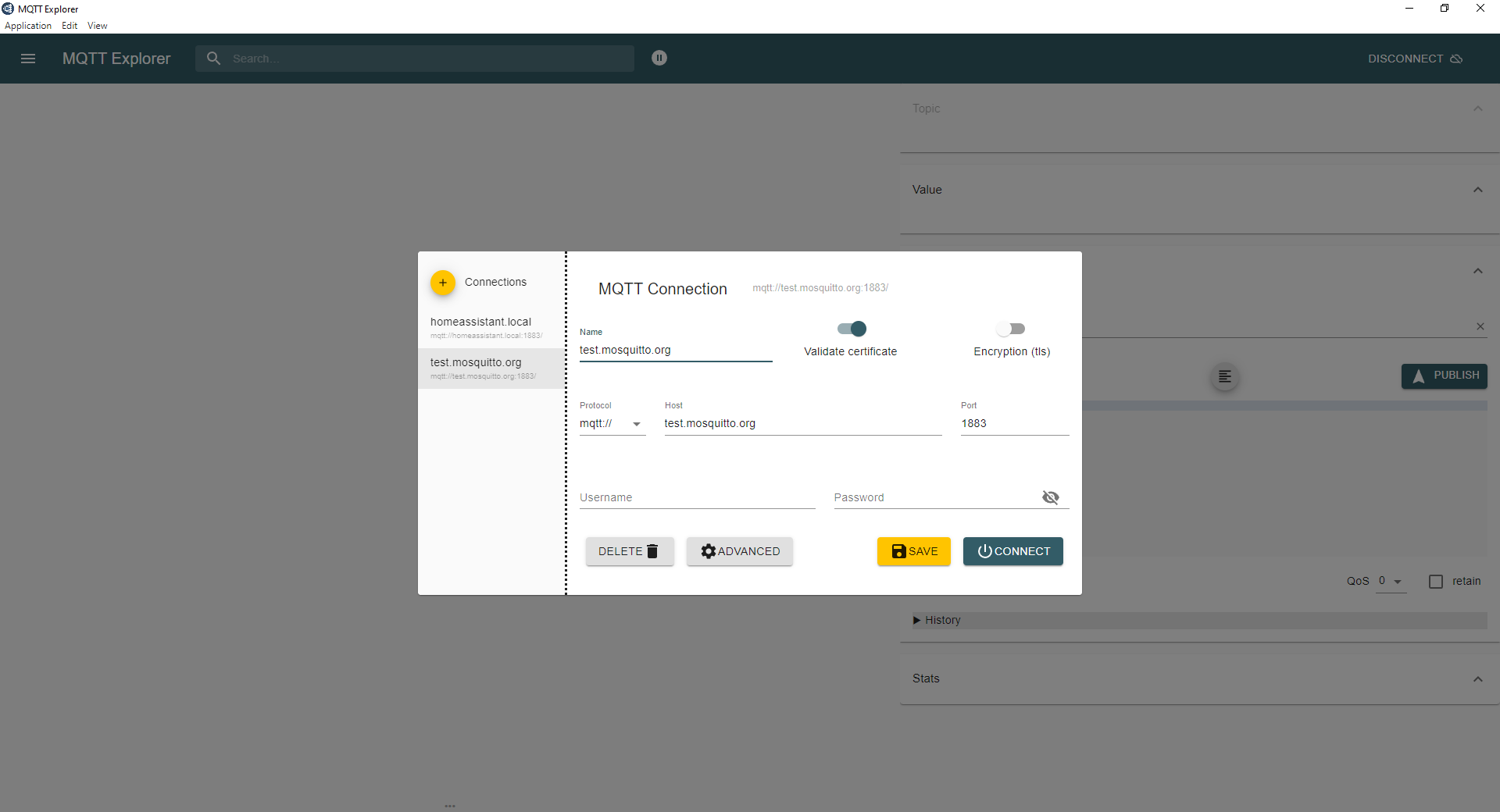
- Secondly, open up MQTT Explorer and you'll be presented by a screen looking like this
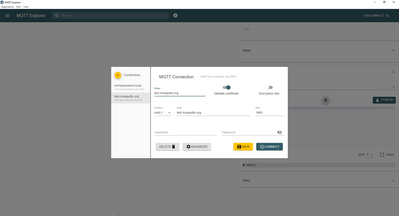
-
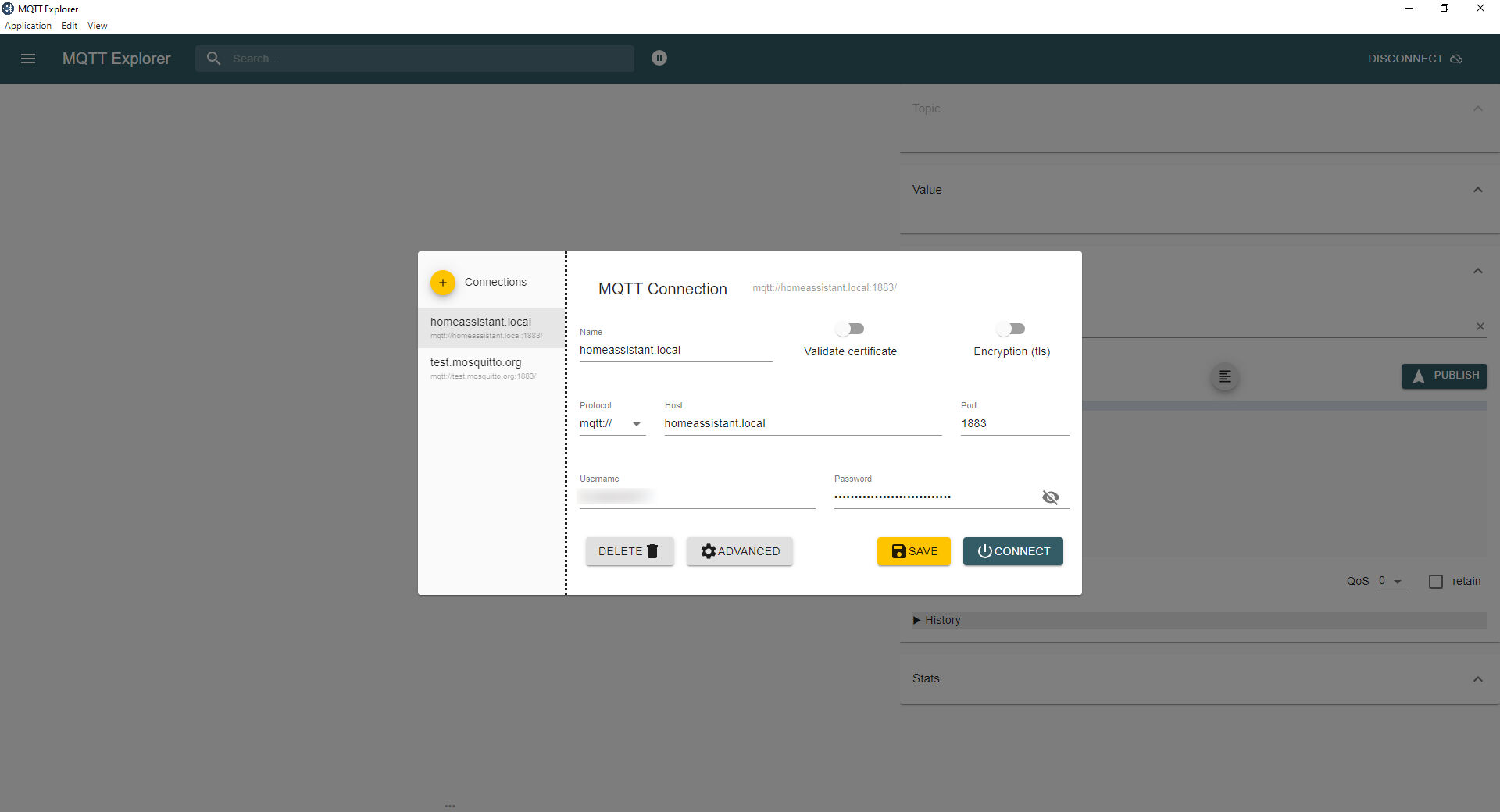
Now click on that yellow plus in the top left hand corner to add a new connection and fill it out so it looks like this
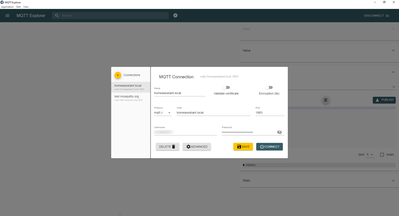
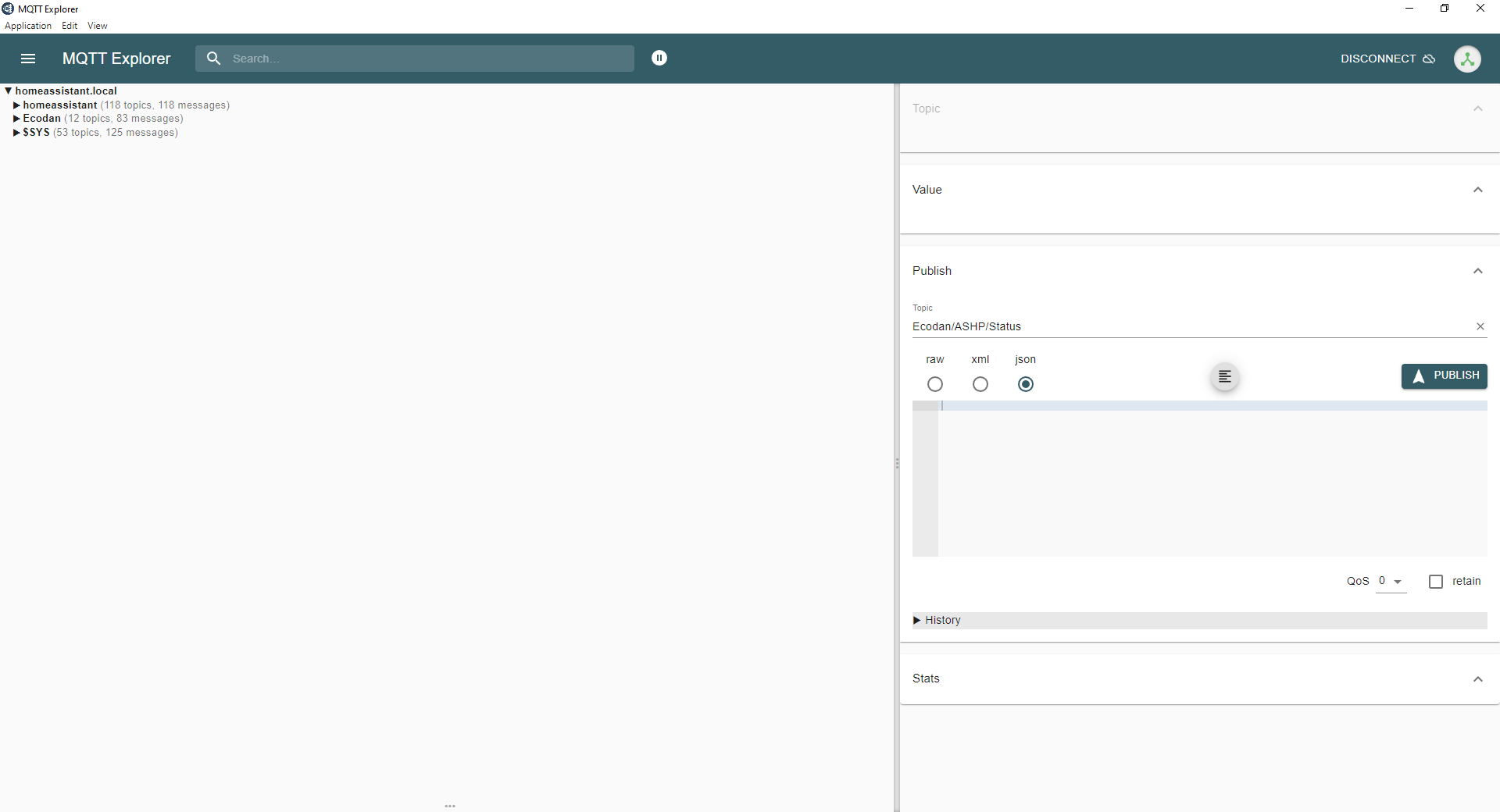
- Click on Save (so you can come back to that connection on other days) and then click on Connect. That'll give you a screen looking like this
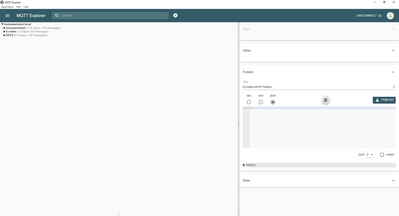
- If you click on the little triangle next to the word Ecodan in the list on the left, you'll see that topic heading expand to see the next level (ASHP). You can then continue to drill down into ASHP to see Status and then, drilling further, CompCurve.
- Click on CompCurve and, on the right hand side, you'll see the top box (entitled Value) now has a load of text with lots of curly brackets. There's also a little icon next to the heading "Value" which, if you hover over it, will say "Copy to clipboard". Click on the icon to do that.
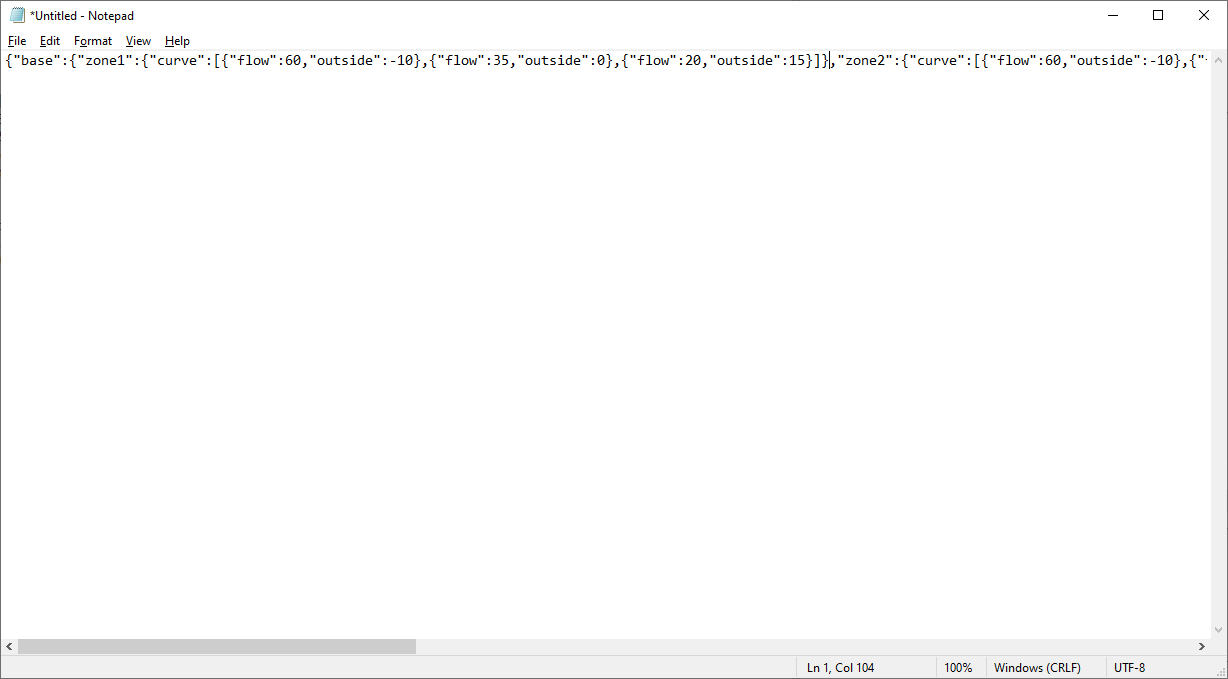
- Now, on your PC, open up Notepad (or any other plain text editor you might prefer, but not something like Microsoft Word that does any kind of formatting). Into the Notepad window, go to Edit and Paste to paste in the text you got from MQTT Explorer. It'll look like this
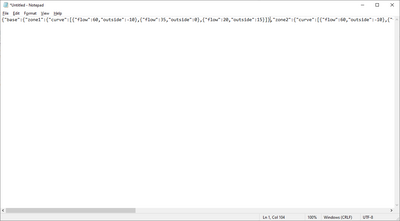
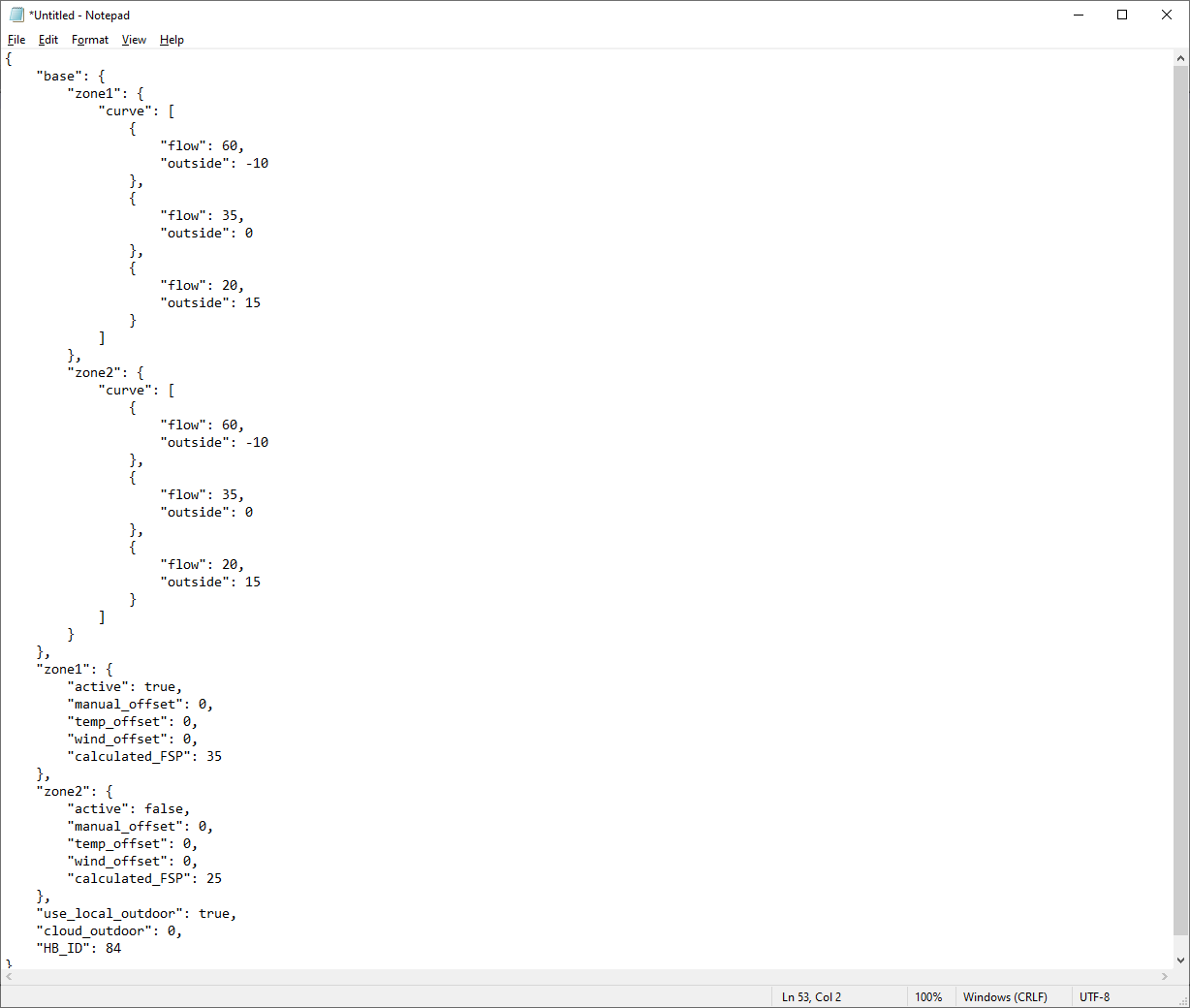
- There's no problem with leaving it all on one line, but for ease of reading I'm going to reformat it so it looks like this
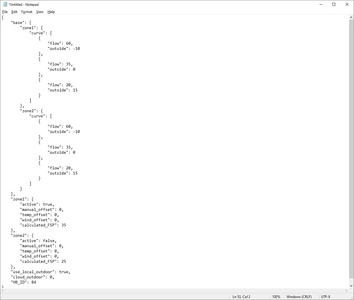
- This is what JSON looks like, and you can see that the brackets surround elements within other elements to form a hierarchy (i.e. Zone1 and Zone2 are elements within the Base element and Zone1 contains a Curve element which is potentially different from another Curve element within Zone2. You will also see that the Zone1 Curve element contains several further elements, each with a Flow value and an Outside value. These are the bits we're going to change.
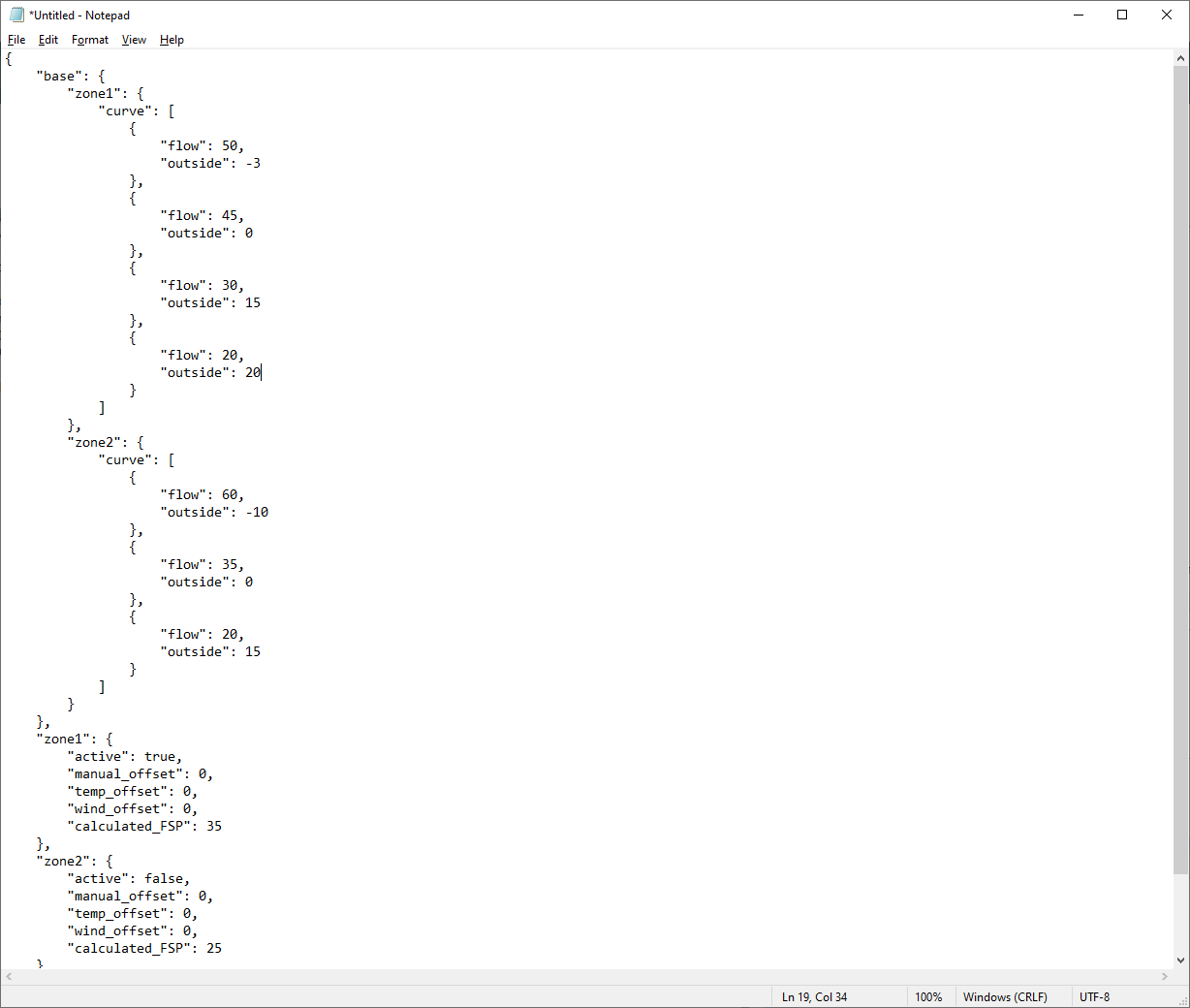
- Change the first element so the Flow value is 50 and the Outside value is -3.
- Change the second element so the Flow value is 45 and the Outside value is 0
- Change the third element so the Flow value is 30 and the Outside value is 15
- Just after where you've just typed 15 there's a curly bracket. Add a comma after that and then add in another element looking exactly like the others (including the opening and closing curly brackets) with a Flow value of 20 and an Outside value of 20
- Your new bit of text will now look like this
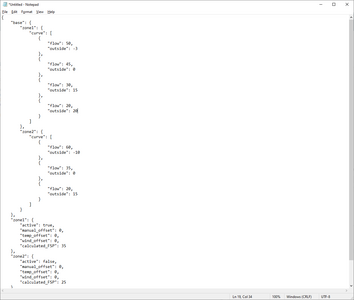
What it's saying is that the heat pump should give a flow temperature of 50degC at an OAT of -3, a flow of 45degC at OAT 0, a flow of 30degC at OAT 15 and a flow of 20degC at OAT 20. I'm not saying those figures are appropriate to you at all, but it just demonstrates you can dictate what flow temperature should be at what OAT and also that you can add as many extra points on that curve as you want.
- Now you need to go back over that JSON and change the flow temperatures and corresponding OATs to what suits your system. Personally, I would start for now with just the points currently set in the heat pump's WC curve.
- Now go down the text until you've got another Zone1 element containing an element called Active. At the moment, for you, it'll have a value of false, but you need to change it to true. Leave the Zone2 element as it is.
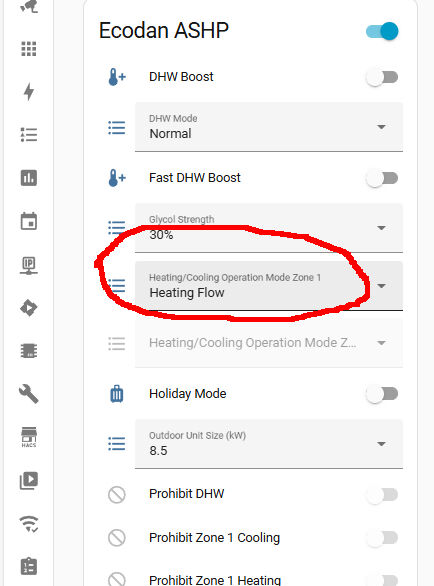
- Now you need to switch over to Home Assistant and, in all those new entities the dongle has now created, find the one called Heating/Cooling Operation Mode Zone 1. It'll currently be set to Heating Compensation
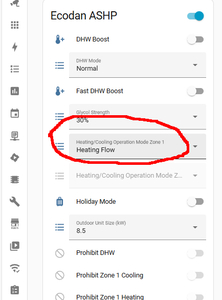
- Change the setting to Heating Flow. This is what will set the heat pump to work in constant flow temperature mode.
- Now switch back to MQTT Explorer. Below the Value section where you copied your JSON from, there's another box marked Publish. Under where it says Publish, there's a line entitled Topic which currently is set to Ecodan/ASHP/Status/CompCurve. Change this to Ecodan/ASHP/Command/System/CompCurve instead.
- Now, in the bigger box below, copy your new JSON from Notepad and paste into the Publish section
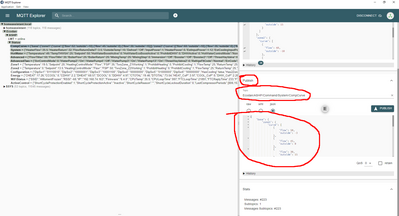
- Finally, click Publish.
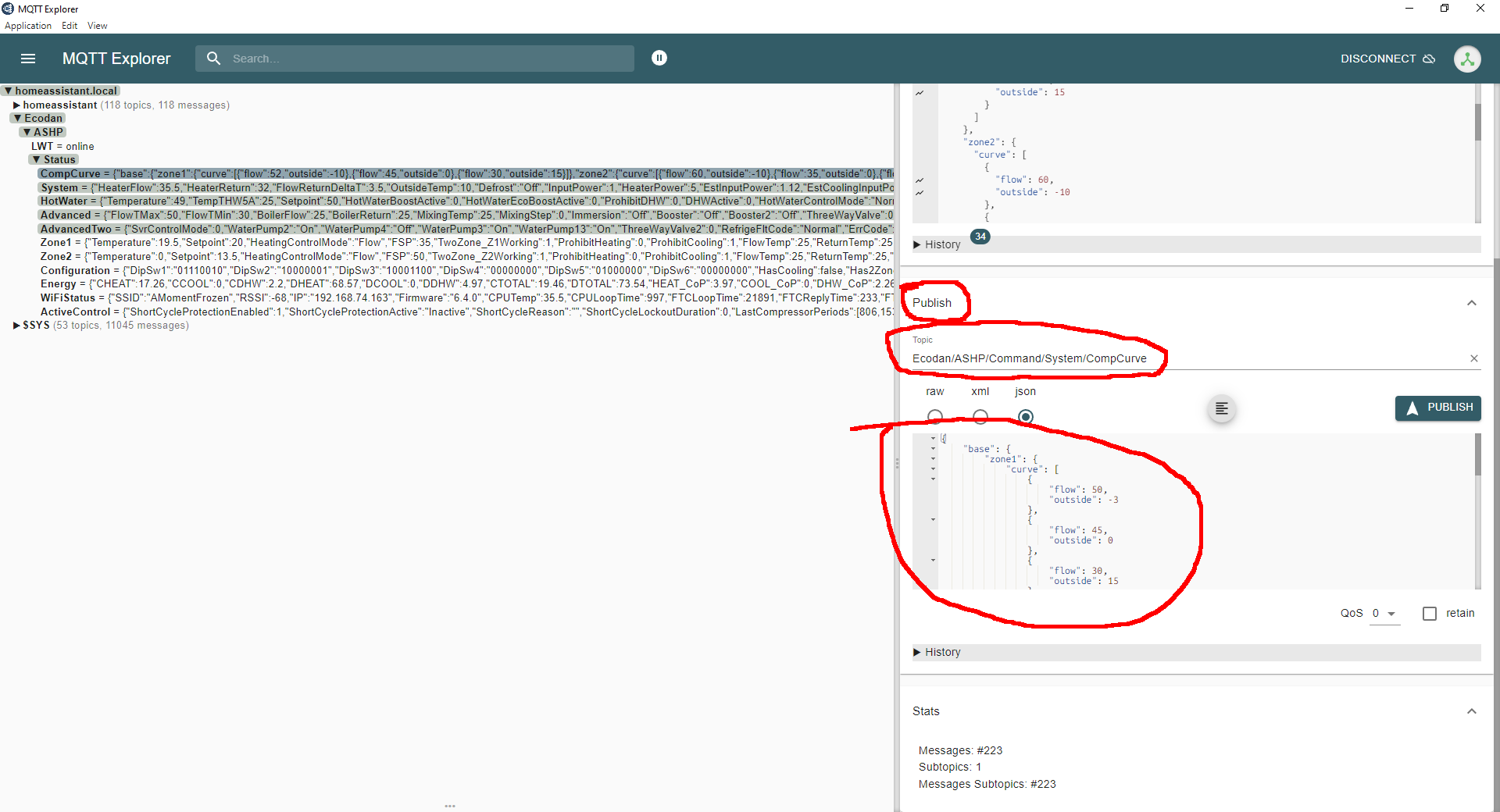
The dongle will now use the compensation curve you've given it to work out, from the OAT it's told by the heat pump, what the flow temperature should be, and it will then change the heat pump's fixed flow temperature to that value. From the heat pump's point of view it's working on a fixed flow temperature that the user is fiddling with very regularly.
If you want to amend the curve, you can repeat these steps, grabbing the current running value from the Status topic, editing it and then publishing to the different Command/System topic. Once you've got it the way you want it you can then just leave it be.
Other points to note are:
- You may have seen at the bottom of the JSON some more elements about manual_offset, temp_offset and wind_offset. These are relatively self-explanatory, for providing a manual offset, an offset for higher wind speeds and an offset for high solar gain. These are only really useful if you want to create automations in Home Assistant.
- The documentation I linked to earlier (here) has a bit of help in setting up a number entity in HA so you can make those offsets easily configurable via automations. However, I've found the documentation doesn't work exactly as laid out and I needed to make a tweak.
- These offsets make it feasible to, for instance, offset the curve up a bit if the weather forecast is for a lot of wind, offset the curve down a bit if the weather forecast shows a lot of sun or put in offsets for wind and solar gain and let the little dongle work out the net offset offect on the WC curve.
I'll post more on these later points if you become interested. For now, though, I'm sure I've posted more than enough for one stint. Phew!
105 m2 bungalow in South East England
Mitsubishi Ecodan 8.5 kW air source heat pump
18 x 360W solar panels
1 x 6 kW GroWatt battery and SPH5000 inverter
1 x Myenergi Zappi
1 x VW ID3
Raised beds for home-grown veg and chickens for eggs
"Semper in excretia; sumus solum profundum variat"
2
Topic starter
15/12/2025 6:07 pm
I should also point out that if everything goes wrong and you can't make head nor tail of it all, all you need to do is change the heat pump back to "Heating Compensation" mode instead and the Mitsi WC curve will be obeyed again and the dongle's WC curve ignored. It's a quick and easy get-out clause.
105 m2 bungalow in South East England
Mitsubishi Ecodan 8.5 kW air source heat pump
18 x 360W solar panels
1 x 6 kW GroWatt battery and SPH5000 inverter
1 x Myenergi Zappi
1 x VW ID3
Raised beds for home-grown veg and chickens for eggs
"Semper in excretia; sumus solum profundum variat"
1
15/12/2025 6:55 pm
I should also point out that if everything goes wrong and you can't make head nor tail of it all, all you need to do is change the heat pump back to "Heating Compensation" mode instead and the Mitsi WC curve will be obeyed again and the dongle's WC curve ignored. It's a quick and easy get-out clause.
I've had a quick read through it, and the immediate take-away from it was that the operating mode will show as being in constant flow, rather than curve mode, on the analysis within Mel Pump, which was my immediate observation when I saw the same thing under Havenwise control. I suspect that Havenwise must be interfacing in a similar way via whatever means it uses to do so (as it doesn't use the dongle for this) to do something similar, albeit much more complex, to make the frequent changes to the constant flow temperature requirement that I noted in a previous post on a different thread.
There's a lot to absorb, so I'll take my time with it, and will report back in due course with an update, but I just wanted to acknowledge the effort put into your very detailed post, for which I'm grateful. I wasn't quite expecting such detailed instructions, but I'm glad to have them, having seen the steps involved.
In a way, it's good that this operates on a different mode to the curve settings, as that does enable the quick switch back in case of disasters, which is a reassuring fall-back to have.
130m2 4 bed detached house in West Yorkshire
10kW Mitsubishi Ecodan R290 Heat Pump - Installed June 2025
6.3kWp PV, 5kW Sunsynk Inverter, 3 x 5.3kWh Sunsynk Batteries
MyEnergi Zappi Charger for 1 EV (Ioniq5) and 1 PHEV (Outlander)
User of Havenwise (Full control Jun-Dec 2025, DHW only from early Dec)
Subscriber to MelPump App data via CN105 Dongle Kit

Latest Posts
-
RE: Humidity, or lack thereof... is my heat pump making rooms drier?
Actually, it’s better for wooden furniture – or at leas...
By Majordennisbloodnok , 6 hours ago
-

This is absolutely standard for any sealed pressurised ...
By JamesPa , 8 hours ago
-
RE: Oversized 10.5kW Grant Aerona Heat Pump on Microbore Pipes and Undersized Rads
@uknick TBH if I were taking the floor up ...
By JamesPa , 8 hours ago
-
RE: What determines the SOC of a battery?
@batpred Your BMS parameters will be the same as m...
By Bash , 9 hours ago
-

RE: Getting ready for export with a BESS
I would have not got it if it was that tight
By Batpred , 10 hours ago
-
RE: Setback savings - fact or fiction?
I also need to correct something I said by mistake earl...
By cathodeRay , 10 hours ago
-
RE: Electricity price predictions
@judith Thanks for sharing, and nice to see how the ...
By Batpred , 10 hours ago
-
RE: Testing new controls/monitoring for Midea Clone ASHP
@tasos the OAT is incorporated into the control logic. ...
By benson , 11 hours ago
-
RE: Need help maximising COP of 3.5kW Valiant Aerotherm heat pump
@judith thanks Judith. Confirmation appreciated. The ...
By DavidB , 13 hours ago
-
RE: Recommended home battery inverters + regulatory matters - help requested
That makes sense. I thought better to comment in this t...
By Batpred , 13 hours ago
-
Bosch CS5800i 7kW replacing Greenstar Junior 28i
My heat pump journey began a couple of years ago when I...
By Slartibartfast , 14 hours ago
-
RE: How to control DHW with Honeywell EvoHome on Trianco ActiveAir 5 kW ASHP
The last photo is defrost for sure (or cooling, but pre...
By JamesPa , 15 hours ago
-
RE: Plug and play solar. Thoughts?
Essentially, this just needed legislation. In Germany t...
By Batpred , 15 hours ago
-
RE: A Smarter Smart Controller from Homely?
@toodles Intentional opening of any warranty “can of wo...
By Papahuhu , 17 hours ago
-
RE: Safety update; RCBOs supplying inverters or storage batteries
Thanks @transparent Thankyou for your advic...
By Bash , 18 hours ago
-
RE: Air source heat pump roll call – what heat pump brand and model do you have?
Forum Handle: Odd_LionManufacturer: SamsungModel: Samsu...
By Odd_Lion , 18 hours ago
-
RE: Configuring third party dongle for Ecodan local control
Well, it was mentioned before in the early pos...
By F1p , 1 day ago
-
RE: DIY solar upgrade - Considering adding more panels
I know this is a bit old, but it made me wonder what co...
By Batpred , 1 day ago
-

RE: New Vaillant aroTherm Plus in black - When will it come to the UK?
@majordennisbloodnok Daikin, take note! (In fact, I hav...
By Toodles , 2 days ago
-
RE: Midea ASHP – how to set weather compensation
@mk4 — good work! First, I agree, no evidence of cycl...
By cathodeRay , 2 days ago
-

RE: Solis inverters S6-EH1P: pros and cons and battery options
I don't know about Solis inverters. It isn't a featur...
By Transparent , 2 days ago
-
Daikin Altherma 3 H HT - Freeze Prevention Threshold
Hi. We have an Altherma 3 HT (18kW I think) which, now ...
By RICHARDF5033 , 2 days ago
-
RE: Passiv Smart Thermostat - Help & Forum Support
@petch We are not yet compatible with the R290 from Gra...
By Will H , 2 days ago