

Notifications
Clear all
Joining the Renewable Heating Hub forums is completely free and only takes a minute. By registering you’ll be able to ask questions, join discussions, follow topics you’re interested in, bookmark useful threads and receive notifications when someone replies. Non-registered members also do not have access to our AI features. When choosing your username, please note that it cannot be changed later, so we recommend avoiding brand or product names. Before registering, please take a moment to read the Forum Rules & Terms of Use so we can keep the community helpful, respectful and informative for everyone. Thanks for joining!

Topic starter
30/05/2024 5:01 pm
My installation originally consisted of one 13.5 kW Powerwall and I found that on most days, this would charge up to 100% if supplied with energy for a period sufficient for such a charge. My daily consumption was approximately ~ 11-12 kWh and I used the grid to charge via the Agile rate at night. In the morning, my battery would have charged up to 100% and I would provide what I could via Solar PV.
I then had an ASHP fitted along with a DHW system fed from Solar or grid; the Tesla BMS would have detected an increase in usage so when I had a second 13.5 kWh capacity added to my battery and we went into the winter, the 27kWh capacity was frequently used in full (or close to 100%) and again, given sufficient timed access to cheapest Agile time, the BMS would ‘allow’ for a full charge.
Now we have a lower energy demand as the ASHP is resting most of the time and the Solar PV is contributing far more, I note that the BMS tends to charge the battery to ~78 - 80% and then diverts all excess to export. I suppose this is the BMS logic deciding that charging to 80% is sufficient for the day to day demand. I know that the Tesla controls do have the means to optimise usage so I assume this charging level is all part of this optimisation process.
I suppose I am just one of those users who like to start the day with a full battery - even if I do not need that much energy! Regards, Toodles.
Toodles, heats his home with cold draughts and cooks food with magnets.

31/05/2024 9:45 am
Hi Toodles,
Have a look at the Netzero app, you can automate simple powerwall changes through the app.
So if you wanted it to charge the battery to 100% overnight you could get it to set the back up reserve to 100% from a specific time then turn it back to its previous setting a few hours later.
The other advantage of netzero is that its integrated with Agile, so it will automatically change the times slots and rates in your utility rate plan for the following day, so whilst you are still at the whim of the tesla logic at least it knows the correct agile prices for the day.
I assume you are currently choosing a set of times where it is generally cheaper overnight to charge with the actual prices you may find the powerwall alters how much it charges up when it knows all the half hour slot prices
I'm on paid export so I use it to export all solar and battery during the day but the tesla logic has a habit of exporting everything then the house has to pull from the grid at peak times, so I use the app to change from export everything back to export solar only when the powerwall gets down to 10%, then when it charges up overnight and it gets to 100% it automatically changes it back to export everything.
Its really intuitive to use and has worked flawlessly for me all year and its currently free to use
1
Topic starter
31/05/2024 10:13 am
@gary Oooh! Thank you, I haven’t heard of that app! I’ll go and look up the Apple apps in a minute. I set up three or more hours at the cheapest night rates (except on the odd night, where there are no cheap slots at all! This happened recently and I then find there are a couple of hours in the afternoon that I can use instead. Exporting as much as i can as long as there is a differential of at least 3 pence to cover the ~10% losses plus some wear and tear. When Agile offers a unit for say 10 pence or less, I’m there! Thank you Gary, I’m off to the Apps shop! Toodles.
Toodles, heats his home with cold draughts and cooks food with magnets.
Topic starter
01/06/2024 9:51 am
@gary I have installed and played with the app now - not sure I am fully conversant with it as yet though. I allowed Netzero to have access to my my Tesla App and the 48 30-minute time slots appear but after the 16:00 (approx) publication of the Agile tariff rates, I thought I might see some indication of the chosen charging periods. I have not seen any configuration settings for my preferences of price I wish to pay for charging slots. Maybe I’m missing something but I expected the app to request the price limit I wish to pay. (As in the Myenergi Eddi app which allows me to put a limit on the amount I’m willing to pay for any slots for charging from grid.) For now, I have reverted to setting times in the Tesla app.
The facility to set the Backup Reserve will be very handy though; at present I am using the ‘manual’ settings in the Tesla app for the present as I wish to know the charging times. I consult the Octopus Watch app soon after 16:00 to choose my times - but it would be handy to use full automation with Netzero app. I have read all (I think) of the guidance notes with the app but would be grateful for further advice on using this automation and being able to see the ‘chosen’ times please. (If this is indeed the way it works). Regards, Toodles.
Toodles, heats his home with cold draughts and cooks food with magnets.

01/06/2024 10:39 am
Hi
The Netzero app can only do what the Tesla app can do. What you are describing is not possible in the Tesla app. Netzero will input the 48 half hour slots and prices then the Tesla app will determine the best charging/discharging strategy.
Topic starter
01/06/2024 11:09 am
@gary Yes, I see the 48 slots appear in the Tesla app. however, there is nothing ‘against’ any of these to indicate price, whether it is high - medium - low price. What I expected to see was some indication of whether a time slot would be off-peak or peak. How does the Tesla app then determine what happens at any of these slots please?
It is probably me overthinking it all, but I expected the Netzero app to indicate the price per kWh in the form of a value that I could specify as ‘off-peak so charge’ or ‘above my specified value so do not charge’.. I wish to know when the Tesla app will allow connection to the grid to charge as I also set the Sunamp Thermino DHW heating to charge during the time the Tesla app is permitting grid use. When setting the off-peak times in consultation with Octopus Watch, I have been setting the cheapest times manually in the Tesla app as there is no facility in the app to automate this function.
I am very grateful for the ability to set the Backup Reserve using Netzero even if I still have to set the off-peak slots manually still. Regards Toodles.
Toodles, heats his home with cold draughts and cooks food with magnets.
01/06/2024 3:07 pm
In the utility rate plan there is schedule then below that pricing are you saying all the pricing slots are blank?
im not on agile so have never used it I would contact the developer he is very responsive
Topic starter
01/06/2024 3:31 pm
@gary The 48 slots are followed by the word Pricing and Edit as per screen shot attached. When I set up ‘manually, the list of slots is followed by Off Peak and Sell Price and under this comes Peak and sell price as per attached images. I’ll use the Netzero app to control the Backup reserve and set the Tesla app manually as previously. Regards, Toodles.
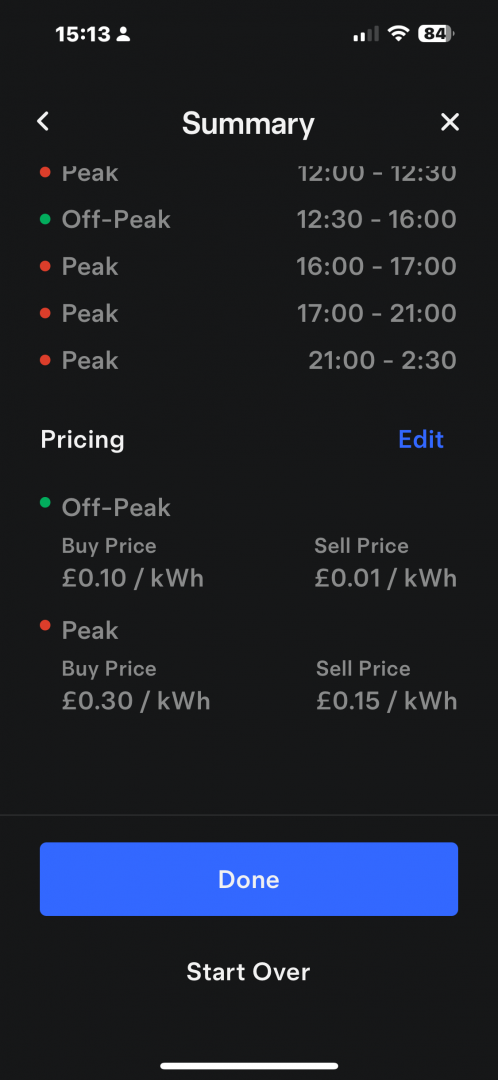
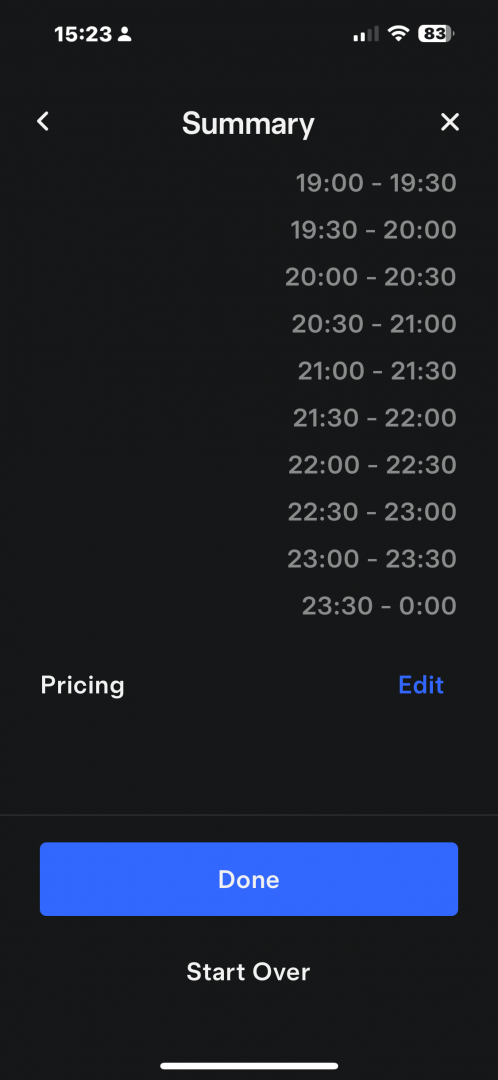
Toodles, heats his home with cold draughts and cooks food with magnets.

01/06/2024 4:06 pm
Those prices make sense for today it’s cheap till 4pm which it’s classed as off peak and then expensive from 4 onwards so it’s classed those as peak.
The Tesla app can only take rates for peak off peak and mid peak so net zero has to bucket them into those price groups
Topic starter
01/06/2024 4:30 pm
@gary Sorry to confuse; that first screen image was from my manual setting up and the values are those I have chosen from Agile prices via Octopus Watch list. The other image is the one obtained with Netzero settings. Regards, Toodles.
Toodles, heats his home with cold draughts and cooks food with magnets.
Topic starter
01/06/2024 4:49 pm
Just for clarity, I am attaching a screen shot of my manual settings in Tesla app that I have just set up for the next day’s use of grid power. I then set up the Reserve levels in Netzero to ensure the Tesla Powerwalls fully charge. Regards, Toodles
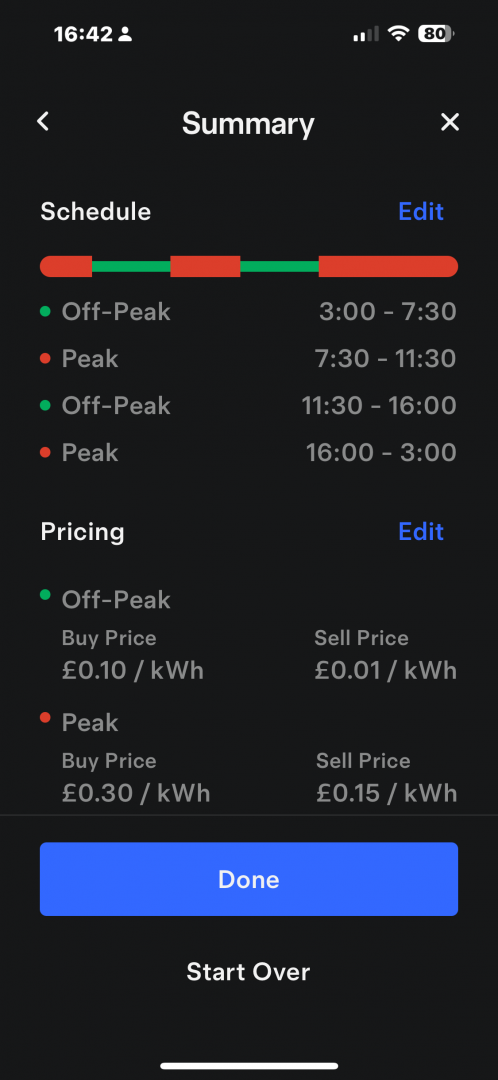
Toodles, heats his home with cold draughts and cooks food with magnets.
Topic starter
01/06/2024 4:54 pm
Having just looked at the Met Office guesstimate for tomorrow’s weather, I may start the day with a fully charged battery and be able to export quite a few solar PV kWh’s during the day. (15 p. per unit for export but approx. 11 pence for import). Regards, Toodles.
Toodles, heats his home with cold draughts and cooks food with magnets.

Page 1 / 3
Next
SPONSORS

Degrees of Separation
Latest Posts
-

RE: PV and battery long payback - sense check query
People following this thread who are hoping that plug i...
By JamesPa , 39 minutes ago
-
RE: Indevolt Batteries UK Support & Info Thread
People following this thread who are hoping that plug i...
By JamesPa , 41 minutes ago
-
Safety study for plug in batteries out to tender - looks like Q3 2027 at best before legal
Whilst searching for other information I came across th...
By JamesPa , 43 minutes ago
-
RE: Passiv Smart Thermostat - Help & Forum Support
By Singlespeed , 2 hours ago
-
second winter starting with Vaillant 7Kw arotherm plus still noise inside house
just had Vaillant over to service the HP and asked abou...
By AdamK , 3 hours ago
-
RE: Replacing Storage Heaters with a Heat Pump in a Stone Cottage
There are of course some installers trying it on, as th...
By JamesPa , 3 hours ago
-
RE: tepeo ZEB UK Support & Info Thread
OK so ZEB is basically a variant on a storage heater, b...
By JamesPa , 1 day ago
-
RE: Heat Geek installations: share your experiences
@editor I suspect that the Heat Geek online quote is a ...
By AndrewJ , 1 day ago
-
RE: Adding additional Solar Panels to a DC coupled battery system
Ah, yes. Thanks for clarifying.
By Transparent , 2 days ago
-
RE: Vaillant ecoTEC Plus - Flow Temp and Set Up
@trebor12345 I have been meaning to get home assista...
By Batpred , 2 days ago
-
RE: Is This Initial Free Quote From Octopus Trusted Partner Reasonable?
If you've got a sash window or a door you can remove th...
By EtchedPixels , 2 days ago
-
RE: Are We Sleepwalking Into Another Race to the Bottom?
Roughly how most air/air is done except that step 3 doe...
By EtchedPixels , 2 days ago
-
RE: Nook batteries from Octopus
@batpred If your energy use is low enough that just get...
By EtchedPixels , 2 days ago
-
RE: Missing flow temperature in Heat Geek proposal
I suspect 4 yrs ago, their approach had not got to this...
By Batpred , 2 days ago





SPONSORS
