Notifications
Clear all
Air Source Heat Pumps (ASHPs)
1
Posts
1
Users
0
Reactions
11
Views

Topic starter
11/12/2025 12:39 am
TL;DR: therm turns raw heat-pump history into structured run-level and long-term performance data that you can also feed directly into AI for automated analysis and diagnosis.
Over the last while I’ve been building an analysis tool for my own Samsung/Joule heat pump using data from Home Assistant exports. It started as a way to answer some very basic questions I couldn’t get clear answers to from dashboards alone — what is my real COP, what’s is influencing system performance and are there things I can do to optimise how it runs? I found myself getting overwhelmed by all the options that were available to adjust and didn't know what the try and optimise first.
That project turned into my web app therm, which was an opportunity to look into AI-based coding tools (I have no professional experience) and to see what I could come up with, so I said I would share it here to see if others were interested. It is not a mass-market tool and probably only for those who already like to analyse their heat pump data.
One of the goals I had was to be able to produce an output that I could give to an AI system so that it could help diagnose any issues with my setup. I had tried uploading the raw Home Assistant/Grafana data to AI platforms but the issue was the very inconsistent analysis between uploads on various days. The app hopefully resolves this by conducting the structured data analysis and leaves the interpretation of a much smaller, but consistently laid out dataset to the AI system. The JSON data outputs also contain prompts for the AI system to use to guide their interpretation and result output.
The can also work as a prospective tool for someone who wants to monitor the impact of any changes they make and only set up the data feeds now.
The app can be accessed via the Streamlit platform (unfortunately they do make you sign up). There are sample files there to use to see the app working:
https://heatpump-therm.streamlit.app/
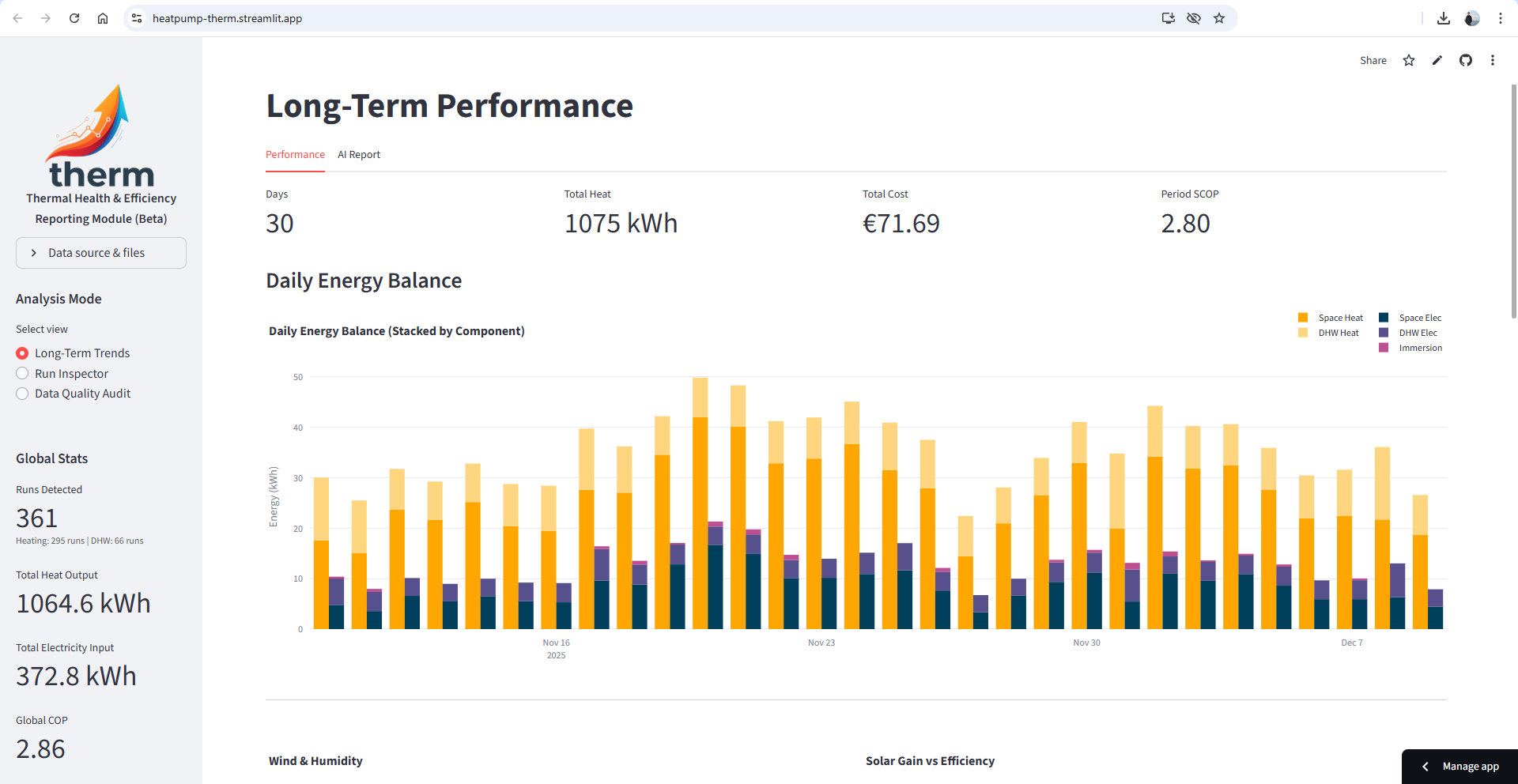
How it works in practice
The app is designed to work entirely from exported history files. You can feed it:
-
Home Assistant history exports, or
-
Grafana exports
Home Assistant has a retention period (often 7-14 days) and after this, it downsamples the data to hourly records so the native history records are less useful for granular analysis but can still provide daily stats.
As a minimum dataset, the app requires an Outdoor Unit power sensor (I use a CT clamp) and then Flow/Return temperatures (I am getting them from the Modbus data)
Once the files are loaded, the app reconstructs the system behaviour minute-by-minute and breaks operation into proper heating runs, DHW runs, defrost periods, and idle time. Each run is then analysed for delivered heat, electrical input, real COP, ΔT stability, flow behaviour, and zone interaction.
It creates structured JSON data for the long-term data and for the individual runs. This
Environmental context
The app also pulls in environmental data so that heat-pump behaviour can be interpreted in context rather than in isolation. At the moment I’m using the modbus outdoor temperature, my Ecowitt weather station data and OpenWeatherMap as a fallback/comparison source
That gives me outdoor temperature, humidity, wind speed, solar radiation and UV, aligned directly against COP, compressor frequency, and heat output. These are graphed to visualise system performance in different conditions.
Data sources, sampling, and why the calculations are not trivial
One thing that became very obvious early on is that heat-pump analysis only works if you respect how the data is actually sampled, stored, and later down-sampled.
The down-sampling of the Home Assistant history daata to hourly statistics is useful for long-term energy totals, but it completely breaks things like:
-
Per-run COP
-
ΔT stability during a cycle
-
Short cycling behaviour
-
Defrost energy impact
-
DHW ramp-up efficiency
Grafana/Influx retains full-resolution data for much longer, but introduces a different challenge: numeric sensors and state sensors behave completely differently when exported. Pumps, modes, valves and defrost are state series; temperatures, power and flow are numeric. These have to be processed using different resampling logic or you quietly destroy the meaning of the data.
therm rebuilds everything onto a common minute-level timeline and applies different rules depending on the sensor type:
-
Power, flow and temperatures are averaged safely
-
Binary and state signals are forward-filled so on/off transitions are preserved
-
Gaps caused by retention limits are explicitly tracked
On top of that, the physics itself is sensitive to resolution. Heat output is derived from:
-
Flow rate
-
Flow vs return ΔT
-
Specific heat capacity
-
Time-step integration
Even small sampling mismatches can produce negative heat, impossible COP, or completely bogus efficiency spikes if they’re not handled properly. A lot of the work in therm is simply about stopping bad calculations from happening silently.
This means:
-
High-resolution recent data is needed for run-level diagnostics
-
Hourly historical data is mainly suitable for daily and seasonal trends
-
Mixing retention-limited HA data with long-retention Grafana data is not yet supported
There are still some quirks to be worked out and I'm sure there are still issues in the system but I have spent quite some time trying to squash them all.
The biggest fault it exposed on my system
The single most important thing THERM uncovered on my own Samsung/Joule setup was this:
During DHW production, the space-heating circulation pumps are allowed to run. When that happens, heat intended for the cylinder is simultaneously being pushed into underfloor and radiators. The return temperature rises rapidly, ΔT collapses, and the compressor has to work much harder for the same tank temperature increase. DHW COP gets severely impacted.
This behaviour was essentially invisible to me and would take someone closely monitoring monitor pump states to detect it.
I had added an optocoupler board previously to monitor the primary pump, secondary pump, and three zone pumps, and merged those digital states into the analysis alongside the Modbus data. I was able then to correlate the zone pump readings with the Indoor Unit power sensor to set a threshold of 120W so that Heating during DHW can be determined without the zone pump sensors.
The AI analysis helped me to discover this and it has had a major impact on the performance of the system.
It also helped to identify that the pump speeds were likely incorrect and when I changed these, I also saw performance improvements.
What this is — and isn’t
therm isn’t a replacement for Home Assistant or Grafana dashboards. It’s more of a analysis tool: you use it when something doesn’t make sense, when COP looks wrong, when DHW feels inefficient, when short-cycling appears, or when zones behave oddly.
It’s particularly aimed at people who already:
-
Have Samsung Modbus wired up
-
Log to HA + InfluxDB / Grafana
-
Export their own history data
-
Want to prove performance rather than infer it
It would be great to hear feedback from anyone who tries it.
Grafana panels
It took me a while to get the Grafana panels configured so I could export the data. The only way I could get this to work was using 2 separate panels, State and Numeric
Heat Pump Export Data - State
SELECT "value", "state", "entity_id"
FROM "state"
WHERE
$timeFilter
AND (
-- Pumps / circulation
"entity_id" = 'underfloor_pump' OR
"entity_id" = 'downstairs_radiator_pump' OR
"entity_id" = 'upstairs_radiator_pump' OR
"entity_id" = 'primary_pump' OR
"entity_id" = 'secondary_pump' OR
-- Defrost (binary)
"entity_id" = 'heat_pump_defrost_status' OR
-- 3-way valve / immersion mode (value versions)
"entity_id" = 'heat_pump_3way_valve_position_value' OR
"entity_id" = 'heat_pump_immersion_heater_mode_value' OR
"entity_id" = 'heat_pump_hot_water_mode_value' OR
"entity_id" = 'heat_pump_hot_water_status_value'
)
Heat Pump Export Data - Numeric
SELECT "value", "entity_id"
FROM /.*/
WHERE
$timeFilter
AND (
-- Heat pump electrical / thermal
"entity_id" = 'heat_pump_power_ch1' OR
"entity_id" = 'heat_pump_heat_output' OR
"entity_id" = 'heat_pump_indoor_power' OR
"entity_id" = 'heat_pump_compressor_frequency' OR
-- Hydraulics / temps
"entity_id" = 'heat_pump_flow_rate' OR
"entity_id" = 'heat_pump_flow_temperature' OR
"entity_id" = 'heat_pump_return_temperature' OR
--"entity_id" = 'heat_pump_flow_delta' OR
"entity_id" = 'heat_pump_hot_water_temperature' OR
-- Room temps
"entity_id" = 'living_room_temp_humidity_temperature' OR
"entity_id" = 'playroom_temp_humidity_sensor_temperature' OR
"entity_id" = 'main_bedroom_temperature' OR
"entity_id" = 'bedroom1_temp_humidity_sensor_temperature' OR
"entity_id" = 'bedroom2_room_temp_humidity_sensor_temperature' OR
"entity_id" = 'ecowitt_weather_indoor_temperature' OR
"entity_id" = 'heat_pump_temp_humidity_sensor_temperature' OR
-- Environment
"entity_id" = 'heat_pump_outdoor_temperature' OR
"entity_id" = 'ecowitt_weather_humidity' OR
"entity_id" = 'ecowitt_weather_solar_radiation' OR
"entity_id" = 'ecowitt_weather_wind_speed' OR
"entity_id" = 'openweathermap_wind_speed' OR
"entity_id" = 'openweathermap_humidity' OR
"entity_id" = 'openweathermap_temperature' OR
"entity_id" = 'openweathermap_uv_index'
)
This topic was modified 2 hours ago 4 times by redzer_irl


Latest Posts
-
Heat Pump Performance Analysis Web App using Modbus Data
TL;DR: therm turns raw heat-pump history into structure...
By redzer_irl , 2 hours ago
-

RE: The good, the bad and the not that great – my heat pump installation
@cathoderay the guy I spoke to on the phone seemed very...
By Burtis , 3 hours ago
-
RE: A Smarter Smart Controller from Homely?
Talking of a smarter homely, I was getting too frequent...
By Papahuhu , 4 hours ago
-
RE: Setback savings - fact or fiction?
interestingly that’s not what I see, here is the same f...
By Adrian , 5 hours ago
-

RE: Homely for Daikin Altherma 3 - Petersfield Area
Welcome to the forums @russ. We have a massive thread...
By Mars , 5 hours ago
-
RE: Configuration issues with 10kW Midea R32 heat pump
Sorry that was a screenshot of @curlyKatie - mine has...
By SteveT , 6 hours ago
-
Different dT on each radiator?
All supplier surveys I've had, as well as tools like He...
By medwardz , 8 hours ago
-
RE: British Gas vs Octopus Energy vs Heat Geek vs EDF vs Aira vs OVO vs EON.Next vs Boxt
I get the impression that that comment "they don't comm...
By JamesPa , 10 hours ago
-

@majordennisbloodnok Just in case there are variations ...
By Toodles , 11 hours ago
-
RE: Latest NIBE model has known defect and no solution
@kings I’m glad I could help. NIBE are taking this very...
By Mars , 13 hours ago
-
RE: Octopus Cosy Heat Pump Owners & Discussion Thread
@jamespa yes, I'm under no illusions but in some respec...
By AndrewJ , 13 hours ago
-
RE: Poll for Time of Use, tariffs, technology
@majordennisbloodnok thanks. Unfortunately i can't upd...
By Tim441 , 16 hours ago
-
RE: Electricity price predictions
It seems the end of cfd payments is in sight, even if a...
By Batpred , 18 hours ago
-
-
@pie_eater Yes, I installed Homely to a Daikin heat pum...
By gery , 1 day ago
-
RE: Havenwise App Help & Forum Support – Get the Most from Your Heat Pump
@davidalgarve Potentially stupid question, but are you ...
By Sheriff Fatman , 1 day ago
-
RE: What a Bad Heat Pump Installation Looks Like
Spot on, for relatively little money, an air of ready "...
By Batpred , 1 day ago
-
RE: Replacing my 18 month old Hitachi Yutaki ASHP
@trebor12345 Ok that makes more sense and leads is i...
By JamesPa , 2 days ago
-
-

RE: Home energy storage & battery register
Now the proud owner of: 4.1Kw peak Aiko Neostar solar...
By TechnoGeek , 2 days ago