Notifications
Clear all
Air Source Heat Pumps (ASHPs)
264
Posts
11
Users
53
Reactions
12.7 K
Views
31/12/2025 4:15 pm
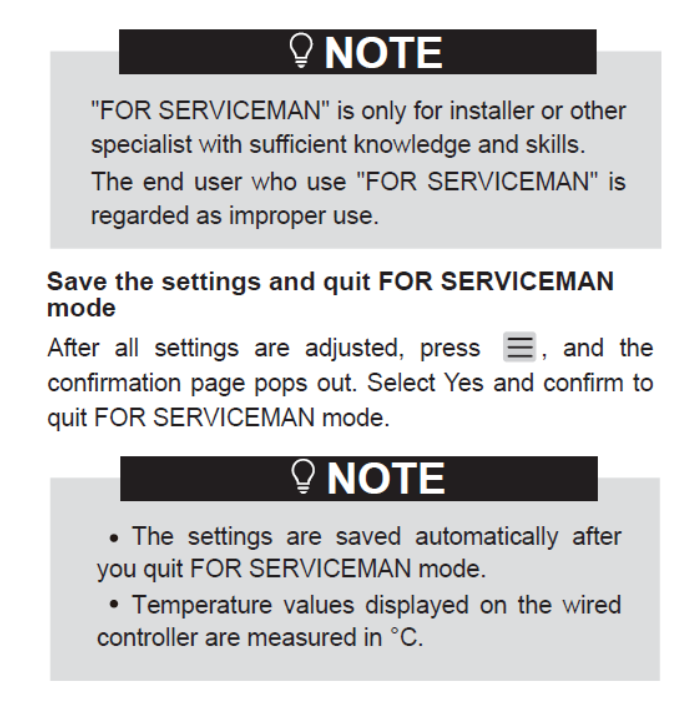
@mosibi — thanks. That's an interesting find, one I have seen before. Most of the ones I have seen have the modbus tables at the end (which this one doesn't) but they don't have the 'FOR SERVICEMAN' section that this one does. That said, it tells you how to get in and out, but also says it is not intended for home owner use, and has no details of what the serviceman can do! And the manual is intended for end users, perhaps Danish users given the domain name?
In any event, useful to see it in black and white, it's not us just pushing the wrong buttons.
But it still begs the question of why my auto-adapt script, which can alter FOR SERVICEMAN settings, doesn't trigger the behaviour. As I said earlier, I think it may be something peculiar to the HA code that causes this behaviour. Does it use the password at any point, for example (my script doesn't)? A Notepad++ find in files (in the right folders) for 234 would be a good starting point.
Midea 14kW (for now...) ASHP heating both building and DHW

31/12/2025 5:31 pm
Midea MHCV10WD2N7 R290, 5.8kWp energy community solar power.
31/12/2025 5:46 pm
@tasos — more manual inconsistency! And we are obviously badly behaved end users — unless perhaps, as informed end users, we might come under 'other specialist[s] with sufficient knowledge and skills'.
What does your unit do if you go in though the back door (FOR SERVICEMAN), change a setting and then exit? Does doing that turn everything off which you then have to switch on again?
Midea 14kW (for now...) ASHP heating both building and DHW
31/12/2025 5:57 pm
What does your unit do if you go in though the back door (FOR SERVICEMAN), change a setting and then exit? Does doing that turn everything off which you then have to switch on again?
I have not noticed something of that sort but I will check tomorrow to be sure.
Midea MHCV10WD2N7 R290, 5.8kWp energy community solar power.

31/12/2025 5:57 pm
@cathoderay Perhaps a gnarly old hand emerges from under the display and gives a sharp tap to the owner’s fingers along with a remonstrative shout of ‘Get Orff, you shouldn’t be in here at all! (Anon)
Toodles, heats his home with cold draughts and cooks food with magnets.
31/12/2025 6:19 pm
I have not noticed something of that sort but I will check tomorrow to be sure.
To be sure, It will be interesting to hear what you find.
Perhaps a gnarly old hand emerges from under the display and gives a sharp tap to the owner’s fingers along with a remonstrative shout of ‘Get Orff, you shouldn’t be in here at all! (Anon)
Thankfully that hasn't happened. My wired controller does occasionally try to remonstrate by attempting to fall off the wall, but a sharp tap from the owner's finger seems to put it back in its place!
Midea 14kW (for now...) ASHP heating both building and DHW

31/12/2025 7:12 pm
But it still begs the question of why my auto-adapt script, which can alter FOR SERVICEMAN settings, doesn't trigger the behaviour. As I said earlier, I think it may be something peculiar to the HA code that causes this behaviour. Does it use the password at any point, for example (my script doesn't)? A Notepad++ find in files (in the right folders) for 234 would be a good starting point.
Unix / Linux guy over here, so "grep" it is instead of search in Notepad++ 🙂
The ESPHome configuration I use (and created), writes and gets data using the "modbus_controller" component which uses the ESPHome "modbus" component. That component implemented all the modbus logic, comparable what "minimalmodbus" for Python does (which I used before I started with ESPHome). The ESPHome logic does nothing else then spawning modbus commands and does use any form of authentication, which is even as far as I know, not even possible with Modbus RTU.
So I do not think that the communication has to do anything with the behavior we see, but the specific wired controller (firmware) could be the reason why some encounter this more then others. You mentioned that your auto-adapt script does not show it. I assume that your script changes the leaving water temperature and nothing else? I did the same for a while using our ESPHome controller and then I also do not see that anything is disabled.
BTW: Maybe a bit off topic, but I noticed that the heat pump uses a bit more energy (50 a 60 watt) when setting the LWT using modbus instead of using the weather compensation curve.
31/12/2025 7:47 pm
Unix / Linux guy over here, so "grep" it is instead of search in Notepad++
Using 'grep' is fine, I have even been known to use a version ported to Windows!
So I do not think that the communication has to do anything with the behavior we see, but the specific wired controller (firmware) could be the reason why some encounter this more then others. You mentioned that your auto-adapt script does not show it. I assume that your script changes the leaving water temperature and nothing else? I did the same for a while using our ESPHome controller and then I also do not see that anything is disabled.
Very possibly (firmware changes).
My auto-adapt script doesn't set the LWT directly. The unit runs on weather compensation, and what the auto-adapt script does is move the end points of the WCC up and down when the actual room temperature is above or below the desired room temperature, on a degree for degree basis, up to a maximum of 3 degrees: if actual room temp is 1 degree below desired room temp, then move the WCC up one degree, etc etc. They are the 3.8 and 3.9 settings when you do them manually. The only other thing the script does is read the same values (confirms the change) and logs them in a csv file.
Midea 14kW (for now...) ASHP heating both building and DHW
31/12/2025 8:01 pm
My auto-adapt script doesn't set the LWT directly. The unit runs on weather compensation, and what the auto-adapt script does is move the end points of the WCC up and down
Check. Changing the WCC values also do not disable anything when I do that via modbus, so same what you see.

31/12/2025 8:33 pm
If I had to make a guess, I’d say that there are one or two advanced settings that are only read on startup. I’d also guess the code within the firmware of the controller, not the heat pump, has been written so there’s a user interface that hides those settings behind a password in a section specifically for pros who do the servicing, and ensures the system shutdown is carried out automatically instead of being forgotten. Finally, I’d guess there are a whole load more settings the coders wanted to keep away from householder fingers, so were also hidden behind that password.
That’s just a guess, but I’d be mildly surprised if I’m not at least close. And, if I am right, that’d comfortably explain “serviceman” settings being changed by modbus not prompting a system shutdown whilst the same settings changed by the controller might.
Or, of course, I could be way off the mark.
105 m2 bungalow in South East England
Mitsubishi Ecodan 8.5 kW air source heat pump
18 x 360W solar panels
1 x 6 kW GroWatt battery and SPH5000 inverter
1 x Myenergi Zappi
1 x VW ID3
Raised beds for home-grown veg and chickens for eggs
"Semper in excretia; sumus solum profundum variat"
01/01/2026 8:05 am
@majordennisbloodnok — you may well be onto something. Maybe it is not exiting the FOR SERVICEMAN menu that triggers the off state, but entering the FOR SERVICEMAN menu, ie keying in the password turns the unit off. Since modbus access doesn't need or use the password, it doesn't trigger the off state. But it does seem that accessing the wired controller from HA does trigger the off state, or does it? This is what @benson wrote:
What happens with my ashp is as follows:
- I need to turn this [DHW Heating] back on if I change anything in serviceman settings, which as we all know is [midea] standard.
- This setting will then remain on, and trigger an immediate tank reheat if needed (i.e. the tank is below set reheat temp. Our setting is 5 degrees C or more below target temp) even if outside of the scheduled DHW reheat times.
- if I don't turn Power DHW T5S back on after serviceman, the schedules won't ever kick in.
- once I have done the above and the schedules then kick back in, when the schedule is finished Power T5S then turns off. All then behaves as normal.
The first point, (need to turn DHW back on) after changing anything in serviceman settings, if read literally, means settings changed manually in the serviceman, meaning the password will have been used to get there. This is indeed standard Midea behaviour.
The second point, the unit remains in DHW heating mode: again this is expected Midea behaviour, since DHW heating always takes precedence over space heating. Given the steps go to serviceman > enter password > do something in the serviceman menus > exit serviceman > turn DHW heating on and the DHW temp is below threshold then DHW will become active.
The third point is the curious one. I am not sure that is what I have seen. I think way back when I didn't know what was going on, I did have occasions when the DHW scheduling remained active after I had entered and exited the serviceman menu, and had then turned the space heating back on.
Maybe the point is you have to manually turn something on. It doesn't matter whether it is space heating or DHW heating, as long as one is turned on the system remains on. If neither are turned on, the system remains dormant, ie both are off, and will remain so until one or the other is manually turned on.
I don't think HA comes into any of that, instead it is a manual access to the serviceman settings using the password - perhaps @benson can clarify?
And it is all consistent with the idea that it is entering the serviceman menu using the password that triggers the off state, which is bypassed when using modbus, meaning the off state doesn't get triggered.
Midea 14kW (for now...) ASHP heating both building and DHW

Topic starter
01/01/2026 11:01 am
Thanks all for the suggestions.
Might help if I try and explain with a screenshot of my main dashboard and how I have things set up. The bottom left dial isn't directly relevant to any of this but I added a label as thought it might cause a bit of confusion if I didn't, in terms of what this represented:
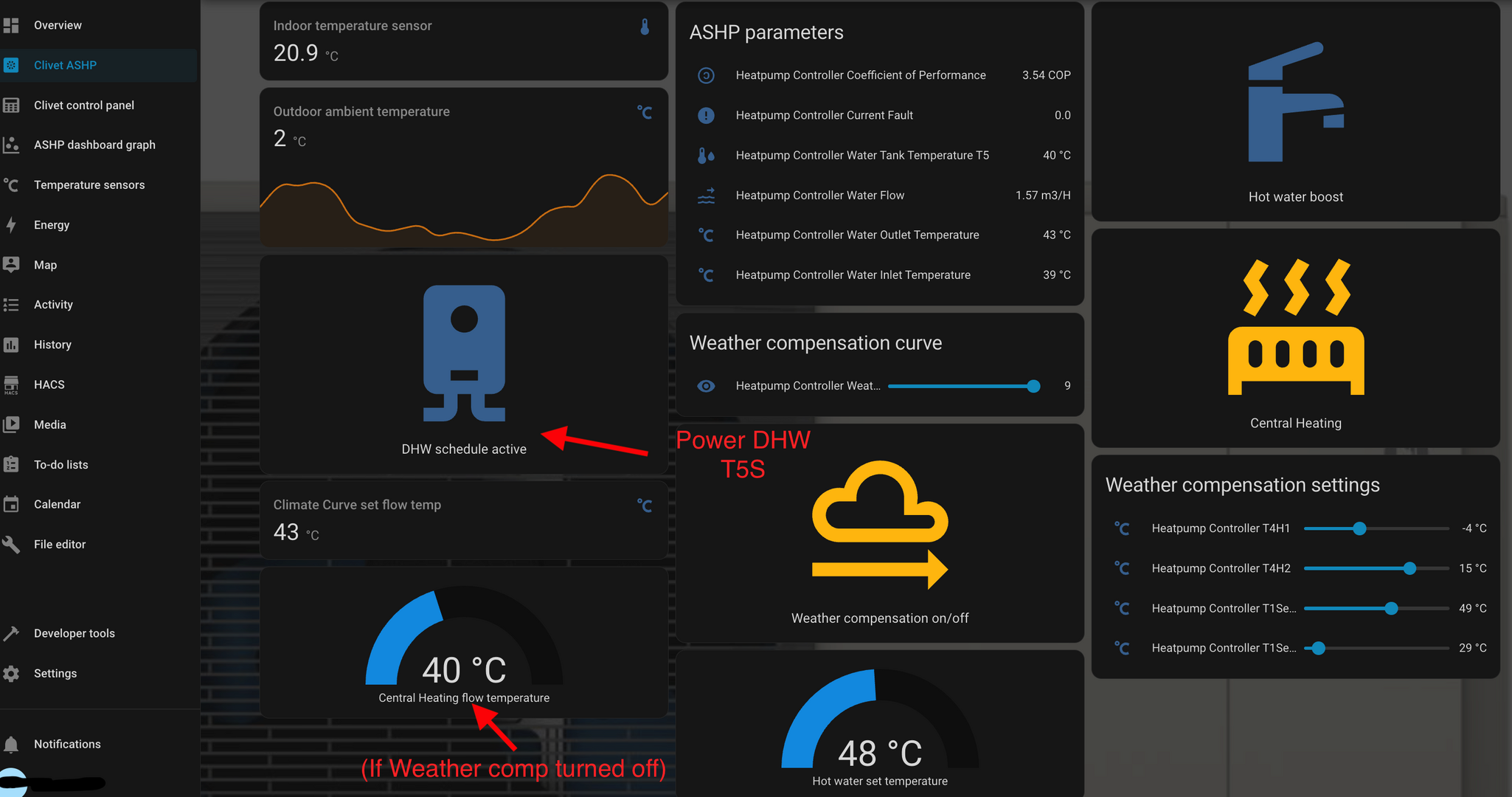
The new buttons I've created are on another separate dashboard.
@cathoderay and @jamespa thanks and yes each single button press will increase both ends of the curve by 1 degree C, and I could keep pressing it to increase by 1 degree increments. There's obviously hard limits set on these. For my system though just this small adjustment by 1 degree C I believe is going to be sufficient to cater for any extreme weather. Right now it is obviously very cold, but not windy- the default WCC settings are keeping the IAT very steady. I do have the actual values displayed on the above so I can see what I am doing, and changing.
@tasos I did do a fair bit of fiddling to see if small adjustments at one rather than both ends would work but it didn't- or at least not quickly. The sweet spot for my settings is definitely my default values shown in the screenshot above, for the vast majority of the time.
@mosibi that is an interesting way of doing things via automations...
The Power DHW T5S- this is the setting that turns DHW on and off on the control panel- so what I see when I toggle this on my home assistant dashboard is the wavy lines by the tap on the right hand side of the physical control panel appearing and disappearing. Thus how I've described it in my dashboard isn't exactly accurate in that it is not just activating the schedules. It's basically turning on a reheat.
These wavy lines on the physical control panel also disappear in between my reheat timed schedules so they do not mean that the schedule is active. They mean that the tank is actively reheating, or will do if the tank temp has dropped sufficiently.
Turning this on seems to be the only way of getting the reheat schedules to reactivate after change to serviceman settings. If I do not turn Power DHW T5S back on after I alter my WCC settings (which is all via modbus- I don't rarely touch the physical control panel so @majordennisbloodnok what you say makes complete sense but my modbus alterations definitely do not work that way), the scheduled reheat times will not kick in- or so I believed....
Maybe the point is you have to manually turn something on. It doesn't matter whether it is space heating or DHW heating, as long as one is turned on the system remains on. If neither are turned on, the system remains dormant, ie both are off, and will remain so until one or the other is manually turned on.
This is a very interesting suggestion and to be honest I'd have to test this. That would certainly make things easier for me if that is true. Thinking about it, I initially set this all up when I did not require my CH so the only way of turning it back on, was turning the DHW back on. Perhaps I just always assumed I needed to turn both back on. Maybe....all I need to do is turn Power DHW T5S briefly on and I can turn it back off again straight away just to reactivate the schedules, I wonder.
As for why Mideas do the shut down, I asked Clivet a while back and this was their response:
Sadly no, the serviceman function works on the assumption that you are changing critical operational parameters to the system, so it stops all operations to stop these being done in "real time" effectively letting the system catch up electronically with what you have asked it to do.
The biggest mystery for me is why cathoderays modbus alterations don't trigger a shut down, and my modbus alterations do.
This post was modified 2 months ago 2 times by benson

Latest Posts
-
RE: Say hello and introduce yourself
@editor @kev1964-irl This discussion might be best had ...
By GC61 , 38 minutes ago
-

RE: What determines the SOC of a battery?
Thanks. It is not clear how @bash concluded the chargin...
By Batpred , 47 minutes ago
-
Struggling to get CoP above 3 with 6 kw Ecodan ASHP
I've been using this heatpump for two winters now and a...
By GoodbyeGas , 2 hours ago
-
RE: Humidity, or lack thereof... is my heat pump making rooms drier?
That would make sense. I've found the effects are prett...
By Majordennisbloodnok , 2 hours ago
-
RE: Testing new controls/monitoring for Midea Clone ASHP
@benson — as @tasos suggests, plotting multiple variabl...
By cathodeRay , 3 hours ago
-
@painter26 — as @jamespa says, it's for filling and re-...
By cathodeRay , 4 hours ago
-

RE: Oversized 10.5kW Grant Aerona Heat Pump on Microbore Pipes and Undersized Rads
@uknick TBH if I were taking the floor up ...
By JamesPa , 15 hours ago
-
RE: Getting ready for export with a BESS
I would have not got it if it was that tight
By Batpred , 17 hours ago
-
RE: Setback savings - fact or fiction?
I also need to correct something I said by mistake earl...
By cathodeRay , 17 hours ago
-
RE: Electricity price predictions
@judith Thanks for sharing, and nice to see how the ...
By Batpred , 18 hours ago
-
RE: Need help maximising COP of 3.5kW Valiant Aerotherm heat pump
@judith thanks Judith. Confirmation appreciated. The ...
By DavidB , 20 hours ago
-
RE: Recommended home battery inverters + regulatory matters - help requested
That makes sense. I thought better to comment in this t...
By Batpred , 20 hours ago
-
Bosch CS5800i 7kW replacing Greenstar Junior 28i
My heat pump journey began a couple of years ago when I...
By Slartibartfast , 21 hours ago
-
RE: How to control DHW with Honeywell EvoHome on Trianco ActiveAir 5 kW ASHP
The last photo is defrost for sure (or cooling, but pre...
By JamesPa , 22 hours ago
-
RE: Plug and play solar. Thoughts?
Essentially, this just needed legislation. In Germany t...
By Batpred , 23 hours ago
-
RE: A Smarter Smart Controller from Homely?
@toodles Intentional opening of any warranty “can of wo...
By Papahuhu , 24 hours ago
-
RE: Safety update; RCBOs supplying inverters or storage batteries
Thanks @transparent Thankyou for your advic...
By Bash , 1 day ago
-
RE: Air source heat pump roll call – what heat pump brand and model do you have?
Forum Handle: Odd_LionManufacturer: SamsungModel: Samsu...
By Odd_Lion , 1 day ago
-
RE: Configuring third party dongle for Ecodan local control
Well, it was mentioned before in the early pos...
By F1p , 2 days ago
-
RE: DIY solar upgrade - Considering adding more panels
I know this is a bit old, but it made me wonder what co...
By Batpred , 2 days ago
-
RE: New Vaillant aroTherm Plus in black - When will it come to the UK?
@majordennisbloodnok Daikin, take note! (In fact, I hav...
By Toodles , 2 days ago
-
RE: Midea ASHP – how to set weather compensation
@mk4 — good work! First, I agree, no evidence of cycl...
By cathodeRay , 2 days ago
-

RE: Solis inverters S6-EH1P: pros and cons and battery options
I don't know about Solis inverters. It isn't a featur...
By Transparent , 2 days ago