Notifications
Clear all
Air Source Heat Pumps (ASHPs)
264
Posts
11
Users
53
Reactions
12.7 K
Views

02/12/2025 6:59 pm
@benson In the case of Daikin, the ASHP varies the pump speed to maintain the chosen Delta T, in my own case, this means it starts up at ~28 lpm, settles to ~14 lpm after a few minutes then drops to ~7 lpm where it then sits for hour sometimes. This is actually a fairly recent thing as it used to run at ~14 lpm most of the time; I have yet to find out whether this is due to a firmware update or something else.
As to the LSV’s and the Thermostats on the radiators, usually the starting point is with the TRV’s fully open and gradually adjust the LSV’s this will help reduce the number of variables too! Toodles.
This post was modified 3 months ago by Toodles
Toodles, heats his home with cold draughts and cooks food with magnets.
1
02/12/2025 7:04 pm
@benson — I had a rather unusual, or maybe it is not, situation. I have a TRV (all fully open, achieved by taking their heads off) on one end of the rad and lock shield on the other. In my attempts to balance the rads, in particular to get better flow to two end of the run rads, I had so turned down all the other lock shields such that they seriously restricted flow. This in turn meant less heat delivery. Being in this state is not obvious, apart from the fact that overall energy out, and so heat delivered, is capped. It took a very clever forum member to spot this state of affairs (the clue was the heat was not getting across my plate heat exchanger as it should, because the secondary circuit circulation was too sluggish, and suggest the obvious solution, open up all the lock shield valves fully. The effect on output was immediate and very visible. hence 'big bang'. As I normally have all doors in the house open, air movement between rooms is enough to keep most of the house at around the same temperature.
What I have only recently realised is that the pump speed will be set by the ashp to achieve the correct delta T.
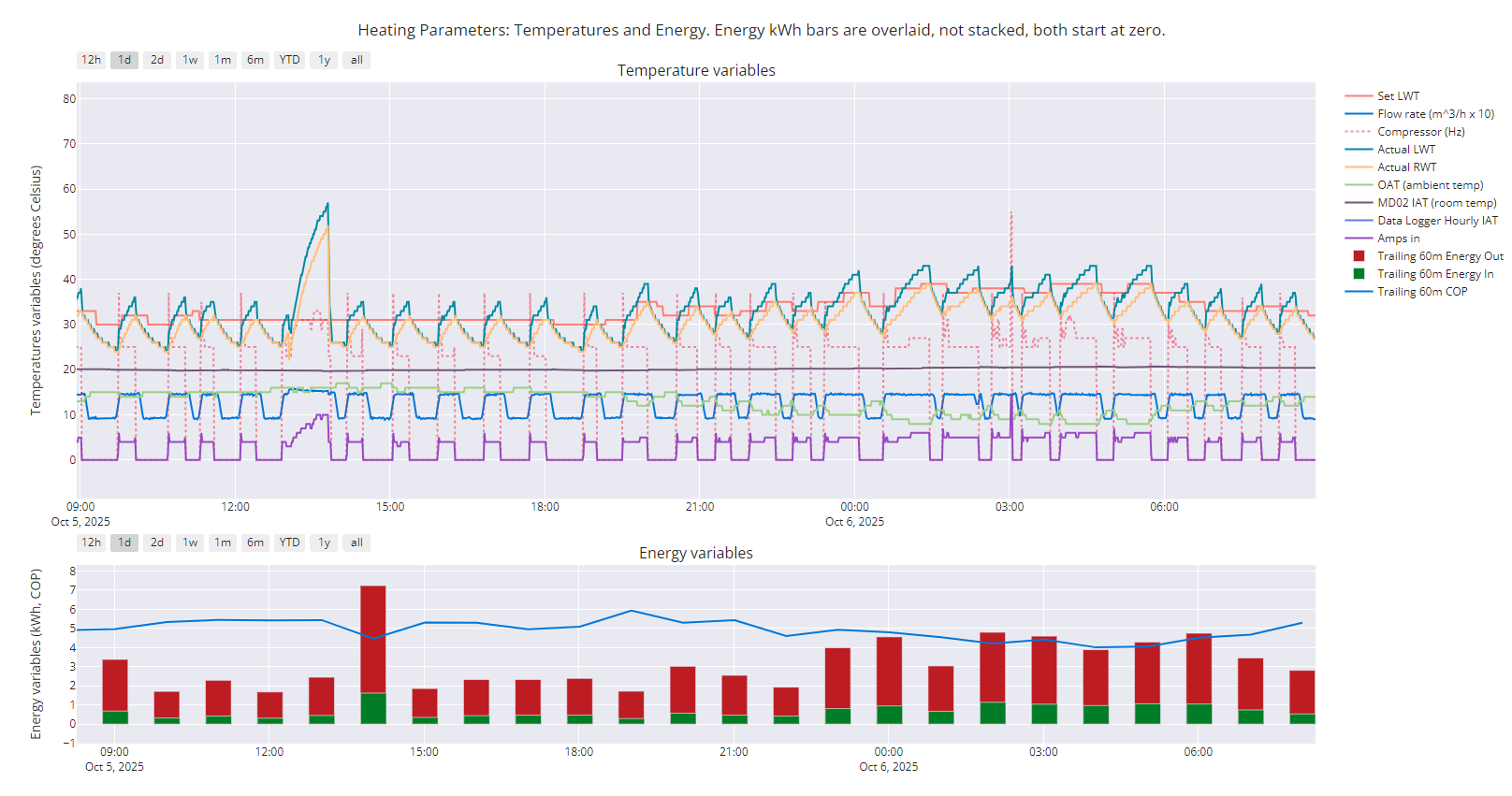
I am not sure this is the case with Midea and Midea clone units. My primary flow rate is usually either ~1.4m^3/h (most of the time) or ~1.0m^3/h (the rest of the time). See if you have flow rate in your data, and if so whether you can add it to a chart for a while. Failing that, the wired controller shows it as one of the Operational Parameters, check it from time to time to see if it varies much.
This is my version of such a chart, and seriously over-crowded it is too, which is why I don't normally include the extra variables. You can see the flow rate in mid-blue, multiplied by 10 to get it to display better on the chart. You can also see what the compressor is doing, and the amps in. I'm still not sure what sets the delta t...
Midea 14kW (for now...) ASHP heating both building and DHW

Topic starter
02/12/2025 8:42 pm
I am not sure this is the case with Midea and Midea clone units. My primary flow rate is usually either ~1.4m^3/h (most of the time) or ~1.0m^3/h (the rest of the time). See if you have flow rate in your data, and if so whether you can add it to a chart for a while. Failing that, the wired controller shows it as one of the Operational Parameters, check it from time to time to see if it varies much.
Here's what mine typically looks like.
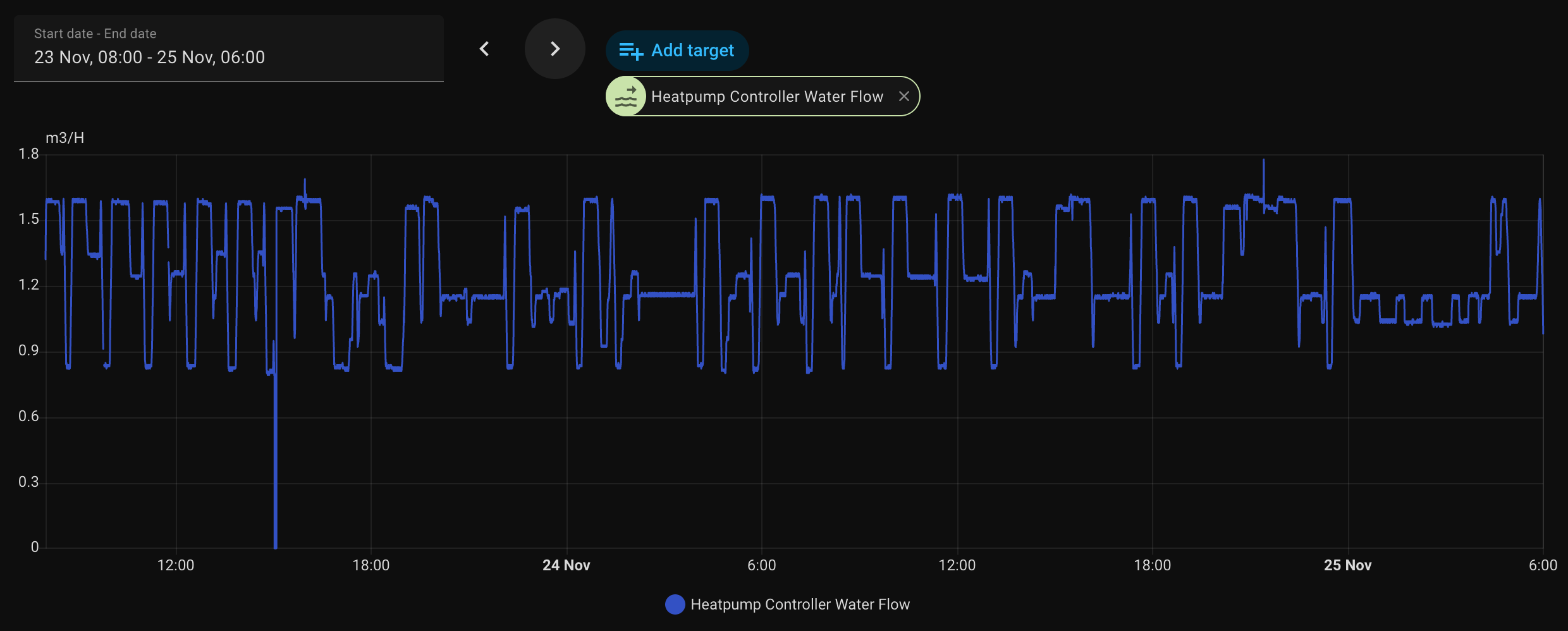
Hence why I assumed it was varying flow rate to achieve the correct temp drop...which is always around 4 or 5 degrees C.
This post was modified 3 months ago 2 times by benson
03/12/2025 8:11 am
@benson — your flow rate still shows a step pattern, albeit more exaggerated than mine, with what look like set points, with the highs and lows at the same value. This does not look like a continuously variable modulation of flow to me.
It would be interesting to see the same chart with the LWT and RWT added, zoomed in to say half a dozen cycles, to see how the flow rate changes during each cycle. Meanwhile taking your earlier chart, there are some things that don't really make sense to me, notably the almost instantaneous changes in LWT (zooming in as above will help clarify how instantaneous), and the change from a gradual (and more credible) rise in LWT/RWT delta t on the left to the sudden (and less credible) rises seen on the right:
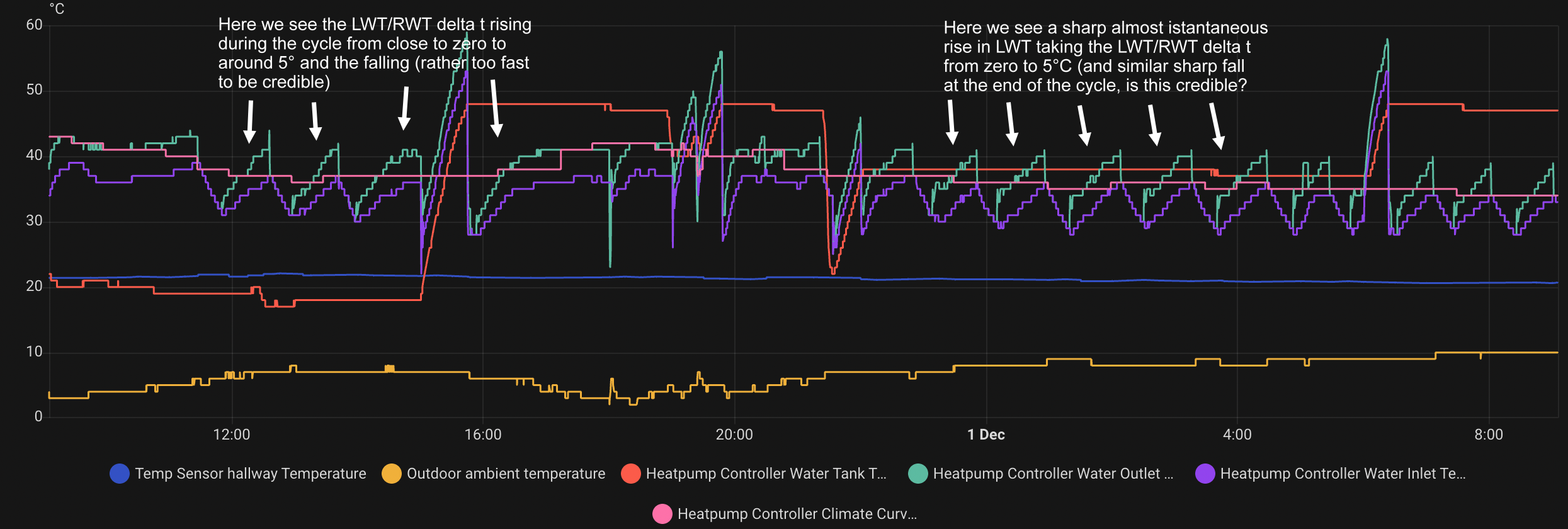
I think this is well worth looking at in detail, as it may give us more insight into how Midea and Midea clone units modulate their output. It may also be worth looking in detail at how your charts get plotted, including the data point intervals. Mine use 'minute data' ie there is a data point every minute, which is a high enough resolution to make small changes visible. Exactly the same data plotted with hourly data points would look very different, even though it is from the same data set.
Midea 14kW (for now...) ASHP heating both building and DHW
1
03/12/2025 8:41 am
As to the LSV’s and the Thermostats on the radiators, usually the starting point is with the TRV’s fully open and gradually adjust the LSV’s this will help reduce the number of variables too!
Very true, that is the standard method (and the one I used) but there is that trap that I fell into. Both the upstairs and the downstairs last radiators on the respective pipe runs were cooler than I wanted, and I ended up screwing down all the other lock shields to the point where the total system resistance restricted overall flow, which in turn restricted total heat output. The heat pump never managed to achieve its rated output. Once I opened up all the lock shield valves ('big bang') the heat pump showed a step increase in output:
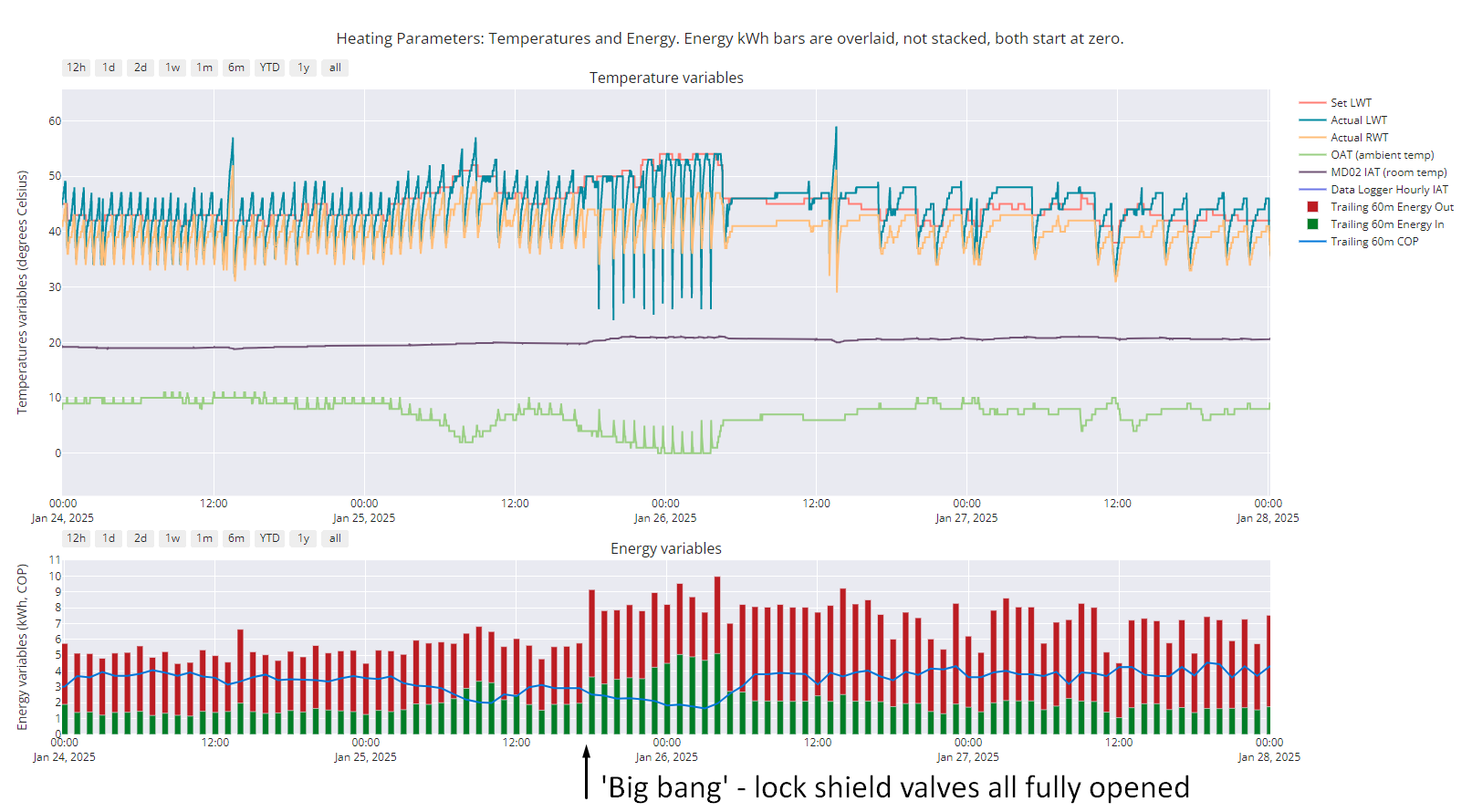
As well as noting the step increase, also note the overall output pattern before and after 'big bang'. For sure, some of the increased output after 'big bang' is down to lower OATs, but if you look at periods when the OAT is the same or very similar, output is generally higher after 'big bang' than before.
Midea 14kW (for now...) ASHP heating both building and DHW
Topic starter
31/12/2025 8:41 am
@cathoderay I completely missed your reply above for some reason but will have a closer look at this. I was revisiting this thread to provide a quick update, and ask a further midea specific question and have only just seen it.
My 'default' WCC settings are still working well....99% of the time. On Christmas Eve we had slightly unusual weather conditions (or it was for around here at least) in that the OAT was very low, and it was rather windy as well. Our IAT did suffer a bit and dropped to around 19.8, which is outside our ideal range of between 20.5 and 21.5. I therefore tweaked the curve settings manually, very slightly, adding 1 degree onto the warm end and cold end which did the trick. I left this for a few days and sure enough the IAT then overshot so I've reduced them back down.
As the above seems to be a very rare occurrence (in that my default settings will work for the vast majority of the time) I have just set up two simple button cards on home assistant which then run a script to boost the WCC values by 1 degree. I do have the sliders that I can use to change these settings but they are a little small and fiddly to change on my phone, hence why I wanted a button.
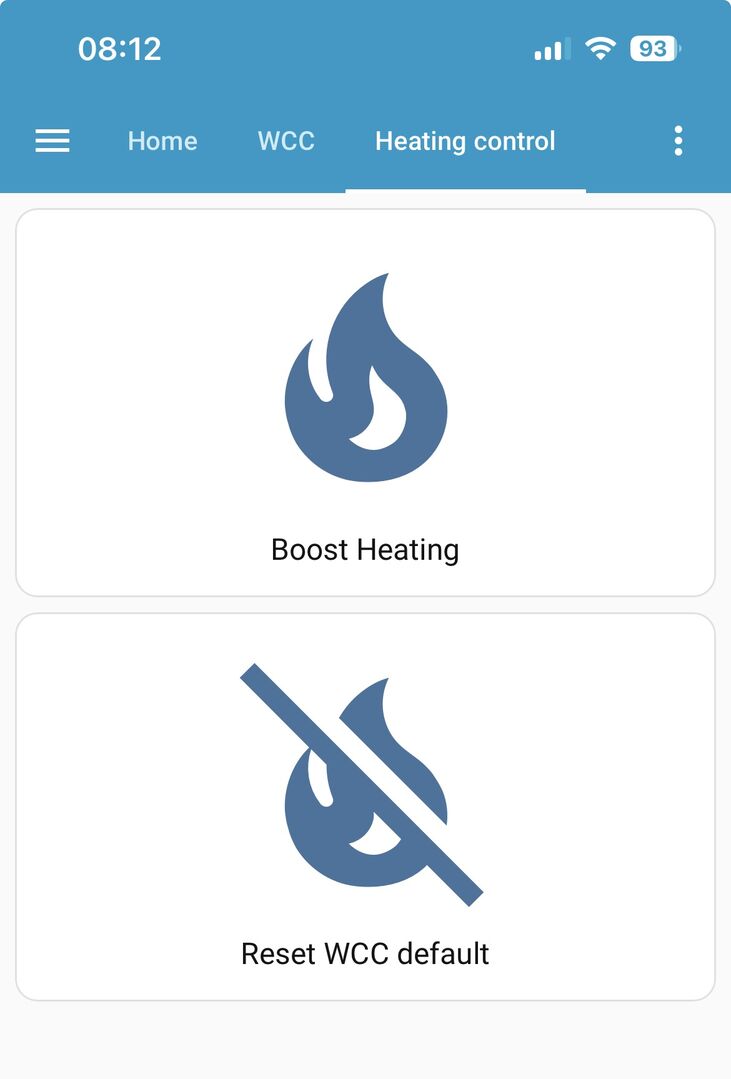
I then have another button to restore the original values. I then have to turn heating and DHW back on again but I have two other dashboard buttons for that.
The DHW setting is the most annoying one, I am finding. This is Power DHW T5S. I confirmed that this is the right entity by turning it back on via the physical control panel, and then I could see that this was the entity that was changing on my home assistant dashboard.
What happens with my ashp is as follows:
- I need to turn this back on if I change anything in serviceman settings, which as we all know is [midea] standard.
- This setting will then remain on, and trigger an immediate tank reheat if needed (i.e. the tank is below set reheat temp. Our setting is 5 degrees C or more below target temp) even if outside of the scheduled DHW reheat times.
- if I don't turn Power DHW T5S back on after serviceman, the schedules won't ever kick in.
- once I have done the above and the schedules then kick back in, when the schedule is finished Power T5S then turns off. All then behaves as normal.
Hopefully this makes sense how I have described it. This setting doesn't just turn the schedules back on. It triggers an immediate tank reheat as said and then will remain on, until the next schedule 'off' time which seems very strange. Any ideas or is this just how the midea works?
This post was modified 2 months ago 4 times by benson
31/12/2025 9:14 am
@benson — the manual implementation of a WCC adjustment is neat. Push button control! Is it incremental ie one button push increases the WCC endpoints by one degree, two pushes increases it by two degrees? If so, then it may be worth having a display showing the current settings.
The erratic behaviour — I think it may be that you have some sort of control conflict somewhere. Interestingly my auto-adapt script doesn't trigger the annoying Midea turning itself off behaviour when you exit the FOR SERVICEMAN menu. Coming back to your setup, I see the HA entity terminology is as opaque as ever! But you have confirmed that it is the control, ie the switch that turns it on or off, not the state, ie reporting on whether it is on or off? Maybe there is something in the way HA connects to the wired controller that makes the wired controller think that someone has just come in and then exited through the back door (ie mimicked a manual FOR SERVICEMAN change) where as my script flies in and out through the window so to speak and so doesn't trigger a need to restart the unit. Maybe see if you can make sense of the HA code, to see what it actually does?
Our setting is 5 degrees C or more below target temp) even if outside of the scheduled DHW reheat times.
I'm also not sure about this. The schedule is a simple timer, with on and off periods, and if you are in an off period, then it won't come on automatically, that is the whole point! You have to manually override the schedule to get DHW heating to come on during a schedule off period, at least I do (and the DHW tank temp needs to be below the trigger threshold). If you want it to always reheat when the temp drops below your set trigger threshold, then surely you have to remove any schedule, and have it always on?
Midea 14kW (for now...) ASHP heating both building and DHW
1

31/12/2025 11:14 am
I therefore tweaked the curve settings manually, very slightly, adding 1 degree onto the warm end and cold end which did the trick. I left this for a few days and sure enough the IAT then overshot so I've reduced them back down.
Perhaps it would be better to just change the cold end, as it seems to be low. Surely the whole line will be changed, but not as much as if the whole line is moved in parallel.
Regarding DHW, let me just say that I am using the hot water heat exchanger of my boiler, thus having constantly hot water at the LWT temperature, which is sufficient for most purposes. If warmer temp is needed, I just turn on the electric resistance for 15 mins. In this way, I think you will get rid of all the peaks in the LWT chart.
Midea MHCV10WD2N7 R290, 5.8kWp energy community solar power.
1

31/12/2025 11:45 am
@benson — the manual implementation of a WCC adjustment is neat. Push button control! Is it incremental ie one button push increases the WCC endpoints by one degree, two pushes increases it by two degrees? If so, then it may be worth having a display showing the current settings.
Perhaps it would be better to just change the cold end, as it seems to be low. Surely the whole line will be changed, but not as much as if the whole line is moved in parallel.
@benson very well done for implementing this with such a simple UI. FWIW its functionally similar to what Vaillant heat pumps do if you change the 'target room temperature' on the UI when its operating in pure WC mode, and what I believe Samsung heat pumps also do through user menu, which lets you bump the FT up or down by a degree or more. The Vaillant definitely shifts the whole WC curve, Im not sure whether the Samsung shifts the whole curve or is just temporary.
4kW peak of solar PV since 2011; EV and a 1930s house which has been partially renovated to improve its efficiency. 7kW Vaillant heat pump.
1

31/12/2025 12:57 pm
@benson We also see that when changing (certain?) values using modbus which are in the 'for serviceman' menu, automated DHW is turned off. This behavior is stated in the manual of our heat pump, so I just work around it by enabling it using an automation in Home Assistant, when it's detected that it's shut off.
But since a few months I changed the way how we heat the water tank, after we had a Homely for a short while (our installer wanted to have a bit of insight in our HP). In the Homely app the default is that you pick one or more fixed times at which you want to heat the water tank and I noticed that it worked quite well for our family, so I created an automation in Home Assistant to mimic that way-of-working.
Below is the code of the automation, which does to following:
- Trigger on 05:30, 17:00 and when a DHW run is stopped. Each trigger has his own "trigger id" which is used in the actions
- Actions
- If triggered by one of the the two "times", heat up the water tank to the setpoint which is set, but only if it is below the threshold (setpoint - delta)
- If triggered by "05:30" and the day is sunday, then change the setpoint to 60 and heat up the water tank. This is my anti legionella run
- If triggered by "DHW run stopped" and the day is sunday, then change the setpoint back to 50
This automation has a high WAF, since according to her the water temperature is always good. I also record the energy usage of the various states (Heating, DHW, Cooling, Defrosting), and using this method, the energy usage is lower (only a few kW per month) then on the automatic setting. So I am happy to (which is of course way less important then the WAF)
alias: Water tank periodic heating
description: ""
triggers:
  - trigger: time
    at: "17:00:00"
    id: time_one
  - trigger: time
    at: "05:30:00"
    id: time_two
  - trigger: state
    entity_id:
      - sensor.heatpump_active_state
    from:
      - DHW
    id: dhw_stopped
    alias: DHW run is stopped
conditions: []
actions:
  - alias: "Tank temperature back to 50 degrees"
    if:
      - condition: time
        weekday:
          - sun
      - condition: trigger
        id:
          - dhw_stopped
    then:
      - action: number.set_value
        metadata: {}
        data:
          value: "50"
        target:
          entity_id: number.heatpump_set_dhw_tank_temperature_t5s
  - if:
      - condition: trigger
        id:
          - time_one
          - time_two
      - condition: numeric_state
        entity_id: sensor.heatpump_water_tank_temperature_t5
        below: 0
        value_template: >-
          {{ (state.state | int) -
          ((states('number.heatpump_set_dhw_tank_temperature_t5s') | int) -
          (states('number.heatpump_dt1s5') | int)) }}
        alias: If water tank temperature is below threshold
      - condition: state
        entity_id: switch.heatpump_power_dhw_t5s
        state: "off"
    then:
      - action: switch.turn_on
        metadata: {}
        data: {}
        target:
          entity_id: switch.heatpump_forced_water_tank_heating
    alias: Tank heating when temperature below threshold
  - alias: Legionella run on sunday morning
    if:
      - condition: time
        weekday:
          - sun
      - condition: trigger
        id:
          - time_two
      - condition: state
        entity_id: switch.heatpump_power_dhw_t5s
        state: "off"
    then:
      - action: number.set_value
        metadata: {}
        data:
          value: "60"
        target:
          entity_id: number.heatpump_set_dhw_tank_temperature_t5s
      - action: switch.turn_on
        metadata: {}
        data: {}
        target:
          entity_id: switch.heatpump_forced_water_tank_heating
mode: single
1
31/12/2025 1:03 pm
This behavior is stated in the manual of our heat pump
Do you have the reference for this? I have never seen it explicitly said, most of us have learnt it the hard way. There is also my observation (consistent with your observation
when changing (certain?) values using modbus which are in the 'for serviceman' menu
that my auto-adapt script doesn't turn things off, even though it directly changes settings that are behind the FOR SERVICEMAN password.
It would be very useful to clear up what is going on here, and what the 'modbus rules of engagement' are for the Midea (and clone) wired controllers.
Midea 14kW (for now...) ASHP heating both building and DHW
31/12/2025 3:48 pm
Do you have the reference for this? I have never seen it explicitly said, most of us have learnt it the hard way. There is also my observation (consistent with your observation
That cost me quite some time to find it again. The Midea manuals, as you know, are not always that straightforward in explaining stuff, so this is what I found and what I interpreted (combined with my own and others experience) as what I stated above:

Source:

Latest Posts
-

RE: Solis inverters S6-EH1P: pros and cons and battery options
Just to wrap this up here for future readers: The S...
By Batpred , 26 minutes ago
-
RE: Electricity price predictions
I get the scientific argument however I would ask what ...
By JamesPa , 31 minutes ago
-
RE: Struggling to get CoP above 3 with 6 kw Ecodan ASHP
Welcome to the forums.I assume that you're getting the ...
By Sheriff Fatman , 33 minutes ago
-
RE: What determines the SOC of a battery?
I agree. Fogstar confirmed that the Seplos BMS does ...
By Batpred , 51 minutes ago
-
RE: Humidity, or lack thereof... is my heat pump making rooms drier?
I've found that generally the humidity in the house is ...
By IRMartini , 1 hour ago
-
RE: Say hello and introduce yourself
@editor @kev1964-irl This discussion might be best had ...
By GC61 , 2 hours ago
-
RE: Testing new controls/monitoring for Midea Clone ASHP
@benson — as @tasos suggests, plotting multiple variabl...
By cathodeRay , 4 hours ago
-
@painter26 — as @jamespa says, it's for filling and re-...
By cathodeRay , 6 hours ago
-
RE: Oversized 10.5kW Grant Aerona Heat Pump on Microbore Pipes and Undersized Rads
@uknick TBH if I were taking the floor up ...
By JamesPa , 17 hours ago
-
RE: Getting ready for export with a BESS
I would have not got it if it was that tight
By Batpred , 18 hours ago
-
RE: Setback savings - fact or fiction?
I also need to correct something I said by mistake earl...
By cathodeRay , 18 hours ago
-
RE: Need help maximising COP of 3.5kW Valiant Aerotherm heat pump
@judith thanks Judith. Confirmation appreciated. The ...
By DavidB , 21 hours ago
-
RE: Recommended home battery inverters + regulatory matters - help requested
That makes sense. I thought better to comment in this t...
By Batpred , 22 hours ago
-
Bosch CS5800i 7kW replacing Greenstar Junior 28i
My heat pump journey began a couple of years ago when I...
By Slartibartfast , 22 hours ago
-
RE: How to control DHW with Honeywell EvoHome on Trianco ActiveAir 5 kW ASHP
The last photo is defrost for sure (or cooling, but pre...
By JamesPa , 24 hours ago
-
RE: Plug and play solar. Thoughts?
Essentially, this just needed legislation. In Germany t...
By Batpred , 1 day ago
-
RE: A Smarter Smart Controller from Homely?
@toodles Intentional opening of any warranty “can of wo...
By Papahuhu , 1 day ago
-
RE: Safety update; RCBOs supplying inverters or storage batteries
Thanks @transparent Thankyou for your advic...
By Bash , 1 day ago
-
RE: Air source heat pump roll call – what heat pump brand and model do you have?
Forum Handle: Odd_LionManufacturer: SamsungModel: Samsu...
By Odd_Lion , 1 day ago
-
RE: Configuring third party dongle for Ecodan local control
Well, it was mentioned before in the early pos...
By F1p , 2 days ago
-
RE: DIY solar upgrade - Considering adding more panels
I know this is a bit old, but it made me wonder what co...
By Batpred , 2 days ago
-
RE: New Vaillant aroTherm Plus in black - When will it come to the UK?
@majordennisbloodnok Daikin, take note! (In fact, I hav...
By Toodles , 2 days ago
-
RE: Midea ASHP – how to set weather compensation
@mk4 — good work! First, I agree, no evidence of cycl...
By cathodeRay , 2 days ago