Notifications
Clear all

18/02/2026 11:42 pm
I don't recognise that screenshot you have posted.
I spent many nights working out why the unit's weren't balancing as well as I'd hoped using the Seplos desktop app.
Once the batteries reached around 97-98% capacity the BMS would ask the Solis inverter to ramp down the charge rate, dropping to around 10A, possibly 5A, from the requested 100A charge rate I set
The screenshot is via home assistant, as it is currently working..
I would be interested to know if there's any configuration required to get it to ramp the charging down as it gets close to 100 soc.
I assume you are using pylontech protocol on both the BMS and the Solis sides? I think that does not allow control of the voltage range etc, or did I miss anything?
I also assume you are using the default config that Fogstar shipped the kit with?
8kW Solis S6-EH1P8K-L-PLUS hybrid inverter; G99: 8kw export; 16kWh Seplos Fogstar battery; Ohme Home Pro EV charger; 100Amp head, HA lab on mini PC

19/02/2026 7:27 am
The easiest way to analyze what's going on is to post screenshots of the BMS configuration parameters and the inverter settings.
My blog where I write about all the systems in place and decisions made for my off-grid house at 63 degrees north in Finland.
1

19/02/2026 12:40 pm
There is no configuration required to the Seplos BMS settings. The BMS automatically does this for you.
I know that it does it as I spent many late nights staring at a computer screen trying to get my head around why the cell balance was off!
In the end I upgraded to the JK Active balancer, which confirmed conclusively that my cells had got out of balance, significantly.
The cells need to be reasonably balanced for the balancer to have an opportunity to top balance properly.
I had 4 cells that were way out. The cells ran away too quickly and never allowed the balancer time to do it's work.
In the end I made a lighting rig out of car headlight bulbs and discharged the over shooting cells to bring them back in line with the others.
Now that the cells were roughly the same I observed the BMS ramp down its charge rate once the cells got to about 3.450V, at which point the Active Balancer kicked in and moved the energy around the cells to get them properly balanced.
Once the total pack reached 57.6V the BMS shut down the charge rate to 0A.
The Active balancer still works when the cells are not charging until they drop back below 3.450V.
It is important to check your balance start voltage on the JK Active balancer.
The default is 3.450V and will keep going until the difference is less than 10mV.
You can change these, but I wouldn't. Do check though.
You need to really observe this through the Seplos app and JK bluetooth app as the batteries reach near capacity. This will mean staying up late one night (or more if they are out of balance, although I suspect you'll find they are probably balanced anyway).
1
19/02/2026 12:52 pm
The easiest way to analyze what's going on is to post screenshots of the BMS configuration parameters and the inverter settings.
On my Solis, there are only a handful of parameters in the timed charge periods (they are actually exactly the same for discharge periods). This is all that can be set:
- start and stop times of the period
- the amp level
- the soc level
For charging, I just split the last charging slot. So I now have a few slots before that, with a soc of 94-98. The last one now has 10A charging to soc 100.
The Seplos 16kwh battery was configured as below:
- battery type: Lithium Battery
- battery model: PYLON_LV
- Max charge current: 100A
- Max discharge current: 190A
- battery saving: Disable
- Max charge SOC: 100
Attaching screenshots reduces the resolution, making it unreadable.
So I made the screenshots with the Seplos BMS configuration accessible via this link:
https://drive.google.com/drive/folders/1YVChebpuYF5KqYWYK72GXrRq4C5Qi2TQ?usp=sharing
Perhaps @bash configs are different, and that would trigger the BMS to slow the charging down automatically.
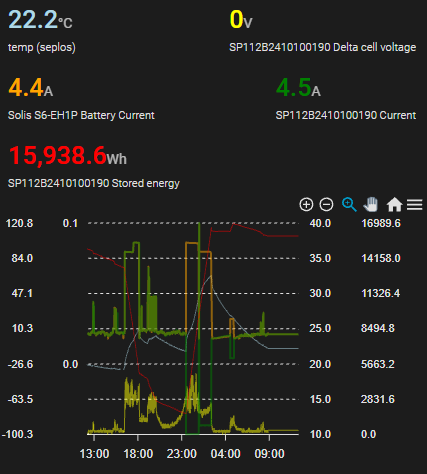
Below I am including a graph including the charge current. That does not show any smoothing effect (as was the case with the power). Note: the charging periods shown are yesterday's, slightly different from the ones described above.
8kW Solis S6-EH1P8K-L-PLUS hybrid inverter; G99: 8kw export; 16kWh Seplos Fogstar battery; Ohme Home Pro EV charger; 100Amp head, HA lab on mini PC
19/02/2026 2:33 pm
As I said you are looking at the wrong thing.
You need to be connected to your BMS direct.
I am using the default settings of the BMS, so should be the same as yours unless you have fiddled with your BMS settings.
I don't think so. 🙂 My post crossed with yours, thanks for that. I will look at the cell balancing later.
All I am looking for now is to understand the "magic" that worked for you, enabling the Seplos BMS to slow the charging as the battery charge increases.
I assume you did not check the gdrive where I placed the screenshots with all the configs that I directly grabbed from the Seplos BMS?
Anyway, hopefully some fiddling with the Seplos BMS parameters worked in those overnight sessions.
As @upnorthandpersonal said, sharing your config is the simplest way. I can do the detailed comparison. 😆
8kW Solis S6-EH1P8K-L-PLUS hybrid inverter; G99: 8kw export; 16kWh Seplos Fogstar battery; Ohme Home Pro EV charger; 100Amp head, HA lab on mini PC
19/02/2026 5:35 pm
There's no magic, it is the design of the BMS, I have watched it many times from the stock firmware unchanged.
You need to set your alarm for 3am and do some observations 😆
19/02/2026 5:40 pm
Interestingly having had a very quick look at your BMS settings, they look totally different to mine, not the values themselves, but the layout.
Are you definitely on Seplos V3?
How did you log onto the BMS?
I connect using the USB - RS485 cable supplied by Fogstar connected to my laptop using the Seplos Dev software application.
19/02/2026 7:06 pm
You need to set your alarm for 3am and do some observations 😆
At the moment, my HA is doing the monitoring job. I thought I would do the tedious job to compare all those parameters. 😆 Anyway, when you get a chance..
I did have a few late evenings to get Solis on a straight and narrow. What I rather forget is the DIY pack building "customer experience"..
Interestingly having had a very quick look at your BMS settings, they look totally different to mine, not the values themselves, but the layout.
Yes, this is the layout on the Seplos bluetooth app, called Octopus. It is a V3 and I upgraded the firmware to 1.5.
For some reason I cannot access the JK LB via their app, but HA still plots some basic data. I suspect it is not doing anything..
As for the values for the Seplos BMS, the old Fogstar just advised me to change one or two values.
8kW Solis S6-EH1P8K-L-PLUS hybrid inverter; G99: 8kw export; 16kWh Seplos Fogstar battery; Ohme Home Pro EV charger; 100Amp head, HA lab on mini PC
19/02/2026 8:27 pm
Your BMS parameters will be the same as mine then, as I only changed the Fogstar recommended ones in the tutorial (which are largely irrelevant as the JK Balancer has taken this over).
Page 5 / 5
Prev

Latest Posts
-

RE: Humidity, or lack thereof... is my heat pump making rooms drier?
Actually, it’s better for wooden furniture – or at leas...
By Majordennisbloodnok , 4 hours ago
-

This is absolutely standard for any sealed pressurised ...
By JamesPa , 6 hours ago
-
RE: Oversized 10.5kW Grant Aerona Heat Pump on Microbore Pipes and Undersized Rads
@uknick TBH if I were taking the floor up ...
By JamesPa , 6 hours ago
-
RE: What determines the SOC of a battery?
@batpred Your BMS parameters will be the same as m...
By Bash , 7 hours ago
-
RE: Getting ready for export with a BESS
I would have not got it if it was that tight
By Batpred , 8 hours ago
-
RE: Setback savings - fact or fiction?
I also need to correct something I said by mistake earl...
By cathodeRay , 8 hours ago
-
RE: Electricity price predictions
@judith Thanks for sharing, and nice to see how the ...
By Batpred , 9 hours ago
-
RE: Testing new controls/monitoring for Midea Clone ASHP
@tasos the OAT is incorporated into the control logic. ...
By benson , 10 hours ago
-
RE: Need help maximising COP of 3.5kW Valiant Aerotherm heat pump
@judith thanks Judith. Confirmation appreciated. The ...
By DavidB , 11 hours ago
-
RE: Recommended home battery inverters + regulatory matters - help requested
That makes sense. I thought better to comment in this t...
By Batpred , 12 hours ago
-
Bosch CS5800i 7kW replacing Greenstar Junior 28i
My heat pump journey began a couple of years ago when I...
By Slartibartfast , 12 hours ago
-
RE: How to control DHW with Honeywell EvoHome on Trianco ActiveAir 5 kW ASHP
The last photo is defrost for sure (or cooling, but pre...
By JamesPa , 13 hours ago
-
RE: Plug and play solar. Thoughts?
Essentially, this just needed legislation. In Germany t...
By Batpred , 14 hours ago
-
RE: A Smarter Smart Controller from Homely?
@toodles Intentional opening of any warranty “can of wo...
By Papahuhu , 15 hours ago
-
RE: Safety update; RCBOs supplying inverters or storage batteries
Thanks @transparent Thankyou for your advic...
By Bash , 16 hours ago
-
RE: Air source heat pump roll call – what heat pump brand and model do you have?
Forum Handle: Odd_LionManufacturer: SamsungModel: Samsu...
By Odd_Lion , 17 hours ago
-
RE: Configuring third party dongle for Ecodan local control
Well, it was mentioned before in the early pos...
By F1p , 1 day ago
-
RE: DIY solar upgrade - Considering adding more panels
I know this is a bit old, but it made me wonder what co...
By Batpred , 1 day ago
-

RE: New Vaillant aroTherm Plus in black - When will it come to the UK?
@majordennisbloodnok Daikin, take note! (In fact, I hav...
By Toodles , 1 day ago
-
RE: Midea ASHP – how to set weather compensation
@mk4 — good work! First, I agree, no evidence of cycl...
By cathodeRay , 1 day ago
-

RE: Solis inverters S6-EH1P: pros and cons and battery options
I don't know about Solis inverters. It isn't a featur...
By Transparent , 1 day ago
-
Daikin Altherma 3 H HT - Freeze Prevention Threshold
Hi. We have an Altherma 3 HT (18kW I think) which, now ...
By RICHARDF5033 , 2 days ago
-
RE: Passiv Smart Thermostat - Help & Forum Support
@petch We are not yet compatible with the R290 from Gra...
By Will H , 2 days ago