Notifications
Clear all
11/02/2026 9:51 am
If one employs an external room thermostat (not the wired controller's), is the weather curve still in effect ?
Yes, if WC is turned on. This is the setup I have, but I use the external thermostat primarily as an on/off switch: set to 26°C in winter so always on, 10°C in summer so always off. In addition, I also use it for setbacks when using them by setting it to say 16°C overnight between 2100 and 0300, which in effect turns it off between those hours, except on the extremely rare occasions when the IAT drops below 16°C during the setback period.
But what I am not doing is intentionally using the room stat to control the IAT. The drop in IAT during the setback is a consequence, not the intent of, the setback, which in my case is to save energy (if that is indeed what happens). That said, others may have a different intent, eg lower IAT overnight because they find that more comfortable for sleeping. But even then they are not really using the room stat to control the IAT, they are just turning the heat pump off, and that lets the IAT drop.
Midea 14kW (for now...) ASHP heating both building and DHW
11/02/2026 9:59 am
normally this is configurable one way or another. The external thermostat basically acts as an on/off signal and the heat pump can be configured to ignore it or not. Separately it can be configured to employ WC or not. Thus you can normally have any combo of fixed/variable FT, external on/off switch (thermostat) or permanently on.
We cross posted! And it is confusing, because both the external room stat and WC do do things, but they are not doing the same thing, ie intentionally controlling the room temp. That is done by the weather compensation, the room stat is as you say just used as an on/off switch.
You will need a Midea expert to say where in the menus this is.
I am not sure it is there. If you have an external room stat wired in, it will always call or not call for heat. The way to make the heat pump 'ignore' it is by setting it to a value that is either always on or always off. In effect, the heat pump ignores it because it never changes.
Midea 14kW (for now...) ASHP heating both building and DHW

11/02/2026 10:47 am
@cathoderay OK, thanks all. Much as I thought. I am using the same logic. As for the Midea expert, I very much doubt there exists one.
Midea MHCV10WD2N7 R290, 5.8kWp energy community solar power.

Topic starter
18/02/2026 7:34 am
Over the last few weeks I’ve done a bit more testing with the SV1 entity which captures the port valve position, and trying to split the energy usage in the dashboard, and COP figures, for space heating and DHW.
I am sure the utility meters in HA are working correctly but the COP values definitely aren’t so I can only assume use of the SV1 to do this isn’t quite resulting in the right kWh input, and output. Here’s my current dashboard showing the COP values for yesterday, with DHW being higher.
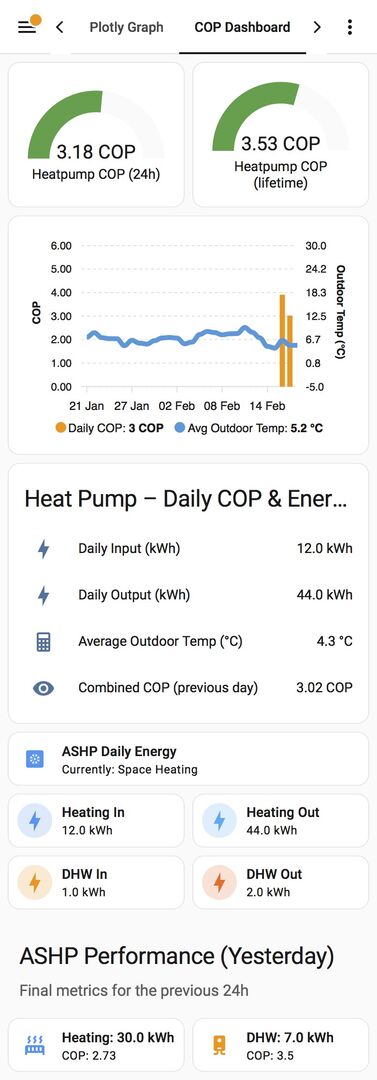
Ignore the mostly blank bar graph capturing the combined COP values for each day. I’ve been fiddling with it a lot and each time I do it, I lose the old data.
I’ve asked Gemini (which I am starting to use a bit more, and slightly prefer over Chatgbt) and it has suggested the following:
The Most Likely Culprits
1. The "Pre-Heat" or "Residual" Heat:
The moment SV1 flips to "DHW," the heat pump starts ramping up. If there is leftover heat in the pipes or the pump takes a minute to actually start drawing high power, the "Input" (Electricity) might be under-reported for the first few minutes of the switch, while the "Output" (Heat) is still being measured from the hot water already in the loop.
2. Sensor Latency:
Your electricity meter might update every 30 seconds, but your heat meter (flow/delta T) might update every 5 seconds. If SV1 flips right in the middle, a few hundred watts of heat output might get "credited" to DHW before the electricity meter "catches up" to the ramp-up.
3. The "Dead Band" at the End:
When SV1 flips back to Space Heating, the heat pump is still very hot. That "cooldown" heat goes into your radiators, but if the valve flips too fast, the DHW cycle might look like it used less energy than it actually did to get the job done.
Not a massive issue for me as tracking the combined figure is enough just to monitor how things are performing generally. Thus, probably not worth going down the rabbit holes suggested by Gemini….
I know the use of Gemini, Chatgbt etc isn’t for everyone but again if it helps others I find it makes a lot of errors if you ask it to create something that requires multiple steps, in one go (for example, asking it ito write a yaml package to split energy usage using the SV1 entity and capture COP values, then plot on graph).
If you break it down, so ask it to set up stable utility meters first, then tackle the COP stuff, it is much more robust. It is also more useful from a self learning perspective as well because I can more easily follow how the code is written so am picking up a few bits here and there.
This post was modified 2 days ago by benson
18/02/2026 12:27 pm
I’ve asked Gemini (which I am starting to use a bit more, and slightly prefer over Chatgbt) and it has suggested the following:
You might as well ask Uranus, and you might even get a more sensible answer!
I think you will probably need to look in the code at how HA calculates COP, in particular how it allocates energy values to DHW or space heating. The position of SV1 is certainly so far as I can tell the most reliable indicator of where the heat actually goes. In my scripts I do the allocation by multiplication by 1 or 0. For example, if the valve is set to DHW, I multiply the energy value (in and out) for DHW by 1, and the same value by 0 for space heating, if that makes sense.
That said, there almost certainly is some lag/latency during switch overs, but generally they appear to be small, and don't appear to affect the overall results.
FWIW, a typical DHW COP for me is around 3.5, but there can also be wide variations. Space heating COP varies much more, depending primarily of course on the OAT.
I know the use of Gemini, Chatgbt etc isn’t for everyone but again if it helps others I find it makes a lot of errors if you ask it to create something that requires multiple steps, in one go (for example, asking it ito write a yaml package to split energy usage using the SV1 entity and capture COP values, then plot on graph).
If you break it down, so ask it to set up stable utility meters first, then tackle the COP stuff, it is much more robust. It is also more useful from a self learning perspective as well because I can more easily follow how the code is written so am picking up a few bits here and there.
The problem with AI is it can't be clever, which we can. We can think outside the box, argue (pleasantly and constructively) with each other, verify things, and generally just use a human approach. AI output is just a word salad based on statistical word proximity values. It has no way of knowing whether it is on the right track, or spouting nonsense. Only yesterday I saw someone ask it (google's hilariously useless version) about EVE (LiFePO4) cells (search: "Causes of EVE Cell Failure and Smoking"), and the answer it gave was about vaping!
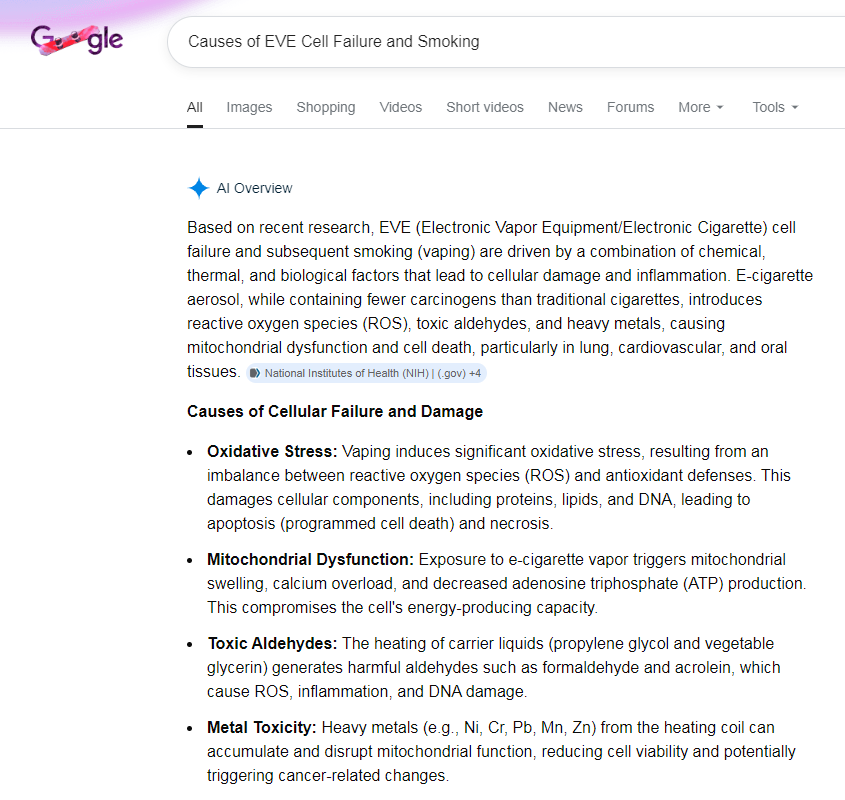
Refresh the result and you get this:
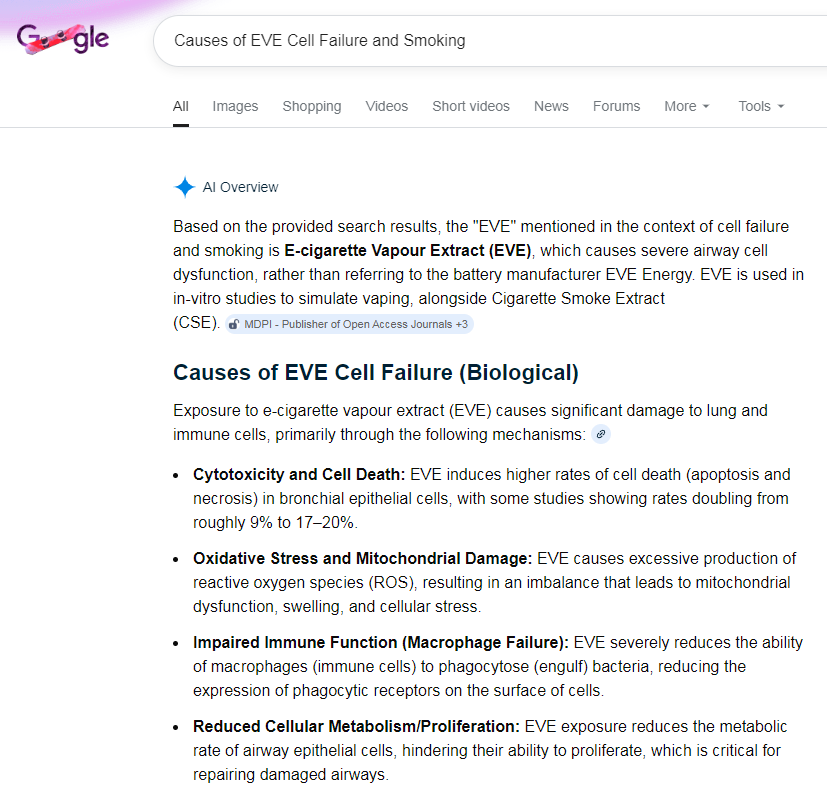
Refresh the page a dozen or so times, and occasionally at random it will come up with a LiFePO4 related answer...which bangs on about thermal runaway which LiFePO4 batteries don't do (though if you really really abuse them then they can vent gases which can ignite, but that is not thermal runaway). Truly, never has so much stupidity been condensed into so large a computer.
Midea 14kW (for now...) ASHP heating both building and DHW

18/02/2026 12:45 pm
...
You might as well ask Uranus, and you might even get a more sensible answer!
...
When Uranus starts talking back to you, you know you're in trouble 😉
105 m2 bungalow in South East England
Mitsubishi Ecodan 8.5 kW air source heat pump
18 x 360W solar panels
1 x 6 kW GroWatt battery and SPH5000 inverter
1 x Myenergi Zappi
1 x VW ID3
Raised beds for home-grown veg and chickens for eggs
"Semper in excretia; sumus solum profundum variat"
18/02/2026 12:49 pm
When Uranus starts talking back to you, you know you're in trouble

Exactly the point I was making!
Midea 14kW (for now...) ASHP heating both building and DHW
Topic starter
18/02/2026 1:05 pm
In my scripts I do the allocation by multiplication by 1 or 0. For example, if the valve is set to DHW, I multiply the energy value (in and out) for DHW by 1, and the same value by 0 for space heating, if that makes sense.
Yes that does make sense- interesting. I think it might be one that I need to park for now as I've spent hours trying to split the energy and display the figures/COP reliably, and my wife is now commenting adversely with regard to how long I am spending on my dashboards....
As for AI it is a useful tool, rather than authority on anything as you say. It definitely helps if you set clear parameters alongside the query- so don't guess, base your response purely on verifiable facts etc.
What I would say is when I used it to help me balance my radiators I uploaded my dashboard graph and it commented that the oscillation around the climate curve set point was quite normal for the midea unit, and the shining star of my graph was the indoor air temp. Very much reminded me of someone...indeed it was like an esteemed member of this very forum was talking back at me 😆
18/02/2026 1:35 pm
What I would say is when I used it to help me balance my radiators I uploaded my dashboard graph and it commented that the oscillation around the climate curve set point was quite normal for the midea unit, and the shining star of my graph was the indoor air temp. Very much reminded me of someone...indeed it was like an esteemed member of this very forum was talking back at me

Nicely put...
I only go on about AI being unreliable to counter the sometimes seemingly blind lemming like rush towards mass adoption.
Midea 14kW (for now...) ASHP heating both building and DHW
1
Topic starter
18/02/2026 5:51 pm
I've actually been revising my space heating controls today as well using Gemini to assist with the yaml code, to basically run without weather compensation and just set outlet flow temp. Quick overview as follows:
- first automation will set 'curve' value which mirrors the values that I was using for my WCC, but the ASHP is in fixed outlet flow temp mode.
- second automation will adjust this outlet flow temp value if needed. For example, if the IAT is outside of our indoor temp comfort zone which might happen if it is particularly windy (today for example), it will offset the flow temp value by +2. If it is even further out of this temp comfort zone it will boost it further with an offset of +3. The same logic will apply at the other end so if it overshoots it will adjust by -2.
- a number helper is linked to the above, which calculates the new outlet flow temp value.
Literally just got it up and running but at the moment it looks like it is working ok. This then avoids the 'serviceman off' quirk with any WCC setting adjustments which I had running to cater for any under and overshooting. Essentially what I was seeing was this:
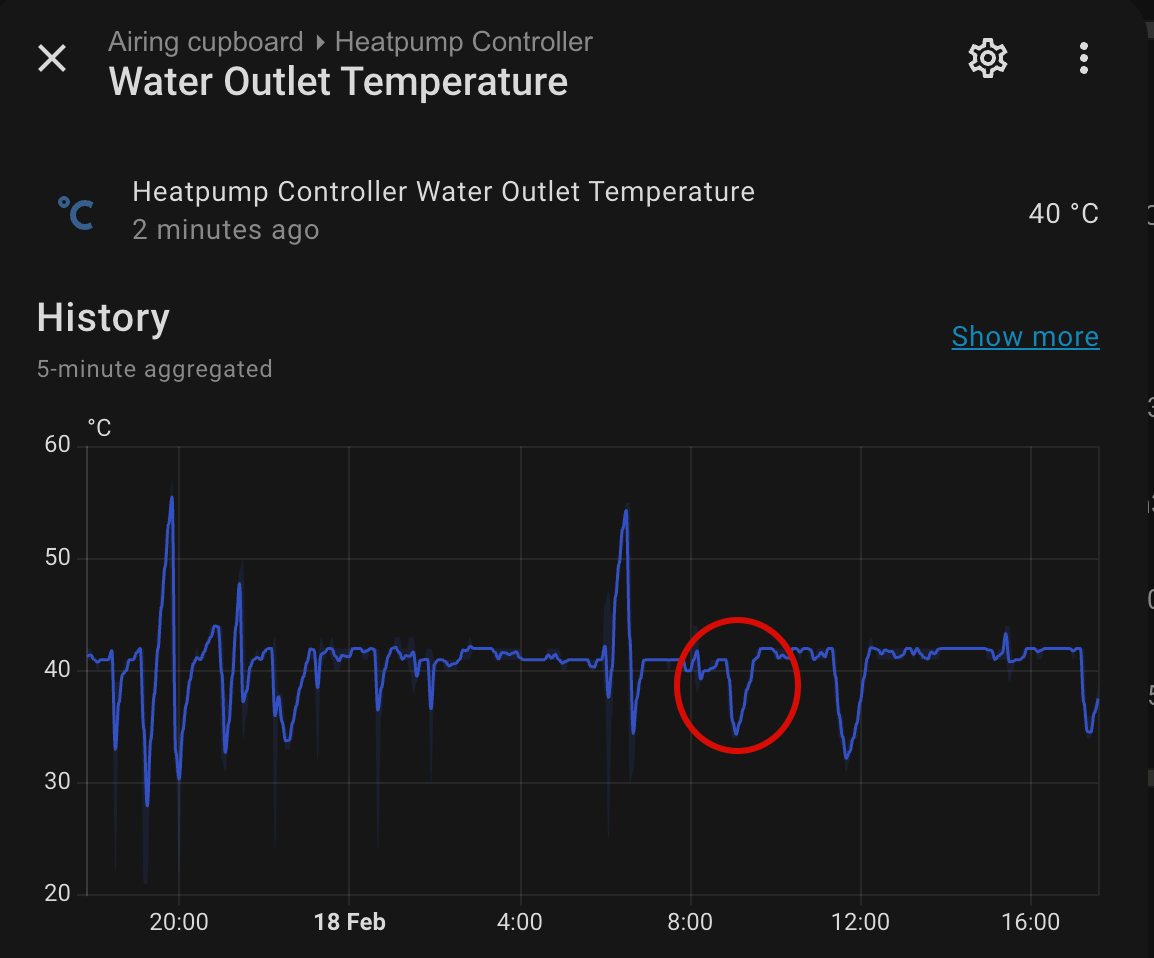
Even though the heating is only off for a minute after exiting serviceman, before it is turned back on (by an automation which detects if it has been turned off), the actual run time loss for space heating is quite significant. Thus, if it was undershooting and the automation ran to bump up the WCC, it was actually compounding the issue slightly as it would interrupt the heating run for much longer.
By leaving the serviceman settings completely alone, turning off weather comp settings and running on set outlet flow temps I am hoping it will run a bit better.
This post was modified 1 day ago by benson
18/02/2026 6:07 pm
@benson, this looks like an interesting variation on the setup I have since you are adjusting a curve based on internal variation whereas I'm adjusting based on a variety of external factors.
Since both approaches certainly have merit and others may well want to understand a bit better, I wonder if you could post in a bit more detail on the Tinkerer's Corner thread. Given the audience of that thread, you'll be able to let rip with all the HA technicolour you wish.
105 m2 bungalow in South East England
Mitsubishi Ecodan 8.5 kW air source heat pump
18 x 360W solar panels
1 x 6 kW GroWatt battery and SPH5000 inverter
1 x Myenergi Zappi
1 x VW ID3
Raised beds for home-grown veg and chickens for eggs
"Semper in excretia; sumus solum profundum variat"
1
Topic starter
18/02/2026 6:15 pm
@majordennisbloodnok will certainly have a read of that thread. Thanks for the nudge 👍
1

Latest Posts
-
RE: Humidity, or lack thereof... is my heat pump making rooms drier?
Actually, it’s better for wooden furniture – or at leas...
By Majordennisbloodnok , 6 hours ago
-

This is absolutely standard for any sealed pressurised ...
By JamesPa , 8 hours ago
-
RE: Oversized 10.5kW Grant Aerona Heat Pump on Microbore Pipes and Undersized Rads
@uknick TBH if I were taking the floor up ...
By JamesPa , 8 hours ago
-
RE: What determines the SOC of a battery?
@batpred Your BMS parameters will be the same as m...
By Bash , 9 hours ago
-

RE: Getting ready for export with a BESS
I would have not got it if it was that tight
By Batpred , 10 hours ago
-
RE: Setback savings - fact or fiction?
I also need to correct something I said by mistake earl...
By cathodeRay , 10 hours ago
-
RE: Electricity price predictions
@judith Thanks for sharing, and nice to see how the ...
By Batpred , 11 hours ago
-
RE: Testing new controls/monitoring for Midea Clone ASHP
@tasos the OAT is incorporated into the control logic. ...
By benson , 11 hours ago
-
RE: Need help maximising COP of 3.5kW Valiant Aerotherm heat pump
@judith thanks Judith. Confirmation appreciated. The ...
By DavidB , 13 hours ago
-
RE: Recommended home battery inverters + regulatory matters - help requested
That makes sense. I thought better to comment in this t...
By Batpred , 13 hours ago
-
Bosch CS5800i 7kW replacing Greenstar Junior 28i
My heat pump journey began a couple of years ago when I...
By Slartibartfast , 14 hours ago
-
RE: How to control DHW with Honeywell EvoHome on Trianco ActiveAir 5 kW ASHP
The last photo is defrost for sure (or cooling, but pre...
By JamesPa , 15 hours ago
-
RE: Plug and play solar. Thoughts?
Essentially, this just needed legislation. In Germany t...
By Batpred , 16 hours ago
-
RE: A Smarter Smart Controller from Homely?
@toodles Intentional opening of any warranty “can of wo...
By Papahuhu , 17 hours ago
-
RE: Safety update; RCBOs supplying inverters or storage batteries
Thanks @transparent Thankyou for your advic...
By Bash , 18 hours ago
-
RE: Air source heat pump roll call – what heat pump brand and model do you have?
Forum Handle: Odd_LionManufacturer: SamsungModel: Samsu...
By Odd_Lion , 18 hours ago
-
RE: Configuring third party dongle for Ecodan local control
Well, it was mentioned before in the early pos...
By F1p , 1 day ago
-
RE: DIY solar upgrade - Considering adding more panels
I know this is a bit old, but it made me wonder what co...
By Batpred , 1 day ago
-

RE: New Vaillant aroTherm Plus in black - When will it come to the UK?
@majordennisbloodnok Daikin, take note! (In fact, I hav...
By Toodles , 2 days ago
-
RE: Midea ASHP – how to set weather compensation
@mk4 — good work! First, I agree, no evidence of cycl...
By cathodeRay , 2 days ago
-

RE: Solis inverters S6-EH1P: pros and cons and battery options
I don't know about Solis inverters. It isn't a featur...
By Transparent , 2 days ago
-
Daikin Altherma 3 H HT - Freeze Prevention Threshold
Hi. We have an Altherma 3 HT (18kW I think) which, now ...
By RICHARDF5033 , 2 days ago
-
RE: Passiv Smart Thermostat - Help & Forum Support
@petch We are not yet compatible with the R290 from Gra...
By Will H , 2 days ago