Notifications
Clear all

Topic starter
03/01/2026 3:05 pm
Ok here's how I've set it up:
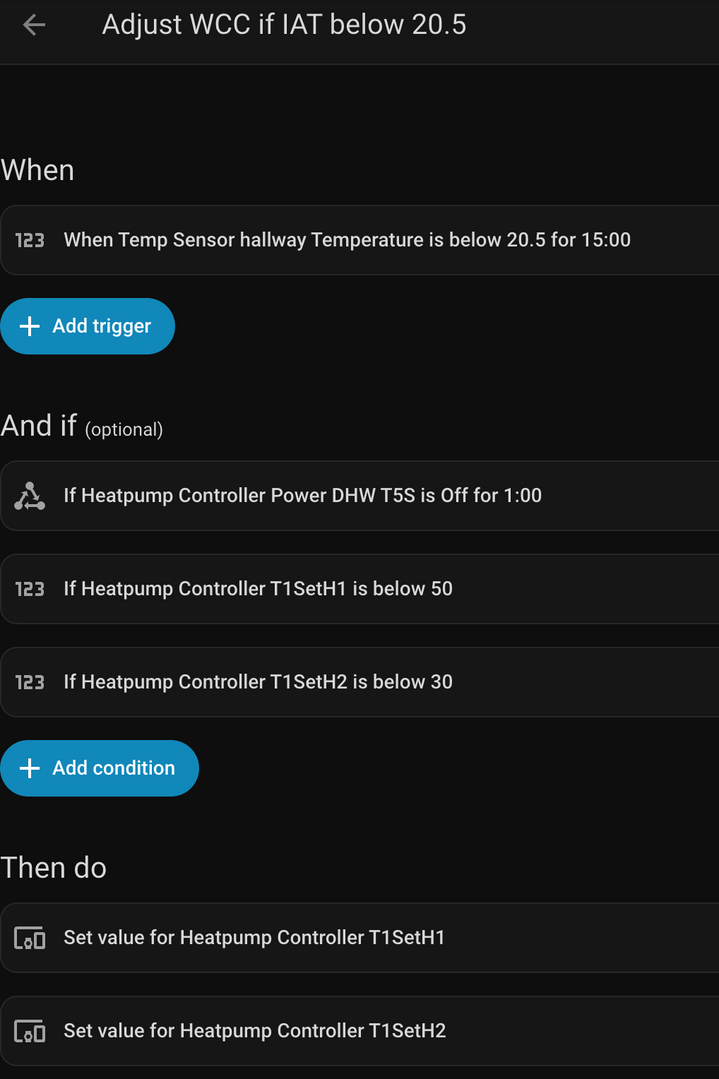
It hasn't been triggered yet but basically I'm hoping the conditions cover what I need. IAT needs to have been below 20.5 for 15 minutes. It will only run the automation if the DHW schedule is not active, and the current WCC values are my lower 'default' ones, which are 49 and 29.
Thus, this should avoid the automation continuously running if it has already been run and adjusted the values. The 'then do' values are 50 and 30 to bump it up a bit.
I then have a separate simple automation to turn the CH back on if it detects that it has been off for more than 1 minute.
This post was modified 2 months ago by benson
Topic starter
03/01/2026 5:39 pm
I have just realised that there is an error in the above automation/yaml code which is that the Power DHW T5S is required to be off for 1 minute. What this actually means is that the state needs to change from on to off, so it won't run if Power DHW T5S is already off I think. Therefore, I have removed this part.
03/01/2026 6:01 pm
I have just realised that there is an error in the above automation/yaml code which is that the Power DHW T5S is required to be off for 1 minute. What this actually means is that the state needs to change from on to off, so it won't run if Power DHW T5S is already off I think. Therefore, I have removed this part.
Not sure I get this - the And if DHW Power is off seems clear enough, but more importantly, does this matter (DHW Power being off)? I'm pretty sure if all you are doing is setting the WCC endpoints than you can do that anytime, just as you could do the same thing manually.
There is also a bit of uncertainty which I think I have mentioned before about what Power DHW T5S really is. The DHW can be on, but not heating eg tank is already at temp, or it can be on and actively heating. There is also the transitional period, when the three port, two way valve has changed position, the circulating pump may be running, but the compressor hasn't started yet. Is that on or off? Again, if you don't need to know whether the DHW heating is active, then you don't need to deal with the ambiguity!
Midea 14kW (for now...) ASHP heating both building and DHW
Topic starter
03/01/2026 6:36 pm
@cathoderay I thought it's just the way home assistant works with the automations- if I include the 'for a certain time duration' field, it will mean that not only does that particular entity need to be off for that duration, but it must have also changed from on, to off. My IAT dropped to 20.4 earlier today and the WCC increase automation didn't run, and I realised it was probably this.
I can indeed run the auto adapt at any time, but if this interrupts a scheduled DHW schedule and turns DHW Power off I would need to use another automation to put DHW Power back on as well, but only during these scheduled times. It seemed easier just to avoid these schedule times for this reason.
It has actually just worked as intended- around 15 minutes ago the IAT rose above 21 so it has set back to the WCC default values so all seems good thus far.
This post was modified 2 months ago by benson
03/01/2026 6:58 pm
I can indeed run the auto adapt at any time, but if this interrupts a scheduled DHW schedule and turns DHW Power off I would need to use another automation to put DHW Power back on as well, but only during these scheduled times. It seemed easier just to avoid these schedule times for this reason.
OK, that makes sense.
It has actually just worked as intended actually- around 15 minutes ago the IAT rose above 21 so it has set back to the WCC default values so all seems good thus far.
That's good! Is this with the "turn CH back on" automation you mentioned earlier? If so, then another reason to run the WCC adjustments only when the space heating is on. But thinking back to what I have said recently, there is a contradiction in there. I do have a determine whether the DHW heating is on check in the code, but I have just said it doesn't matter whether it is on or not, because I don't have the unit gets turned off problem. Or maybe I did when the DHW heating was on, and that's why I added the check? It is quite a while ago now, and while the code is reasonably well documented, the underlying reason for a bit of code isn't always so well documented... I'll see if I can find any notes I made at the time.
Midea 14kW (for now...) ASHP heating both building and DHW
Topic starter
03/01/2026 7:34 pm
That's good! Is this with the "turn CH back on" automation you mentioned earlier? If so, then another reason to run the WCC adjustments only when the space heating is on.
Yes that's right. It's a very simple one- if it has changed from on to off for a duration of 1 minute.
I did wonder about that bit in your code you mentioned as well. Anyway thanks for your suggestion that just turning on CH would reactivate the DHW schedules as well. That has solved a bit of a headache for me. My next plan is to try and make sure these automations don't interfere too much and are really only there to cater for exceptional conditions that might lead to more significant under and over shooting- not least as each time they run they interrupt a cycle by briefly turning the heat pump off.
This post was modified 2 months ago by benson
Topic starter
07/02/2026 11:30 am
To update on this, following a bit more testing and tweaking over the last couple of months...
I've simplified the WCC setting automations which adjust the curve if weather conditions result in IAT dropping too low, so here's what the 'indoor temp too low' one now looks like.
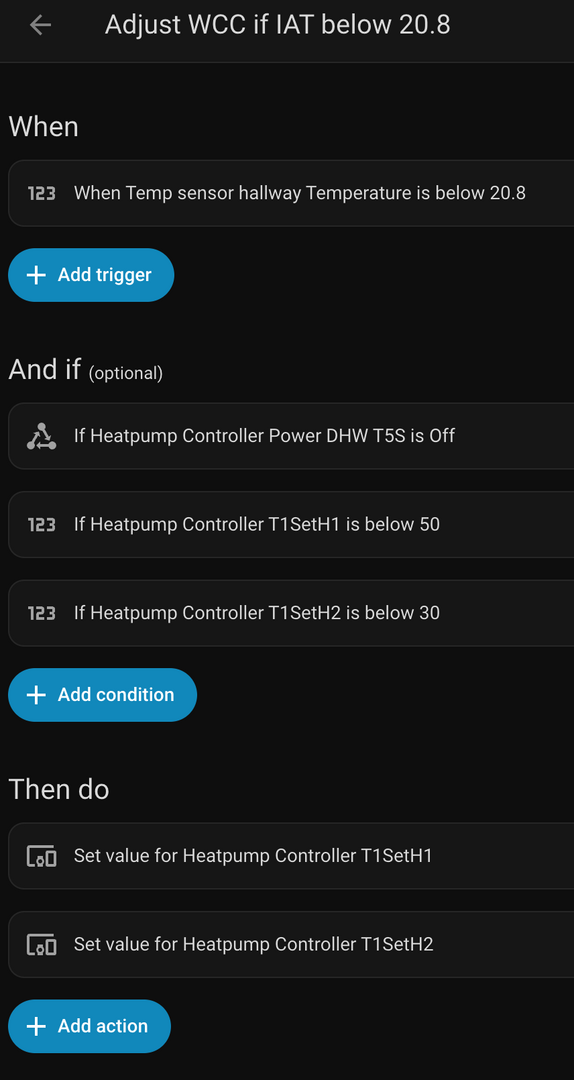
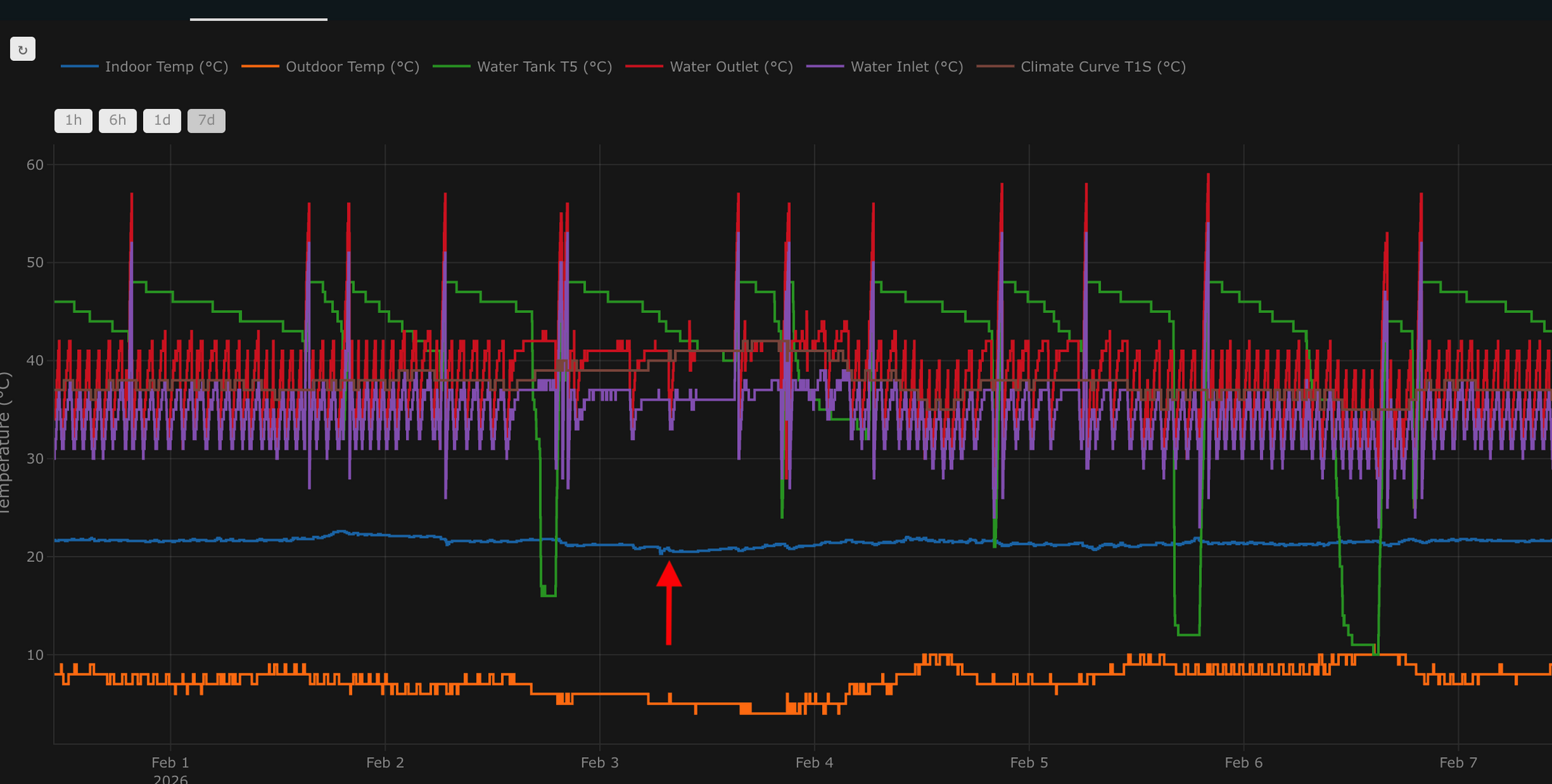
This then moves the low and high end of the curve up by 1 degree. Generally this has only been activating once or twice a month, and it is always when there is a combination of low OAT, and it is windy. This small adjustment works perfectly, giving the heating a boost but not too much that it massively overshoots. I then have another automation at IAT of 21.5 to reset to default values. I've removed the criterion that required the temp to drop for a certain time period e.g. "if IAT under 20.8 for 15 minutes" as I find this more reliable.
Another automation puts space heating back on if it detects that it has been off for 1 minute.
I have taken on board the advice on this thread to separate my COP graphs so I now have one combined (this is the one on the left), one space heating (top right), and one for DHW (bottom right). I've used utility meter helpers to do this to measure kWh input and output- so space heating utility meters will accrue when SV1 is off, and then the DHW utility meters will do likewise when SV1 is on.
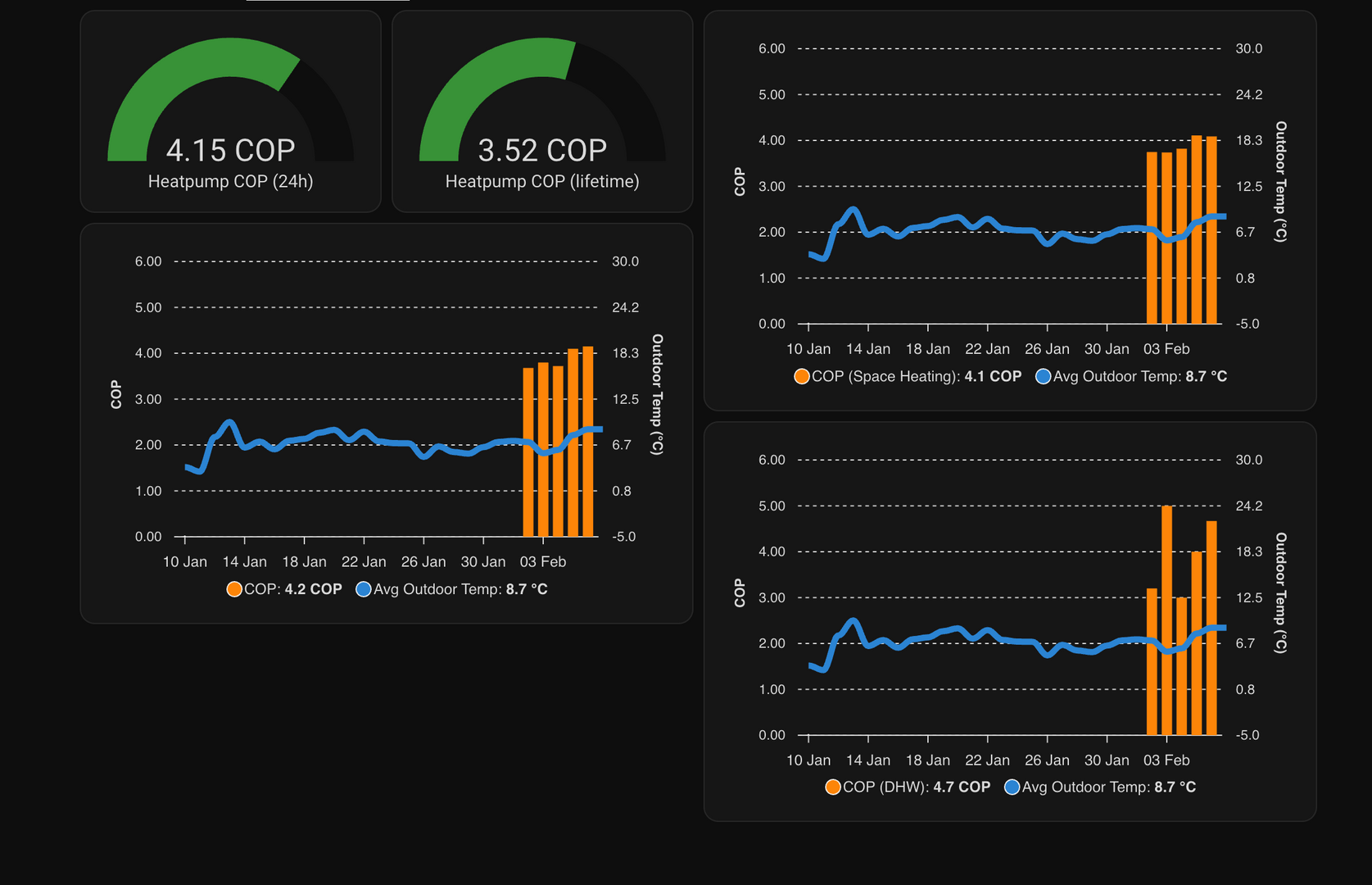
As you can see from the graphs however, there does seem to be some erroneous COP figures for DHW on at least a couple of the days so far. That said, I have checked the utility meter graphs and they do align exactly with when the cylinder is heating- thus perhaps it is just the relatively small numbers and margins that are producing these figures?
As for performance, IAT is very steady. Here's the plotly graph from the last seven days, with the arrow indicating when the WCC boost adjustment initiated when it was cold and windy and few days ago.
In terms of costs and COP, here's January 25 (homely) versus January 26 (native controls):
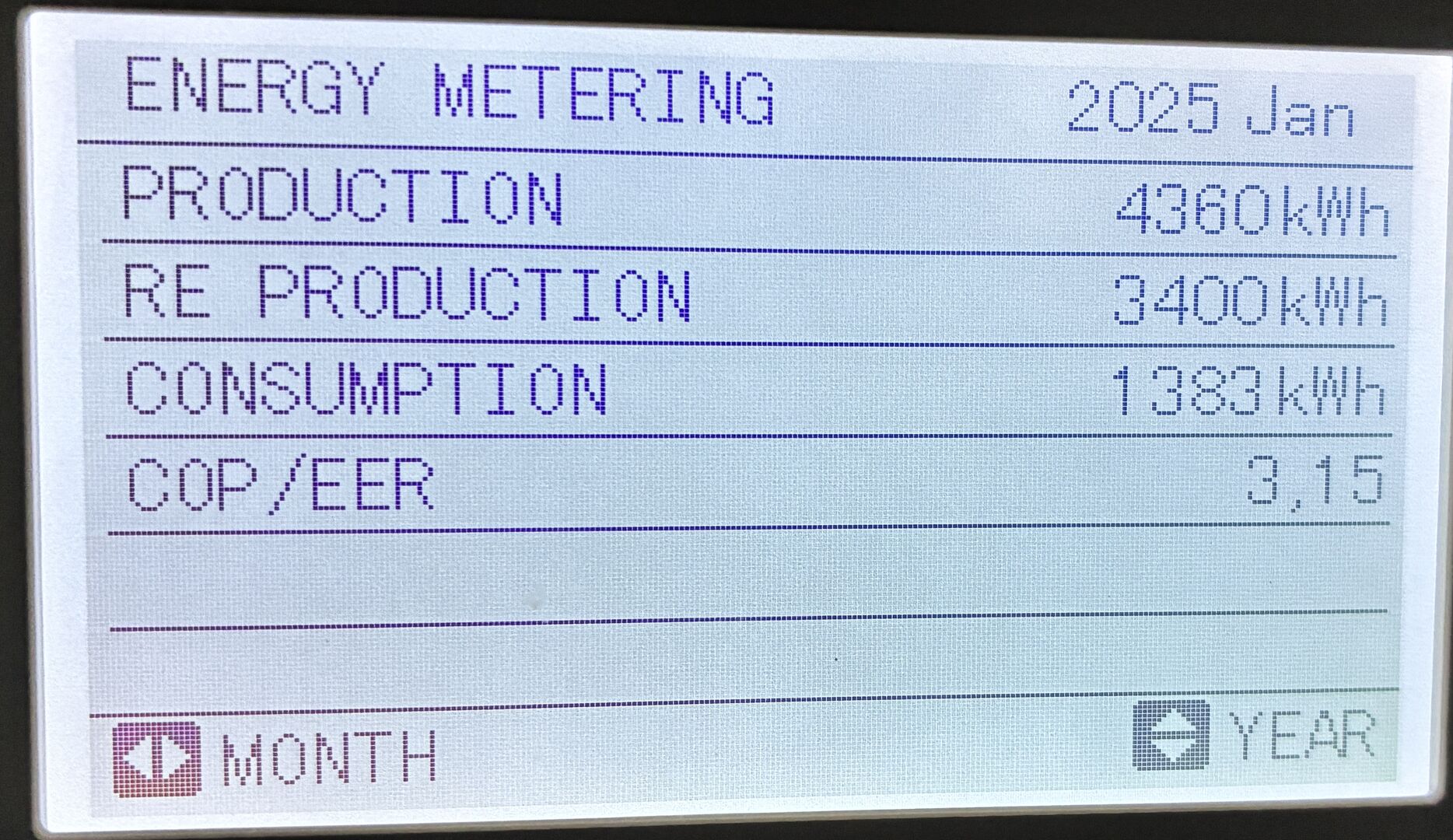
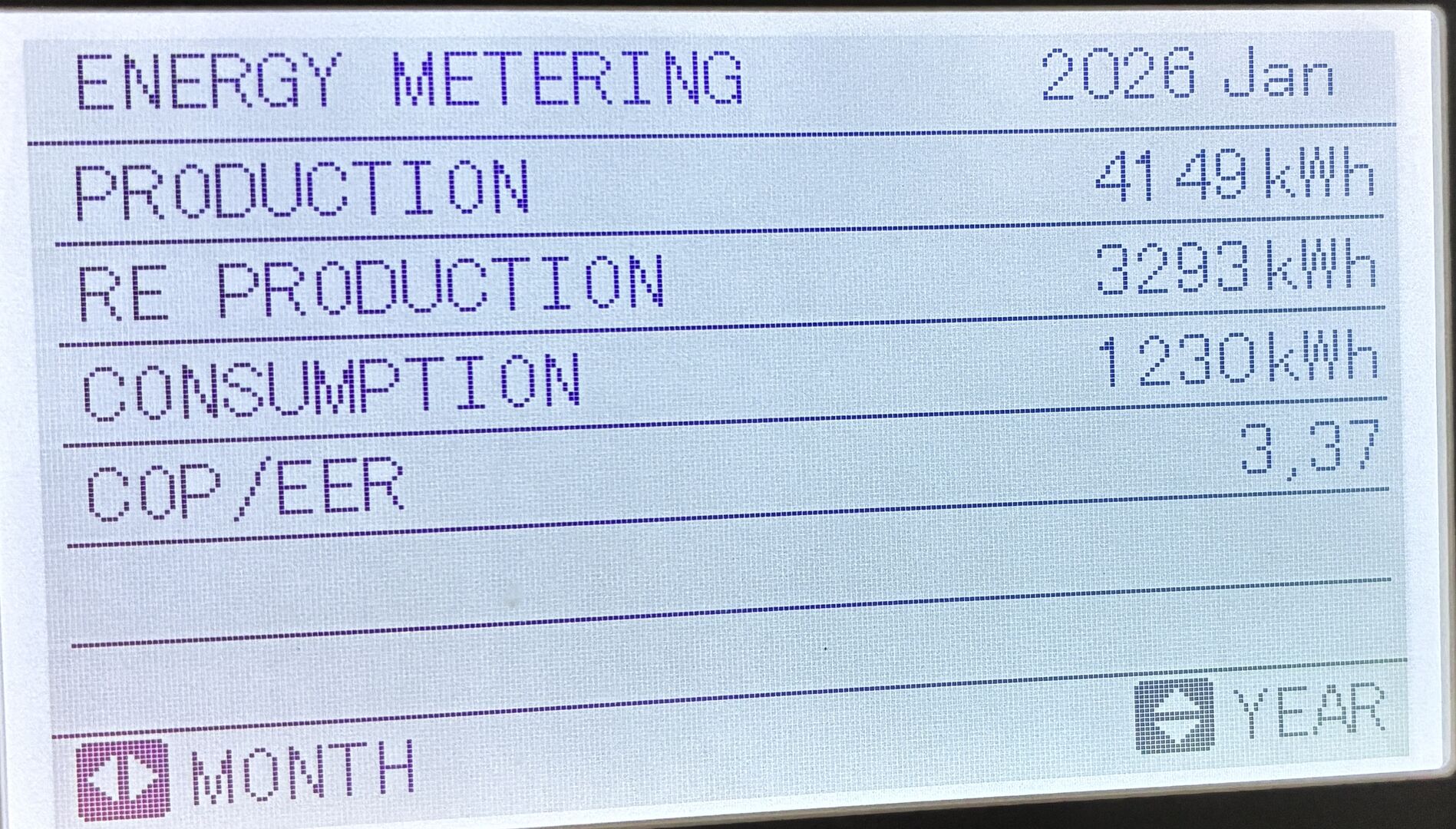
According to our local weather station the average outdoor temp has been 1 degree warmer this January, compared with last.
Lastly, I finally managed to get round to rebalancing the radiators after our installers attempts- they said they had done these to provide a ΔT of 5C. I invested in a couple of Testo 115i bluetooth clamps to confirm this. These were super simple to use and with one on each radiator pipe you can plot a graph to show current ΔT:
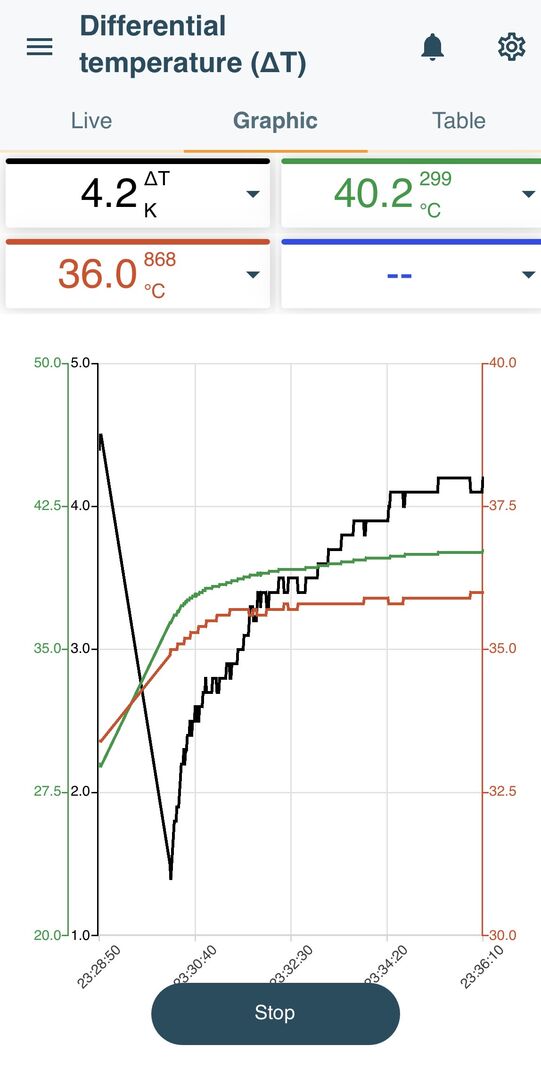
Quite a few of my downstairs radiators were giving a ΔT of around 8-9C (thus quite what the installers were doing who knows) so I opened one lockshield side fully open, and then adjusted the one the other side to get it closer to 5. I then adjusted the upstairs and again found myself generally opening up the lockshields a bit more. I have tapo temp sensors in most rooms so used these to adjust down if rooms tended to be a bit warmer. This has provided a much more even balance throughout the rooms in the house as per below:
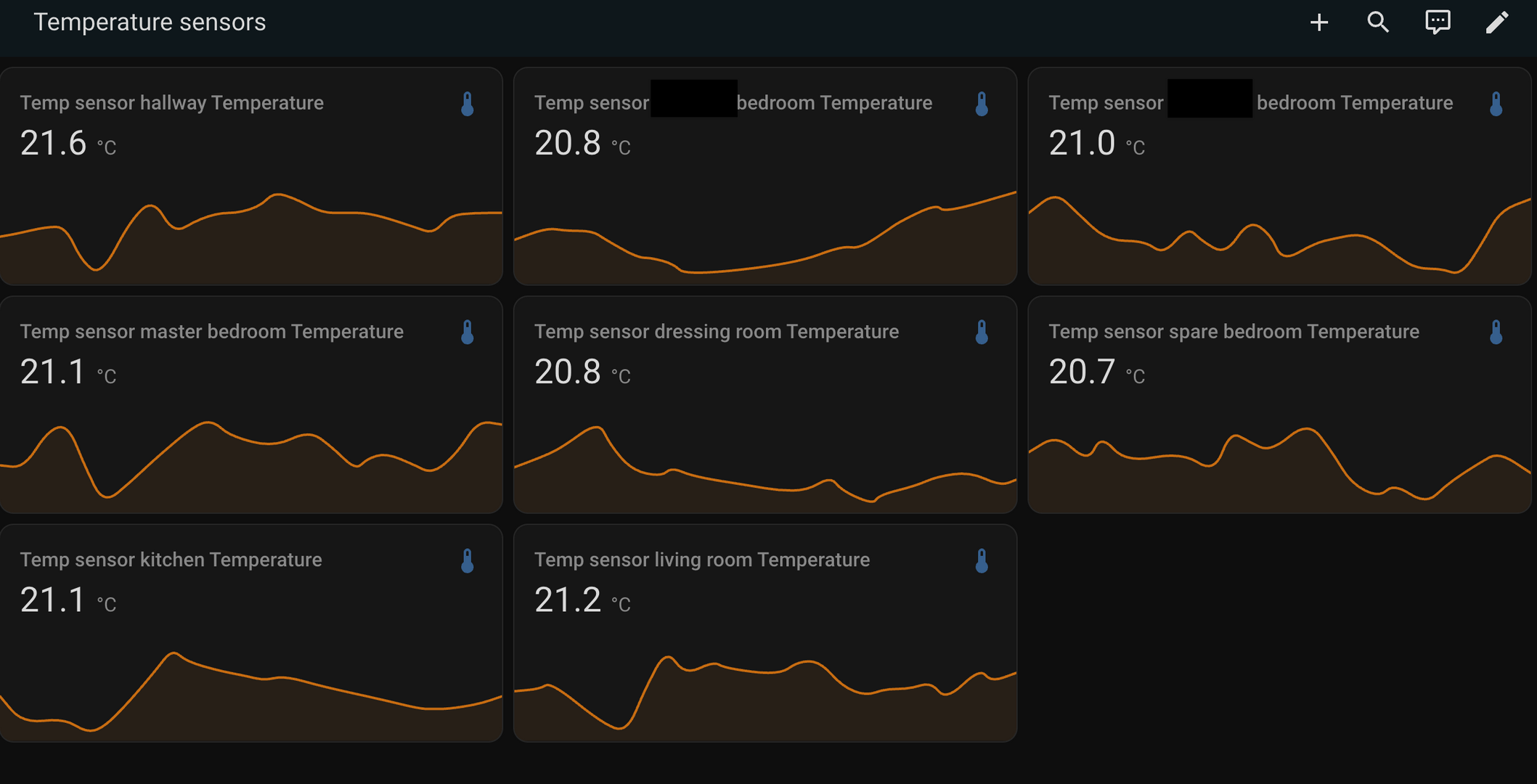
All in all, things are working very well. Efficiency wise again the lifetime COP seems to be generally creeping up but I wouldn't say there is a massive difference between the efficiency that homely was achieving, versus this approach. It is certainly no worse, and if anything slightly better.
Thus, the main benefits are more stable IAT, control and access to ones own data etc. It has generally been more reliable as well, with one example being that homely used to miss the occasional tank reheat during scheduled times which I personally believe is due to the midea serviceman 'off' feature. This never happens now due to tailoring the automations to prevent this.

07/02/2026 4:25 pm
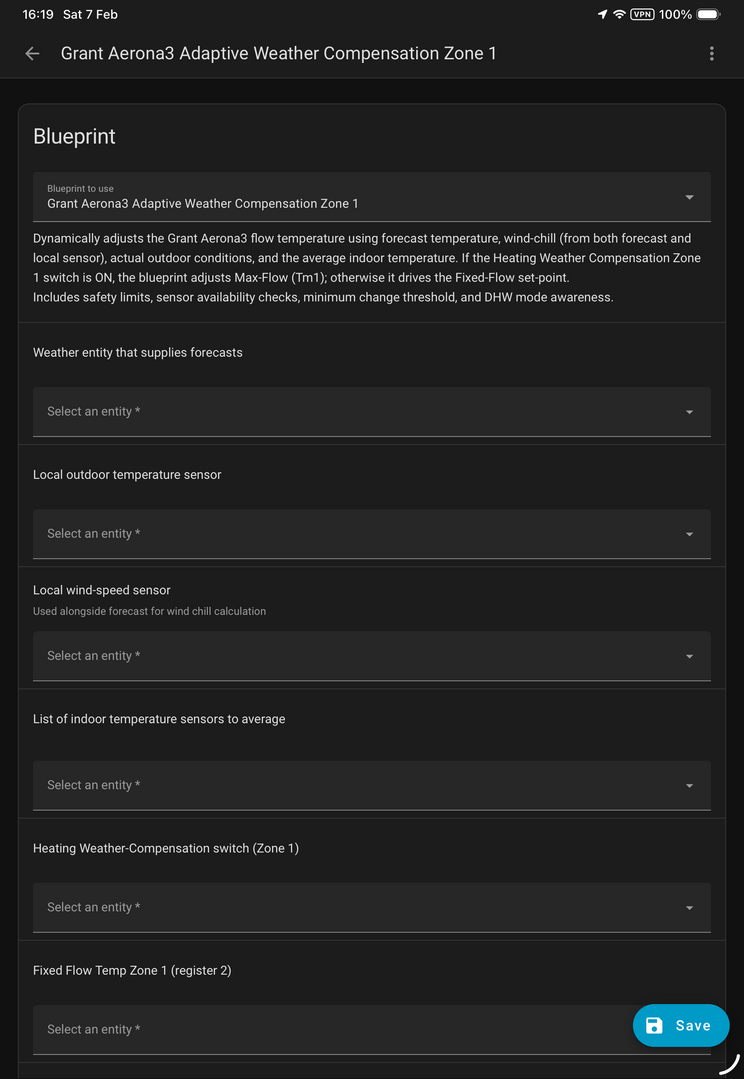
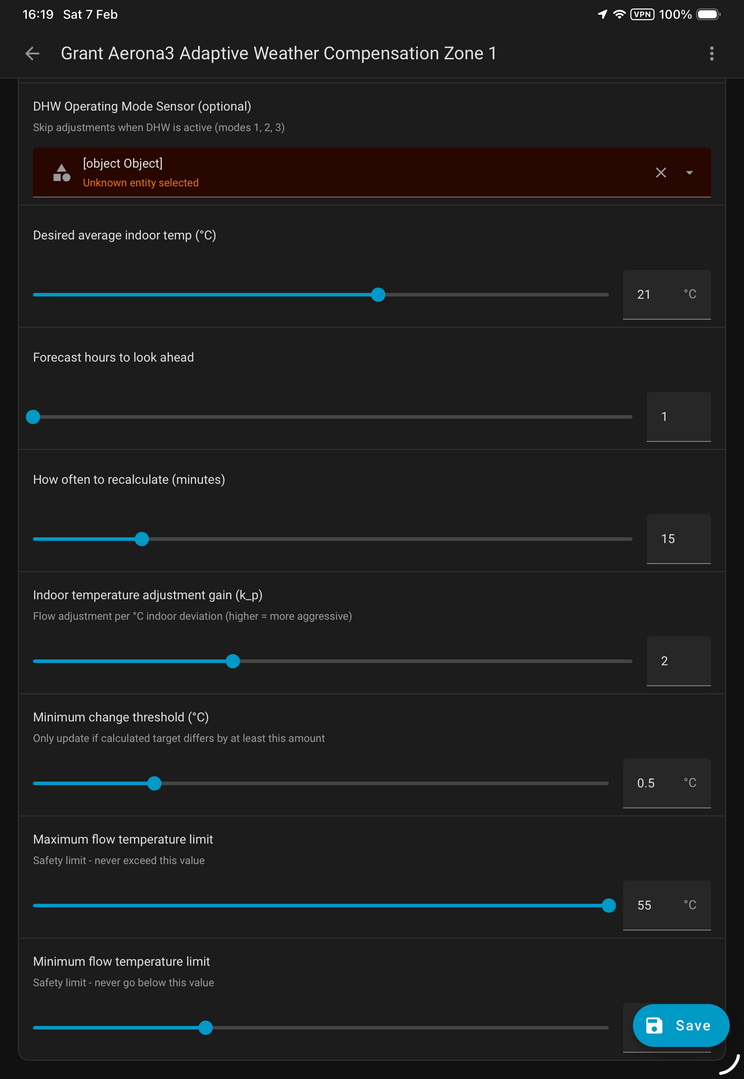
@benson I have a similar automation that I turned into a Blueprint. I am testing it on fixed flow rate. It gives me a mix of weather compensation and load compensation, think poor mans Homely/Havenwise.
Kind Regards
Si
——————————————————————————
Grant Aerona3 13kW
13 x 435w + 13x 480w Solar Panels
Sigenergy 10kW Inverter
16kW Sigenstor battery
1
Topic starter
07/02/2026 8:14 pm
@grantmethestrength looks neat 🙂 . I haven't really delved into blueprints to be honest so been reading up on them a bit after you posted. What are you using for the weather forecast data, out of interest?
07/02/2026 8:22 pm
@benson I am using the met.no forecast integration and I also have an ecowitt weather station for actual local readings. I like blueprints as you can easily change the entities without having to rewrite everything and they are so much easier to share! I have been meaning to create aliases for all my entities so that if I swap out a sensor I don’t have to spend hours changing dashboards etc. Only downside is I still have to spend the initial hours creating the aliases lol! That said I have just integrated claude code into my HA setup and it is massively helping do the monotonous stuff (with proper guard rails).
Kind Regards
Si
——————————————————————————
Grant Aerona3 13kW
13 x 435w + 13x 480w Solar Panels
Sigenergy 10kW Inverter
16kW Sigenstor battery

09/02/2026 5:56 am
@grantmethestrength What are "blueprints" please ?
Midea MHCV10WD2N7 R290, 5.8kWp energy community solar power.
09/02/2026 6:17 am
@tasos blueprints are pretty cool. It is a way for home assistant users to share scripts/automations with others so that you can more easily use them in your set up. For example there is one for a sensor light you download the blueprint for it and then input the sensor entity, the light entity and the associated times you want it to trigger and the underlying code is already written for you. There is a whole exchange where Home Assistant users share there blueprints freely so you can download and adapt them for your specific system. You can find more info here.
Kind Regards
Si
——————————————————————————
Grant Aerona3 13kW
13 x 435w + 13x 480w Solar Panels
Sigenergy 10kW Inverter
16kW Sigenstor battery

Latest Posts
-
RE: Testing new controls/monitoring for Midea Clone ASHP
@cathoderay yes that is it in a nutshell. I am keepin...
By benson , 3 minutes ago
-
@painter26 — as @jamespa says, it's for filling and re-...
By cathodeRay , 50 minutes ago
-
RE: Humidity, or lack thereof... is my heat pump making rooms drier?
I'd be happy with what you have (so would millions of o...
By Deltona , 2 hours ago
-

RE: Oversized 10.5kW Grant Aerona Heat Pump on Microbore Pipes and Undersized Rads
@uknick TBH if I were taking the floor up ...
By JamesPa , 12 hours ago
-
RE: What determines the SOC of a battery?
@batpred Your BMS parameters will be the same as m...
By Bash , 12 hours ago
-

RE: Getting ready for export with a BESS
I would have not got it if it was that tight
By Batpred , 13 hours ago
-
RE: Setback savings - fact or fiction?
I also need to correct something I said by mistake earl...
By cathodeRay , 13 hours ago
-
RE: Electricity price predictions
@judith Thanks for sharing, and nice to see how the ...
By Batpred , 14 hours ago
-
RE: Need help maximising COP of 3.5kW Valiant Aerotherm heat pump
@judith thanks Judith. Confirmation appreciated. The ...
By DavidB , 16 hours ago
-
RE: Recommended home battery inverters + regulatory matters - help requested
That makes sense. I thought better to comment in this t...
By Batpred , 17 hours ago
-
Bosch CS5800i 7kW replacing Greenstar Junior 28i
My heat pump journey began a couple of years ago when I...
By Slartibartfast , 17 hours ago
-
RE: How to control DHW with Honeywell EvoHome on Trianco ActiveAir 5 kW ASHP
The last photo is defrost for sure (or cooling, but pre...
By JamesPa , 19 hours ago
-
RE: Plug and play solar. Thoughts?
Essentially, this just needed legislation. In Germany t...
By Batpred , 19 hours ago
-
RE: A Smarter Smart Controller from Homely?
@toodles Intentional opening of any warranty “can of wo...
By Papahuhu , 20 hours ago
-
RE: Safety update; RCBOs supplying inverters or storage batteries
Thanks @transparent Thankyou for your advic...
By Bash , 22 hours ago
-
RE: Air source heat pump roll call – what heat pump brand and model do you have?
Forum Handle: Odd_LionManufacturer: SamsungModel: Samsu...
By Odd_Lion , 22 hours ago
-
RE: Configuring third party dongle for Ecodan local control
Well, it was mentioned before in the early pos...
By F1p , 2 days ago
-
RE: DIY solar upgrade - Considering adding more panels
I know this is a bit old, but it made me wonder what co...
By Batpred , 2 days ago
-

RE: New Vaillant aroTherm Plus in black - When will it come to the UK?
@majordennisbloodnok Daikin, take note! (In fact, I hav...
By Toodles , 2 days ago
-
RE: Midea ASHP – how to set weather compensation
@mk4 — good work! First, I agree, no evidence of cycl...
By cathodeRay , 2 days ago
-

RE: Solis inverters S6-EH1P: pros and cons and battery options
I don't know about Solis inverters. It isn't a featur...
By Transparent , 2 days ago
-
Daikin Altherma 3 H HT - Freeze Prevention Threshold
Hi. We have an Altherma 3 HT (18kW I think) which, now ...
By RICHARDF5033 , 2 days ago
-
RE: Passiv Smart Thermostat - Help & Forum Support
@petch We are not yet compatible with the R290 from Gra...
By Will H , 2 days ago