Notifications
Clear all
Air Source Heat Pumps (ASHPs)
264
Posts
11
Users
53
Reactions
12.7 K
Views

01/01/2026 12:32 pm
The biggest mystery for me is why cathoderays modbus alterations don't trigger a shut down, and my modbus alterations do.
I confirm system shutting down after exiting the SERVICEMAN MODE but not shutting down when parameters changed through direct modbus communication.
@benson you are using Home Assistant though, no ? Maybe this is the reason for the different behavior ?
HAPPY NEW YEAR everyone !!
Midea MHCV10WD2N7 R290, 5.8kWp energy community solar power.

01/01/2026 12:49 pm
@benson is using an esphome controller which integrates with Home Assistant. The esphome controller uses regular modbus, which is not different then for example using a python script that talks modbus to the controller.
I had a few people, who use the same esphome configuration, that mentioned this behavior for certain modbus registers. In a specific case, I was not able to reproduce the things that the messenger had, although we where using exactly the same configuration and controller hardware. So I still am under the impression that specific hardware and firmware versions of the wired controller can behave differently regarding this.
1

Topic starter
01/01/2026 7:30 pm
So I still am under the impression that specific hardware and firmware versions of the wired controller can behave differently regarding this.
Seems to be the only logical explanation. Our ASHP was purchased/installed late 2024, and perhaps Midea decided to 'upgrade' the firmware to make sure that the serviceman changes via modbus behaved in the same way as changes via the control panel at some point.
02/01/2026 8:48 am
Our ASHP was purchased/installed late 2024
Mine was installed in early Feb 2022 and may well have left the factory in 2021, meaning quite a long interval between manufacturing dates. The varying emphasis in the wired controller manuals on the turned off behaviour may also indirectly confirm changes were made to the firmware.
If you are stuck with a unit which turns itself off when accessed via modbus, then I think it should be possible to add some code to turn it back on, thereby removing the need to do it manually. There are many many versions of the wired controller manual, this is mine, a scan of the physical copy that came with the unit, and it shows what looks like the main on/off switches in bits 1 and 2. These are single bits in a read/write 16 bit register:
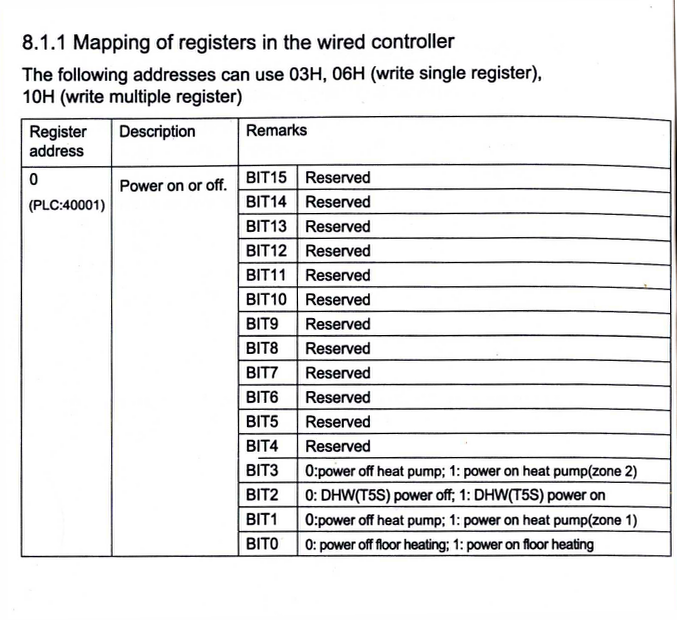
The exact code to turn those registers on (write a value of 1) may need a bit of research, possibly by looking at the code behind the DHW on/off button in HA. If the same code was added to the end of the WCC change code, it should turn the DHW back on after the WCC change has been made.
Midea 14kW (for now...) ASHP heating both building and DHW
02/01/2026 11:03 am
The exact code to turn those registers on (write a value of 1) may need a bit of research, possibly by looking at the code behind the DHW on/off button in HA. If the same code was added to the end of the WCC change code, it should turn the DHW back on after the WCC change has been made.
My Airwell is installed in October 2022 and I do not know the exact manufacturing date.
Your screenshot of register 0 is valid for all Midea (clone) variants I have seen until today. The differences between the variants in the same refrigeration type (R32 and R290) are not that big, but between R32 and R290 there are quite some differences where mainly the R290 variants have more registers then the R32. If you are curious, you will find the ESPhome configuration I've created for register 0 bit 1 and 2 here and the base configuration and specific model configuration here
Regarding "Power DHW T5S": I have created an automation for myself in Home Assistant, which automatically powers on "Power DHW T5S" when it is turned off for 1 minute. And I only do this when my custom DHW method is not enabled. This way I do not have to add enabling "Power DHW T5S" to on at multiple pieces of logic, but I can purely let this one event based automation handle it.
02/01/2026 11:47 am
If you are curious, you will find the ESPhome configuration I've created for register 0 bit 1 and 2 here and the base configuration and specific model configuration here
I had a look and it looks complicated to me! There may even be some bitwise operators in there.
Regarding "Power DHW T5S": I have created an automation for myself in Home Assistant, which automatically powers on "Power DHW T5S" when it is turned off for 1 minute. And I only do this when my custom DHW method is not enabled. This way I do not have to add enabling "Power DHW T5S" to on at multiple pieces of logic, but I can purely let this one event based automation handle it.
That's a neat 'catch all/except' solution. I expect @benson may want to look into it a bit more.
Midea 14kW (for now...) ASHP heating both building and DHW
Topic starter
02/01/2026 12:58 pm
That's a neat 'catch all/except' solution. I expect @benson may want to look into it a bit more.
Yes that would be a good solution and the one that Sven (creator of my esphome device) suggested. I don’t want to trigger a tank reheat though whenever the automation runs.
I am however testing the principle as to whether just turning back on something (so central heating back on) is actually sufficient for the ashp to come out of deactivated mode after serviceman and for DHW schedules to kick in. This would be far simpler to implement as an automation. I will know whether this has worked at precisely 1500hrs today which is when my next tank reheat schedule is set for….
02/01/2026 2:09 pm
I had a look and it looks complicated to me! There may even be some bitwise operators in there.
Sorry for the offtopic:
The bitwise operators are required where one register contains multiple values. As you probably know the registers are all 16 bits and Midea places 1, 2, 4 and 16 values in one register and in some cases, 2 registers are combined into 1 value. Register 0 is an example of a register that holds 16 values and thus if you for example need to change bit 2 from 0 to 1, you normally would have to store the current state of all the bits and flip the value for bit 2 and then write the complete register at once. With the bitwise operator, that logic is done automatically by only updating value 0x04 (bit zero is 0x00, bit one is 0x02, bit two is 0x04, bit 3 is 0x08, ...) of register 0.
Btw... That's also where my nickname Mosibi comes from: "Most Significant Bit"
02/01/2026 2:43 pm
Btw... That's also where my nickname Mosibi comes from: "Most Significant Bit"
Then you clearly know what you are talking about!
I do find bitwise operations are not exactly intuitive (at least for me). I managed to find a way of reading (but not writing to) these bit registers that treats the registers contents as a binary string, and then extracts the nth 1 or 0 from the right hand end from that string (eg reading the position of the three port two way valve) that works for me, and just importantly I can still understand what it does when I come back to the code months or years later.
This post was modified 2 months ago by cathodeRay
Midea 14kW (for now...) ASHP heating both building and DHW
02/01/2026 3:01 pm
and just importantly I can still understand what it does when I come back to the code months or years later.
As somebody with 30 years professional experience in computing, being able to understand the code is way more important that squeezing out the last bits of efficiency. (and then you are sitting together with a co-worker, debugging a strange printer error and he, while looking at the code where large parts where in HEX, says: Ah, I already see it!)
1
Topic starter
02/01/2026 8:38 pm
Maybe the point is you have to manually turn something on. It doesn't matter whether it is space heating or DHW heating, as long as one is turned on the system remains on. If neither are turned on, the system remains dormant, ie both are off, and will remain so until one or the other is manually turned on.
As it turns out this is correct! All I needed to do was turn the heating back on, which makes things much easier.
My plan now is to set up an automation to run my adjustment script if the IAT runs too low, and to run the 'revert to default WCC' script when it rises sufficiently. I will use the "and if" conditions to avoid my DHW reheat times for any WCC adjustments just so these reheat periods are not interfered with in terms of shut downs. Then, all I need to do is set up a "turn CH back on" automation if it detects that the CH has been off for longer than a short period of time (perhaps a minute, or less).
This post was modified 2 months ago by benson
03/01/2026 8:05 am
My plan now is to set up an automation to run my adjustment script if the IAT runs too low, and to run the 'revert to default WCC' script when it rises sufficiently. I will use the "and if" conditions to avoid my DHW reheat times for any WCC adjustments just so these reheat periods are not interfered with
This is what my auto adapt script does. It also covers the situation when the IAT overshoots, when it takes the WCC down a bit. It deals with 'is the DHW heating on' question at the start with a check on the position of the three port two way valve:
# check DHW is NOT running (use three port two way valve position)
on_off = instrument.read_register(129, 0)
valve_pos = "{:08b}".format(on_off)[-5]      # 1 = DHW is on, 0 = DHW is off

# note valve_pos is a string, not an integer, hence need '0' not 0
if valve_pos == '0':

   rest of the code...
This code first reads the register value which comes back as a hex number. Then we have my way of reading a single bit without using bitwise operators. The valve_pos = line converts the hex value to its binary equivalent, right pads with zeroes to eight digits, and then extracts the fifth digit from the right, which is bit 4 (the bit numbers use zero based counting, python slicing uses one based counting). If that value is 1, the DHW heating is on, if it is zero, the DHW heating is off. If it is zero (DHW heating is off), then the rest of the code runs.
Midea 14kW (for now...) ASHP heating both building and DHW
1

Latest Posts
-
Struggling to get CoP above 3 with 6 kw Ecodan ASHP
I've been using this heatpump for two winters now and a...
By GoodbyeGas , 9 minutes ago
-

RE: Humidity, or lack thereof... is my heat pump making rooms drier?
That would make sense. I've found the effects are prett...
By Majordennisbloodnok , 19 minutes ago
-
RE: Testing new controls/monitoring for Midea Clone ASHP
@benson — as @tasos suggests, plotting multiple variabl...
By cathodeRay , 1 hour ago
-
@painter26 — as @jamespa says, it's for filling and re-...
By cathodeRay , 3 hours ago
-

RE: Oversized 10.5kW Grant Aerona Heat Pump on Microbore Pipes and Undersized Rads
@uknick TBH if I were taking the floor up ...
By JamesPa , 13 hours ago
-
RE: What determines the SOC of a battery?
@batpred Your BMS parameters will be the same as m...
By Bash , 14 hours ago
-

RE: Getting ready for export with a BESS
I would have not got it if it was that tight
By Batpred , 15 hours ago
-
RE: Setback savings - fact or fiction?
I also need to correct something I said by mistake earl...
By cathodeRay , 15 hours ago
-
RE: Electricity price predictions
@judith Thanks for sharing, and nice to see how the ...
By Batpred , 16 hours ago
-
RE: Need help maximising COP of 3.5kW Valiant Aerotherm heat pump
@judith thanks Judith. Confirmation appreciated. The ...
By DavidB , 18 hours ago
-
RE: Recommended home battery inverters + regulatory matters - help requested
That makes sense. I thought better to comment in this t...
By Batpred , 19 hours ago
-
Bosch CS5800i 7kW replacing Greenstar Junior 28i
My heat pump journey began a couple of years ago when I...
By Slartibartfast , 19 hours ago
-
RE: How to control DHW with Honeywell EvoHome on Trianco ActiveAir 5 kW ASHP
The last photo is defrost for sure (or cooling, but pre...
By JamesPa , 20 hours ago
-
RE: Plug and play solar. Thoughts?
Essentially, this just needed legislation. In Germany t...
By Batpred , 21 hours ago
-
RE: A Smarter Smart Controller from Homely?
@toodles Intentional opening of any warranty “can of wo...
By Papahuhu , 22 hours ago
-
RE: Safety update; RCBOs supplying inverters or storage batteries
Thanks @transparent Thankyou for your advic...
By Bash , 23 hours ago
-
RE: Air source heat pump roll call – what heat pump brand and model do you have?
Forum Handle: Odd_LionManufacturer: SamsungModel: Samsu...
By Odd_Lion , 23 hours ago
-
RE: Configuring third party dongle for Ecodan local control
Well, it was mentioned before in the early pos...
By F1p , 2 days ago
-
RE: DIY solar upgrade - Considering adding more panels
I know this is a bit old, but it made me wonder what co...
By Batpred , 2 days ago
-

RE: New Vaillant aroTherm Plus in black - When will it come to the UK?
@majordennisbloodnok Daikin, take note! (In fact, I hav...
By Toodles , 2 days ago
-
RE: Midea ASHP – how to set weather compensation
@mk4 — good work! First, I agree, no evidence of cycl...
By cathodeRay , 2 days ago
-

RE: Solis inverters S6-EH1P: pros and cons and battery options
I don't know about Solis inverters. It isn't a featur...
By Transparent , 2 days ago
-
Daikin Altherma 3 H HT - Freeze Prevention Threshold
Hi. We have an Altherma 3 HT (18kW I think) which, now ...
By RICHARDF5033 , 2 days ago