You’ve just had a brand new system installed (heat pump, solar PV and inverter, EV wallbox, smart lights, robot vacuum or lawnmower, smart blinds, whatever) and you want to do a bit of tinkering. You install the app on your phone and there the device is, all ready for a test drive. But how is that achieved?
Pretty much all manufacturers of “Internet of Things” devices (IoT devices that I’ll refer to from now on as smart kit) adopt certain fundamental design principles:
- Consumers want smart kit precisely so they can interact with it.
- The consumer wants “easy”, and the easiest way for a consumer to interact with that smart kit is by providing them with an app they can install on their phone.
- The manufacturer’s developers can rely on both the phone and their own smart kit having access to the Internet, so they can make both talk home to the manufacturer’s own servers on the Internet and act as a link between the smart kit and the app.
- If the manufacturer can encourage interaction in this way, the manufacturer gets to see all the usage and configuration data and can use it for their own purposes too. If they can manage to make that the ONLY way of interacting with the smart kit, they can even charge for the service and turn the customer into a cash cow.
I think we’re all now familiar with the term “the cloud” being used as shorthand for all this traffic to, from and through a company service made available on the web, and it has been so convenient that a lot of us have bought into the concept completely. Not all of us, however, and not in all situations, and the recent announcement of an arm of GivEnergy going into administration provides a stark example of the potential pitfalls.
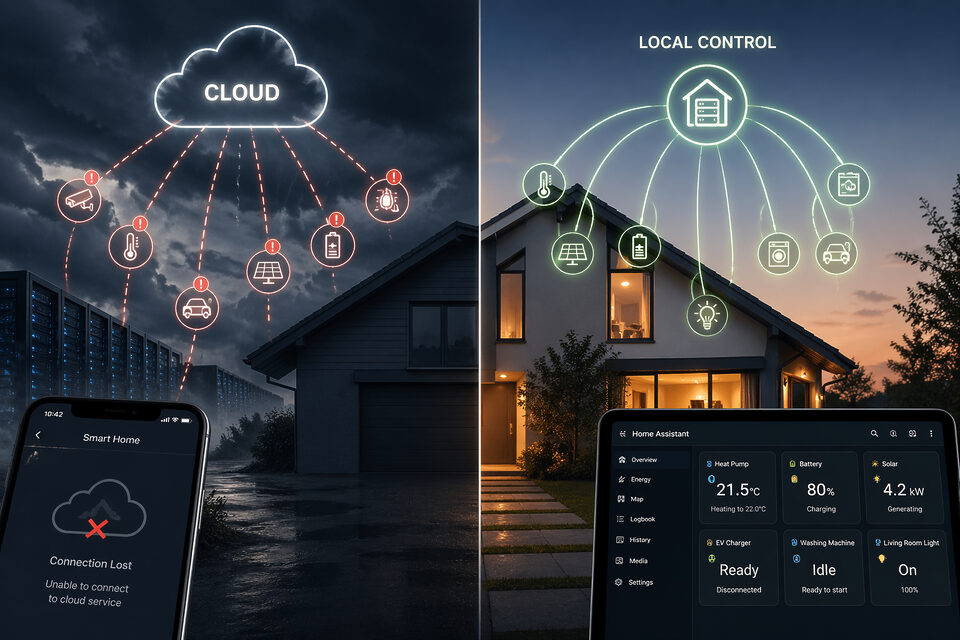
The problem is that if you rely on a cloud solution, the moment that cloud solution is unavailable you start running into problems.
- If you have a home inverter and battery that can continue powering your home in the event of a power cut, that’s still not going to power your ISP’s systems. A power cut will still knock out your Internet connection (and any mobile provider’s masts once their backup power has been depleted, 20 minutes perhaps?), so how do you make a change to your inverter at that point?
- If the manufacturer providing the cloud solution (e.g. GivEnergy) goes bust and the servers have to be switched off, how can you access your kit?
- If the cloud solution provider decides to start charging for the service, what choice do you have other than simply coughing up the money?
This is a specific issue GivEnergy customers have had to address recently, but it’s not just a situation specific to them. Quite a few voices of dissent have questioned the wisdom of total cloud reliance and have looked at ways to manage their smart kit in ways that either cut out or reduce reliance on Internet connectivity.
One of the most commonly talked about alternatives is to install a home automation system (most commonly Home Assistant) on your network and then get it talking to each of your bits of smart kit directly. For example:
- My inverter has a two-wire physical connection to it, and Home Assistant uses Modbus to control it and the connected battery over those two wires. No Internet needed.
- My heat pump doesn’t have a connection for employing Modbus, so it has a little dongle that plugs into a different connector, and that dongle then plugs into the network. Home Assistant talks over the network with that dongle to send commands when necessary to the heat pump. No Internet needed.
- My car charger comes equipped with a physical network connection as well as being Wi-Fi capable. Home Assistant talks across the network to the car charger to control it. No Internet needed.
- My security camera and DVR are both plugged into the network, so Home Assistant can connect locally there too. No Internet needed.
- A similar story (albeit via Wi-Fi instead) for my smart plugs, my various greenhouse sensors, my EV, printer, smoke alarms, even my robot vacuum. No Internet needed.
Understandably, there are good reasons for using some Internet-based services… Octopus’ tariff information, weather forecasts, solar generation forecasts and so forth. I also maintain cloud-based monitoring of my heat pump in parallel for a bit of cross-checking. However, I have a balance that’s right for me in being relatively independent from cloud service providers playing games or disappearing.
The problem, of course, is that now I’ve centralised control of my integrated home onto a local Home Assistant server, I either have to only interact with it when I’m at home or I have to do something to make my local server accessible over the Internet. Given the latter (the more desirable option) is fraught with potential security issues, it’s worth examining what options are available to do this safely, but to do this we first need to understand a bit about how your Internet connection works.
In a nutshell, a router is a piece of networking equipment that acts as a gateway to other networks. Typically, you’ll have a single home network, and everything on your home network can see (and talk to) everything else on that same network. If you want to talk with something on a different network (the Internet, for example) you’ll need to go through a router.
Strictly speaking, though, a router doesn’t care where the traffic is coming from or going to; it just helpfully ushers everything through. In order to avoid the whole Internet constantly looking around your virtual home, you need something that can understand the difference between public and private, and that, as I’m sure you’re well aware, is a firewall.
A firewall is a router that can be configured with rules, and it blocks traffic from one network to another unless there’s a rule explicitly stating it’s allowed. Those rules can be very restrictive (only let this computer talk to that server for such and such a purpose) or relatively relaxed (let all computers at home access the Internet to do whatever they want), but since your home network is regarded as a private network, anything going out to the Internet is actually hidden behind the address of the firewall. It doesn’t matter, for instance, if you are the only Renewable Heating Hub member in your home or the whole family have signed up; every connection from your home (your PC, your phone, your spouse’s tablet, etc.) will appear to the Renewable Heating Hub forum as coming from the same place.
I mentioned earlier about rules that can restrict to a particular purpose, and that’s an important concept here. Each computer can be found on a network because it’s been given a unique address; hopefully you’re familiar with an IP address. However, a server often has multiple jobs to do, so if your computer wants to talk with that server for a particular purpose, it also has to let the server know which hat to wear; do you want it to be working as an email server, a web server, a streaming server, or something else? That is done using ports. So, to send an email, your phone or PC needs to connect to a mail server (a particular IP address) and then talk to it on port 25.
Browsing the forum requires you to connect to the RHH server (a different server and therefore a different IP address) and then browse on port 443 (the correct port for an HTTPS website). If you try to talk with the RHH server on port 25, you won’t get an answer because that server doesn’t handle email. It’s a bit like trying to get through to a particular department in a company’s customer services; not only do you have to dial the right phone number, you also have to choose the correct option afterwards, and if you don’t, you might end up speaking to someone in debt collection instead of technical support.
Putting all this together and coming back to your Home Assistant server, the first and simplest option you have is to sidestep all the networking altogether and use a feature built into Home Assistant – Home Assistant Cloud. The company behind Home Assistant (Nabu Casa) hosts their own servers running their own version of Home Assistant, and Home Assistant Cloud allows your HA instance to talk with theirs so they can maintain a synchronised copy of your setup. If you do something with the cloud instance, that change is immediately replicated back to your home. It might not have escaped your notice, of course, that you’ve just swapped one cloud service for another, although you have at least consolidated your separate apps for inverter, heat pump, EV charging, etc., into one app that does everything. It’s also something Nabu Casa charges for, and currently it’s £6.50 per month or £65.00 per year.
If you don’t want a monthly or yearly outgoing fee, your next option is to tell your firewall to allow any computer on the Internet through to your HA server on HA’s normal port (which happens to be 8123). This option is called port forwarding, and I would most definitely NOT recommend it, because it leaves your system wide open to attackers. Additionally, unless your contract with your Internet Service Provider provides you with a static (unchanging) IP address, you can’t even be sure you’ll be able to find your server next time you’re out of the house.
The problem of your external IP address changing is normally possible to solve, or at least mitigate, by using a service called DuckDNS. It’s basically a way of referring to a computer name (myHomeAssistant.somedomain.com) rather than an IP address and letting the service deal with what the latest IP address actually is. Unfortunately, while it solves the issue of reliably accessing your Home Assistant, it doesn’t improve security at all; you’ve still got an unprotected home server available on the Internet.
The next step up, then, is to use something called a reverse proxy. The idea is that a computer on the Internet connects to this middleman proxy, which then adds a whole layer of secure processing to the connection it opens up with your Home Assistant server. If you’ve ever tried to contact a company director and found yourself having to go through their PA, you’ll understand how effective this proxy approach can be; your message gets through, but only after being filtered and checked. The main drawback is that reverse proxies are complex to set up. If you enjoy technical challenges, it can be rewarding, but it’s not ideal for most users.
Another alternative is to set up a VPN (virtual private network). Here, software installed on your phone or PC and similar software on your server or firewall work together to create a secure, private channel across the Internet that behaves like an extension of your home network. It’s relatively secure and not too difficult to configure, but every device you want to connect must have the VPN software installed. The key advantage is that, unlike other methods, you don’t need to enable port forwarding, which is a significant security benefit.
The final option to consider is the use of a Cloudflare tunnel. Cloudflare is a major Internet security company, and a Cloudflare tunnel is somewhat like setting up a VPN between Cloudflare and your home server, then using a Cloudflare-hosted address as a proxy for your server. This still introduces a dependency on a third party, but unlike smaller providers, Cloudflare’s scale makes it a relatively stable choice. If Cloudflare were to fail, it would have widespread consequences far beyond your personal setup.
The idea is that you create a free account with Cloudflare and set up a tunnel with a chosen name (e.g. Dennis). You install an add-on in Home Assistant called Cloudflared and configure it with the tunnel credentials. This creates a secure link between Cloudflare and your server. You can then define publicly accessible endpoints (e.g. homeassistant.bloodnok.com) that map to local services (e.g. homeassistant.local:8123). You can access your system via the Cloudflare address, without exposing your home network directly. The only real cost is registering a domain name, typically around £10 per year, although this can be used for other services like email or a personal website.
There’s a lot to take in here. I’ve given a brief overview of why you might want to take control of your smart kit away from manufacturers, why local hosting can be beneficial, and how you might safely access your system remotely. It’s not trivial, and there is a learning curve, but the result can be a stable, scalable and manageable system. If you’re interested but have questions, head over to the forums and ask. If you’ve already gone down this route, it would be useful to hear your experiences.

+1
It’s not just cloud though. Many devices have replaced the traditional screen and buttons with a much cheaper Bluetooth chip and a phone app. For example, my EV charger is configured this way, most likely to avoid an expensive IP68 user interface. It’s a box with a socket, a RFID reader, and 4 LEDs, there is not a single button.
This raises the question: if the device is expected to last X years, will the manufacturer maintain the bluetooth app and keep it up to date so it can be installed on future models of phones X years from now? Will the app be available for download? Will the servers it talks to still be there?
In my case, I don’t care, because I used the app exactly once at setup : to configure it to Modbus with full local control. The only thing that requires the app is to add new RFID dongles, so I added a bunch, just in case. So this device does not require cloud to work, only to install. If that was not the case I wouldn’t have bought this model.
I feel the monthly subscription to Home Assistant Cloud is well worth the money.